2018 VOLVO XC90 air condition
[x] Cancel search: air conditionPage 211 of 666

CLIMATE CONTROL
}}
* Option/accessory.209
Air quality
The materials used in the passenger compart- ment and air filtering system have been selectedto ensure a high level of air quality in the passen-ger compartment.
Materials used in the passenger compartment
The materials in the passenger compartment are designed to be pleasant and comfortable, evenfor people with asthma or allergies. The materials have been developed and tested to minimize dust in the passenger compartment and make it easier to keep clean. The mats in both the passenger compartment and cargo compartment can be easily removedfor cleaning. Use Volvo-recommended cleaning agents and car care products to clean the interior.
Air filtering systemsIn addition to the passenger compartment filter, the Clean Zone Interior Package * and Interior Air
Quality System * also help maintain high air qual-
ity in the passenger compartment.
Related information
• Climate (p. 206)
• Clean Zone
* (p. 209)
• Clean Zone Interior Package
* (p. 210)
• Interior Air Quality System
* (p. 210) •
Passenger compartment air filter (p. 211)
Clean Zone
*
The Clean Zone function monitors the condi- tions affecting good air quality in the passengercompartment and indicates whether they are ful-filled or not.
The indicator is shown in the center display's Climate view.
The indicator is shown in the climate bar when Climate view is not open.
If the conditions are not met, the text
Clean
Zone will be shown in white. When all the condi-
tions are met, the text will change to blue. Clean Zone monitors whether:
• All doors and tailgate are closed.
• All side windows and panoramic roof
* are
closed.
• The Interior Air Quality System
* is activated.
Page 212 of 666

||
CLIMATE CONTROL
* Option/accessory.
210 •
The blower is activated.
• Air recirculation is deactivated.
NOTE
Clean Zone does not indicate that the air quality is good, but only that the conditions forgood air quality have been met.
Related information
• Air quality (p. 209)
• Clean Zone Interior Package
* (p. 210)
• Interior Air Quality System
* (p. 210)
• Passenger compartment air filter (p. 211)
Clean Zone Interior Package
*
Clean Zone Interior Package (CZIP) is a series of modifications that filters even more allergy andasthma-inducing substances from the passengercompartment.
CZIP includes the following:
• An enhanced function that starts the blower when the vehicle is unlocked using theremote key. The blower will then fill the pas-senger compartment with fresh air. The func-tion starts when required and switches offautomatically after a period of time or whenone of the passenger compartment doors isopened. The amount of time the blower runsgradually decreases due to reduced need upuntil the vehicle is 4 years old.
• The fully automatic Interior Air QualitySystem (IAQS).
Related information
•Air quality (p. 209)
• Clean Zone
* (p. 209)
• Interior Air Quality System
* (p. 210)
• Passenger compartment air filter (p. 211)
Interior Air Quality System
*
Interior Air Quality System (IAQS) is a fully auto- matic air quality system that removes gases andparticles to reduce odors and contaminants inthe passenger compartment.
IAQS is part of the Clean Zone Interior Package (CZIP) and removes air contaminants such asparticles, hydrocarbons, nitric oxides and ground-level ozone. If the system's air quality sensors detect contami- nants in the outside air, the air intake closes andair recirculation is activated.
NOTE
To ensure optimal air quality in the passenger compartment, the air quality sensor shouldalways be engaged. Recirculation is limited in cold weather to pre- vent fogging. In the event of fogging, use the defroster functions for the windshield, side windowsand rear window.
Related information
• Activating and deactivating the air quality sensor
* (p. 211)
• Air quality (p. 209)
• Clean Zone
* (p. 209)
Page 219 of 666
CLIMATE CONTROL
}}
* Option/accessory.217
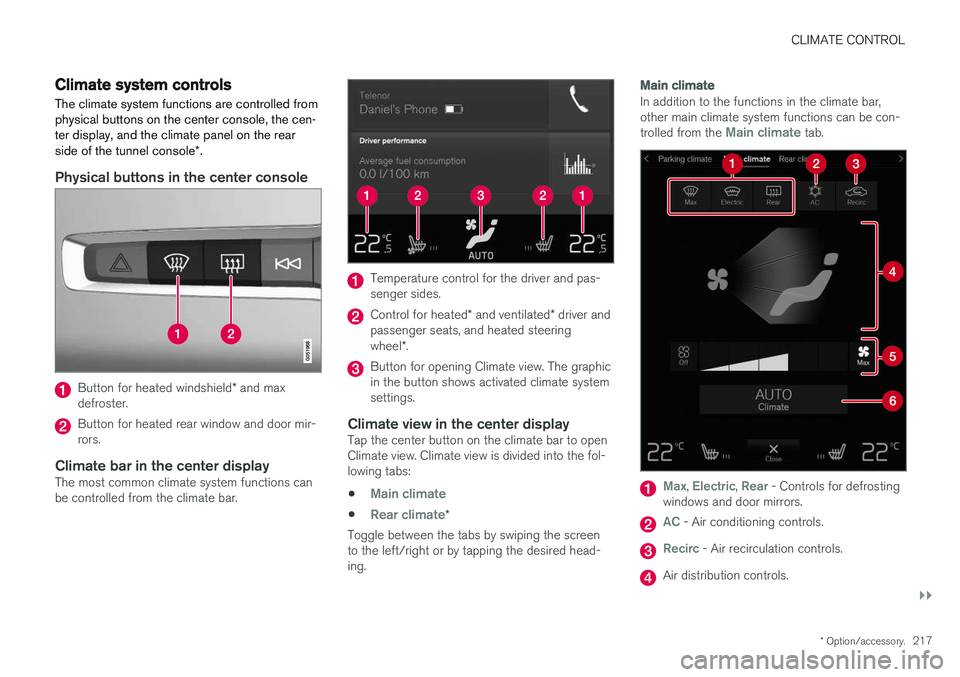
Climate system controls
The climate system functions are controlled from physical buttons on the center console, the cen-ter display, and the climate panel on the rear side of the tunnel console *.
Physical buttons in the center console
Button for heated windshield * and max
defroster.
Button for heated rear window and door mir- rors.
Climate bar in the center displayThe most common climate system functions canbe controlled from the climate bar.
Temperature control for the driver and pas- senger sides.
Control for heated * and ventilated * driver and
passenger seats, and heated steering wheel *.
Button for opening Climate view. The graphic in the button shows activated climate systemsettings.
Climate view in the center displayTap the center button on the climate bar to openClimate view. Climate view is divided into the fol-lowing tabs:
•
Main climate
•Rear climate*
Toggle between the tabs by swiping the screen to the left/right or by tapping the desired head-ing.
Main climate
In addition to the functions in the climate bar, other main climate system functions can be con- trolled from the
Main climate tab.
Max, Electric, Rear - Controls for defrosting
windows and door mirrors.
AC - Air conditioning controls.
Recirc - Air recirculation controls.
Air distribution controls.
Page 221 of 666

CLIMATE CONTROL
}}
* Option/accessory.219
all selected climate settings will be displayed. The screen locks automatically after a period of inac-tivity.
Related information
•
Climate (p. 206)
• Activating and deactivating power front seats
* (p. 219)
• Activating and deactivating the heated rearseats
* (p. 220)
• Activating and deactivating front seat ventila-tion
* (p. 221)
• Activating and deactivating the heated steer-ing wheel
* (p. 222)
• Activating auto climate control (p. 223)
• Activating and deactivating recirculation (p. 224)
• Activating and deactivating max defroster(p. 225)
• Activating and deactivating the heated wind- shield
* (p. 226)
• Activating and deactivating the heated rear window and door mirrors (p. 227)
• Setting the blower speed for the front seats(p. 228)
• Setting the blower speed for the rear seats
*
(p. 229)
• Synchronize temperature (p. 232) •
Activating and deactivating air conditioning(p. 233)
• Activating and deactivating climate control for the third-row seats
* (p. 233)
Activating and deactivating power
front seats *
The seats can be heated for added comfort for the driver and passengers in cold weather.
Steering wheel and seat buttons in the climate row.
1. Tap the left- or right-side steering wheel and seat button in the center display's climate bar to open the controls for steering wheeland seat heating. If the vehicle is not equipped with ventilated seats or heated steering wheel, the buttonfor seat heating is directly accessible in theclimate bar.
2. Tap the seat heating button repeatedly to select one of the four levels:
Off, High,Medium or Low.
> The level is changed and the set level is displayed in the button.
Page 225 of 666

CLIMATE CONTROL
* Option/accessory.223
Activating and deactivating
automatic steering wheel heating *
The steering wheel can be heated for added comfort in cold weather.
Steering wheel heating can be set to automati- cally activate when the engine is started. Whenset to automatically activate, heating will beturned on at low ambient temperatures. 1. Tap
Settings in the Top view in the center
display.
2. Tap
Climate.
3. Select
Auto Steering Wheel Heating
Level to activate/deactivate automatic start
of heated steering wheel.
4. Select
Low, Medium or High to select level
after the function has been activated.
Related information
• Activating and deactivating the heated steer- ing wheel
* (p. 222)
Activating auto climate control
If auto climate control is activated, several cli- mate system functions are controlled automati-cally.
Auto climate button in Climate view.
1. Open Climate view in the center display. 2.
Tap or press and hold
AUTO.
• Tap - air recirculation, air conditioning and air distribution are controlled automati-cally.
• Press and hold - air recirculation, air con-ditioning and air distribution are controlledautomatically. Temperature and blowerspeed are changed to standard settings: 22 °C (72 °F) and speed
3 (speed 2 in
the rear seat 3
).
> Auto climate mode is activated and the button lights up.
NOTE
It is possible to change the temperature and blower speed without deactivating automaticclimate control. Automatic climate control isdeactivated when the air distribution ischanged manually or when the max defrosteris activated.
Related information
• Climate system controls (p. 217)
3
For vehicles with 4-zone climate system *.
Page 227 of 666

CLIMATE CONTROL
}}
* Option/accessory.225
Activating and deactivating maxdefroster
Max defroster is used to quickly remove conden- sation and ice from windows.
Activating and deactivating max defroster from the center console
A button in the center console offers quick access to the max defroster. On vehicles with heated windshields *, the max
defroster can only be activated separately from Climate view in the center display.
Button in center console.
Vehicles without a heated windshield:
–Tap the button.
> The max defroster is activated/deacti- vated and the button lights up/goes out. Vehicles with a heated windshield:
–Press the button repeatedly to switch between the three levels:
• Activated windshield heating
• Activated windshield heating and maxdefroster
• Deactivated.
> The heated windshield and max defroster are activated/deactivated and the buttonlights up/goes out.
NOTE
The max defroster starts after a slight delay to avoid a brief increase in blower speed if theheated windshield function has been deacti-vated by pressing the button twice in quicksuccession.
Activating and deactivating max defroster from the center display
Max defroster in Climate view.
1. Open Climate view in the center display. 2. Tap
Max.
> The max defroster is activated/deacti- vated and the button lights up/goes out. Max defroster deactivates automatic cli- mate control and air recirculation, acti-vates the air conditioning, and changes blower speed to
5 and temperature to HI.
When max defroster is deactivated, the climate system reverts to the previous set-tings.
NOTE
The volume increases when the blower speed is changed to 5.
Page 230 of 666

||
CLIMATE CONTROL
228
Activating and deactivating the heated rear window and door mirrors from thecenter display
Rear window/door mirror heating button in Climate view.
1. Open Climate view in the center display. 2.Tap
Rear.
> Heated windows and door mirrors are activated and the button lights up/goes out.
Related information
• Climate system controls (p. 217)
• Automatically activating and deactivating theheated rear window and door mirrors(p. 228)
Automatically activating anddeactivating the heated rear windowand door mirrors
The heated rear window and door mirrors are used to quickly remove condensation and icefrom the glass.
It is possible to select whether rear window and door mirror heating should be automatically acti-vated or deactivated when the engine is started.With automatic start activated, heating will beactivated when there is a risk of ice or condensa-tion on the windows or mirrors. Heating is auto-matically switched off when the window or doormirror is sufficiently warm and the condensationor ice is gone. 1. Tap
Settings in the Top view in the center
display.
2. Tap
Climate.
3. Select
Auto Rear Defroster to activate/
deactivate automatic rear window and door heating.
Related information
• Activating and deactivating the heated rearwindow and door mirrors (p. 227)
Setting the blower speed for the
front seats4
The blower can be set to several different auto- matically controlled speeds for the front seat.
Blower control buttons in Climate view.
1. Open Climate view in the center display. 2. Tap the desired blower speed:
Off, 1-5 orMax.
> The blower speed will be changed and the buttons for the set speed will light up.
CAUTION
The air conditioning will not engage if the blower is turned off completely, which maycause fogging on the inside of the windows.
4The same setting applies to the rear seats with the 2-zone climate system.
Page 235 of 666

CLIMATE CONTROL
}}
* Option/accessory.233
Activating and deactivating airconditioning
The air conditioning cools and dehumidifies incoming air as needed.
Air conditioning button in Climate view.
1. Open Climate view in the center display. 2. Tap
AC.
> The air conditioning is activated/deacti- vated and the button lights up/goes out. When the air conditioning is activated, it will be switched on and off automaticallyby the climate system as needed.
NOTE
For optimum function of the air conditioning, close all side windows and the panoramic roof *.
NOTE
The air conditioning cannot be activated when the fan speed is set to Off.
Related information
• Climate system controls (p. 217)
Activating and deactivating climate
control for the third-row seats
*
The air conditioning cools and dehumidifies incoming air as needed.
Air conditioning button in the Rear climate tab in Cli-
mate view.
1. Open Climate view in the center display and
select the Rear climate tab.
2. Tap
3rd row climate.
> The air conditioning is activated/deacti- vated and the button lights up/goes out.