2018 VOLVO XC60 T8 engine
[x] Cancel search: enginePage 340 of 674
DRIVER SUPPORT
338
Rear Collision Warning
The Rear Collision Warning (RCW) function can help the driver avoid rear-end collisions fromvehicles approaching from behind.
RCW is automatically activated each time the engine is started. RCW can warn the driver of a potential collision with vehicles approaching from behind by rapidlyflashing the turn signals. If, at a speed below 30 km/h (20 mph), the RCW function detects that the car is in danger of beinghit from behind, the seatbelt tensioners may ten-sion the front seatbelts and activate the WhiplashProtection System safety system. Immediately before a collision from behind, RCW may also activate the foot brake in order toreduce the forward acceleration of the car duringthe collision. However, the brakes will only beapplied if your vehicle is stationary. The brakeswill be immediately released if the acceleratorpedal is depressed.
Related information
• Rear Collision Warning limitations (p. 338)
• Whiplash Protection System (p. 46)
Rear Collision Warning limitations
In some situations, it may be difficult for RCW to warn the driver of a collision risk.
This may be the case if:
• the vehicle approaching from the rear is detected at a late stage
• the vehicle approaching from the rearchanges lanes at a late stage
• the vehicle approaching from the rear is mov-ing at a speed above 80 km/h (50 mph)
• a trailer, bicycle holder or similar is con-nected to the vehicle's electrical system - theRCW function will then be automaticallydeactivated.
NOTE
In certain markets RCW does
not warn with
the direction indicators due to local traffic regulations – in such cases, that part of thefunction is deactivated.
NOTE
The warning with direction indicators for Rear Collision Warning is deactivated if the colli-sion warning distance in the City Safety func- tion is set to the lowest level "
Late".
The seat belt tensioning and braking func- tions remain active.
Related information
• Rear Collision Warning (p. 338)
Page 342 of 674
||
DRIVER SUPPORT
340given, the indicator light will become brighter and begin flashing.
NOTE
The light illuminates on the side of the vehicle where the system has detected the vehicle. Ifthe vehicle is passed on both sides simulta-neously, both lights come on.
WARNING
•
The BLIS function is supplementary driver support intended to facilitate driving andhelp make it safer – it cannot handle allsituations in all traffic, weather and roadconditions.
• The responsibility for changing lanessafely and using good judgment alwaysrests with the driver.
• BLIS is not a substitute for the driver'sattention and judgment. The driver isalways responsible for ensuring the vehi-cle is driven in a safe manner, at theappropriate speed, with an appropriatedistance to other vehicles, and in accord-ance with current traffic rules and regula-tions.
Related information
• Activating/deactivating BLIS (p. 340)
• BLIS limitations (p. 341) •
Recommended maintenance for BLIS(p. 342)
• BLIS messages (p. 343)
Activating/deactivating BLIS The BLIS 79
function can be activated/deacti-
vated.
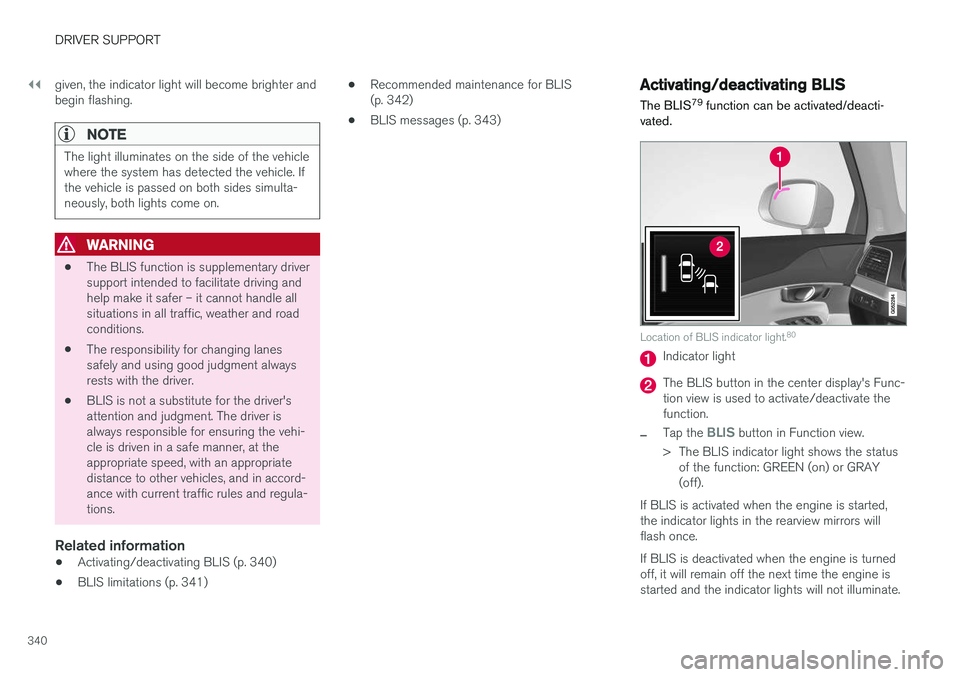
Location of BLIS indicator light. 80
Indicator light
The BLIS button in the center display's Func- tion view is used to activate/deactivate thefunction.
–Tap the BLIS button in Function view.
> The BLIS indicator light shows the status of the function: GREEN (on) or GRAY (off).
If BLIS is activated when the engine is started,the indicator lights in the rearview mirrors willflash once. If BLIS is deactivated when the engine is turned off, it will remain off the next time the engine isstarted and the indicator lights will not illuminate.
Page 347 of 674

DRIVER SUPPORT
}}
* Option/accessory.345
Activating/deactivating Cross TrafficAlert
The driver can choose to deactivate the CTA 89
function as follows:
Press the Cross Traffic Alertbutton in the center display's Function view.
• GRAY button indicator light - CTA is deacti- vated.
• GREEN button indicator light - CTA is acti-vated.
CTA is automatically activated each time theengine is started.
Related information
• Cross Traffic Alert
* (p. 344)
Cross Traffic Alert limitations
CTA 90
functionality may be reduced in certain
situations.
CTA does not function optimally in all situations and has certain limitations. The CTA sensors, forexample, cannot "see" through other parkedvehicles or objects blocking the vehicle. Below are a few examples of situations in which CTA's field of vision may be initially limited andapproaching vehicles may therefore not bedetected until they are very close to your vehicle:
The vehicle is parked very far into a parking space.
In a diagonal parking space, CTA may be completely "blind" on one side of your vehicle.
CTA's blind zone.
CTA's field of vision.
However, as you back your vehicle slowly out of a parking space, CTA's field of vision changes inrelation to the obstructing vehicle/object and itsblind zone is reduced.
89 Cross Traffic Alert
90 Cross Traffic Alert
Page 375 of 674

DRIVER SUPPORT
}}
373
Park Assist front, rear and sides
Park Assist has different parameters depending on which part of the vehicle is approaching anobstacle.
Back
Note: This illustration is general and details may vary depending on model.
The rear sensors will be activated if the vehicle begins rolling backward or if reverse gear isengaged. The distance monitored begins approx. 1.5 meters (5 feet) behind the vehicle. The rear sensors will be automatically deactivated if the vehicle is backing up with a trailer attached.
NOTE
When reversing with e.g. a trailer or bike car- rier on the trailer hitch – without Volvo originaltrailer cables – the Parking Assist system mayhave to be turned off manually to prevent thesensors from reacting to these.
Side sensors
Park Assist's side sensors are automatically acti- vated when the engine is started. They are activeat speeds below 10 km/h (6 mph). The distance monitored begins approx. 30 cm (1 ft) from the sides. The audible signal for obsta-cles along the sides of the vehicle is emittedfrom the side speakers.
Front camera
Note: This illustration is general and details may vary depending on model.
Park Assist's front sensors are automatically acti- vated when the engine is started. The front sen-sors are active at speeds below 10 km/h(6 mph). The distance monitored begins approx. 80 cm (2.5 ft) in front of the vehicle.
NOTE
The Parking Assist system is deactivated when the parking brake is applied or when P
is selected on vehicles with automatic trans- mission.
Page 376 of 674

||
DRIVER SUPPORT
* Option/accessory.
374
CAUTION
When installing auxiliary lights: Make sure these do not obscure the sensors – the auxili-ary lights could be perceived as an obstacle.
Related information
• Park Assist
* (p. 372)
Activating/deactivating Park Assist
The Park Assist Pilot function can be activated/ deactivated.
On/OffPark Assist's front and side sensors are automat- ically activated when the engine is started. Therear sensors are activated if the vehicle is movingbackward or reverse gear is engaged.
The function can be activated/deactivated in the center dis-play's Function view.
–Tap the Park Assist button in Function view.
> The Park Assist Pilot indicator light shows the status of the function: GREEN (on) or GRAY (off).
In vehicles equipped with Park Assist Camera,Park Assist can also be activated/deactivatedfrom the relevant camera view.
Related information
• Park Assist
* (p. 372)
Park Assist limitations
Park Assist may not be able to detect all condi- tions in all situations and functionality may there-fore be limited in certain cases.
The driver should be aware of the following limi- tations for Park Assist:
WARNING
Be extra cautious when reversing if this symbol isshown when a trailer, bikecarrier or similar is attachedand electrically connectedto the vehicle. The symbol indicates that
the rear parking assist sensors are deacti-
vated and will not warn of any obstacles.
Page 384 of 674

DRIVER SUPPORT
* Option/accessory.
382
Starting the Park Assist Camera
The Park Assist Camera starts automatically when reverse gear is engaged or can be startedmanually using one of the center display's func-tion buttons.
Camera view when backing upWhen reverse gear is engaged, the screen shows the rear view 122
.
Camera view when manually starting
the camera
Start the Park Assist Camera using this button in the centerdisplay's Function view. The screen will first show the most recently used cameraview. However, each time the
engine is started, the previous side view will bereplaced by the 360° view and a previously dis-played zoomed-in rear view will be replaced bythe regular rear view.
Automatically deactivating the cameraFront view switches off when the vehicle's speed reaches 25 km/h (16 mph) to help avoid dis-tracting the driver. It will be automatically reactiva-ted if the vehicle's speed falls below 22 km/h(14 mph) within 1 minute as long as the vehicle'sspeed has not exceeded 50 km/h (31 mph). Other camera views switch off at 15 km/h(9 mph) and are not reactivated.
Related information
•
Park Assist Camera
* (p. 377)
Park Assist Camera limitations
The Park Assist Camera may not be able to detect all conditions in all situations and func-tionality may therefore be limited.
The driver should be aware of the following limi- tations for the Park Assist Camera:
WARNING
Be extra cautious when reversing if this symbol isshown when a trailer, bikecarrier or similar is attachedand electrically connectedto the vehicle. The symbol indicates that
the rear parking assist sensors are deacti-
vated and will not warn of any obstacles.
NOTE
A bike carrier and other accessories mounted on the rear of the vehicle can obscure thecamera's view.
122
In Canada, it is also possible to select the 360° view.
Page 389 of 674
DRIVER SUPPORT
}}
* Option/accessory.387
Parallel parking
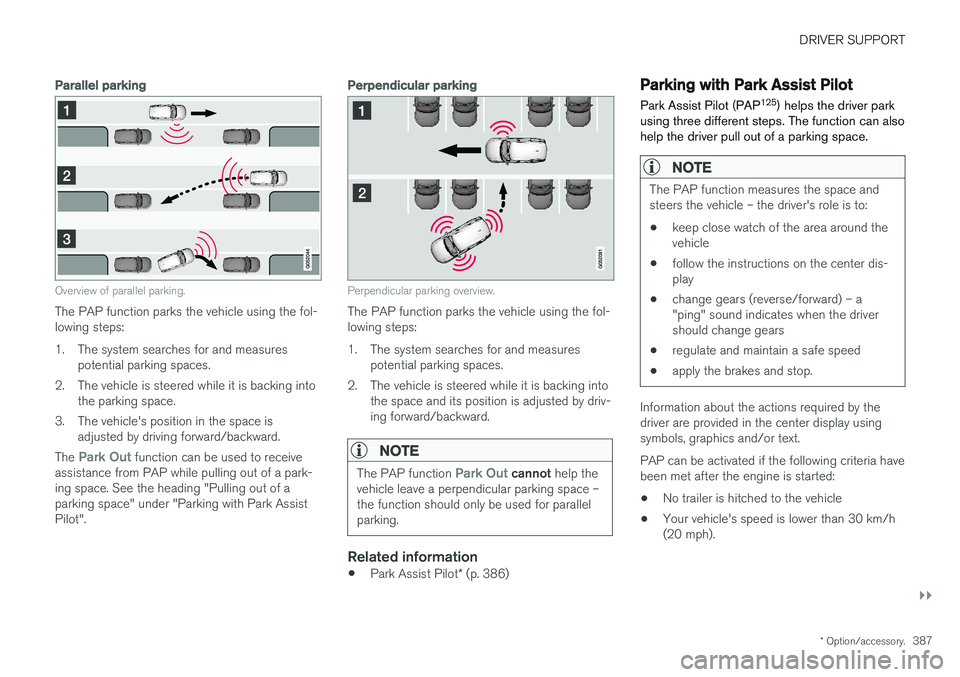
Overview of parallel parking.
The PAP function parks the vehicle using the fol- lowing steps:
1. The system searches for and measures
potential parking spaces.
2. The vehicle is steered while it is backing into the parking space.
3. The vehicle's position in the space is adjusted by driving forward/backward.
The
Park Out function can be used to receive
assistance from PAP while pulling out of a park- ing space. See the heading "Pulling out of aparking space" under "Parking with Park AssistPilot".
Perpendicular parking
Perpendicular parking overview.
The PAP function parks the vehicle using the fol- lowing steps:
1. The system searches for and measures potential parking spaces.
2. The vehicle is steered while it is backing into the space and its position is adjusted by driv-ing forward/backward.
NOTE
The PAP function Park Out cannot help the
vehicle leave a perpendicular parking space – the function should only be used for parallelparking.
Related information
• Park Assist Pilot
* (p. 386)
Parking with Park Assist Pilot Park Assist Pilot (PAP 125
) helps the driver park
using three different steps. The function can also help the driver pull out of a parking space.
NOTE
The PAP function measures the space and steers the vehicle – the driver's role is to:
• keep close watch of the area around thevehicle
• follow the instructions on the center dis-play
• change gears (reverse/forward) – a"ping" sound indicates when the drivershould change gears
• regulate and maintain a safe speed
• apply the brakes and stop.
Information about the actions required by the driver are provided in the center display usingsymbols, graphics and/or text. PAP can be activated if the following criteria have been met after the engine is started: •
No trailer is hitched to the vehicle
• Your vehicle's speed is lower than 30 km/h (20 mph).
Page 398 of 674
HYBRID INFORMATION
396
General information about TwinEngine
Twin Engine vehicles are driven just like any other vehicle, but certain functions differ from avehicle powered exclusively by gasoline. Theelectric motor powers the vehicle primarily at lowspeeds; the gasoline engine is used at higherspeeds or during more active driving.
The instrument panel displays Twin Engine-spe- cific information - charging information, selecteddrive mode, distance to discharged battery andhybrid battery charge level. Different drive modes can be selected while driv- ing, e.g. electric power only or, if more power isneeded, a combination of electric and gasolinepower. The vehicle calculates the optimal combi-nation of driveability, driving experience, environ-mental impact and fuel economy for the selecteddrive mode. In order to function optimally, the hybrid battery (and its electrical drive systems) and the gasolineengine (and its drive systems) must be at thecorrect operating temperature. Battery capacitycan be considerably reduced if the battery is toocold or too hot. Preconditioning prepares thevehicle's drive systems and passenger compart-ment before driving to help reduce both wear andenergy consumption. It also helps increase thehybrid battery's range. The hybrid battery, which powers the electric motor, is recharged using the charging cable. Itcan also be recharged during light braking and through engine braking in gear position
B. The
combustion engine can also help recharge thehybrid battery.
Important
No electrical current
Keep in mind that if there is no electrical current to the vehicle, i.e. the ignition is switched off orthe start battery is discharged, certain functionssuch as brakes, power steering, etc. will not work.
WARNING
If the vehicle does not have electrical current and both the electric motor and the gasolineengine are switched off, the brakes cannot beused to stop the vehicle.
Towing not permitted
Never tow a Twin Engine vehicle behind another vehicle, as this could damage the electric motor.
Exterior engine noise
WARNING
Keep in mind that the vehicle does not emit any engine noise when using the electricmotor and may therefore be difficult to detectfor children, pedestrians, cyclists or animals.This is especially true at low speeds, e.g. inparking lots.
High-voltage electrical current
WARNING
Several components in the vehicle work with high voltage that can be hazardous in case ofan incorrect procedure. These componentsand any orange wiring in the vehicle may onlybe handled by trained and qualified Volvoservice technicians.
Do not touch anything that is not clearly descri- bed in this Owner's Manual.
Related information
• Charging the hybrid battery (p. 397)
• Hybrid gauge (p. 83)
• Drive modes (p. 435)
• Starting and stopping preconditioning(p. 222)
• Hybrid battery (p. 609)
• Factors affecting electric motor range(p. 448)
• Gear selector positions for automatic trans-missions (p. 429)
• Towing using a towline (p. 466)