2018 VOLVO XC60 T8 tow
[x] Cancel search: towPage 626 of 674
||
MAINTENANCE AND SERVICE
* Option/accessory.
624
CAUTION
The microfiber cloth must be free of sand and dirt when cleaning the center display.
CAUTION
When cleaning the center display, apply only light pressure to the screen. Pressing toohard could damage the screen.
CAUTION
Do not spray liquid or corrosive chemicals directly onto the center display. Do not usewindow cleaners, cleaning agents, aerosolsprays, solvents, alcohol, ammonia or deter-gents that contain abrasives. Never use abrasive cloths, paper towels or tis- sue paper, as these may scratch the centerdisplay.
Related information
• Cleaning the interior (p. 623)
• Cleaning fabric upholstery and ceiling liner (p. 625)
• Cleaning the seat belt (p. 625)
• Cleaning floor mats and inlay mats (p. 625)
• Cleaning leather upholstery (p. 626) •
Cleaning the leather steering wheel(p. 627)
• Cleaning interior plastic, metal and wood sur-faces (p. 628)
Cleaning the head-up display
*
Carefully wipe the glass covering the head-up display unit with a clean and dry microfiber cloth.If necessary, the cloth may be slightly moistened.
Never use strong stain removers. For difficult cleaning conditions, a special cleaning agent canbe purchased at a Volvo retailer.
Related information
• Activating and deactivating the head-up dis- play
* (p. 140)
• Head-up display
* (p. 138)
Page 629 of 674
MAINTENANCE AND SERVICE
627
Cleaning the leather upholstery
1. Apply the leather cleaner to a damp spongeand squeeze it until the cleaner foams.
2. Move the sponge in circular motions to apply the foam to the stain.
3. Dampen the stain thoroughly with the sponge. Let the sponge absorb the stain and do not rub.
4. Dry the stain using a soft towel and let the leather dry completely.
Protecting the leather upholstery
1. Apply a small amount of leather protector toa cloth and then apply the protector to the leather using light circular movements.
2. Let it dry for approximately 20 minutes. Protecting the leather upholstery makes it better able to withstand sunlight's harmful UV rays.
Related information
• Cleaning the interior (p. 623)
• Cleaning the center display (p. 623)
• Cleaning fabric upholstery and ceiling liner(p. 625)
• Cleaning the seat belt (p. 625)
• Cleaning floor mats and inlay mats (p. 625)
• Cleaning the leather steering wheel(p. 627)
• Cleaning interior plastic, metal and wood sur-faces (p. 628)
Cleaning the leather steering wheel
Only use cleaning agents and car care products recommended by Volvo. Clean regularly andtreat stains immediately for best results. It isimportant to vacuum before using a cleaningagent.
Leather steering wheelLeather needs to breathe. Never cover the leather steering wheel with a plastic protector.Volvo Leather Care Kit 951 0251 and LeatherSoftener 943 7429 are recommended for clean-ing the leather steering wheel. First, remove dirt,dust, etc. with a damp sponge or cloth.
CAUTION
Sharp objects such as rings could damage the leather on the steering wheel.
If there are stains on the steering wheel:
Type 1 (ink, wine, coffee, milk, sweat or blood)
–Use a soft cloth or sponge. Wipe the steering wheel using a solution of 5% ammonia. Forblood stains, mix approximately 2 dl(1 cup) ofwater with 25 g (one ounce) of salt and wipethe stain.
Type 2 (grease, oil, sauces or chocolate)
1. Same procedure as for Type 1 stains.
2. Finish by wiping the wheel with an absorbent paper or towel. Type 3
(dry dirt or dust)
1. Remove the dirt/dust using a soft brush.
2. Same procedure as for Type 1 stains.
Related information
• Cleaning the interior (p. 623)
• Cleaning the center display (p. 623)
• Cleaning fabric upholstery and ceiling liner (p. 625)
• Cleaning the seat belt (p. 625)
• Cleaning floor mats and inlay mats (p. 625)
• Cleaning leather upholstery (p. 626)
• Cleaning interior plastic, metal and wood sur-faces (p. 628)
Page 639 of 674

MAINTENANCE AND SERVICE
}}
637
It is important to use the right color.
Related information
•
Paintwork (p. 635)
• Touching up minor paint damage (p. 635)
Changing rear window wipers
The wiper blades help remove water from the windshield and rear window. Along with thewasher fluid, they clean the glass and helpimprove visibility while driving. The windshieldand rear window wiper blades can be replaced.
Changing rear window wipers
Lift the wiper arm from the window and pull the lower section of the blade to the right.
1. Grasp the center of the wiper blade and
lift it from the window to the stop position.
NOTE
When the wiper arm is halfway folded out, it will stop in a locking position that helps pre-vent the arm from falling back onto the rearwindow. The wiper arm must be pulled pastthe locking position stop in order to changethe wiper blade.
2. Grip the lower part of the blade and pull
to the right until the blade loosens from the arm.
3. Press the new wiper blade until it clicks into place. Check to make sure the blade issecurely in place.
4. Fold the wiper arm back toward the window.
CAUTION
Check the blades regularly. Neglected main- tenance shortens the life of the blades.
Related information
• Using the rain sensor (p. 173)
• Using the windshield and headlight washers (p. 175)
• Using automatic rear window wiping whenbacking up (p. 176)
Page 640 of 674

MAINTENANCE AND SERVICE
* Option/accessory.
638 •
Heated windshield washer nozzles
* (p. 173)
• Using the rain sensor's memory function (p. 174)
• Using the rear window wiper/washer(p. 176)
• Filling washer fluid (p. 640)
• Windshield wipers in the service position(p. 639)
• Replacing windshield wiper blades (p. 638)
• Using the windshield wipers (p. 172)
Replacing windshield wiper blades
The wiper blades help remove water from the windshield and rear window. Along with thewasher fluid, they clean the glass and helpimprove visibility while driving. The windshieldand rear window wiper blades can be replaced.
Replacing wiper blades
1. Raise the wiper arms to the service position. Service position is activated/deactivated via the function view in the center display whenthe car is stationary and the windshield wip-ers are not on.
2.
Put the wiper blade in removal position
by folding it out from the wiper arm until it clicks. 3.
Press and hold the button on the wiper
blade attachment and pull the wiper blade straight out
, parallel with the wiper arm.
4. Slide in the new wiper blade until it clicks into place.
5. Fold the blade back toward the arm until it clicks into place. The blade is no longer in its removal position and can once again bemoved.
6. Check to make sure the wiper blade is securely in place.
7. Press the wiper blade back against the wind- shield.
Wiper blades come in varying lengths.
Page 651 of 674
SPECIFICATIONS
649
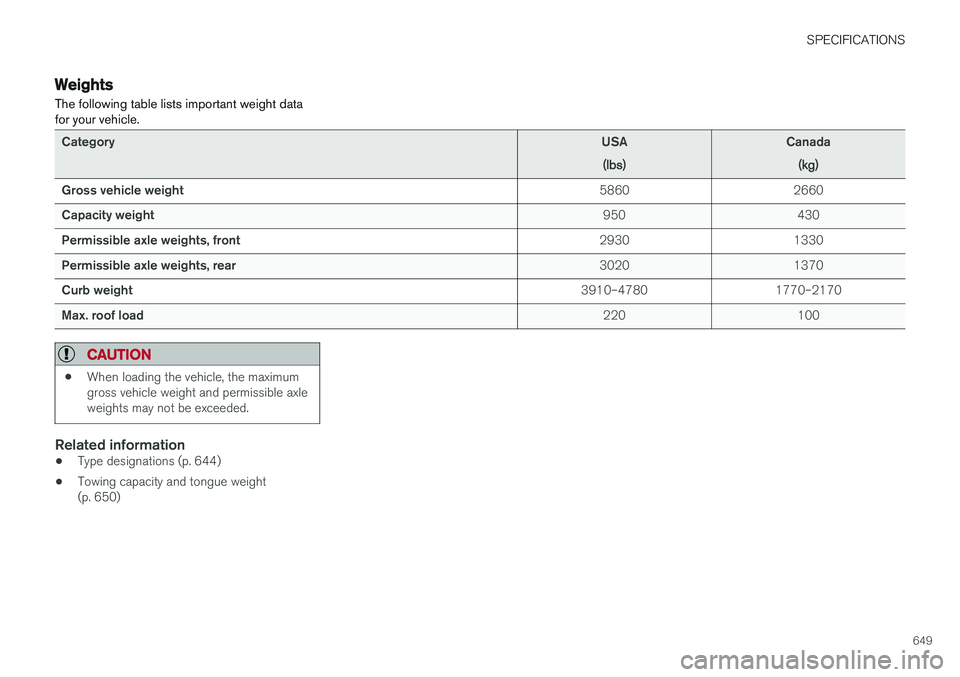
Weights The following table lists important weight data for your vehicle.
CategoryUSA
(lbs)Canada(kg)
Gross vehicle weight 5860 2660
Capacity weight 950 430
Permissible axle weights, front 2930 1330
Permissible axle weights, rear 3020 1370
Curb weight 3910–4780 1770–2170
Max. roof load 220 100
CAUTION
•When loading the vehicle, the maximum gross vehicle weight and permissible axleweights may not be exceeded.
Related information
• Type designations (p. 644)
• Towing capacity and tongue weight (p. 650)
Page 652 of 674

SPECIFICATIONS
* Option/accessory.
650
Towing capacity and tongue weight Towing capacity and tongue weight are shown in the tables below.
Category
USA
(lbs)Canada(kg)
Max. trailer weights Without brakes: 1650 750 With brakes:
3500 1580
Max. tongue weight 350 150
CAUTION
•The maximum trailer weights listed are only applicable for altitudes up to 3280 ft(1,000 m) above sea level. With increas-ing altitude the engine power and there-fore the car's climbing ability are impairedbecause of the reduced air density, sothe maximum trailer weight has to bereduced accordingly. The weight of thecar and trailer must be reduced by 10%for every further 3280 ft (1,000 m) (orpart thereof).
Related information
•
Type designations (p. 644)
• Weights (p. 649)
• Driving with a trailer (p. 462)
• Trailer Stability Assist
* (p. 464)
Page 662 of 674
INDEX
660Cooling system
overheating 458
Corner Traction Control 264
Corrosion protection 634Covering cargo compartment 582
Crash, see Collision 42
Crash event data 33
Cross Traffic Alert – CTA 344, 345, 346, 347
Cruise control 276, 277 manage speed 277, 278
temporary deactivation 279, 280
turn off 280
CTA – Cross Traffic Alert 344, 345, 346, 347
Curb weight 649
CZIP (Clean Zone Interior Package) 200
D
Data recording 33 transferring between vehicle and work-
shop 590
Data sharing 526
Daytime running lights 150
Decals location of 644
Defrosting 214
Detection of cyclist 329
Dimensions 647
Dipstick, electronic 601
Direction of rotation 542
Display lighting 159
Distance Alert 281, 282, 283 limitations 284
DivX ®
502
Door mirrors 165, 166 compass 471, 472
dimming 166
outer 165, 166
power folding 166
resetting 166
Driveline transmission 428
Drive mode 435 changing 439
Driver Alert Control 353 operation 354, 355
Driver Alert Control limitations 355
Driver performance 88Driver profile 133 edit 135
select 134
Driver support system 262
Drive systems 433Driving cooling system 458
with a trailer 462
Driving economy 446
Driving through standing water 452 driving with a trailer towball load 650
towing capacity 650
E
Economical driving 446
Electrical outlet 572
use 574
Electrical system 605 Electric drive motor specifications 651
electric motor 433 Driving 447
Range 448
Electric parking brake 422
Page 671 of 674

INDEX
669
tread wear indicator 543
winter tires 561
Tire sealing system 563
Tire tread 543
Tools 554Top tether anchors (child restraint sys- tems) 72
Total airing function 229, 247
Towbar 461 removable, attaching, installing, mount-
ing 461
removable, removing, detaching 461
Towing 466
Towing capacity and towball load 650
Towing eyelet 466
TPMS - Tire Pressure Monitoring System 549
Traction control 264
Traffic information 483
Trailer 464 driving with a trailer 462
Lamps 465
swaying 464
Trailer Stability Assist 464 trailer 464
Trailer stabilizer 264
Trailer towing trailer hitch 461
Transmission 428 automatic 429
Transmission fluid grade 653
Travel Link 492 Fuel 495
Notifications 494
Sports 496
weather 493
Tread depth 543, 561
Tread wear indicator 543
Trip computer 85, 86
Trip odometer 85
Trip odometer resetting 87
Trip statistics 88 Troubleshooting Adaptive Cruise Control 296
Troubleshooting the camera sensor 322
TSA - Trailer Stability Assist 264, 464
Tunnel detection 151
Turn off engine 416
Turn signals 154Twin Engine general 396Type approvalradar system 320
U
Uniform Tire Quality Grading 546
Units 128
Unknown vehicle component 260Unlockingsettings 232
with key blade 241
USB socket for connecting media 504
V
Vehicle care 628, 629, 631, 632, 633, 634
leather upholstery 626
Vehicle Event Data 33 Vehicle functions in the center display 118
Vehicle key bat. low 234 Vehicle modem connecting vehicle to Internet 522
settings 523
Vehicle recovery 467