2018 VOLVO XC60 T8 mirror controls
[x] Cancel search: mirror controlsPage 170 of 674

WINDOWS, GLASS AND MIRRORS
* Option/accessory.
168
Panoramic roof *
The panoramic roof is divided into two glass sections. The front section can be opened verti-cally at the rear edge (ventilation position) or hor-izontally (open position). The rear section cannotbe moved. The panoramic roof has a wind deflector and sun curtain made of perforated fabric (locatedbeneath the glass sections) for extra protectionin e.g. bright sunlight.
The panoramic roof and sun curtain are operated using the controls in the ceiling. It can also be operated using keyless opening *
with the door handle. To operate the panoramic roof and sun curtain, the ignition must be in mode I or II.
WARNING
Children, other passengers or objects can be trapped by the moving parts.
• Always operate the windows with caution.
• Do not allow children to play with the operating controls.
• Never leave a child alone in the vehicle.
• Remember to always cut the current tothe power windows by setting the vehi- cle's electrical system to ignition mode
0
and then taking the remote key with you when leaving the vehicle.
• Never stick objects or body parts outthrough the windows, even if the vehicleelectrical system is completely turned off.
CAUTION
• Do not open the panoramic roof when load carriers are installed.
• Never place heavy objects on the panor-amic roof.
CAUTION
• Remove ice and snow before opening the panoramic roof.
• Do not operate the panoramic roof if it isfrozen in place.
Wind blocker
The panoramic roof is equipped with a wind blocker that folds up when the roof is open.
Related information
•
Operating the panoramic roof
* (p. 169)
• Auto closing the panoramic roof
* sun curtain
(p. 171)
• Pinch protection for windows and sun cur-tains (p. 162)
• Keyless locking and unlocking
* (p. 244)
• Locking and unlocking using the remote key(p. 231)
• Locking and unlocking from inside the vehi-cle (p. 247)
Page 171 of 674

WINDOWS, GLASS AND MIRRORS
}}
* Option/accessory.169
Operating the panoramic roof *
The panoramic roof and sun curtain are oper- ated using a control in the ceiling panel, andboth are equipped with pinch protection.
WARNING
Children, other passengers or objects can be trapped by the moving parts.
• Always operate the windows with caution.
• Do not allow children to play with the operating controls.
• Never leave a child alone in the vehicle.
• Remember to always cut the current tothe power windows by setting the vehi- cle's electrical system to ignition mode
0
and then taking the remote key with you when leaving the vehicle.
• Never stick objects or body parts outthrough the windows, even if the vehicleelectrical system is completely turned off.
CAUTION
•Do not open the panoramic roof when load carriers are installed.
• Never place heavy objects on the panor-amic roof.
CAUTION
• Remove ice and snow before opening the panoramic roof.
• Do not operate the panoramic roof if it isfrozen in place.
To operate the panoramic roof and sun curtain, the ignition must be in mode
I or II.
It can also be operated using keyless opening *
with the door handle.
WARNING
Make sure that no child or other passenger comes into contact with the windows as they are closing with keyless closing *.
CAUTION
Check that the panoramic roof is properly closed when closing.
The movement of the roof will stop if the control is released during manual operation or when the glass has reached the comfort 4
or fully open/
closed position. The movement of both the pan- oramic roof and the sun curtain is also stopped ifthe control in the ceiling is operated again in the direction opposite that of the current direction ofmovement. The panoramic roof and sun curtain are also equipped with pinch protection.
NOTE
For manual opening, the sun curtain must be completely open before the panoramic roofcan be opened. For the reverse procedure,the panoramic roof must be completelyclosed before the sun curtain can be com-pletely closed.
4
The comfort position is a position which helps keep wind and resonance sounds to a comfortably low level.
Page 184 of 674

||
SEATS AND STEERING WHEEL
* Option/accessory.
182 Only one movement (forward/rearward/up/ down) can be performed at a time. The front seat backrests cannot be folded down completely.
Related information
•
Manual front seats (p. 180)
• Power front seats
* (p. 181)
• Storing memory settings in power front seats
* (p. 182)
• Using stored memory in a powered front seat (p. 183)
• Adjusting front seat massage settings
*
(p. 184)
• Adjusting front seat cushion length (p. 185)
• Front seat massage settings
* (p. 184)
• Adjusting front seat side bolster settings
*
(p. 186)
• Adjusting front seat lumbar support
* (p. 186)
• Adjusting the passenger seat from the driv- er's seat
* (p. 187)
Storing memory settings in power
front seats *
The memory function can be used to store the settings for the seat, door mirrors and head-up display *.
Two different positions can be stored using the memory function. The memory function controls are located on one or both of the front doors *.
Button M for storing a setting.
Memory button
Memory button
Storing a position1. Adjust the seat, door mirrors and head-up
display to the desired position. 2.
Press and hold the M button. The indicator
light in the button will illuminate.
3. Within three seconds, press and hold the 1
or 2 button.
> When the position has been stored in the memory button, an audible signal will sound and the indicator light in the M but-
ton will go out.
If none of the memory buttons are pressed withinthree seconds, the M button will go out and no
position will be stored. The seat must be adjusted again before a new memory position can be stored.
Related information
• Manual front seats (p. 180)
• Power front seats
* (p. 181)
• Adjusting the power front seats
* (p. 181)
• Using stored memory in a powered front seat(p. 183)
• Adjusting front seat massage settings
*
(p. 184)
• Adjusting front seat cushion length (p. 185)
• Front seat massage settings
* (p. 184)
• Adjusting front seat side bolster settings
*
(p. 186)
• Adjusting front seat lumbar support
* (p. 186)
• Adjusting the passenger seat from the driv- er's seat
* (p. 187)
Page 198 of 674

CLIMATE CONTROL
* Option/accessory.
196
Climate
The vehicle is equipped with electronic climate control. The climate system cools, heats anddehumidifies the air in the passenger compart-ment.
All of the climate system functions are controlled from the center display and the buttons on thecenter console. Certain rear seat functions can also be controlled from the climate controls * on the rear of the tun-
nel console.
Related information
• Climate zones (p. 196)
• Climate control sensors (p. 196)
• Perceived temperature (p. 197)
• Climate control system voice commands (p. 197)
• Parking climate (p. 220)
• Air quality (p. 198)
• Air distribution (p. 201)
• Climate system controls (p. 208)
Climate zones
The vehicle is divided into climate zones to make it possible to set different temperatures for dif-ferent parts of the passenger compartment.
2-zone climate system
Climate zones with 2-zone climate system.
In 2-zone climate systems, the passenger com- partment temperature can be set separately forthe left and right sides of the vehicle.
Related information
• Climate (p. 196)
Climate control sensors
The climate system has a number of sensors to help regulate the climate settings in the vehicle.
Location of the sensors
Humidity sensor - in the rearview mirror con- sole.
Ambient temperature sensor - in the right- side door mirror.
Sunlight sensors - on the upper side of the dashboard.
Passenger compartment temperature sensor - near the buttons in the center console.
NOTE
Do not cover or block the sensors with cloth- ing or other objects.
Page 210 of 674
CLIMATE CONTROL
* Option/accessory.
208
Climate system controls
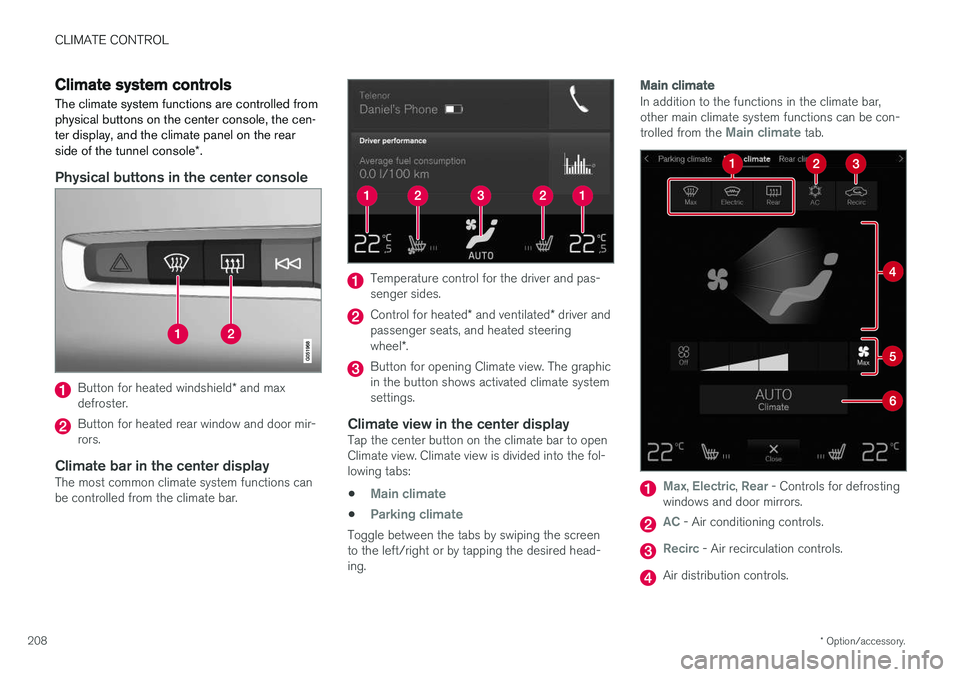
The climate system functions are controlled from physical buttons on the center console, the cen-ter display, and the climate panel on the rear side of the tunnel console *.
Physical buttons in the center console
Button for heated windshield * and max
defroster.
Button for heated rear window and door mir- rors.
Climate bar in the center displayThe most common climate system functions canbe controlled from the climate bar.
Temperature control for the driver and pas- senger sides.
Control for heated * and ventilated * driver and
passenger seats, and heated steering wheel *.
Button for opening Climate view. The graphic in the button shows activated climate systemsettings.
Climate view in the center displayTap the center button on the climate bar to openClimate view. Climate view is divided into the fol-lowing tabs:
•
Main climate
•Parking climate
Toggle between the tabs by swiping the screen to the left/right or by tapping the desired head-ing.
Main climate
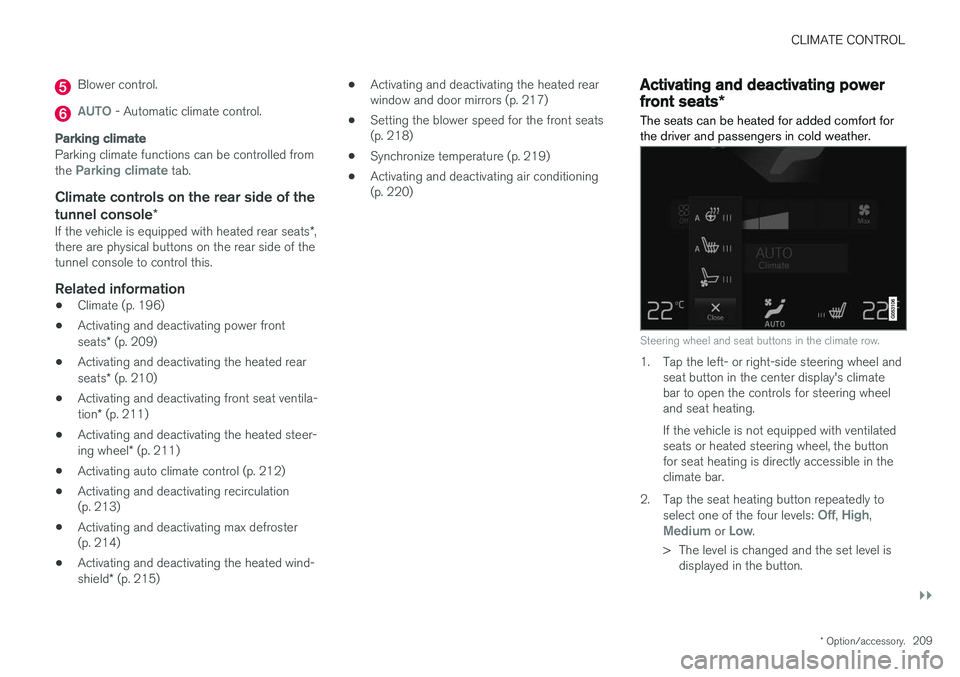
In addition to the functions in the climate bar, other main climate system functions can be con- trolled from the
Main climate tab.
Max, Electric, Rear - Controls for defrosting
windows and door mirrors.
AC - Air conditioning controls.
Recirc - Air recirculation controls.
Air distribution controls.
Page 211 of 674
CLIMATE CONTROL
}}
* Option/accessory.209
Blower control.
AUTO - Automatic climate control.
Parking climate
Parking climate functions can be controlled from the Parking climate tab.
Climate controls on the rear side of the
tunnel console *
If the vehicle is equipped with heated rear seats *,
there are physical buttons on the rear side of the tunnel console to control this.
Related information
• Climate (p. 196)
• Activating and deactivating power front seats
* (p. 209)
• Activating and deactivating the heated rearseats
* (p. 210)
• Activating and deactivating front seat ventila-tion
* (p. 211)
• Activating and deactivating the heated steer-ing wheel
* (p. 211)
• Activating auto climate control (p. 212)
• Activating and deactivating recirculation (p. 213)
• Activating and deactivating max defroster(p. 214)
• Activating and deactivating the heated wind- shield
* (p. 215) •
Activating and deactivating the heated rear window and door mirrors (p. 217)
• Setting the blower speed for the front seats(p. 218)
• Synchronize temperature (p. 219)
• Activating and deactivating air conditioning(p. 220)
Activating and deactivating power
front seats
*
The seats can be heated for added comfort for the driver and passengers in cold weather.
Steering wheel and seat buttons in the climate row.
1. Tap the left- or right-side steering wheel and seat button in the center display's climate bar to open the controls for steering wheeland seat heating. If the vehicle is not equipped with ventilated seats or heated steering wheel, the buttonfor seat heating is directly accessible in theclimate bar.
2. Tap the seat heating button repeatedly to select one of the four levels:
Off, High,Medium or Low.
> The level is changed and the set level is displayed in the button.
Page 218 of 674

||
CLIMATE CONTROL
* Option/accessory.
216
Activating and deactivating windshield heating from the center display
Windshield heating button in Climate view.
1. Open Climate view in the center display. 2.
Tap
Electric.
> Windshield heating is activated/deacti- vated and the button lights up/goes out.
NOTE
Triangular areas at the far sides of the wind- shield are not heated and will take slightlylonger to defrost/de-ice.
NOTE
The heated windshield may affect the per- formance of transponders and other commu-nication equipment.
Related information
• Climate system controls (p. 208)
• Activating and deactivating automatic wind- shield heating
* (p. 216)
Activating and deactivating
automatic windshield heating *
Windshield heating is used to quickly remove condensation and ice from the windshield.
Windshield heating can be set to automatically activate when the engine is started. With auto-matic start activated, heating will be activatedwhen there is a risk of ice or condensation on thewindows or mirrors. Heating is automaticallyswitched off when the window or door mirror issufficiently warm and the condensation or ice isgone. 1. Tap
Settings in the Top view in the center
display.
2. Tap
Climate.
3. Select
Auto Front Defroster to activate/
deactivate automatic windshield heating.
Related information
• Activating and deactivating the heated wind- shield
* (p. 215)
Page 219 of 674

CLIMATE CONTROL
217
Activating and deactivating theheated rear window and doormirrors The heated rear window and door mirrors are used to quickly remove condensation and icefrom the glass.
Activating and deactivating the heated rear window and door mirrors from thecenter console
A button in the center console offers quick access to the heated rear window and door mir-rors functions.
Button in center console.
–Tap the button.
> Heated windows and door mirrors areactivated and the button lights up/goes out.
Activating and deactivating the heated rear window and door mirrors from thecenter display
Rear window/door mirror heating button in Climate view.
1. Open Climate view in the center display. 2. Tap
Rear.
> Heated windows and door mirrors are activated and the button lights up/goes out.
Related information
• Climate system controls (p. 208)
• Automatically activating and deactivating theheated rear window and door mirrors(p. 217)
Automatically activating anddeactivating the heated rear windowand door mirrors
The heated rear window and door mirrors are used to quickly remove condensation and icefrom the glass.
It is possible to select whether rear window and door mirror heating should be automatically acti-vated or deactivated when the engine is started.With automatic start activated, heating will beactivated when there is a risk of ice or condensa-tion on the windows or mirrors. Heating is auto-matically switched off when the window or doormirror is sufficiently warm and the condensationor ice is gone. 1. Tap
Settings in the Top view in the center
display.
2. Tap
Climate.
3. Select
Auto Rear Defroster to activate/
deactivate automatic rear window and door heating.
Related information
• Activating and deactivating the heated rearwindow and door mirrors (p. 217)