2018 VOLVO V90 light
[x] Cancel search: lightPage 341 of 656

DRIVER SUPPORT
339
Other limitations
WARNING
•Warnings and brake interventions can be triggered late or not at all if the traffic sit-uation or external influences prevent thecamera and radar unit from properlydetecting pedestrians, cyclists, large ani-mals or vehicles ahead of the vehicle.
• To be able to detect vehicles at night, itsfront and rear lights must work and illumi-nate clearly.
• The camera and radar unit have a limitedrange for pedestrians and cyclists – thesystem can provide effective warningsand brake interventions if the relativespeed is lower than 50 km/h (30 mph).For stationary or slow-moving vehicles,warnings and brake interventions areeffective at vehicle speeds of up to70 km/h (43 mph). Speed reduction forlarge animals is less than 15 km/h(9 mph) and can be achieved at vehiclespeeds over 70 km/h (43 mph). At lowerspeeds, the warning and brake interven-tion for large animals is less effective.
• Warnings for stationary or slow-movingvehicles and large animals can be disen-gaged due to darkness or poor visibility.
• Warnings and brake interventions for pedestrians and cyclists are disengagedat vehicle speeds over 80 km/h(50 mph).
• Do not place, affix or mount anything onthe inside or outside of the windshield, orin front of or around the camera andradar unit – this could disrupt camera-based functions.
• Objects, snow, ice or dirt in the area ofthe camera sensor can reduce the func-tion, disengage it completely or give animproper function response.
NOTE
The function uses the vehicle's camera unit, which has some general limitations – see thesection "Camera unit limitations".
NOTE
The function uses the vehicle's radar unit, which has some general limitations – see thesection "Radar unit limitations".
Market limitationsCity Safety is not available in all countries. If City Safety is not shown in the center display's
Settings menu, your vehicle is not equipped with
this function. In the center display's Top view, tap:
•
SettingsMy CarIntelliSafe
Related information
• City Safety
™ (p. 329)
Page 344 of 656

DRIVER SUPPORT
* Option/accessory.
342
BLIS *
The BLIS 77
function is designed to help provide
assistance in heavy traffic with several lanes moving in the same direction by helping thedriver to detect the presence of vehicles in the"blind spot" area behind and to the side of thevehicle.
BLIS is a driver support system designed to alert the driver of:
• vehicles in your "blind spot"
• vehicles approaching rapidly in adjacentlanes.
Location of BLIS indicator light. 78
Indicator light
The BLIS button in the center display's Func- tion view is used to activate/deactivate thefunction.
BLIS overview
Blind spot zone
Rapidly approaching vehicle zone.
The BLIS function is active at speeds above 10 km/h (6 mph). The system is designed to react to: • vehicles passing your vehicle
• vehicles that are rapidly approaching your vehicle from behind.
When BLIS detects a vehicle in zone 1 or a rap- idly approaching vehicle in zone 2, an indicatorlight will illuminate in the relevant rearview mirrorand glow steadily. If the driver then uses the turnsignal on the side in which the warning has been
77 Blind Spot Information Systems
78 Note: This illustration is general and details may vary depending on model.
Page 345 of 656

DRIVER SUPPORT
}}
343
given, the indicator light will become brighter and begin flashing.
NOTE
The light illuminates on the side of the vehicle where the system has detected the vehicle. Ifthe vehicle is passed on both sides simulta-neously, both lights come on.
WARNING
•
The BLIS function is supplementary driver support intended to facilitate driving andhelp make it safer – it cannot handle allsituations in all traffic, weather and roadconditions.
• The responsibility for changing lanessafely and using good judgment alwaysrests with the driver.
• BLIS is not a substitute for the driver'sattention and judgment. The driver isalways responsible for ensuring the vehi-cle is driven in a safe manner, at theappropriate speed, with an appropriatedistance to other vehicles, and in accord-ance with current traffic rules and regula-tions.
Related information
• Activating/deactivating BLIS (p. 343)
• BLIS limitations (p. 344) •
Recommended maintenance for BLIS(p. 345)
• BLIS messages (p. 346)
Activating/deactivating BLIS The BLIS 79
function can be activated/deacti-
vated.
Location of BLIS indicator light. 80
Indicator light
The BLIS button in the center display's Func- tion view is used to activate/deactivate thefunction.
–Tap the BLIS button in Function view.
> The BLIS indicator light shows the status of the function: GREEN (on) or GRAY (off).
If BLIS is activated when the engine is started,the indicator lights in the rearview mirrors willflash once. If BLIS is deactivated when the engine is turned off, it will remain off the next time the engine isstarted and the indicator lights will not illuminate.
Page 350 of 656

DRIVER SUPPORT
* Option/accessory.
348
Activating/deactivating Cross TrafficAlert
The driver can choose to deactivate the CTA 89
function as follows:
Press the Cross Traffic Alertbutton in the center display's Function view.
• GRAY button indicator light - CTA is deacti- vated.
• GREEN button indicator light - CTA is acti-vated.
CTA is automatically activated each time theengine is started.
Related information
• Cross Traffic Alert
* (p. 347)
Cross Traffic Alert limitations
CTA 90
functionality may be reduced in certain
situations.
CTA does not function optimally in all situations and has certain limitations. The CTA sensors, forexample, cannot "see" through other parkedvehicles or objects blocking the vehicle. Below are a few examples of situations in which CTA's field of vision may be initially limited andapproaching vehicles may therefore not bedetected until they are very close to your vehicle:
The vehicle is parked very far into a parking space.
In a diagonal parking space, CTA may be completely "blind" on one side of your vehicle.
CTA's blind zone.
CTA's field of vision.
However, as you back your vehicle slowly out of a parking space, CTA's field of vision changes inrelation to the obstructing vehicle/object and itsblind zone is reduced.
89 Cross Traffic Alert
90 Cross Traffic Alert
Page 354 of 656
DRIVER SUPPORT
* Option/accessory.
352
Activating/deactivating Road SignInformation
The Road Sign Information function can be switched On or Off .
Press the
Road Sign
Information button in the cen-
ter display's Function view.
• GREEN button indicator light - RSI is acti- vated.
• GRAY button indicator light - RSI is deacti-vated.
NOTE
•If the Automatic Speed Limiter function is activated, road sign information is shownin the driver display even if RSI is notactivated.
• To remove road sign information from the driver display, you must deactivate
both
Automatic Speed Limiter and RSI.
• When the Automatic Speed Limiter func- tion is activated but RSI is deactivated, nowarnings are given from RSI. In this situa-tion, settings for RSI cannot be adjustedeither - to be able to adjust settings aswell as receive warnings, RSI must beactivated.
Related information
•
Road Sign Information
* (p. 351)
Road Sign Information and signdisplays
Road Sign Information (RSI 96
) displays road
signs in different ways depending on the sign and situation.
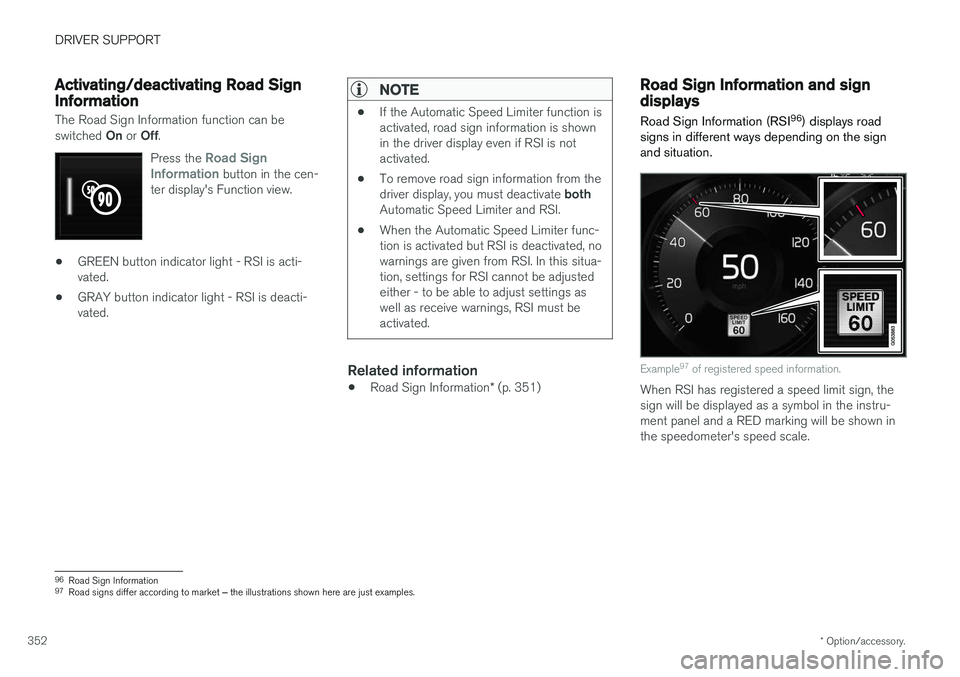
Example 97
of registered speed information.
When RSI has registered a speed limit sign, the sign will be displayed as a symbol in the instru-ment panel and a RED marking will be shown inthe speedometer's speed scale.
96 Road Sign Information
97 Road signs differ according to market ‒ the illustrations shown here are just examples.
Page 360 of 656

DRIVER SUPPORT
358
Selecting guidance to a rest area ifthe Driver Alert Control warning hasbeen givenThe
Rest Stop Guidance function can be
switched on or off.
When the guide is activated, it will automatically display suggestions for a suitable place to take abreak if the DAC warning is given. To select
Rest Stop Guidance:
1. Tap
Settings in the center display's Top
view.
2. Select
My CarIntelliSafeDriver Alert
Control.
3. Select/deselect
Rest Stop Guidance to
activate/deactivate the function.
Related information
• Driver Alert Control (p. 356)
Driver Alert Control limitations
Driver Alert Control (DAC) functionality may be reduced in certain situations.
In certain situations, the system may provide a warning even if it has not detected a change indriving behavior, e.g.:
• in strong crosswinds
• on grooved road surfaces.
WARNING
In certain cases, driving behavior might not be affected despite the driver's fatigue – whenusing the Pilot Assist function – resulting inthe driver not getting a warning from DAC. It is therefore very important to always stop and take a break at the slightest sign of fati-gue, regardless of whether the DAC functionhas issued a warning or not.
NOTE
The function uses the vehicle's camera unit, which has some general limitations – see thesection "Camera unit limitations".
Related information
• Driver Alert Control (p. 356)
Lane Keeping Aid
Lane Keeping Aid (LKA 106
) is designed to
actively steer the vehicle on freeways, highways and other major roads to help the driver reducethe risk of the vehicle unintentionally veering outof the lane.
Lake Keeping Assistance steers the vehicle back into the lane and/or alerts the driver using vibra-tions in the steering wheel. Lane Keeping Aid is active at speeds between 65-200 km/h (40-125 mph) on roads withclearly visible traffic lane marker lines. On narrow roads, the function may be unavailable and go into standby mode. The function willbecome available again when the road becomessufficiently wide.
A camera monitors the road/traffic lane's marker lines.
106 Lane Keeping Aid
Page 361 of 656

DRIVER SUPPORT
}}
359
Lane Keeping Aid steers the vehicle back into its lane.
Lane Keeping Aid alerts the driver using vibrations in the steering wheel107
.
Depending on the settings used, Lane Keeping Aid functions in different ways:
• With
Assist108
activated: When the vehicle
approaches a lane marker line, LKA will actively steer the vehicle back into the laneusing light pressure on the steering wheel.
• With
Warning108
activated: If the vehicle is
about to move over a lane marker line, the driver will be alerted by vibrations in thesteering wheel.
NOTE
When the direction indicator is activated, the Lane Keeping Aid does not provide any warn-ing or intervene with steering.
WARNING
• The Lane Keeping Aid function is supple- mentary driver support intended to helpimprove driving safety – it cannot handleall situations in all traffic, weather androad conditions.
• The function is not a substitute for thedriver's attention and judgment. The driveris always responsible for ensuring thevehicle is driven in a safe manner, at theappropriate speed, with an appropriatedistance to other vehicles, and in accord-ance with current traffic rules and regula-tions.
107
The steering wheel vibrations vary. The more time the vehicle is over the lane marker line, the longer the vibrations.
108 See "LKA assistance options" under "Activating/deactivating Lane Keeping Aid".
Page 363 of 656

DRIVER SUPPORT
}}
361
Activating/deactivating LaneKeeping Aid The Lane Keeping Aid (LKA110
) function can be
switched On or Off.
On/OffPress the Lane Keeping Aidbutton in the center display's Function view.
• GREEN button indicator light - LKA is acti- vated.
• GRAY button indicator light - LKA is deacti-vated.
Related information
•Lane Keeping Aid (p. 358)
Selecting type of assistance forLane Keeping Aid
The driver can determine what types of assis- tance LKA 111
should provide if the vehicle veers
from its lane.
1. Select SettingsMy CarIntelliSafe in
the center display's Top view.
2. Under
Lane Keeping Aid Mode, select
what assistance LKA should provide:
•
Assist the driver will receive steering
assistance but no warning.
•
Both - the driver will receive both steering
assistance and a warning.
•
Warning - the driver will only receive a
warning.
Related information
• Lane Keeping Aid (p. 358)
Lane Keeping Aid limitations
In certain demanding driving conditions, Lane Keeping Aid may not be able to properly assistthe driver. In these situations, it is recommendedthat the function be deactivated.
Examples of such situations include:
• road work
• winter driving conditions
• poor road surfaces
• a very sporty driving style
• bad weather with reduced visibility
• roads with indistinct or no lane markings
• sharp edges or lines other than the lane's side markings
• when the power steering works at reducedpower - e.g. during cooling due to overheat-ing (see section "Speed-dependent steeringforce").
NOTE
The function uses the vehicle's camera unit, which has some general limitations – see thesection "Camera unit limitations".
110
Lane Keeping Aid
111 Lane Keeping Aid