2018 VOLVO V90 CROSS COUNTRY window
[x] Cancel search: windowPage 6 of 662

4
Setting types in the center display137
Table of settings in the center display 138
Driver profiles 139
Selecting a driver profile 140
Changing a driver profile's name 141
Resetting driver profile settings 141
Linking a remote key to a driver profile 141
Messages in the center display 142
Handling messages in the center display 143
Handling messages saved from the center display 144
Head-up display *
144
Activating and deactivating the head- up display * 146
Head-up display settings *
146
Voice control 147
Using voice commands 148
Voice control for cellular phones 149
Voice control for radio and media 150
Voice control settings 150
LIGHTING
Lighting panel and controls154
Adjusting light functions via the cen- ter display 155
Parking lights 156
Daytime running lights 156
Low beams 157
Using high beam 158
Active high beam 159
Using turn signals 160
Active Bending Lights *
161
Front fog lights/cornering illumination *
161
Rear fog light 162
Brake lights 163
Emergency brake lights 163
Hazard warning flashers 164
Using home safe lighting 164
Welcome Light 164
Interior Lighting 165
Adjusting interior lighting 167
WINDOWS, GLASS AND MIRRORS
Windows, glass and mirrors170
Pinch protection for windows and sun curtains 170
Reset procedure for pinch protection 171
Power windows 171
Operating the power windows 172
Using sun curtains *
173
Rearview/door mirrors 173
Adjusting the rearview mirror dim-ming function 174
Adjusting the door mirrors 175
Panoramic roof *
176
Operating the panoramic roof *
177
Auto closing the panoramic roof * sun
curtain 179
Using the windshield wipers 180
Heated windshield washer nozzles *
181
Using the rain sensor 181
Using the rain sensor's memory function 182
Using the windshield and headlightwashers 183
Using the rear window wiper/washer 184
Using automatic rear window wipingwhen backing up 185
Page 7 of 662

5
SEATS AND STEERING WHEEL
Manual front seats188
Power front seats *
189
Adjusting the power front seats *
189
Storing memory settings in power front seats * 190
Using stored memory in a powered front seat 191
Front seat massage settings *
192
Adjusting front seat massage settings *
192
Adjusting front seat cushion length 193
Adjusting front seat side bolster settings *
194
Adjusting front seat lumbar support *
194
Adjusting the passenger seat from the driver's seat * 195
Folding down the rear seat backrests 196
Adjusting the rear seat head restraints 198
Steering wheel controls and horn 199
Adjusting the steering wheel 200
CLIMATE CONTROL
Climate202
Climate zones 202
Climate control sensors 203
Perceived temperature 203
Climate control system voice commands 204
Air quality 205
Clean Zone *
205
Clean Zone Interior Package *
206
Interior Air Quality System *
206
Activating and deactivating the air quality sensor * 207
Passenger compartment air filter 207
Air distribution 208
Adjusting air distribution 208
Opening, closing and directing air vents 209
Air distribution options 211
Climate system controls 214
Activating and deactivating powerfront seats * 216
Activating and deactivating theheated front seat * 217
Activating and deactivating theheated rear seats * 217
Activating and deactivating front seatventilation * 218
Activating and deactivating the heated steering wheel
*219
Activating and deactivating automaticsteering wheel heating *220
Activating auto climate control 220
Activating and deactivating recirculation 221
Activating and deactivating the recir- culation timer setting 221
Activating and deactivating max defroster 222
Activating and deactivating the heated windshield * 223
Activating and deactivating automaticwindshield heating * 224
Activating and deactivating the heated rear window and door mirrors 224
Automatically activating and deacti-vating the heated rear window anddoor mirrors 225
Setting the blower speed for thefront seats 225
Setting the blower speed for the rear seats * 226
Setting the temperature for the front seats 227
Setting the temperature for the rear seats * 228
Synchronize temperature 229
Activating and deactivating air condi- tioning 229
Page 15 of 662

13
MAINTENANCE AND SERVICE
Volvo's service program572
Data transfer between vehicle and workshop over Wi-Fi 574
Download Center 575
Handling system updates via Down-load Center 575
Vehicle status 576
Scheduling service and repairs 576
Sending vehicle information to theworkshop 578
Hoisting the vehicle 579
Opening and closing the hood 581
Climate control system service 582
Replacing a windshield with head-up display * 582
Engine compartment overview 583
Engine oil 583
Checking and filling engine oil 584
Refilling coolant 586
Replacing bulbs 587
Removing the plastic cover to replace bulbs 588
Location of exterior lights 589
Replacing the low beam headlight bulbs 590
Replacing the high beam headlight bulbs 590
Replacing daytime running lights/ front parking light bulbs591
Replacing front turn signal bulbs 592
Replacing backup lights 593
Replacing the rear fog light bulb 593
Bulb specifications 594
Start battery 595
Support battery 598
Battery symbols 599
Fuses and fuseboxes 600
Replacing fuses 601
Fuses in the engine compartment 602
Fuses under the glove compartment 605
Fuses in the cargo compartment 608
Cleaning the interior 612
Cleaning the center display 612
Cleaning the head-up display *
613
Cleaning fabric upholstery and ceil-ing liner 614
Cleaning the seat belt 614
Cleaning floor mats and inlay mats 614
Cleaning leather upholstery 615
Cleaning the leather steering wheel 616
Cleaning interior plastic, metal andwood surfaces 617
Cleaning the exterior
617
Polishing and waxing 618
Hand washing 618
Automatic car washes 620
High-pressure washing 621
Cleaning the wiper blades 621
Cleaning exterior plastic, rubber and trim components 622
Cleaning rims 623
Corrosion protection 623
Paintwork 624
Touching up minor paint damage 624
Color codes 625
Changing rear window wipers 626
Replacing windshield wiper blades 627
Windshield wipers in the service position 628
Filling washer fluid 629
Page 29 of 662
YOUR VOLVO
}}
* Option/accessory.27
Creating and registering a Volvo ID
A Volvo ID can be created in two ways. If your Volvo ID was created with the Volvo On Callapp, the Volvo IDmust also be registered to thevehicle to enable access to the Volvo ID serv-ices.
Creating a Volvo ID using the app
1. Download the Volvo ID app from Download
Center in the center display's App view.
2. Start the app and register a personal email address.
3. Follow the instructions that will be sent auto- matically to this email address.
> A Volvo ID has now been created and isautomatically registered to the vehicle. The Volvo ID services can now be used.
Creating a Volvo ID using the Volvo On Call
app3
1. Download the latest version of the Volvo On Call app from a smartphone, via e.g. App Store, Windows Phone or Google Play.
2. On the app's start page, create a Volvo ID and enter a personal email address.
3. Follow the instructions that will be sent auto- matically to this email address.
> A Volvo ID has now been created. Seebelow for information on how the ID is registered to the vehicle.
Registering your Volvo ID to the vehicleIf your Volvo ID was created using the Volvo OnCall app, follow these steps to register the ID tothe vehicle:
1. If you have not already done so, download
the Volvo ID app from
Download Center in
App view.
NOTE
To download apps the vehicle must be con- nected to the internet.
2. Start the app and enter your Volvo ID/email address.
3. Follow the instructions that will be automati- cally sent to the email address connected to your Volvo ID.
> Your Volvo ID has now been registered tothe vehicle. The Volvo ID services can now be used.
Related information
• Volvo ID (p. 26)
• Download apps (p. 462)
• Handling system updates via Download Cen-ter (p. 575)
• Internet-connected vehicle
* (p. 503)
Drive-E ‒ purer driving pleasure
Volvo is committed to the well-being of its cus- tomers. As a natural part of this commitment, wecare about the environment in which we all live.Concern for the environment means an everydayinvolvement in reducing our environmentalimpact.
Volvo's environmental activities are based on a holistic view, which means we consider the over-all environmental impact of a product throughoutits complete life cycle. In this context, design, pro-duction, product use, and recycling are all impor-tant considerations. In production, Volvo haspartly or completely phased out several chemicalsincluding CFCs, lead chromates, asbestos, andcadmium; and reduced the number of chemicalsused in our plants 50% since 1991. Volvo was the first in the world to introduce into production a three-way catalytic converter with aLambda sond, now called the heated oxygen sen-sor, in 1976. The current version of this highlyefficient system reduces emissions of harmfulsubstances (CO, HC, NOx) from the exhaust pipeby approximately 95 - 99% and the search toeliminate the remaining emissions continues.Volvo is the only automobile manufacturer tooffer CFC-free retrofit kits for the air conditioningsystem of all models as far back as the 1975model 240. Advanced electronic engine controlsand cleaner fuels are bringing us closer to our
3 Vehicles with Volvo On Call.
Page 57 of 662

SAFETY
}}
55
WARNING
•Do not use child safety seats or child booster cushions/backrests in the frontpassenger's seat. We also recommendthat occupants under 140 cm (4 feet7 inches) in height who have outgrownthese devices sit in the rear seat with theseat belt fastened. See also the Occu-pant Weight Sensor information.
• Never drive with the airbags deployed.The fact that they hang out can impair thesteering of your vehicle. Other safety sys-tems can also be damaged.
• The smoke and dust formed when theairbags are deployed can cause skin andeye irritation in the event of prolongedexposure.
Should you have questions about any componentin the SRS system, please contact a trained andqualified Volvo service technician or Volvo cus-tomer support: In the United States Volvo Car USA, LLC Customer Care Center 1 Volvo Drive P.O. Box 914Rockleigh, New Jersey 07647 1-800-458-1552www.volvocars.com/us In Canada Volvo Car Canada Ltd. Customer Care Centre9130 Leslie Street, Suite 101Richmond Hill, Ontario L4B 0B91-800-663-8255www.volvocars.com/ca
Airbag decals
Airbag decal on the outside of both sun visors
Passenger's side airbag decal
WARNING
•
Children must never be allowed in the front passenger's seat.
• Occupants in the front passenger's seatmust never sit on the edge of the seat, sitleaning toward the instrument panel orotherwise sit out of position.
• The occupant's back must be as uprightas comfort allows and be against the seatback with the seat belt properly fastened.
• Feet must be on the floor, e.g., not on thedash, seat or out of the window.
Page 62 of 662

||
SAFETY
60
WARNING
Volvo recommends contacting an authorized Volvo workshop for repairs. Incorrectly per-formed repairs to the side airbag systemcould impair function and lead to seriousinjury.
WARNING
Do not place any objects in the area between the outer edges of the seats and the doorpanels, as this could impair the function of theside airbags. Volvo recommends only using seat covers approved by Volvo. Other seat covers couldprevent the side airbags from functioningproperly.
WARNING
The side airbag is a supplement to the seat belt. Always wear your seat belt.
Related information
•Airbags (p. 52)
Inflatable curtain The inflatable curtain, Inflatable Curtain (IC), helps to prevent the driver and passengers fromstriking their heads on the inside of the vehicleduring a collision.
The inflatable curtains are installed along both sides of the inside of the roof and help protect occupants in the vehicle's outer seats.
IC
AIRBAG is embossed on the panels.
A collision of a sufficiently violent force will trig- ger the sensors and the inflatable curtain willinflate.
WARNING
Volvo recommends contacting an authorized Volvo workshop for repair. Incorrectly per-formed repairs to the inflatable curtain systemcould impair function and lead to seriousinjury.
WARNING
Never hang or attach heavy objects in the handle in the ceiling. The hooks are onlyintended for lightweight garments (not forhard objects such as umbrellas). Never screw or mount anything to the vehi- cle's headlining, door pillars or side panels.This could impair the intended protectiveproperties. Volvo recommends only usingVolvo original parts that are approved forplacement in these areas.
WARNING
If objects are loaded higher than the upper edge of the side windows, leave a 10 cm (4in.) space between the objects and the win-dow. Objects placed closer to this couldimpede the function of the inflatable curtainconcealed inside the headlining.
WARNING
The inflatable curtain is a supplement to the seat belt. Always wear your seat belt.
Page 85 of 662
DISPLAYS AND VOICE CONTROL
* Option/accessory.83
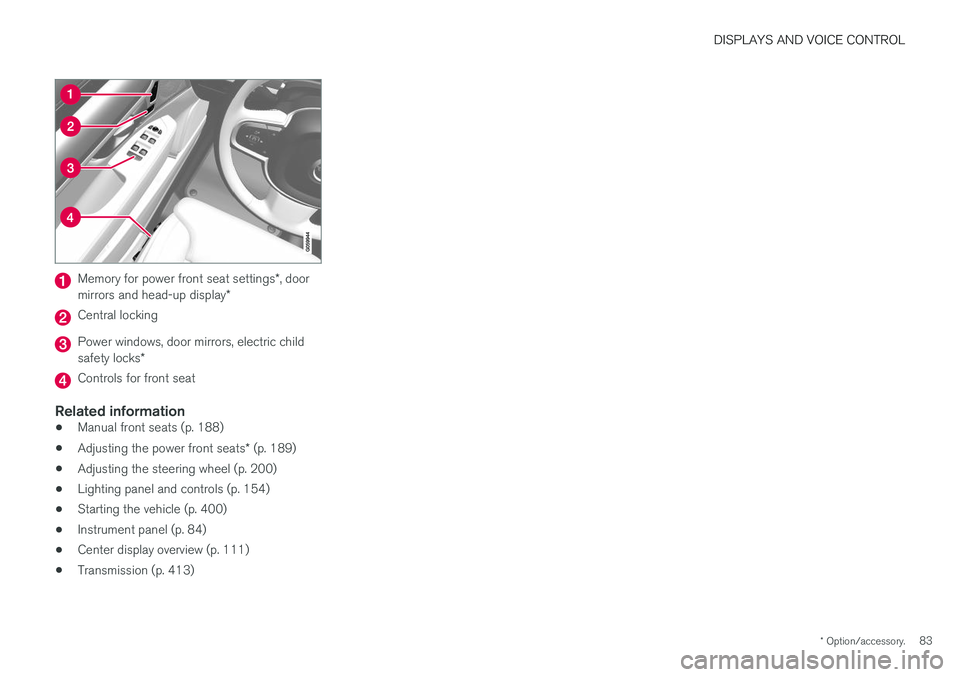
Memory for power front seat settings *, door
mirrors and head-up display *
Central locking
Power windows, door mirrors, electric child safety locks*
Controls for front seat
Related information
•Manual front seats (p. 188)
• Adjusting the power front seats
* (p. 189)
• Adjusting the steering wheel (p. 200)
• Lighting panel and controls (p. 154)
• Starting the vehicle (p. 400)
• Instrument panel (p. 84)
• Center display overview (p. 111)
• Transmission (p. 413)
Page 114 of 662
||
DISPLAYS AND VOICE CONTROL
* Option/accessory.
112
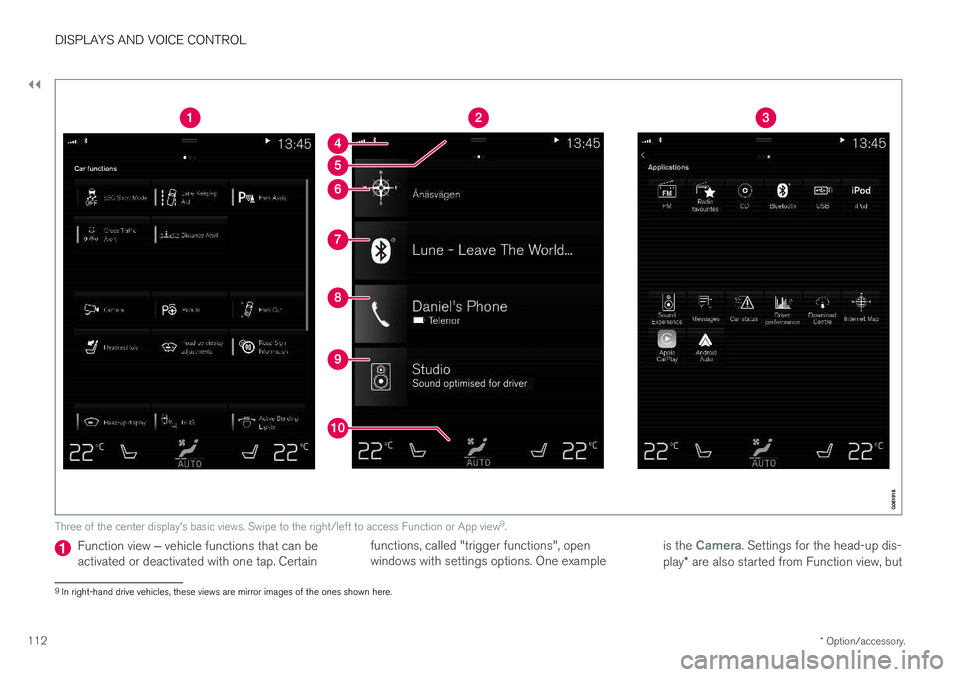
Three of the center display's basic views. Swipe to the right/left to access Function or App view 9
.
Function view ‒ vehicle functions that can be
activated or deactivated with one tap. Certain functions, called "trigger functions", open windows with settings options. One example
is the Camera. Settings for the head-up dis-
play * are also started from Function view, but
9
In right-hand drive vehicles, these views are mirror images of the ones shown here.