2018 VOLVO V90 CROSS COUNTRY USB
[x] Cancel search: USBPage 485 of 662
AUDIO, MEDIA AND INTERNET
}}
* Option/accessory.483
Related information
•Handling the App menu in the instrument panel (p. 105)
• Radio (p. 464)
• Controlling and changing media (p. 483)
• Connecting a device via the USB port(p. 488)
• Connecting a device via Bluetooth ®
(p. 487)
• Download apps (p. 462)
• Internet-connected vehicle
* (p. 503)
• Video (p. 486)
• Apple ®
CarPlay ®
* (p. 489)
• Android Auto
* (p. 492)
• Voice control for radio and media (p. 150)
• Compatible file formats for media (p. 510)
Controlling and changing media
Media playback can be controlled using voice commands, the steering wheel keypad or thecenter display.
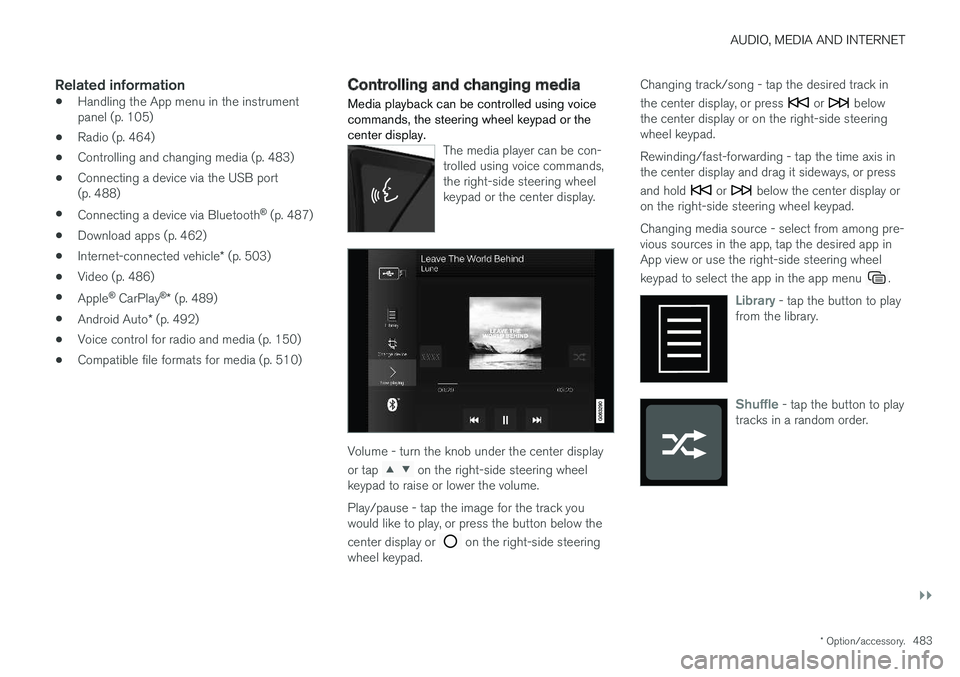
The media player can be con- trolled using voice commands,the right-side steering wheelkeypad or the center display.
Volume - turn the knob under the center display or tap
on the right-side steering wheel
keypad to raise or lower the volume. Play/pause - tap the image for the track you would like to play, or press the button below the center display or
on the right-side steering
wheel keypad. Changing track/song - tap the desired track in the center display, or press
or below
the center display or on the right-side steering wheel keypad. Rewinding/fast-forwarding - tap the time axis in the center display and drag it sideways, or press and hold
or below the center display or
on the right-side steering wheel keypad. Changing media source - select from among pre- vious sources in the app, tap the desired app inApp view or use the right-side steering wheel keypad to select the app in the app menu
.
Library - tap the button to play
from the library.
Shuffle - tap the button to play
tracks in a random order.
Page 486 of 662
||
AUDIO, MEDIA AND INTERNET
* Option/accessory.
484
Similar - tap the button to use
Gracenote to search for similar music on the USB device andcreate a playlist from the musicfound. The playlist can containup to 50 tracks.
Change device - tap the but-
ton to toggle between USB devices when more than one isconnected.
Related information
• Media player (p. 481)
• Media searches (p. 484)
• Sound settings (p. 460)
• Apps (p. 461)
• Gracenote ®
(p. 485)
• Voice control for radio and media (p. 150)
Media searches
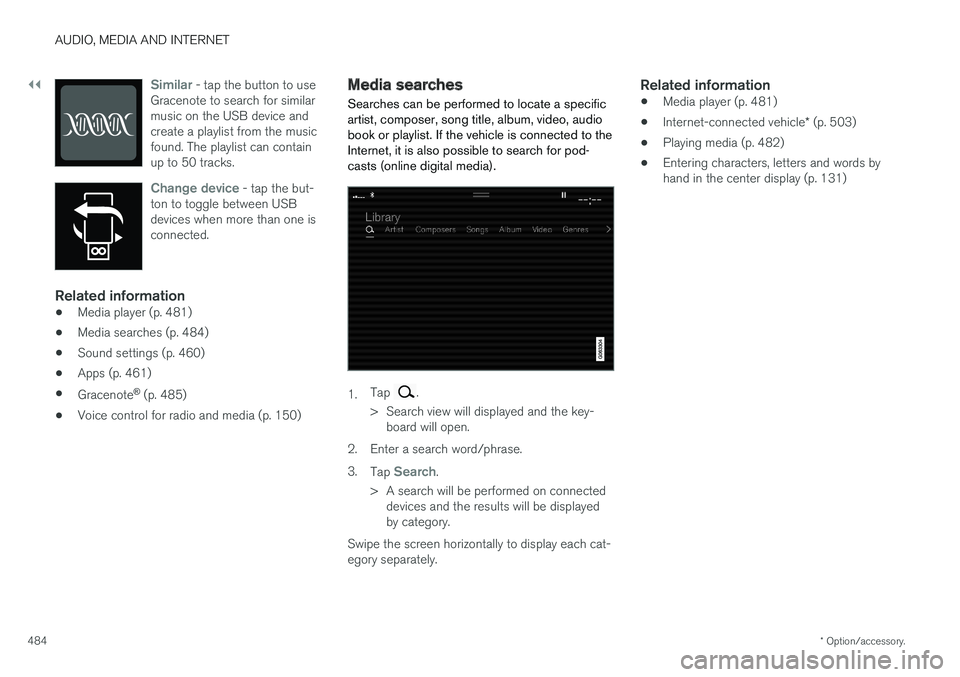
Searches can be performed to locate a specific artist, composer, song title, album, video, audiobook or playlist. If the vehicle is connected to theInternet, it is also possible to search for pod-casts (online digital media).
1. Tap .
> Search view will displayed and the key- board will open.
2. Enter a search word/phrase. 3. Tap
Search.
> A search will be performed on connected devices and the results will be displayed by category.
Swipe the screen horizontally to display each cat-egory separately.
Related information
• Media player (p. 481)
• Internet-connected vehicle
* (p. 503)
• Playing media (p. 482)
• Entering characters, letters and words byhand in the center display (p. 131)
Page 488 of 662
AUDIO, MEDIA AND INTERNET
486
Video
The media player can play videos from USB- connected devices.
Video is not available when the vehicle is moving; only audio will be played. Video will resume whenthe vehicle is stationary. Information on compatible media formats is provi- ded in a separate section.
Related information
• Playing video (p. 486)
• Playing DivX ®
(p. 486)
• Video settings (p. 487)
• Compatible file formats for media (p. 510)
Playing video
The
USB app in App view is used to play videos.1. Connecting media source (USB device). 2. Open the
USB app from App view.
3. Tap the title you would like to play. > Playback will begin.
Related information
• Video (p. 486)
• Playing DivX ®
(p. 486)
• Video settings (p. 487)
• Compatible file formats for media (p. 510)
Playing DivX®
The DivX Certified ®
device must be registered to
play purchased DivX video-on-demand (VOD) movies.
1. Tap Settings in the Top view.
2. Tap
VideoDivX ® VOD to get a registra-
tion code.
3. Go to vod.divx.com for more information and to complete the registration process.
Related information
• Video (p. 486)
• Playing video (p. 486)
• Video settings (p. 487)
• Compatible file formats for media (p. 510)
Page 490 of 662
AUDIO, MEDIA AND INTERNET
* Option/accessory.
488
Playing media via the USB port External audio sources, such as an iPod ® or
MP3 player, can be connected to the audio sys- tem via the vehicle's USB port.
Devices with rechargeable batteries can be charged when they are connected via the USB port and the ignition is in mode I, II or the engine
is running. The content on the external source can be read faster if it only contains data of a compatible for-mat. Video files can also be played via the USBport. Some MP3 players have their own file system that the vehicle has support for.
Related information
• Connecting a device via the USB port(p. 488)
• Playing media (p. 482)
• Video (p. 486)
• Ignition modes (p. 403)
• Technical specifications for USB devices(p. 511)
• Apple ®
CarPlay ®
* (p. 489)
• Android Auto
* (p. 492)
Connecting a device via the USBport
External audio sources, such as an iPod ®
or
MP3 player, can be connected to the audio sys- tem via any of the vehicle's USB ports.
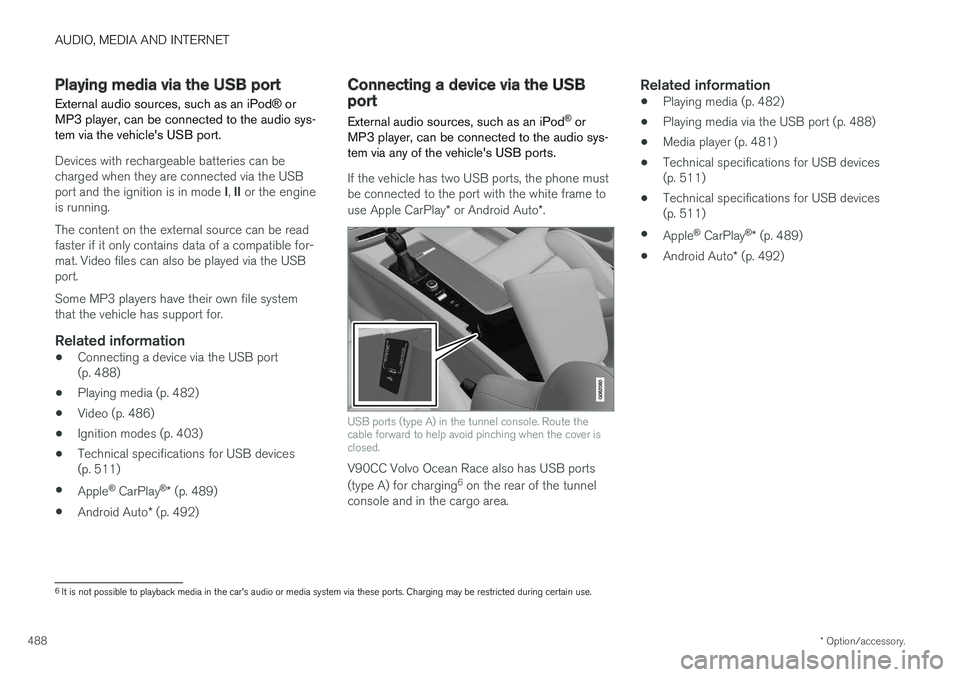
If the vehicle has two USB ports, the phone must be connected to the port with the white frame to use Apple CarPlay * or Android Auto *.
USB ports (type A) in the tunnel console. Route the cable forward to help avoid pinching when the cover isclosed.
V90CC Volvo Ocean Race also has USB ports (type A) for charging 6
on the rear of the tunnel
console and in the cargo area.
Related information
• Playing media (p. 482)
• Playing media via the USB port (p. 488)
• Media player (p. 481)
• Technical specifications for USB devices (p. 511)
• Technical specifications for USB devices(p. 511)
• Apple ®
CarPlay ®
* (p. 489)
• Android Auto
* (p. 492)
6
It is not possible to playback media in the car's audio or media system via these ports. Charging may be restricted during certain use.
Page 492 of 662
||
AUDIO, MEDIA AND INTERNET
* Option/accessory.
490 5. Tap the desired app.
> The app will start up.
Starting CarPlay
CarPlay can be started as follows after an iPhone is connected.
1. Connect an iPhone to the USB port. If there are two USB ports, use the one with the white frame. >If the auto start setting is selected -
the name of the phone will be displayed.
2. Tap the name of the phone - the CarPlay tile will open and compatible apps will be dis- played.
3. If the CarPlay tile does not open, tap
Apple
CarPlay in App view.
> The CarPlay tile will open and compatible apps will be displayed.
4. Tap the desired app. > The app will start up.
CarPlay will run in the background if another app is started in the same tile. To display CarPlay inthe tile, tap the CarPlay icon in App view.
Switching connection between CarPlay and iPod
CarPlay to iPod
1. Tap Settings in the Top view. 2. Proceed to
CommunicationApple
CarPlay.
3. Uncheck the box for the Apple device that should no longer start CarPlay automatically when the USB cable is connected.
4. Remove and then reinsert the Apple device into the USB port.
5. Open the
iPod app from App view.
iPod to CarPlay
1.Tap Apple CarPlay in App view.
2. Read the information in the pop-up window and then tap
OK.
3. Remove and then reinsert the Apple device into the USB port.
> The Apple CarPlay tile will open and com-
patible apps will be displayed 8
.
Related information
• Connecting a device via the USB port (p. 488)
• Apple ®
CarPlay ®
* (p. 489)
• Settings for Apple ®
CarPlay ®
* (p. 490)
• Connecting the car to the Internet via amobile device (Wi-Fi) (p. 505)
• Connect the car to the Internet via carmodem (SIM card) (p. 506)
• Voice control (p. 147)
Settings for Apple® CarPlay®
*
Settings for an Apple device connected through CarPlay 9
.
Automatic start1. Tap Settings in the Top view.
2. Tap
CommunicationApple CarPlay and
select the desired setting:
• Check the box - CarPlay will start auto- matically when the USB cable is con-nected.
• Uncheck the box - CarPlay will not startautomatically when the USB cable is con-nected.
A maximum of 20 Apple devices can be stored inthe list. When the list is full and a new device isconnected, the oldest one will be deleted. To delete the list, the settings must be rest in the center display (factory reset).
System Volumes1. Tap Settings in the Top view.
2. Tap
SoundSystem Volumes to change
the settings for the following:
•
Voice Control
•Navi Voice Guidance
•Phone Ringtone
8 Apple, CarPlay, iPhone and iPod are registered trademarks of Apple Inc.
Page 493 of 662
AUDIO, MEDIA AND INTERNET
* Option/accessory.491
Related information
•Apple ®
CarPlay ®
* (p. 489)
• Using Apple ®
CarPlay ®
* (p. 489)
• Resetting center display settings (p. 137)Tips for using Apple® CarPlay®
*
Here are some useful tips for when you use CarPlay ®
.
• Update your iPhone with the latest version of iOS operating system and ensure that theapps have been updated.
• In the event of a problem with CarPlay, dis-connect the phone from the USB port andreconnect. Otherwise, try to close the app onthe phone that is not working and thenrestart the app, or try closing all apps andrestart your phone.
• If the apps do not appear when CarPlaystarts (black screen), try minimizing andexpanding the tile for CarPlay.
• Using apps that are not compatible withCarPlay may sometimes mean that the con-nection between the phone and the car isbroken. Information about supported appsand compatible phone models can be foundon Apple's website. You can also search forCarPlay in the App Store to find informationabout apps that are compatible with CarPlayin your market.
• CarPlay only works with iPhone 10
.
NOTE
Availability and functionality can vary depend- ing on market.
Related information
• Apple ®
CarPlay ®
* (p. 489)
9
Apple and CarPlay are registered trademarks of Apple Inc..
10 Apple, CarPlay and iPhone are registered trademarks owned by Apple Inc.
Page 495 of 662
AUDIO, MEDIA AND INTERNET
* Option/accessory.493
From a previously connected Android device
1. Connect the device to the USB port.
>If the auto start setting is selected -
the name of the phone will be displayed.
2. Tap the name of the phone - the Android Auto tile will open and compatible apps will be displayed.
3. If the automatic start setting is not acti- vated - open the
Android Auto app from
App view.
> The Android Auto tile will open and com- patible apps will be displayed.
4. Tap the desired app. > The app will start up.
Android Auto will run in the background if another app is started in the same tile. To displayAndroid Auto in the tile, tap the Android Autoicon in App view.
Related information
• Android Auto
* (p. 492)
• Settings for Android Auto
* (p. 493)
• Connecting a device via the USB port(p. 488)
• Voice control (p. 147)
Settings for Android Auto
*
Settings for phones initially connected with Android Auto.
Automatic start1. Tap Settings in the Top view.
2. Tap
CommunicationAndroid Auto and
select setting:
• Check the box - Android Auto will start automatically when the USB cable is con-nected.
• Uncheck the box - Android Auto will notstart automatically when the USB cable isconnected.
A maximum of 20 Android devices can be storedin the list. When the list is full and a new device isconnected, the oldest one will be deleted. A factory reset must be performed to delete the list.
System Volumes1. Tap Settings in the Top view.
2. Tap
SoundSystem Volumes to change
the settings for the following:
•
Voice Control
•Navi Voice Guidance
•Phone Ringtone
Related information
• Android Auto
* (p. 492)
• Using Android Auto
* (p. 492)
• Resetting center display settings (p. 137)
Page 496 of 662
AUDIO, MEDIA AND INTERNET
* Option/accessory.
494
Tips for using Android Auto *
Here are some useful tips for when you use Android Auto.
• Ensure that your apps are updated.
• When starting the car, wait until the center display has started, connect the phone andthen open Android Auto from the app view.
• In the event of problems with Android Auto,disconnect your Android phone from theUSB port and then reconnect via USB. Oth-erwise, try closing the app on the phone andthen restarting the app.
• When a phone is connected to Android Autoit is still possible to playback media viaBluetooth to another media player. TheBluetooth function is on when Android Autois used.
Related information
•
Android Auto
* (p. 492)
Phone
A phone equipped with Bluetooth can be wire- lessly connected to the vehicle's integratedhands-free system.
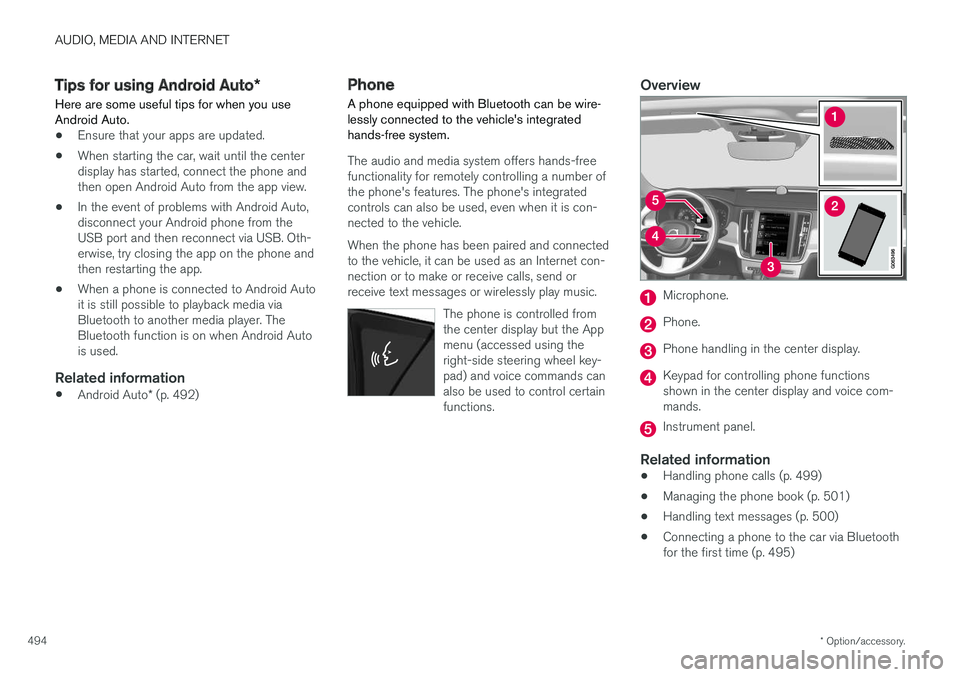
The audio and media system offers hands-free functionality for remotely controlling a number ofthe phone's features. The phone's integratedcontrols can also be used, even when it is con-nected to the vehicle. When the phone has been paired and connected to the vehicle, it can be used as an Internet con-nection or to make or receive calls, send orreceive text messages or wirelessly play music.
The phone is controlled fromthe center display but the Appmenu (accessed using theright-side steering wheel key-pad) and voice commands canalso be used to control certainfunctions.
Overview
Microphone.
Phone.
Phone handling in the center display.
Keypad for controlling phone functions shown in the center display and voice com-mands.
Instrument panel.
Related information
•Handling phone calls (p. 499)
• Managing the phone book (p. 501)
• Handling text messages (p. 500)
• Connecting a phone to the car via Bluetooth for the first time (p. 495)