2018 VOLVO S90 climate settings
[x] Cancel search: climate settingsPage 212 of 640

||
CLIMATE CONTROL
* Option/accessory.
210 After unlocking, blower speed and temperature can also be changed from the climate panel andall selected climate settings will be displayed. Thescreen locks automatically after a period of inac-tivity.
Related information
•
Climate (p. 196)
• Activating and deactivating power front seats
* (p. 210)
• Activating and deactivating the heated rearseats
* (p. 211)
• Activating and deactivating front seat ventila-tion
* (p. 212)
• Activating and deactivating the ventilatedrear seats
* (p. 213)
• Activating and deactivating the heated steer-ing wheel
* (p. 214)
• Activating auto climate control (p. 215)
• Activating and deactivating recirculation (p. 216)
• Activating and deactivating max defroster(p. 217)
• Activating and deactivating the heated wind- shield
* (p. 218)
• Activating and deactivating the heated rear window and door mirrors (p. 219)
• Setting the blower speed for the front seats(p. 220) •
Setting the blower speed for the rear seats
*
(p. 221)
• Synchronize temperature (p. 224)
• Activating and deactivating air conditioning(p. 224)
Activating and deactivating power
front seats
*
The seats can be heated for added comfort for the driver and passengers in cold weather.
Steering wheel and seat buttons in the climate row.
1. Tap the left- or right-side steering wheel and seat button in the center display's climate bar to open the controls for steering wheeland seat heating. If the vehicle is not equipped with ventilated seats or heated steering wheel, the buttonfor seat heating is directly accessible in theclimate bar.
2. Tap the seat heating button repeatedly to select one of the four levels:
Off, High,Medium or Low.
> The level is changed and the set level is displayed in the button.
Page 213 of 640

CLIMATE CONTROL
}}
* Option/accessory.211
Related information
•Climate system controls (p. 208)
• Activating and deactivating the heated front seat
* (p. 211)
Activating and deactivating the
heated front seat *
The seats can be heated for added comfort for the driver and passengers in cold weather.
Seat heating can be set to automatically activate when the engine is started. When set to automat-ically activate, heating will be turned on at lowambient temperatures. 1. Tap
Settings in the Top view in the center
display.
2. Tap
Climate.
3. Select
Auto Driver Seat Heating Leveland Auto Passenger Seat Heating Levelto activate/deactivate automatic start of heated driver's and passenger seat.
4. Select
Low, Medium or High to select level
after the function has been activated.
Related information
• Climate system controls (p. 208)
• Activating and deactivating power front seats
* (p. 210)
Activating and deactivating the
heated rear seats *
The seats can be heated for added comfort for the driver and passengers in cold weather.
Activating and deactivating the heated rear seats from the front seats *
Seat buttons in the Rear climate group in Climate view.
1. Open Climate view in the center display and
select the Rear climate tab.
2. Tap the left- or right-side seat button to open the seat controls. If the vehicle is not equipped with ventilated seats, the button for seat heating is directlyaccessible in the climate bar.
Page 217 of 640
CLIMATE CONTROL
* Option/accessory.215
Activating and deactivating
automatic steering wheel heating *
The steering wheel can be heated for added comfort in cold weather.
Steering wheel heating can be set to automati- cally activate when the engine is started. Whenset to automatically activate, heating will beturned on at low ambient temperatures. 1. Tap
Settings in the Top view in the center
display.
2. Tap
Climate.
3. Select
Auto Steering Wheel Heating
Level to activate/deactivate automatic start
of heated steering wheel.
4. Select
Low, Medium or High to select level
after the function has been activated.
Related information
• Activating and deactivating the heated steer- ing wheel
* (p. 214)
Activating auto climate control
If auto climate control is activated, several cli- mate system functions are controlled automati-cally.
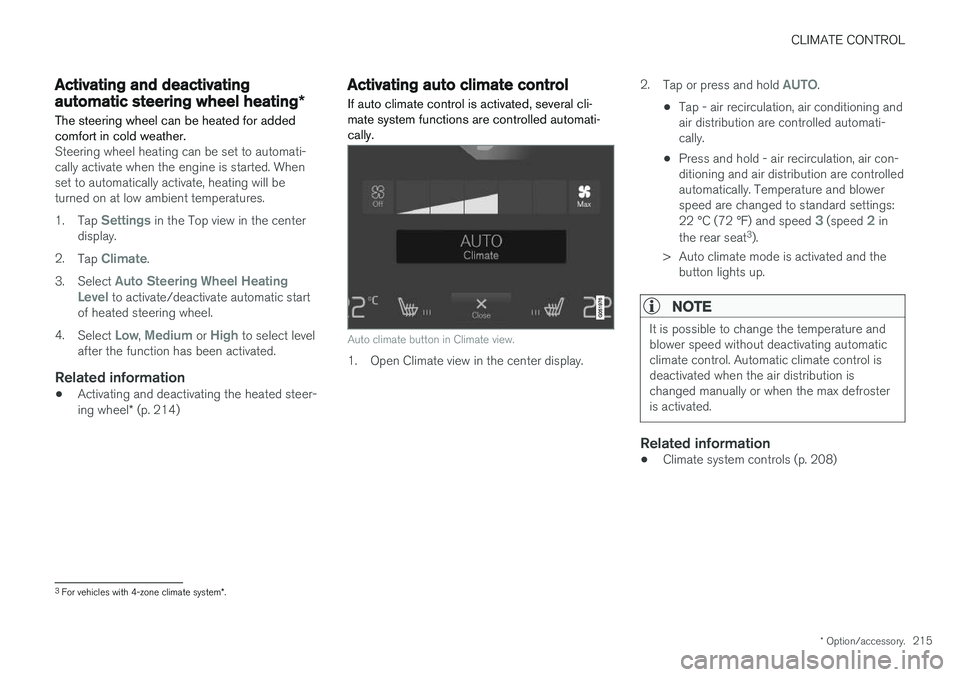
Auto climate button in Climate view.
1. Open Climate view in the center display. 2.
Tap or press and hold
AUTO.
• Tap - air recirculation, air conditioning and air distribution are controlled automati-cally.
• Press and hold - air recirculation, air con-ditioning and air distribution are controlledautomatically. Temperature and blowerspeed are changed to standard settings: 22 °C (72 °F) and speed
3 (speed 2 in
the rear seat 3
).
> Auto climate mode is activated and the button lights up.
NOTE
It is possible to change the temperature and blower speed without deactivating automaticclimate control. Automatic climate control isdeactivated when the air distribution ischanged manually or when the max defrosteris activated.
Related information
• Climate system controls (p. 208)
3
For vehicles with 4-zone climate system *.
Page 218 of 640

CLIMATE CONTROL
216
Activating and deactivatingrecirculation
The climate system's recirculation function helps shut out smog, smoke, exhaust fumes, etc. byreusing the air in the passenger compartment.
Air recirculation button in Climate view.
1. Open Climate view in the center display. 2. Tap
Recirc.
> Air recirculation is activated/deactivated and the button lights up/goes out.
CAUTION
If the air in the vehicle is recirculated too long, there is a risk of fogging on the inside of thewindows.
NOTE
Recirculation cannot be activated when the max defroster is on.
Related information
• Climate system controls (p. 208)
• Activating and deactivating the recirculation timer setting (p. 216)
Activating and deactivating therecirculation timer setting
The climate system's recirculation function helps shut out smog, smoke, exhaust fumes, etc. byreusing the air in the passenger compartment.
When the recirculation timer is activated, air recir- culation will switch off automatically after 20minutes. 1. Tap
Settings in the Top view in the center
display.
2. Tap
Climate.
3. Tap
Recirculation Timer to activate/deacti-
vate the recirculation timer.
Related information
• Activating and deactivating recirculation (p. 216)
Page 221 of 640

CLIMATE CONTROL
}}
* Option/accessory.219
NOTE
If windshield heating is activated when the Start/Stop function auto-stops the engine,the engine will be restarted.
Related information
•Climate system controls (p. 208)
• Activating and deactivating automatic wind- shield heating
* (p. 219)
Activating and deactivating
automatic windshield heating *
Windshield heating is used to quickly remove condensation and ice from the windshield.
Windshield heating can be set to automatically activate when the engine is started. With auto-matic start activated, heating will be activatedwhen there is a risk of ice or condensation on thewindows or mirrors. Heating is automaticallyswitched off when the window or door mirror issufficiently warm and the condensation or ice isgone. 1. Tap
Settings in the Top view in the center
display.
2. Tap
Climate.
3. Select
Auto Front Defroster to activate/
deactivate automatic windshield heating.
Related information
• Activating and deactivating the heated wind- shield
* (p. 218)
Activating and deactivating theheated rear window and doormirrors The heated rear window and door mirrors are used to quickly remove condensation and icefrom the glass.
Activating and deactivating the heated rear window and door mirrors from thecenter console
A button in the center console offers quick access to the heated rear window and door mir-rors functions.
Button in center console.
–Tap the button.
> Heated windows and door mirrors are
activated and the button lights up/goes out.
Page 222 of 640

||
CLIMATE CONTROL
220
Activating and deactivating the heated rear window and door mirrors from thecenter display
Rear window/door mirror heating button in Climate view.
1. Open Climate view in the center display. 2.Tap
Rear.
> Heated windows and door mirrors are activated and the button lights up/goes out.
Related information
• Climate system controls (p. 208)
• Automatically activating and deactivating theheated rear window and door mirrors(p. 220)
Automatically activating anddeactivating the heated rear windowand door mirrors
The heated rear window and door mirrors are used to quickly remove condensation and icefrom the glass.
It is possible to select whether rear window and door mirror heating should be automatically acti-vated or deactivated when the engine is started.With automatic start activated, heating will beactivated when there is a risk of ice or condensa-tion on the windows or mirrors. Heating is auto-matically switched off when the window or doormirror is sufficiently warm and the condensationor ice is gone. 1. Tap
Settings in the Top view in the center
display.
2. Tap
Climate.
3. Select
Auto Rear Defroster to activate/
deactivate automatic rear window and door heating.
Related information
• Activating and deactivating the heated rearwindow and door mirrors (p. 219)
Setting the blower speed for the
front seats4
The blower can be set to several different auto- matically controlled speeds for the front seat.
Blower control buttons in Climate view.
1. Open Climate view in the center display. 2. Tap the desired blower speed:
Off, 1-5 orMax.
> The blower speed will be changed and the buttons for the set speed will light up.
CAUTION
The air conditioning will not engage if the blower is turned off completely, which maycause fogging on the inside of the windows.
4The same setting applies to the rear seats with the 2-zone climate system.
Page 415 of 640

STARTING AND DRIVING
}}
* Option/accessory.413
Gear indicator in 8" instrument panel.
Related information
•Gear selector positions for automatic trans- missions (p. 408)
All Wheel Drive (AWD)
*
All-wheel drive, All Wheel Drive (AWD), also called four-wheel drive, means that power is dis-tributed to all four wheels, which improves trac-tion.
To achieve the best traction, power is automati- cally directed to the wheels that have the bestgrip. The system continuously calculates theneed for torque to the rear wheels, and canimmediately redistribute up to half of the engine'storque to the rear wheels. All-wheel drive also has a stabilizing effect at higher speeds. In normal driving conditions, mostof the engine's power is directed to the frontwheels. When the vehicle is stationary, all-wheeldrive is always activated in preparation for maxi-mum traction during acceleration. All-wheel drive reacts differently depending on which drive mode * is selected.
Related information
• Drive modes
* (p. 413)
• Transmission (p. 407)
Drive modes
*
Drive modes affect the vehicle's driving charac- teristics in different ways to enhance and sim-plify the driving experience in certain types of sit-uations.
Drive modes enable easy access to the vehicle's many functions and settings in different drivingsituations. The following systems are adapted tohelp optimize driving characteristics in each drivemode: • Steering
• Engine/transmission/all-wheel drive
*
• Brakes
• Shock absorbers
• Instrument panel
• Start/Stop function
• Climate control settings
Select the drive mode that is best suited to the current driving conditions. Keep in mind that notall drive modes are available in all situations.
Available drive modes
COMFORT
• This is the vehicle's default mode.
When the engine is started, the vehicle will be in Comfort mode and the Start/Stop function will beactivated. This setting offers driving comfort, lightsteering and soft suspension.
Page 416 of 640

||
STARTING AND DRIVING
* Option/accessory.
414
ECO
• Adapt the vehicle for more fuel-efficient and eco-friendly driving with Eco mode.
In this mode, the Start/Stop function is activatedand certain climate settings are reduced. The instrument panel has an ECO gauge to facili- tate fuel-efficient driving.
DYNAMIC
• Dynamic mode is designed to provide sport- ier driving characteristics and a faster accel-eration response.
Gear shifting will be faster and more distinct andthe transmission will prioritize gears with a highertraction force. Steering response is faster and suspension is stiffer 3
to help reduce body roll when cornering.
The Start/Stop function is deactivated.
INDIVIDUAL
• Customizes drive mode to personal preferen- ces.
Select one of the drive modes as a basis andadjust the settings to achieve your preferred driv- ing characteristics. These settings will be stored in your driver profile. Individual drive mode is only available if it has been activated in the center display.Settings view 4
for Individual drive mode.
1. Tap Settings in the Top view.
2. Tap
My CarIndividual Drive Mode and
select Individual Drive Mode. 3.
Under
Presets, select one of the following
drive modes as a basis: Eco, Comfort orDynamic.
The following settings can be modified: •
Driver Display
•Steering force
•Powertrain Characteristics
•Brake Characteristics
•Suspension Control
•ECO Climate
•Start/Stop.
Related information
• Changing drive mode
* (p. 415)
• ECO drive mode (p. 415)
• Economical driving (p. 424)
• Start/Stop function (p. 418)
• All Wheel Drive (AWD)
* (p. 413)
3
Vehicles with Four-C.
4 The image is schematic and the details may vary depending on vehicle model or software update.