2018 VOLVO S60 trip
[x] Cancel search: tripPage 117 of 396
INSTRUMENTS AND CONTROLS
115
FunctionDescription
Contrast mode /Color mode Adjust the instrument panel's contrast and color.
Service status Shows the number of months and mileage until the next scheduled service.
Information headingsThree trip computer headings can be displayed at the same time; one in each of the displays (seethe previous illustration). One of the combinationsof information headings in the following table canbe displayed. To do so: 1. Ensure that none of the trip computer con-
trols are being used in a command sequence; reset them by pressing RESET
twice.
2. Turn the thumb wheel to begin displaying
the combinations of information headings. Stop on the desired combination. 3. See the table for an explanation of the head-
ing or the actions that can be taken.
Scroll among the combinations of trip computerinformation headings at any time by turning the thumb wheel until the desired combination is
displayed.
Heading combinations Description
Average fuel consumption Trip odometer T1 + mileage Average speed •Press and hold
RESET to reset trip odometer T1.
Current fuel consumption Trip odometer T2 + mileage Distance to empty •Press and hold
RESET to reset trip odometer T2.
Current fuel consumption Mileage mph<>km/h Change between mph<>km/h – see "Digital speed display" in Trip com- puter – Supplementary information (p. 116).
- No trip computer information displayed - No information will be displayed. This also indicates the beginning/end
of the list of information headings.
Scroll among the trip computer information head- ings at any time by turning the thumb wheel
until the desired heading is displayed.Related information
• Trip computer – introduction (p. 110)
• Trip computer – functions, analog instrument panel (p. 111) •
Trip computer – Supplementary information(p. 116)
• Trip computer – Trip statistics (p. 117)
Page 118 of 396
INSTRUMENTS AND CONTROLS
* Option/accessory.
116
Trip computer – Supplementary information
General information for both Analog and Digital trip computer functions.
Average fuel consumptionFuel consumption since the last time this func- tion was reset.
Average speedThe vehicle's average speed since the last timethis function was reset.
Current fuel consumptionCurrent fuel consumption is calculated approxi-mately once a second. When the vehicle is mov-ing at low speed, fuel consumption is displayedper unit of time. At higher speeds, it is displayedin terms of distance. Miles or kilometers can be displayed, see the heading "Changing units".
Distance to emptyThis function shows the approximate distancethat can be driven on the fuel remaining in the tank. When
Distance to empty shows "----",
there is very little useable fuel remaining in that tank; refuel as soon as possible. The calculationis based on average fuel consumption during thelast 20 miles (30 km) of driving and the amountof fuel remaining in the tank (the accuracy of thisfigure may vary if your driving style changes). An economical driving style will generally increasethis distance. See Economical driving (p. 282) for information about driving economically.
Digital speed display
*Speed is expressed in the unit not used by theinstrument panel's speedometer e.g., if the nor-mal speedometer is in mph, the trip computer willdisplay in the speed in km/h and vice versa.
Resetting an analog instrument panel
Trip odometer(s) and average speed
1. Display trip odometer T1 or T1, or Average
speed.
2. Press and hold RESET until selected func-
tion is reset.
Each trip computer heading must be reset indi- vidually.
Resetting a digital instrument panel
Trip odometer
1. Turn the thumb wheel to select the combi-
nation of headings containing the trip odom- eter to be reset.
2. Press and hold RESET until selected trip
odometer is reset.
Average speed and fuel consumption
1. Select Trip computer reset and press OK. 2. Select one of the following alternatives using
the thumb wheel and press OK:
• mpg
• mph
• Reset both
3. Finish by pressing RESET.
Changing unitsTo change the unit (miles/km) used to measure distance and speed, go to
MY CARSettings
System optionsDistance and fuel units.
NOTE
In addition to changing units in the trip com- puter, this also changes the units used in the Volvo Navigation System (VNS) *.
Related information
• Trip computer – introduction (p. 110)
• Trip computer – functions, analog instrument panel (p. 111)
• Trip computer – functions, digital instrumentpanel (p. 114)
• Trip computer – Trip statistics (p. 117)
Page 119 of 396
INSTRUMENTS AND CONTROLS
* Option/accessory.117
Trip computer – Trip statistics
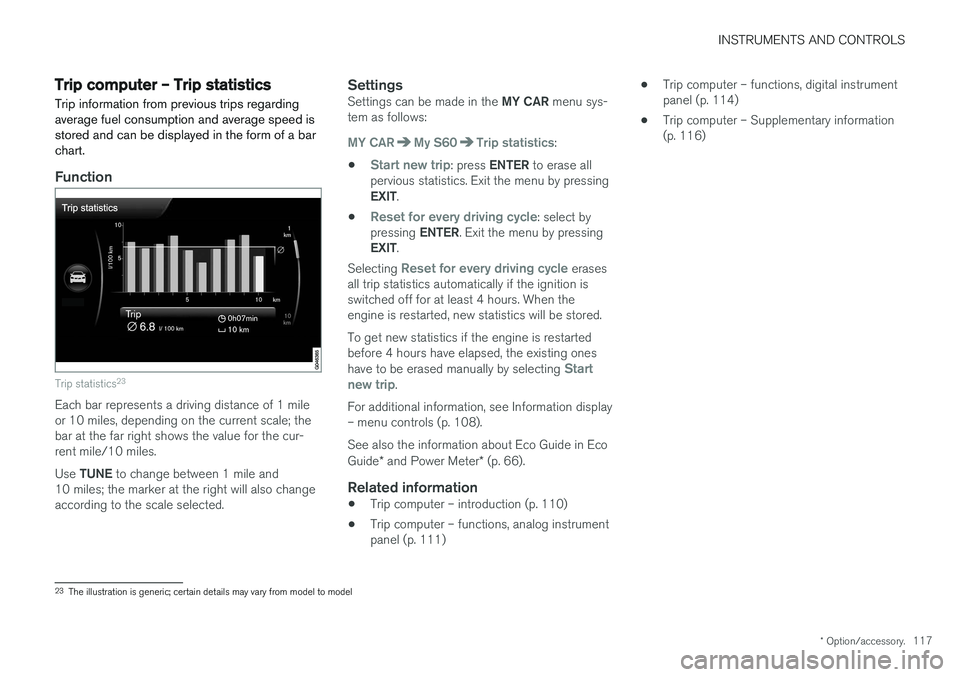
Trip information from previous trips regarding average fuel consumption and average speed isstored and can be displayed in the form of a barchart.
Function
Trip statistics 23
Each bar represents a driving distance of 1 mile or 10 miles, depending on the current scale; thebar at the far right shows the value for the cur-rent mile/10 miles. Use
TUNE to change between 1 mile and
10 miles; the marker at the right will also change according to the scale selected.
SettingsSettings can be made in the MY CAR menu sys-
tem as follows:
MY CARMy S60Trip statistics:
•
Start new trip: press ENTER to erase all
pervious statistics. Exit the menu by pressing EXIT .
•
Reset for every driving cycle: select by
pressing ENTER. Exit the menu by pressing
EXIT .
Selecting
Reset for every driving cycle erases
all trip statistics automatically if the ignition is switched off for at least 4 hours. When theengine is restarted, new statistics will be stored. To get new statistics if the engine is restarted before 4 hours have elapsed, the existing ones have to be erased manually by selecting
Start
new trip.
For additional information, see Information display – menu controls (p. 108). See also the information about Eco Guide in Eco Guide * and Power Meter * (p. 66).
Related information
• Trip computer – introduction (p. 110)
• Trip computer – functions, analog instrument panel (p. 111) •
Trip computer – functions, digital instrumentpanel (p. 114)
• Trip computer – Supplementary information(p. 116)
23
The illustration is generic; certain details may vary from model to model
Page 278 of 396

STARTING AND DRIVING
276
Conserving electrical current
Keep the following in mind to help minimize bat- tery drain:
• When the engine is not running, avoid using ignition mode
II. Many electrical systems (the
audio system, the optional navigation system, power windows, etc) will function in ignition modes 0 and I. These modes reduce drain
on the battery.
• Please keep in mind that using systems, accessories, etc., that consume a great dealof current when the engine is not runningcould result in the battery being completelydrained. Driving or having the engine runningfor approximately 15 minutes will help keepthe battery charged.
• The optional 12-volt socket in thetrunk (p. 137) area provides electrical currenteven with the ignition switched off, whichdrains the battery.
Before a long distance trip
It is always worthwhile to have your vehicle checked by a trained and qualified Volvo servicetechnician before driving long distances. Yourretailer will also be able to supply you with bulbs,fuses, spark plugs and wiper blades for your usein the event that problems occur.
As a minimum, the following items should be checked before any long trip:
• Check that engine runs smoothly and thatfuel consumption is normal.
• Check for fuel, oil, and fluid leakage.
• Have the transmission oil level checked.
• Check condition of drive belts.
• Check state of the battery's charge.
• Examine tires carefully (the spare tire aswell), and replace those that areworn (p. 292). Check tire pressure (p. 299).
• The brakes, front wheel alignment, and steer-ing gear should be checked by a trained andqualified Volvo service technician only.
• Check all lights, including high beams.
• Reflective warning triangles are legallyrequired in some states/provinces.
• Have a word with a trained and qualifiedVolvo service technician if you intend to drivein countries where it may be difficult toobtain the correct fuel. •
Consider your destination. If you will be driv-ing through an area where snow or ice arelikely to occur, consider snow tires (p. 306).
Related information
•
Changing a wheel – removing wheel (p. 293)
• Bulbs – introduction (p. 334)
Page 284 of 396

||
STARTING AND DRIVING
* Option/accessory.
282 nents, altering emission system components or location or removing components, and/orrepeated use of leaded fuel.
NOTE
Unleaded fuel is required for vehicles with three-way catalytic converters.
Heated oxygen sensorsThe heated oxygen sensors monitor the oxygen content of the exhaust gases. Readings are fedinto a control module that continuously monitorsengine functions and controls fuel injection. Theratio of fuel to air into the engine is continuouslyadjusted for efficient combustion to help reduceharmful emissions.
Related information
•
Information displays – warning symbols(p. 69)
• Engine and cooling system (p. 275)
Economical driving
Better driving economy may be obtained by thinking ahead, avoiding rapid starts and stopsand adjusting the speed of your vehicle to imme-diate traffic conditions.
Economical driving conserves natural
resources
Observe the following rules: • Bring the engine to normal operating tem- perature as soon as possible by driving witha light foot on the accelerator pedal for thefirst few minutes of operation. A cold engineuses more fuel and is subject to increasedwear.
• Whenever possible, avoid using the vehiclefor driving short distances. This does notallow the engine to reach normal operatingtemperature.
• Drive carefully and avoid rapid accelerationand hard braking.
• Use the transmission's Drive (
D) position as
often as possible and avoid using kick-down.
• Using the transmission's Sport mode 13
may
increase fuel consumption somewhat. Use the transmission's Drive ( D) position as often
as possible. For additional information about Sport mode, see Transmission – Geartronic(p. 257). •
Using the engine's optional Eco function canhelp improve fuel economy. For additional information, see ECO
* (p. 265).
• Do not exceed posted speed limits.
• Avoid carrying unnecessary items (extra load) in the vehicle.
• Maintain correct tire pressure. Check tirepressure regularly (when tires are cold).
• Remove snow tires when threat of snow orice has ended.
• Note that roof racks, ski racks, etc, increaseair resistance and also fuel consumption.
• At highway driving speeds, fuel consumptionwill be lower with the air conditioning on andthe windows closed than with the air condi-tioning off and the windows open.
• Using the onboard trip computer's fuel con-sumption modes can help you learn how todrive more economically.
Other factors that decrease gas mileage are:
• Dirty air cleaner
• Dirty engine oil and clogged oil filter
• Dragging brakes
• Incorrect front end alignment
13
Certain models only.
Page 294 of 396

WHEELS AND TIRES
292
Tires – tread wear indicator The tires have wear indicator strips running across or parallel to the tread.
G021829
The letters TWI are printed on the side of the tire.
When approximately 1/16" (1.6 mm) is left on the tread, these strips become visible and indi-cate that the tire should be replaced. Tires withless than 1/16" (1.6 mm) tread offer very poortraction. When replacing worn tires, it is recommended that the tire be identical in type (radial) and sizeas the one being replaced. Using a tire of thesame make (manufacturer) will prevent alterationof the driving characteristics of the vehicle.
Related information
• Tire specifications (p. 300)
• Changing a wheel – direction of rotation(p. 293) •
Tires – storage and age (p. 291)
Tires – tire economy
A smooth driving style and correct inflation pres- sure can help prolong the tires' service life.
• Maintain correct tire pressure. The tire infla- tion table, see the tire inflation decal on thedriver's door opening.
• Avoid fast starts, hard braking and tirescreeching.
• Tire wear increases with speed.
• Correct front wheel alignment is very impor-tant.
• Unbalanced wheels impair tire economy anddriving comfort.
• Tires must maintain the same direction ofrotation throughout their lifetime.
• When replacing tires, the tires with the mosttread should be mounted on the rear wheelsto reduce the chance of oversteer duringhard braking.
• Hitting curbs or potholes can damage thetires and/or wheels permanently.
Page 300 of 396

||
WHEELS AND TIRES
2985. Press the plastic covers onto the wheel nuts
and Install the wheel cover (where applica- ble). The opening in the wheel cover for thetire's inflation valve must be positioned overthe valve.
Related information
• Changing a wheel – spare wheel (p. 296)
• Changing a wheel – removing wheel (p. 293)
Tire inflation – general information
Check tire inflation pressure regularly.
Inflation placard
G032521
Tire inflation placard
Tire inflationSee the tire inflation decal on the driver's door opening. This decal indicates the designation ofthe factory-mounted tires on your vehicle, as wellas load limits and inflation pressure.
NOTE
• The placards shown indicate inflation pressure for the tires installed on thevehicle at the factory only.
• A certain amount of air seepage from thetires occurs naturally and tire pressurefluctuates with seasonal changes in tem-perature. Always check tire pressure reg-ularly.
•Use a tire gauge to check the tire inflation pressure, including the spare 2
, at least once
a month and before long trips. You are strongly urged to buy a reliable tire pressuregauge, as automatic service station gaugesmay be inaccurate.
• Use the recommended cold inflation pres-sure for optimum tire performance and wear.
• Under-inflation or over-inflation may causeuneven treadwear patterns.
2
Available as an accessory
Page 327 of 396

MAINTENANCE AND SERVICING
}}
* Option/accessory.325
Onboard Diagnostic System OBD II is part of your vehicle's computerized engine management system. It stores diagnosticinformation about your vehicle's emission con-trols. It can light the Check Engine light (MIL) if itdetects an emission control "fault." A "fault" is acomponent or system that is not performingwithin an expected range. A fault may be perma-nent or temporary. OBD II will store a messageabout any fault.
Emission inspection readiness
How do states use OBD II for emission inspections?
Many states connect a computer directly to a vehicle's OBD II system. The inspector can thenread "faults." In some states, this type of inspec-tion has replaced the tailpipe emission test.
How can my vehicle fail OBD II emission inspection?
Your vehicle can fail OBD II emission inspection for any of the following reasons.
• If your Check Engine (MIL) light is lit, yourvehicle may fail inspection.
• If your vehicle's Check Engine light was lit,but went out without any action on your part,OBD II will still have a recorded fault. Yourvehicle may pass or fail, depending on theinspection practices in your area.
• If you had recent service that required dis-connecting the battery, OBD II diagnostic information may be incomplete and "notready" for inspection. A vehicle that is notready may fail inspection.
How can I prepare for my next OBD II
emission inspection?
• If your Check Engine (MIL) light is lit – or was lit but went out without service, have yourvehicle diagnosed and, if necessary, servicedby a qualified Volvo technician.
• If you recently had service for a lit CheckEngine light, or if you had service thatrequired disconnecting the battery, a periodof driving is necessary to bring the OBD IIsystem to "ready" for inspection. Two half-hour trips of mixed stop-and-go/highwaydriving are typically needed to allow OBD II toreach readiness. Your Volvo retailer can pro-vide you with more information on planning atrip.
• Maintain your vehicle in accordance with yourvehicle's maintenance schedule.
Booking service and repairs
Connected Service Booking (CSB) makes set- ting up a time for service, maintenance and/orrepairs directly from the vehicle quick and con-venient.
Prerequisites
• The owner (primary driver) must have a valid Volvo ID. See Volvo ID (p. 20) for additionalinformation.
• The vehicle must be connected to the Inter- net using a paired Bluetooth ®
cell phone.
See your Sensus Infotainment supplement for information on pairing a cell phone. On models equipped with Volvo On Call (VOC) *,
you can connect to the Internet using your separate VOC data plan. Refer to your sepa-rate Volvo On Call manual.
• By default, the retailer where you purchasedyour vehicle will be your preferred (primary)retailer/Volvo authorized workshop who willperform service and repairs on your vehicle.To change the preferred retailer, go to DealerLocator at volvocars.com and select aretailer, click on Service Scheduler and bookan appointment at the new preferred retailer.
• In order to be guided through the on-screen steps, the menu alternative
Display
notifications must be activated.