2018 VAUXHALL MOVANO_B camera
[x] Cancel search: cameraPage 39 of 261

Keys, doors and windows37Windows
Windscreen
Windscreen stickers
Do not attach stickers, e.g. toll road
stickers or similar, on the windscreen
in the area of the interior mirror.
Otherwise the detection zone of the
sensor in the mirror housing could be
restricted.
Windscreen replacementCaution
If the vehicle has a front-looking
camera sensor for the driver
assistance systems, it is very
important that any windscreen
replacement is performed
accurately according to Vauxhall
specifications. Otherwise, these systems may not work properly
and there is a risk of unexpected
behaviour and/or messages from
these systems.
Manual windows
The door windows can be opened or
closed with the window cranks.
Power windows9 Warning
Take care when operating the
power windows. Risk of injury,
particularly to children.
Keep a close watch on the
windows when closing them.
Ensure that nothing becomes
trapped in them as they move.
Switch on ignition to operate power
windows.
Operate the switch for the respective
window by pushing to open or pulling to close.
For vehicles with automatic opening
feature for the driver's door window;
when opening, operate the switch
again to stop window movement.
In the event of closing difficulties due
to frost or the like, operate the switch
several times to close the window in
stages.
Overload If the windows are repeatedly
operated within short intervals, the
window operation is disabled for
some time.
Page 110 of 261

108LightingWhen the automatic light control
function is switched on and the
engine is running, the system
switches between daytime running
lights (where fitted) and headlights,
depending on the lighting conditions.
For reasons of safety, the light switch
should always remain in the AUTO
position.
Daytime running lights 3 109.
Automatic headlight activation
During poor lighting conditions the
headlights are switched on.
Additionally, headlights are switched
on if the windscreen wipers have
been activated for several wipes.High beam
To change between low and high
beam, pull lever until a click is felt.
High beam assist This feature allows high beam to
function as the main driving light at
night and when vehicle speed is
faster than approx. 28 mph.
It switches to low beam when:
● The camera in the windscreen detects the lights of oncoming or
preceding vehicles.
● It is foggy or snowy.
● Driving in urban areas.
If there are no restrictions detected, the system switches back to high
beam.
Activation
Turn the outer light switch to AUTO
then pull the turn signal lever to activate high beam assist.
The control indicator í illuminates
continuously in the instrument cluster when the assist is activated, while the
blue control indicator 7 3 100
illuminates when high beam is on.
Control indicator í 3 100.
Page 111 of 261

Lighting109Notice
Use of the system does not relieve
the driver from full responsibility for
vehicle operation.
Deactivation
Pull the turn signal lever again.
Control indicator í extinguishes.
High beam assist is also deactivated
when the outer light switch is moved
out of the AUTO position.
Notice
Depending on version, the system
can be also be deactivated via the
Infotainment system. Refer to
Infotainment manual for further
information.
General information
Performance of the system can be
affected due to the following:
● Extreme weather conditions, e.g.
heavy rain, fog or snow.
● The front camera or the windscreen is obstructed, e.g. bya portable navigation system.
● Oncoming or preceding vehicle lights are not detected.● Headlights are not adjustedcorrectly.
● Various reflective surfaces may also cause the system to fail to
detect other vehicles.
Headlight flash
To activate the headlight flash, pull
lever.
Headlight range adjustment
Manual headlight range
adjustment With low beam switched on, adapt the
headlight range to suit the vehicle
load to prevent dazzling of oncoming
traffic.
Turn knurled wheel to required
position:0:front seat occupied4:loaded up to permissible
maximum weight
Headlights when driving
abroad
The asymmetrical headlight beam
extends visibility at the edge of the
road at the passenger side.
However, when driving in countries
where traffic drives on the opposite
side of the road, adjust the headlights
to prevent dazzling of oncoming
traffic.
Have the headlights adjusted by a
workshop.
Daytime running lights
Daytime running lights increase
visibility of the vehicle during daylight.
Page 133 of 261

Driving and operating131Driving and
operatingDriving hints ............................... 132
Driving economically ...............132
Control of the vehicle ...............132
Steering ................................... 132
Starting and operating ...............133
New vehicle running-in ............133
Ignition switch positions ...........133
Starting the engine ..................134
Idle speed control ....................135
Overrun cut-off ........................ 135
Stop-start system ....................135
Parking .................................... 138
Air suspension ......................... 139
Engine exhaust .......................... 141
Diesel particle filter ..................141
Catalytic converter ...................141
AdBlue ..................................... 142
Manual transmission ..................149
Manual transmission automa‐ ted .............................................. 149
Transmission display ...............149
Starting the engine ..................150
Selector lever .......................... 150Manual mode........................... 151
Electronic driving programmes 151
Fault ........................................ 152
Interruption of power supply ....153
Brakes ........................................ 153
Antilock brake system .............153
Parking brake .......................... 154
Brake assist ............................. 155
Hill start assist ......................... 155
Ride control systems .................155
Traction Control system ..........155
Electronic stability program .....156
Limited-slip rear axle ...............158
Driver assistance systems .........158
Cruise control .......................... 158
Speed limiter ........................... 162
Parking assist .......................... 162
Rear view camera ...................164
Lane departure warning ..........166
Fuel ............................................ 167
Fuel for diesel engines ............167
Refuelling ................................ 168
Fuel consumption - CO 2-
Emissions .............................. 169
Trailer hitch ................................ 170
General information .................170
Driving characteristics and towing tips .............................. 170
Trailer towing ........................... 170Towing equipment ...................171
Trailer stability assist ...............171
Auxiliary features .......................171
Power take-off ......................... 171
Page 166 of 261

164Driving and operatingCaution
Performance of the sensors can
be reduced when sensors are
covered, e.g. by ice or snow.
Performance of the parking assist
system can be reduced due to
heavy loading.
Special conditions apply if there
are taller vehicles involved (e.g.
off-road vehicles, mini vans,
vans). Object identification in the
upper part of these vehicles
cannot be guaranteed.
Objects with a very small reflection
cross-section, e.g. objects of
narrow size or soft materials, may
not be detected by the system.
The parking assist system will not
detect objects which are out of the detection range of the sensors.
Rear view camera
The rear view camera assists the
driver when reversing by displaying a view of the area behind the vehicle in
either the interior mirror or the
Infotainment system display screen.
9 Warning
The rear view camera does not
replace driver vision. Note that
objects that are outside the
camera's field of view, e.g. below
the bumper or underneath the
vehicle, are not displayed.
Do not reverse the vehicle by only looking at the display and checkthe surrounding area behind and
around the vehicle before
reversing.
The camera is typically installed on
the rear doors/tailgate, beneath the
number plate moulding.
The area displayed by the camera is
limited. The distance of the image that
appears on the display differs from
the actual distance.
Notice
To achieve the optimum visibility, the rear view camera must not be
obscured by dirt, snow or ice.
Activation
Interior mirror display screen
Rear view camera display is
automatically activated when reverse
gear is engaged. An audible signal
confirms activation.
Page 167 of 261
Driving and operating165Infotainment system display screen
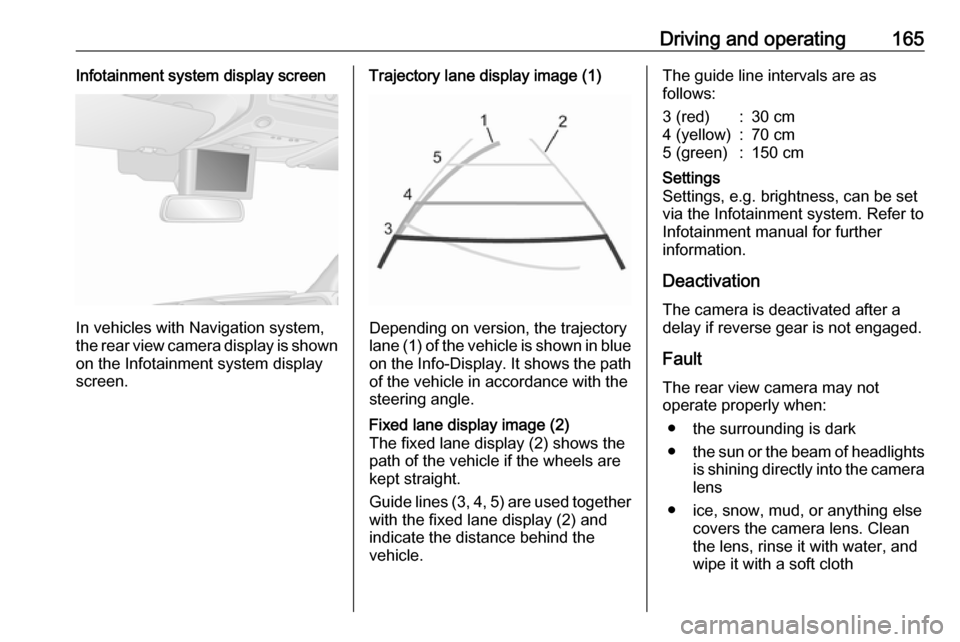
In vehicles with Navigation system,
the rear view camera display is shown
on the Infotainment system display
screen.
Trajectory lane display image (1)
Depending on version, the trajectory
lane (1) of the vehicle is shown in blue
on the Info-Display. It shows the path of the vehicle in accordance with the
steering angle.
Fixed lane display image (2)
The fixed lane display (2) shows the
path of the vehicle if the wheels are
kept straight.
Guide lines (3, 4, 5) are used together
with the fixed lane display (2) and indicate the distance behind the
vehicle.The guide line intervals are as
follows:3 (red):30 cm4 (yellow):70 cm5 (green):150 cmSettings
Settings, e.g. brightness, can be set
via the Infotainment system. Refer to
Infotainment manual for further
information.
Deactivation
The camera is deactivated after a
delay if reverse gear is not engaged.
Fault
The rear view camera may not
operate properly when:
● the surrounding is dark
● the sun or the beam of headlights
is shining directly into the camera lens
● ice, snow, mud, or anything else covers the camera lens. Clean
the lens, rinse it with water, and
wipe it with a soft cloth
Page 168 of 261
166Driving and operating● the rear doors/tailgate are notclosed correctly
● the vehicle had a rear-end accident
● there are extreme temperature changes
Lane departure warning The lane departure warning system
uses a front camera to observe the
lane markings between which the
vehicle is driving. The system detects
lane changes and warns the driver in
the event of an unintended lane
change via visual and acoustic
signals.
Criteria for the detection of an
unintended lane change are:
● no operation of turn and lane- change signals
● no active steering
If the driver is performing these
actions, no warning will be issued.Activation
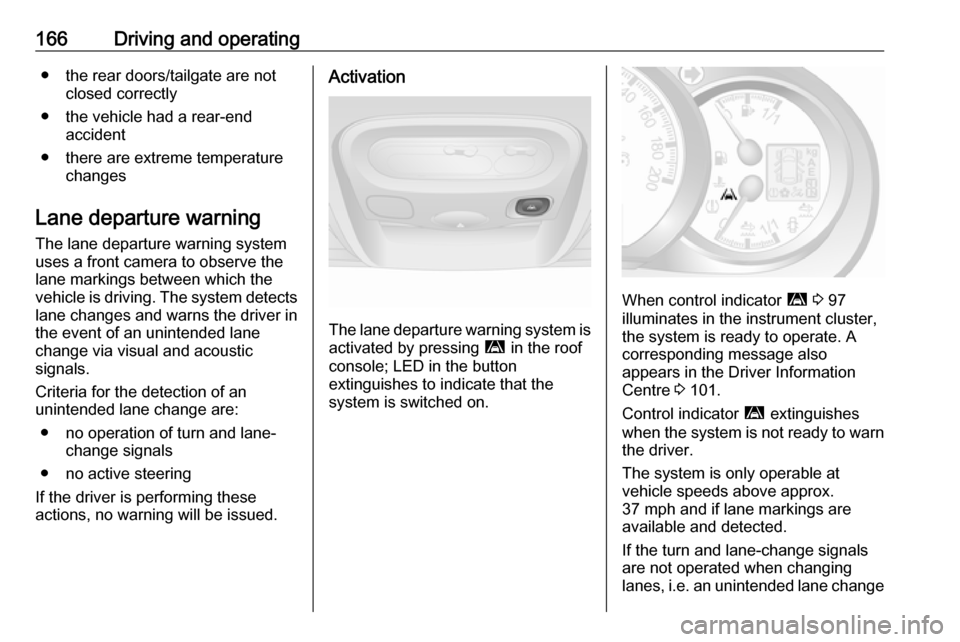
The lane departure warning system is activated by pressing ì in the roof
console; LED in the button
extinguishes to indicate that the
system is switched on.
When control indicator ì 3 97
illuminates in the instrument cluster,
the system is ready to operate. A
corresponding message also
appears in the Driver Information
Centre 3 101.
Control indicator ì extinguishes
when the system is not ready to warn the driver.
The system is only operable at
vehicle speeds above approx.
37 mph and if lane markings are
available and detected.
If the turn and lane-change signals
are not operated when changing
lanes, i.e. an unintended lane change
Page 250 of 261

248Customer informationOperation
frequency (MHz)Maximum output
(dBm)2400 – 2483,5
MHz100 mW EIRP
Rear view camera display
Ficosa International
Gran Via de Carles III, 98, 08028
Barcelona, Spain
Operation
frequency (MHz)Maximum output
(dBm)824 - 894 MHz39 dBm880 - 960 MHz39 dBm1710 - 1880 MHz36 dBm1850 - 1890 MHz33 dBm
Telematics display
MASTERNAUT INTERNATIONAL
4 rue Charles Cros 27400 Louviers,
France
Operation
frequency (MHz)Maximum output
(dBm)900 MHz33 dBm1800 MHz30 dBm
Tyre pressure monitoring receiver
Schrader Electronics
Trooperslane Industrial Estate, 2
Meadowbank Rd, Carrickfergus
BT38 8YF, United Kingdom
Operation frequency: N/A
Maximum output: N/A
Tyre pressure sensors
Schrader Electronics
Trooperslane Industrial Estate, 2 Meadowbank Rd, Carrickfergus
BT38 8YF, United Kingdom
Operation
frequency (MHz)Maximum output
(dBm)433.05 – 434.79
MHz10 mW ERP
Tyre pressure sensors module
Visteon Electronics
04 Rue Nelson Mandela, Zone
Industrielle Borj Cedria, 2055 Bir El
Bey, Tunisia
Operation frequency: N/A
Maximum output: N/A
Radar systems Country-specific Declarations of
Conformity for radar systems are shown on the following page: