Page 167 of 632
1673-2. Opening, closing and locking the doors
3
Operation of each component
YARIS_HV_OM_Europe_OM52J66E
■ Battery-saving function (vehicles with an entry function)
The battery-saving function will be activated in order to prevent the electronic
key battery and the vehicle battery from being discharged while the vehicle is
not in operation for a long time.
● In the following situations, the smart entry & start system may take some
time to unlock the doors.
• The electronic key has been left in an area of approximately 2 m (6 ft.) of
the outside of the vehicle for 10 minutes or longer.
• The smart entry & start system has not been used for 5 days or longer.
● If the smart entry & start system has not been used for 14 days or longer,
the doors cannot be unlocked at any doors except the driver’s door.
In this case, take hold of the driver’s door handle, or use the wireless remote
control or the mechanical key, to unlock the doors.
■ Electronic key battery-saving function
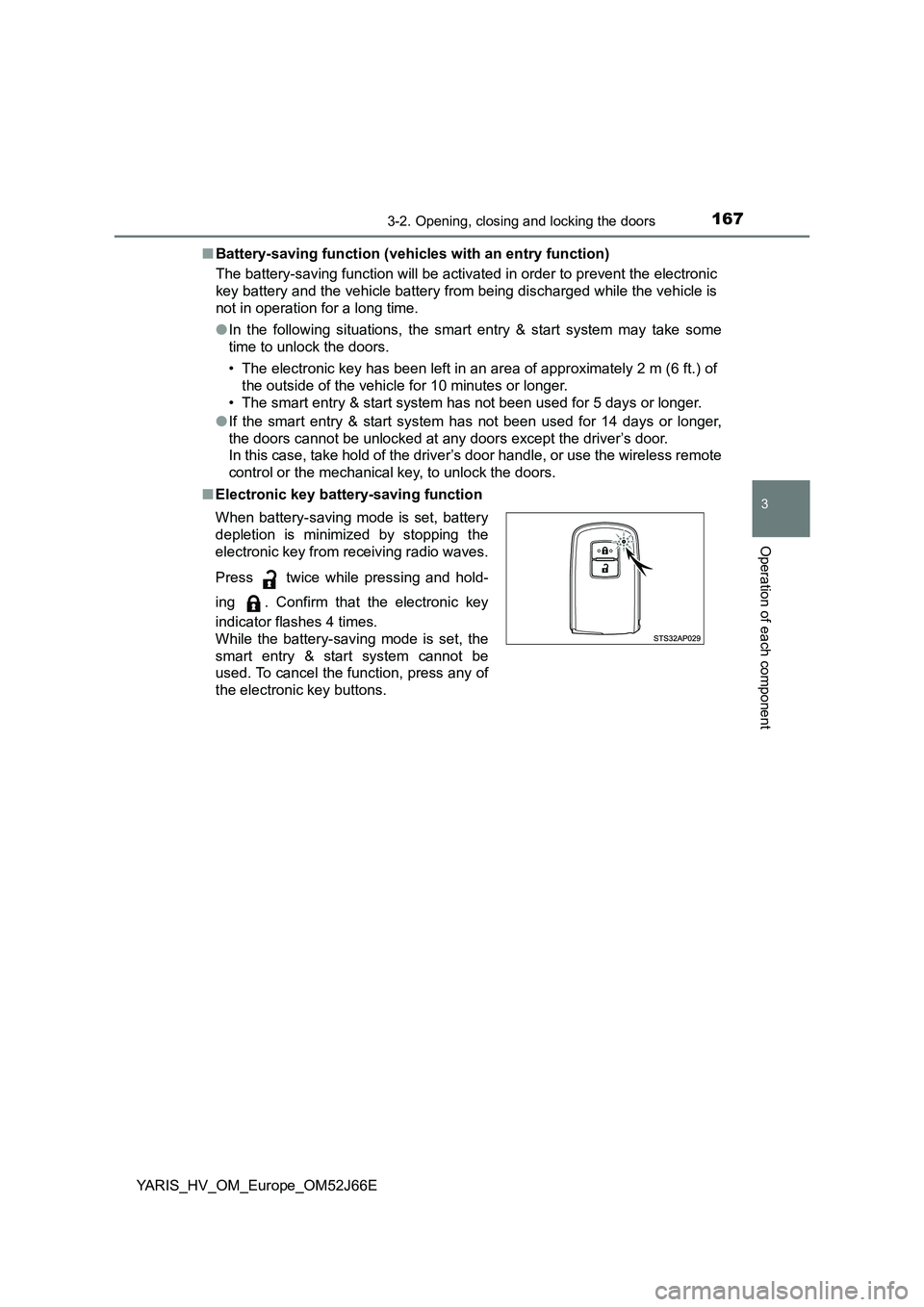
When battery-saving mode is set, battery
depletion is minimized by stopping the
electronic key from receiving radio waves.
Press twice while pressing and hold-
ing . Confirm that the electronic key
indicator flashes 4 times.
While the battery-saving mode is set, the
smart entry & start system cannot be
used. To cancel the function, press any of
the electronic key buttons.
Page 168 of 632
1683-2. Opening, closing and locking the doors
YARIS_HV_OM_Europe_OM52J66E
■ Conditions affecting operation
The smart entry & start system uses weak radio waves. In the following situa-
tions, the communication between the electronic key and the vehicle may be
affected, preventing the smart entry & start system, wireless remote control
and immobilizer system from operating properly.
(Ways of coping: P. 573)
● When the electronic key battery is depleted
● Near a TV tower, electric power plant, gas station, radio station, large dis-
play, airport or other facility that generates strong radio waves or electrical
noise
● When carrying a portable radio, cellular phone, cordless phone or other
wireless communication device
● When the electronic key is in contact with, or is covered by the following
metallic objects
• Cards to which aluminum foil is attached
• Cigarette boxes that have aluminum foil inside
• Metallic wallets or bags
• Coins
• Hand warmers made of metal
• Media such as CDs and DVDs
● When other wireless keys (that emit radio waves) are being used nearby
● When carrying the electronic key together with the following devices that
emit radio waves
• Portable radio, cellular phone, cordless phone or other wireless commu-
nication device
• Another vehicle’s electronic key or a wireless key that emits radio waves
• Personal computers or pers onal digital assistants (PDAs)
• Digital audio players
• Portable game systems
● If window tint with a metallic content or metallic objects are attached to the
rear window
● When the electronic key is placed near a battery charger or electronic
devices
Page 169 of 632
1693-2. Opening, closing and locking the doors
3
Operation of each component
YARIS_HV_OM_Europe_OM52J66E
■ Notes for the entry function (vehicles with an entry function)
● Even when the electronic key is within the effective range (detection areas),
the system may not operate properly in the following case:
• The electronic key is too close to the window or outside door handle, near
the ground, or in a high place w hen the doors are locked or unlocked.
• The electronic key is near the ground or in a high place, or too close to
the rear bumper center when the back door is opened.
• The electronic key is on the instrument panel, luggage cover (if equipped)
or floor, or in the door pockets, glove box, accessory box of the instru-
ment panel, or in/near the front cup holder when the engine is started or
engine switch modes are changed.
● Do not leave the electronic key on top of the instrument panel or near the
door pockets when exiting the vehicle. Depending on the radio wave recep-
tion conditions, it may be detected by the antenna outside the cabin and the
door will become lockable from the out side, possibly trapping the electronic
key inside the vehicle.
● As long as the electronic key is within the effective range, the doors may be
locked or unlocked by anyone.
● Even if the electronic key is not inside the vehicle, it may be possible to start
the engine if the electronic key is near the window.
● The doors may unlock if a large amount of water splashes on the door han-
dle, such as in the rain or in a car wash when the electronic key is within the
effective range. (The door will automatically be locked after approximately
30 seconds if the doors are not opened and closed.)
● If the wireless remote control is used to lock the doors when the electronic
key is near the vehicle, there is a possibility that the door may not be
unlocked by the entry function. (Use the wireless remote control to unlock
the doors.)
● Touching the door lock or unlock sensor while wearing gloves may prevent
lock or unlock operation.
Page 171 of 632
1713-2. Opening, closing and locking the doors
3
Operation of each component
YARIS_HV_OM_Europe_OM52J66E
■ To operate the system properly
Make sure to carry the electronic key when operating the system. Do not get
the electronic key too close to the vehicle when operating the system from the
outside of the vehicle.
Depending on the position and holding condition of the electronic key, the key
may not be detected correctly and the system may not operate properly. (The
alarm may go off accidentally, or the door lock prevention function may not
operate.)
■ If the smart entry & start system does not operate properly
● Locking and unlocking the doors: Use the mechanical key. (P. 573)
● Starting the hybrid system: P. 574
■ Customization
Settings (e. g. smart entry & start system) can be changed.
(Customizable features: P. 603)
■ If the smart entry & start system has been deactivated in a customized
setting
● Locking and unlocking the doors:
Use the wireless remote control or mechanical key. ( P. 141, 573)
● Starting the hybrid system and changing power switch modes: P. 574
● Stopping the hybrid system: P. 222
Page 380 of 632
3805-10. Bluetooth®
YARIS_HV_OM_Europe_OM52J66E
■ About Bluetooth®
■Compatible models
● Bluetooth® specifications:
Ver. 1.1, or higher (Recommended: Ver. 2.1 + EDR or higher)
● Following Profiles:
• A2DP (Advanced Audio Distribution Profile) Ver. 1.0 or higher (recom-
mended: Ver. 1.2 or higher)
• AVRCP (Audio/Video Remote Control Profile) Ver. 1.0 or higher (recom-
mended: Ver. 1.3 or higher)
Portable players must correspond to the above specifications in order to be
connected to the Bluetooth® audio/phone. However, please note that some
functions may be limited depending on the type of portable player.
● Cellular phone
• HFP (Hands Free Profile) Ver. 1.0 or higher (Recommended: Ver. 1.5)
• OPP (Object Push Profile) Ver. 1.1
• PBAP (Phone Book Access Profile) Ver. 1.0
Bluetooth is a registered trademark of
Bluetooth SIG, Inc.
Page 413 of 632
413
7Maintenance and care
YARIS_HV_OM_Europe_OM52J66E
7-1. Maintenance and care
Cleaning and protecting
the vehicle exterior .......... 414
Cleaning and protecting
the vehicle interior ........... 419
7-2. Maintenance
Maintenance
requirements.................... 427
7-3. Do-it-yourself maintenance
Do-it-yourself service
precautions ...................... 430
Hood .................................. 433
Positioning a floor jack ....... 435
Engine compartment.......... 437
12-volt battery .................... 445
Tires ................................... 451
Tire inflation pressure ........ 468
Wheels ............................... 470
Air conditioning filter .......... 474
Wireless remote control/
electronic key battery....... 477
Checking and replacing
fuses ................................ 481
Light bulbs ......................... 486
Page 448 of 632
4487-3. Do-it-yourself maintenance
YARIS_HV_OM_Europe_OM52J66E
■Before recharging
When recharging, the 12-volt battery produces hydrogen gas which is flam-
mable and explosive. Therefore, obser ve the following precautions before
recharging:
● If recharging with the 12-volt battery installed on the vehicle, be sure to dis-
connect the ground cable.
● Make sure the power switch on the charger is off when connecting and dis-
connecting the charger cables to the 12-volt battery.
■ When disconnecting the 12-volt battery terminals
Always disconnect the negative (-) terminal first.
■ After recharging/reconnecting the 12-volt battery (vehicles with a smart
entry & start system)
● Unlocking the doors using entry function of the smart entry & start system
may not be possible immediately after reconnecting the 12-volt battery. If
this happens, use the wireless remote control or the mechanical key to lock/
unlock the doors.
● Start the hybrid system with the power switch in ACCESSORY mode. The
hybrid system may not start with the power switch turned off. However, the
hybrid system will operate normally from the second attempt.
● The power switch mode is recorded by the vehicle. If the 12-volt battery is
reconnected, the vehicle will return the power switch mode to the status it
was in before the 12-volt battery was disconnected. Make sure to turn off
the power before disconnect the 12-volt battery. Take extra care when con-
necting the 12-volt battery if the power switch mode prior to discharge is
unknown.
If the system will not start even after multiple attempts, contact any authorized
Toyota retailer or Toyota authorized repairer, or any reliable repairer.
Page 477 of 632
4777-3. Do-it-yourself maintenance
7
Maintenance and care
YARIS_HV_OM_Europe_OM52J66E
Wireless remote control/electronic key
battery
● Flathead screwdriver
● Lithium battery CR2016 (vehicles without a smart entry & start sys-
tem), or CR2032 (vehicles with a smart entry & start system)
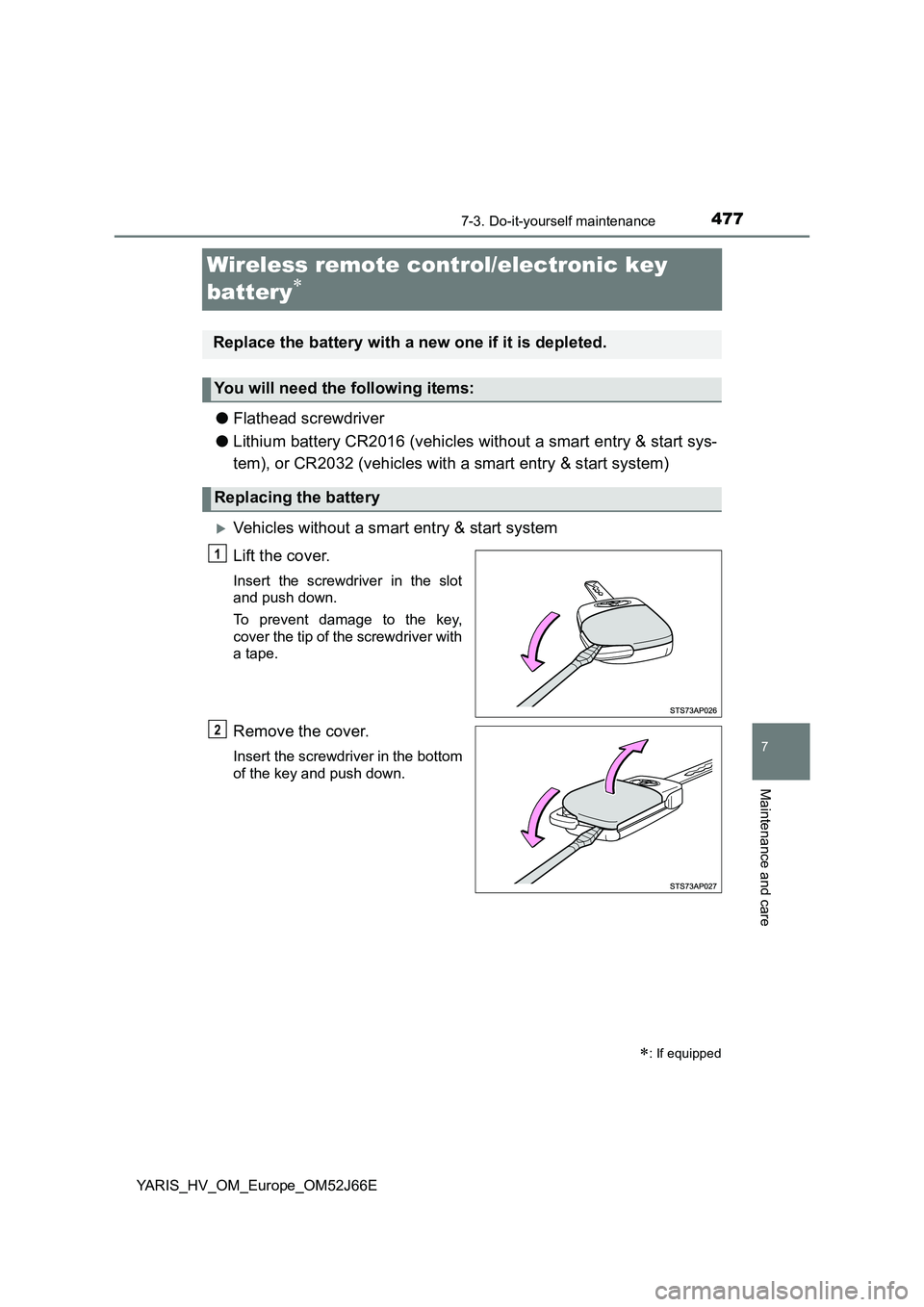
Vehicles without a smart entry & start system
Lift the cover.
Insert the screwdriver in the slot
and push down.
To prevent damage to the key,
cover the tip of the screwdriver with
a tape.
Remove the cover.
Insert the screwdriver in the bottom
of the key and push down.
: If equipped
Replace the battery with a new one if it is depleted.
You will need the following items:
Replacing the battery
1
2