Page 317 of 520
317
6Interior features
6-1. Using the air conditioning system and defogger
Air conditioning system ..... 318
Seat heaters...................... 326
6-2. Using the interior lights Interior lights list ................ 328• Interior light ................... 328
• Personal lights .............. 329
6-3. Using the storage features List of storage features ..... 330• Glove box...................... 331
• Cup holders .................. 331
• Bottle holders ................ 332
• Auxiliary box ................. 333
Luggage compartment features ........................... 334
6-4. Using the other interior features
Other interior features ....... 336 • Sun visors ..................... 336
• Vanity mirrors................ 336
• Power outlet .................. 337
• Assist grips ................... 338
Page 324 of 520

3246-1. Using the air conditioning system and defogger
■Fogging up of the windows
●Vehicles with the button: The windows will easily fog up when the
humidity in the vehicle is high. Turning on will dehumidify the air from
the outlets and defog the windshield effectively.
● Vehicles with the button: If you turn off, the windows may fog up
more easily.
● The windows may fog up if the recirculated air mode is used.
■ Outside/recirculated air mode
When driving on dusty roads such as tunnels or in heavy traffic, set the out-
side/recirculated air mode button to the recirculated air mode. This is effective
in preventing outside air from entering the vehicle interior. During cooling
operation, setting the recirculated air mode will also cool the vehicle interior
effectively.
■ When the indicator light on goes off by itself (vehicles with the
button)
Press to turn off the dehumidification function and turn it on again. There
may be a problem in the air conditioning system if the indicator light goes off
again. Turn the air conditioning system off and have it inspected by your
Toyota dealer.
■ When the outside temperature falls to nearly 32°F (0°C) (vehicles with
the button)
The dehumidification function may not operate even when is pressed.
■ Ventilation and air conditioning odors
●To let fresh air in, set the air conditioning system to the outside air m\
ode.
● During use, various odors from inside and outside the vehicle may enter into
and accumulate in the air conditioning system. This may then cause odor to
be emitted from the vents.
● To reduce potential odors from occurring:
It is recommended that the air conditioning system be set to outside air
mode prior to turning the vehicle off.
Page 327 of 520
3276-1. Using the air conditioning system and defogger
6
Interior features
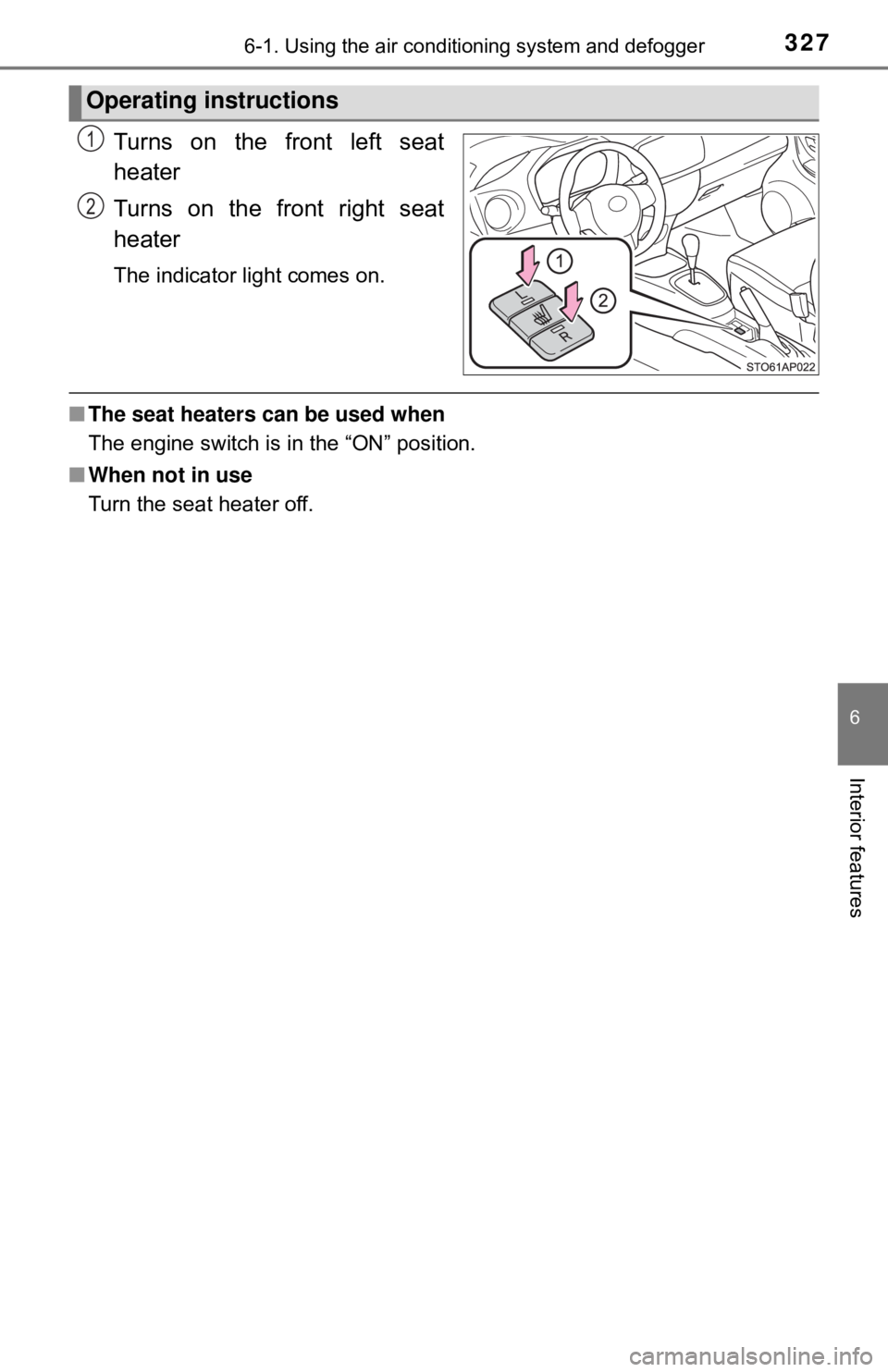
Turns on the front left seat
heater
Turns on the front right seat
heater
The indicator light comes on.
■The seat heaters can be used when
The engine switch is in the “ON” position.
■ When not in use
Turn the seat heater off.
Operating instructions
1
2
Page 346 of 520

3467-1. Maintenance and care
NOTICE
■Cleaning detergents
● Do not use the following types of detergent, as they may discolor the vehi-
cle interior or cause streaks or damage to painted surfaces:
• Non-seat portions: Organic substances such as benzene or gasoline,
alkaline or acidic solutions, dye, and bleach
• Seats: Alkaline or acidic solutions, such as thinner, benzene, and alco-
hol
● Do not use a polish wax or polish cleaner. The instrument panel’s or other
interior part’s painted surface may be damaged.
■ Preventing damage to leather surfaces
Observe the following precautions to avoid damage to and deterioration of
leather surfaces:
● Remove any dust or dirt from leather surfaces immediately.
● Do not expose the vehicle to direct sunlight for extended periods of time.
Park the vehicle in the shade, especially during summer.
● Do not place items made of vinyl, plastic, or containing wax on the uphol-
stery, as they may stick to the leather surface if the vehicle interior heats
up significantly.
■ Water on the floor
Do not wash the vehicle floor with water.
Vehicle systems such as the audio system may be damaged if water comes
into contact with electrical components such as the audio system above or
under the floor of the vehicle. Water may also cause the body to rust.
■ When cleaning the inside of th e windshield (vehicles with Toyota
Safety Sense C)
Be careful not to touch the front sensor ( →P. 173).
If the camera is accidentally scratched or hit, PCS, LDA and Automatic High
Beam may not operate properly or may cause a malfunction.
■ Cleaning the inside of the rear window
● Do not use glass cleaner to clean the rear window, as this may cause
damage to the rear window defogger heater wires. Use a cloth dampened
with lukewarm water to gently wipe the window clean. Wipe the window in
strokes running parallel to the heater wires.
● Be careful not to scratch or damage the heater wires.
Page 396 of 520
3967-3. Do-it-yourself maintenance
Light bulbs
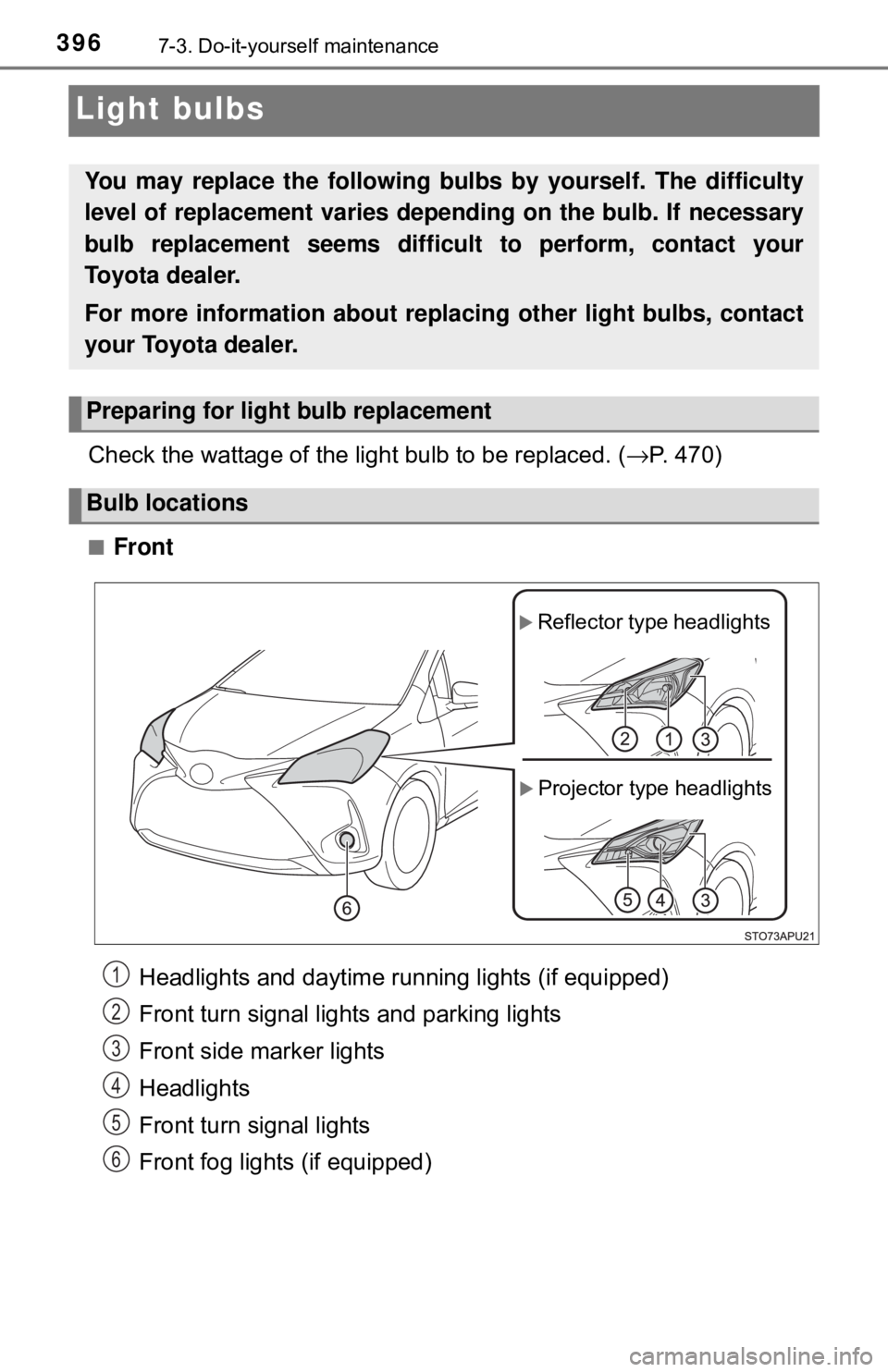
Check the wattage of the light bulb to be replaced. (→P. 470)
■Front
Headlights and daytime running lights (if equipped)
Front turn signal lights and parking lights
Front side marker lights
Headlights
Front turn signal lights
Front fog lights (if equipped)
You may replace the following bulbs by yourself. The difficulty
level of replacement varies de pending on the bulb. If necessary
bulb replacement seems difficul t to perform, contact your
Toyota dealer.
For more information about replacing other light bulbs, contact
your Toyota dealer.
Preparing for light bulb replacement
Bulb locations
Projector type headlights
Reflector type headlights
1
2
3
4
5
6
Page 401 of 520
4017-3. Do-it-yourself maintenance
7
Maintenance and care
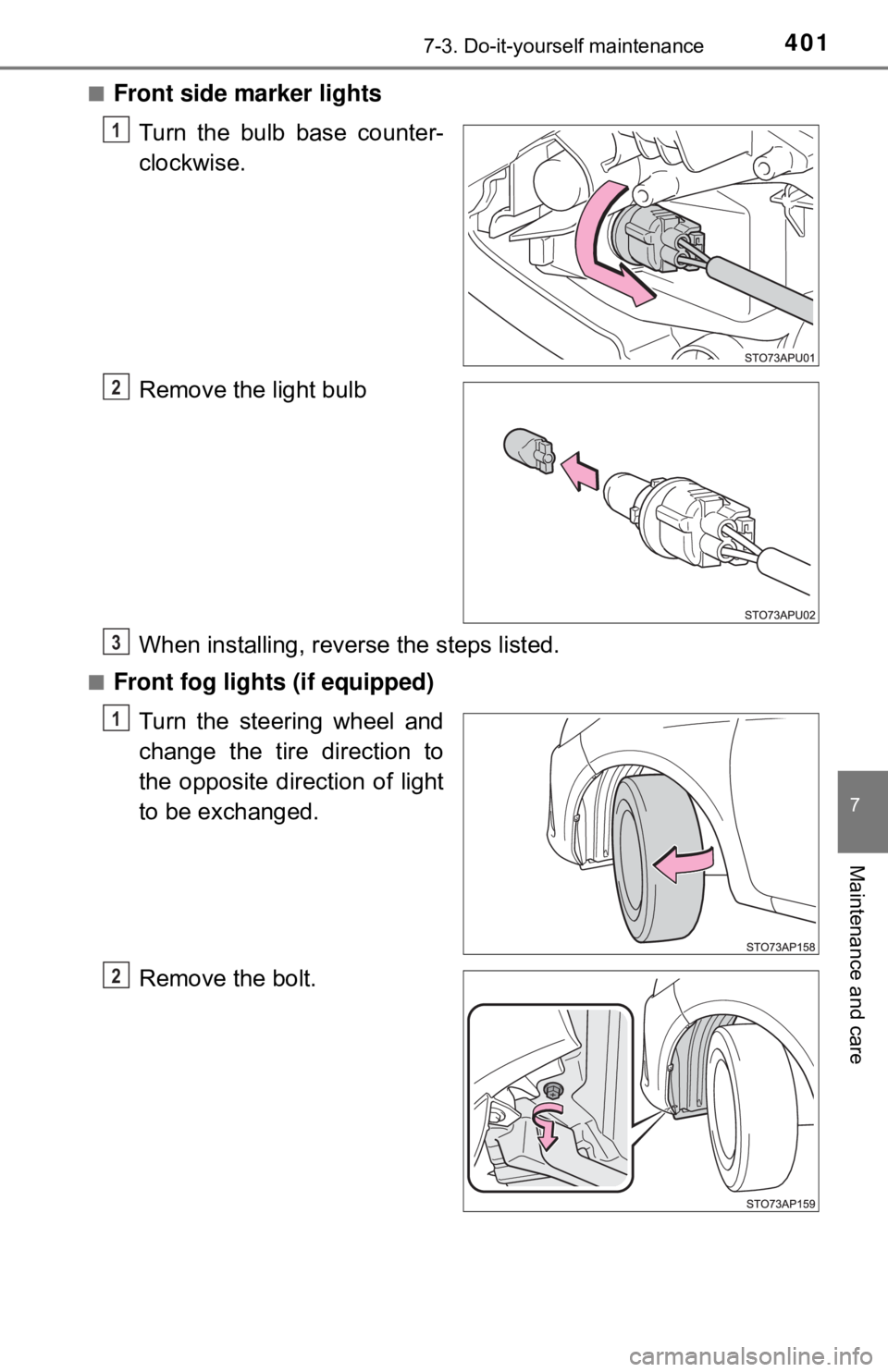
■Front side marker lightsTurn the bulb base counter-
clockwise.
Remove the light bulb
When installing, reve rse the steps listed.
■Front fog lights (if equipped)
Turn the steering wheel and
change the tire direction to
the opposite direction of light
to be exchanged.
Remove the bolt.
1
2
3
1
2
Page 403 of 520
4037-3. Do-it-yourself maintenance
7
Maintenance and care
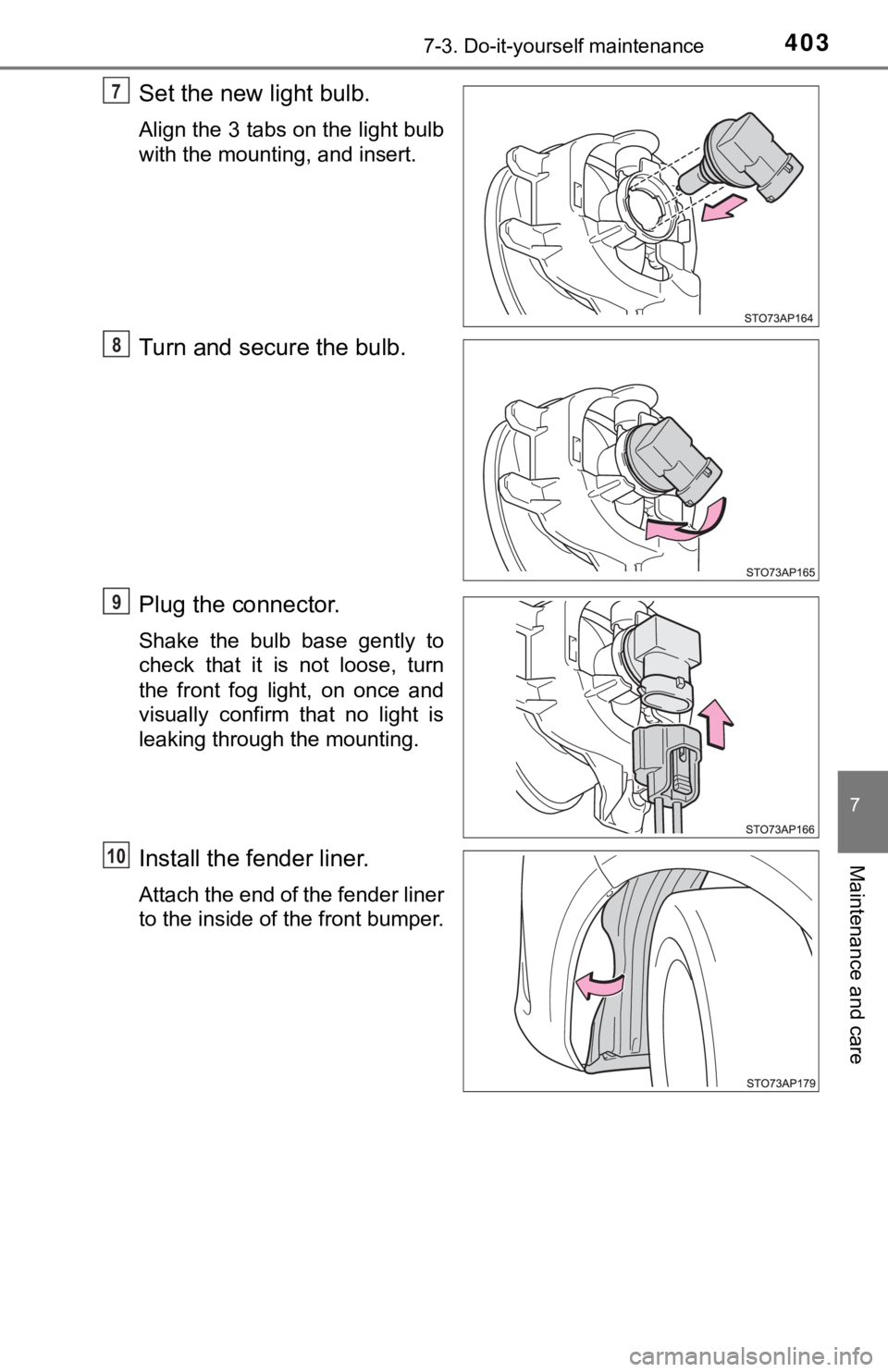
Set the new light bulb.
Align the 3 tabs on the light bulb
with the mounting, and insert.
Turn and secure the bulb.
Plug the connector.
Shake the bulb base gently to
check that it is not loose, turn
the front fog light, on once and
visually confirm that no light is
leaking through the mounting.
Install the fender liner.
Attach the end of the fender liner
to the inside of the front bumper.
7
78
79
10
Page 424 of 520

4248-2. Steps to take in an emergency
PCS warning light*2
When the warning light flashes (and a buzzer sounds):
Indicates a malfunction in the PCS (Pre-Collision system)
→ Have the vehicle inspected by your Toyota dealer
immediately.
When the warning light illuminates:
Indicates that the PCS (Pre-Collision system) is temporar-
ily unavailable, possibly due to either of the following:
• The part of the windshield around the front sensor being dirty, fogged up or covered with condensation, ice, stick-
ers, etc.
→ Clear the dirt, fog, condensat ion, ice, stickers, etc.
( →P. 175)
• Front sensor temperature being outside of its opera- tional range
→ Wait for a while until the area around the front sensor
has cooled down sufficiently.
Either the VSC (Vehicle Stability Control) system or PCS
(Pre-Collision system) is disabled or both are disabled.
→ To enable the PCS, enable both the VSC system and
PCS. ( →P. 180, 217)
Slip indicator
Indicates a malfunction in:
• The VSC system;
• The TRAC system; or
• The hill-start assist control system.
→ Have the vehicle inspected by your Toyota dealer
immediately.
(Yellow)
Automatic High Beam indicator*2
Indicates a malfunction in the Automatic High Beam sys-
tem.
→ Have the vehicle inspected by your Toyota dealer.
Warning lightWarning light/Details/Actions