2018 TOYOTA PROACE VERSO tow
[x] Cancel search: towPage 321 of 504
321
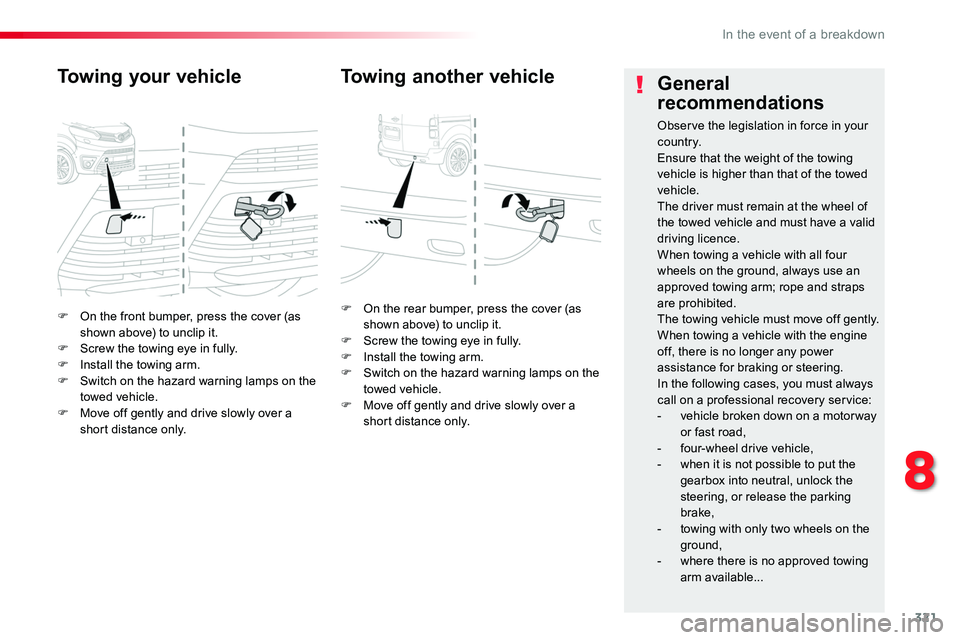
F On the front bumper, press the cover (as shown above) to unclip it.F Screw the towing eye in fully.F Install the towing arm.F Switch on the hazard warning lamps on the towed vehicle.F Move off gently and drive slowly over a short distance only.
Towing your vehicle
F On the rear bumper, press the cover (as shown above) to unclip it.F Screw the towing eye in fully.F Install the towing arm.F Switch on the hazard warning lamps on the towed vehicle.F Move off gently and drive slowly over a short distance only.
Towing another vehicleGeneral
recommendations
Observe the legislation in force in your c o unt r y.Ensure that the weight of the towing vehicle is higher than that of the towed vehicle.The driver must remain at the wheel of the towed vehicle and must have a valid driving licence.When towing a vehicle with all four wheels on the ground, always use an approved towing arm; rope and straps are prohibited.The towing vehicle must move off gently.When towing a vehicle with the engine off, there is no longer any power assistance for braking or steering.In the following cases, you must always call on a professional recovery service:- vehicle broken down on a motor way or fast road,- four-wheel drive vehicle,- when it is not possible to put the gearbox into neutral, unlock the
steering, or release the parking brake,- towing with only two wheels on the
ground,- where there is no approved towing arm available...
8
In the event of a breakdown
Page 324 of 504

324
Engines
Engine characteristics
The engine characteristics (capacity, maximum power, maximum power speed, fuel, CO2 emissions...) for your vehicle are given in the registration document, as well as in sales brochures.These characteristics correspond to the values type-approved on a test bed, under conditions defined in European legislation (Directive 1999/99/EC).For more information, contact an authorized Toyota dealer or repairer, or another duly qualified and equipped professional.
Weights
The kerb weight is equal to the unladen weight + driver (75 kg).The GTW and towed load values indicated apply up to a maximum altitude of 1 000 metres; the towed load mentioned must be reduced by 10 % for every additional 1 000 metres..The weight of the braked trailer can be increased, within the GTW limit, on condition that the GV W of the towing vehicle is reduced by the same amount.The recommended nose weight is the vertical load on the towbar ball (removable with or without tools).
High ambient temperatures may result in a reduction in the per formance of the vehicle to protect the engine; when the ambient temperature is higher than 37 °C, limit the towed weight.
If the ambient temperature is high, it is recommended that the engine be allowed to idle for 1 to 2 minutes after the vehicle comes to a stop, to facilitate its cooling.
Towing with a lightly loaded vehicle can adversely affect roadholding.Braking distances are increased when towing a trailer.Never exceed 60 mph (100 km/h) when towing (comply with the legislation in force in your country).
GV W: gross vehicle weight, the maximum authorised vehicle weight.GT W: gross train weight, the maximum authorised weight of vehicle plus trailer.
Weights and towed loads
The maximum weights and towed loads for your vehicle are given are given in the registration document, as well as in sales brochures.These values are also present on the manufacturer's plate or label.For more information, contact an authorized Toyota dealer or repairer, or another duly qualified and equipped professional.
Technical data
Page 354 of 504
354
1
1
8
Choosing a new destination
Select "Enter address".
Select "See on map" to select the "Guidance criteria".
Select the "Country".
Press "Confirm" to select the "Guidance criteria".
Press "Confirm" to start navigation.
Press "Confirm" to start navigation.
And / Or
Press Navigation to display the primary page.
Press the "MENU" button to go to the
secondary page.
Towards a new destinationTowards a recent destination
Select "My destinations".
Press Navigation to display the primary page.
Press the "MENU" button to go to the secondary page.
Enter the "City", the "Street" and the "Number" and confirm by pressing on the suggestions displayed.
Select the "Recent" tab.
Select the address chosen in the list to display the "Guidance criteria".
To use the navigation system, it is necessary to enter the "City", the "Street" and the "Number" using the virtual keypad, or to take them from the list of "Contacts" or from the "History" of addresses.
Without confirmation of the street number, you will be guided to one end of the street.
Select "Position" to see the point of arrival geographically.
Audio and Telematics
Page 355 of 504
355
1
10
1
1
9
Or
Towards a contact
Select "My destinations".
Select the "Contact" tab.
Press Navigation to display the primary page.
Press the "MENU" button to go to the secondary page.
Select a contact in the list offered to start navigation.
Press "Confirm" to start calculation of the route.
Towards points of interest (POI)
Points of Interest (POI) are listed in different categories.
Press Navigation to display the primary page.
Press the "MENU" button to go to the secondary page.
Select "Points of interest".
Select "Search" to enter the name and address of a POI.
Select the "Tr a v e l", or "Leisure" or "Commercial" or "Public" or
"Geographic" tab.Or
Or
Towards "My home" or "My work"
Select "My destinations".
Press Navigation to display the primary page.
Press the "MENU" button to go to the secondary page.
Select the "Preferred" tab.
Select "My home".
Select "My work".
Select a previously saved favourite destination.
.
Audio and Telematics
Page 356 of 504
356
Towards GPS coordinatesTowards a point on the map
Press Navigation to display the primary page.Press Navigation to display the primary page.
Explore the map by sliding a finger on the screen.Explore the map by sliding a finger on the screen.
Tap the screen to place a marker and display the sub-menu.
Or
Or
OR
And
Select the destination by pressing on the map.
Press this button to start navigation.
Press this button to start navigation.
Press this button to display the world map.Using the grid, select by zoom the desired country or region.
Press this button to save the address displayed
Press this button to save the address displayed.
Press this button to enter the GPS coordinates.Press this button to enter the value for "Latitude" using the virtual keypad.
Press this button to enter the value for "Longitude" using the virtual keypad.
A marker is displayed in the middle of the screen, with the "Latitude" and "Longitude" coordinates.
A long press on a point opens a list of
POIs nearby.
Audio and Telematics
Page 501 of 504

501
Stop & Start .........20, 27, 40, 131, 13 4, 214, 216, 261, 271, 276, 316, 319Stop (warning lamp) ........................................16Storage .............................................94, 111, 112Stowing rings ................................................11 6Sun visor .......................................................111Switching off the engine ...................................................195Synchronising the remote control .....................................................51, 62
Table, folding sliding ..........................................................121Table of weights ....................................325, 326Table position ..................................................89Tables, aircraft ..............................................112Tables of fuses ..............................................311Tank, fuel .......................................................261Technical data .......................................325, 326Telephone .............................................396, 452Telephone, Bluetooth with voice recognition ........................................491Temperature, coolant ................................17, 29Third brake lamp ..................................306, 309Three flashes (direction indicators) ...................................146Time (setting) ..................................44, 411, 467
Under-inflation (detection) ............................258Unlocking .................................... 46, 52, 54, 55Unlocking from the inside ...................64, 69, 71
T
U
Seats, front ................................................87, 90Seats, front bench ...........................................94Seats, heated ............................................91, 94Seat(s), captain, rear, on rails ................................................105, 166Seats, rear .........................................95, 98, 101Selector, gear ................................................210Serial number, vehicle ..................................327Service indicator .......................................29, 31Service (warning lamp) ...................................26Servicing .........................................................11Settings ................402, 404, 406, 458, 460, 462Settings, system ....................................410, 466Sidelamps .....................14 4, 299-301, 305, 308Side repeater ................................................300Skyview® .......................................................120Sliding side door, electric ............................46, 52, 56, 58, 68-72Sliding side door, hands-free ..............................................75-78Sliding side door, manual ....................................................66, 67Sliding side window ......................................118Smart Entry & Start System ......................52-59Snow chains .........................................258, 264Socket, 12 V accessory ................................113Socket, 230 V ................................................114Sockets, audio ...........................113, 114, 388, 444, 484Speed limiter .........................................220, 225Speedometer ............................................13, 14Stability control (ESC).............................23, 159Starting the engine .......................................195Station, radio ................................384, 440, 478Stay, bonnet ..................................................271Steering mounted controls, audio ...................................334, 422, 475, 476Steering wheel, adjustment ....................................................87
TMC (Traffic info) ..........................................357Tool box ........................................282, 285, 291Topping-up the AdBlue® additive .......................................................280To r c h .............................................................11 9Total distance recorder ...................................36Touch screen.................................37, 41, 42, 77, 148-150, 152, 153, 15 6, 216, 222, 232, 2 41, 243, 246, 247, 2 51, 253, 260, 331, 419Toyota Pro Touch with navigation system ....331To y o t a P r o To u c h ..........................................419Toyota Traction Select ..................................162To w b a r ...................................................19 4, 265Towed loads ..........................................325, 326Towing another vehicle .........................320, 321Towing eye ....................................................320Traction control (ASR) ............................23, 159Traffic information (TA) .................385, 479, 481Traffic information (TMC) ..............................357Tr a i l e r ....................................................19 4, 265Triangle, warning...........................................282Trip computer ............................................38-40Trip distance recorder .....................................36Type of bulbs .................................................298Ty r e s ........................................................11, 327Tyre Pressure Warning System (TPWS) ................................20, 258, 290, 297
.
Alphabetical index