Page 408 of 516
408
1
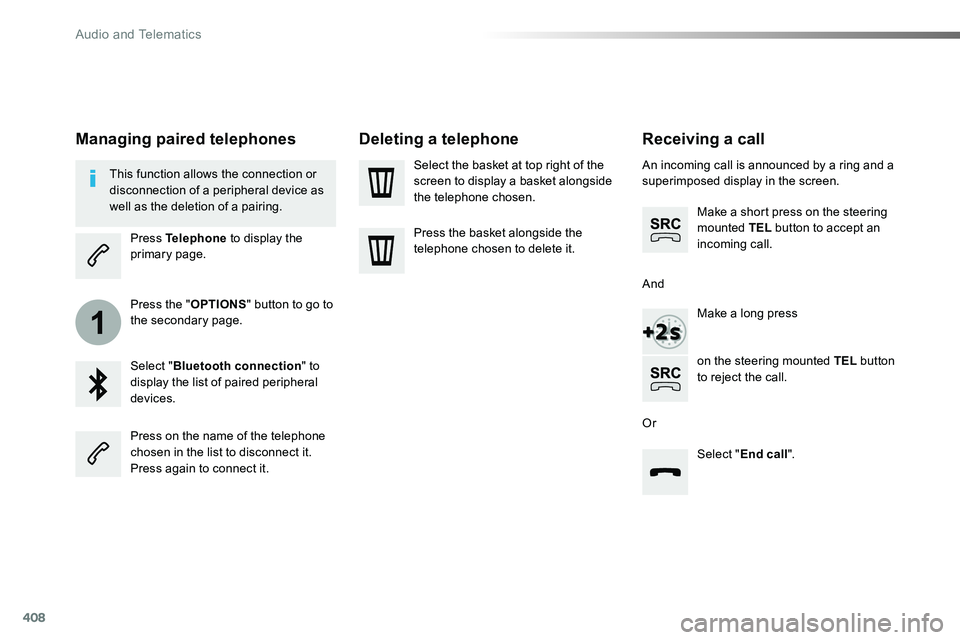
Receiving a call
An incoming call is announced by a ring and a superimposed display in the screen.
Make a short press on the steering mounted TEL button to accept an incoming call.
Make a long press
on the steering mounted TEL button to reject the call.
Or
And
Select "End call".
Press on the name of the telephone chosen in the list to disconnect it.Press again to connect it.
Select the basket at top right of the screen to display a basket alongside the telephone chosen.
Press the basket alongside the telephone chosen to delete it.
Managing paired telephones
This function allows the connection or disconnection of a peripheral device as well as the deletion of a pairing.
Press Telephone to display the primary page.
Press the "OPTIONS" button to go to the secondary page.
Select "Bluetooth connection" to display the list of paired peripheral devices.
Deleting a telephone
Audio and Telematics
Page 409 of 516
409
2
3
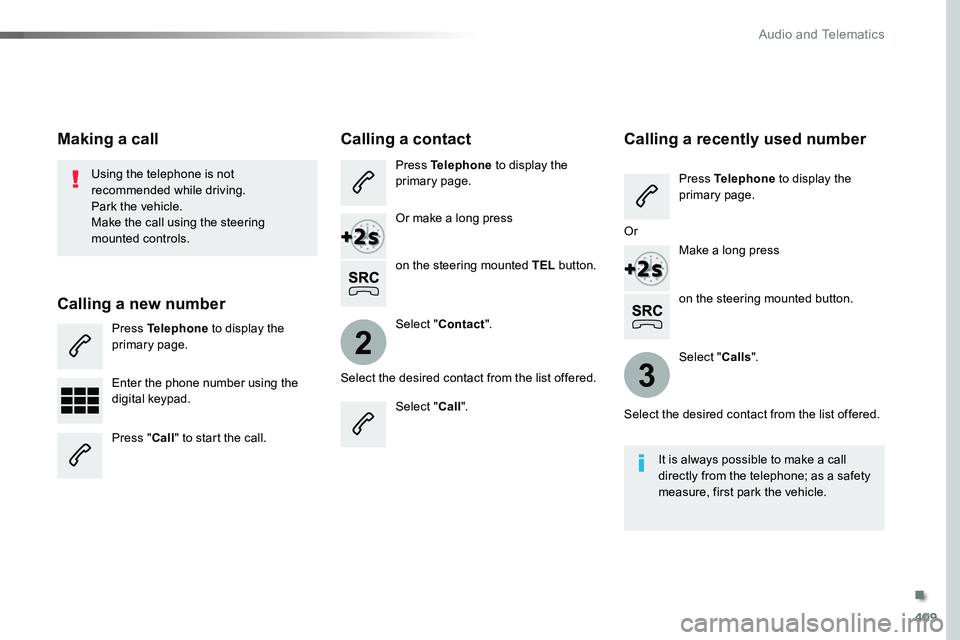
on the steering mounted button.
Using the telephone is not recommended while driving.Park the vehicle.Make the call using the steering
mounted controls.
Making a call
Calling a new number
Press Telephone to display the primary page.
Enter the phone number using the digital keypad.
Press "Call" to start the call.
Calling a contact
Press Telephone to display the primary page.
Or make a long press
on the steering mounted TEL button.
Select "Contact".
Select the desired contact from the list offered.
Select "Call".
Calling a recently used number
Press Telephone to display the primary page.
Make a long press
Select "Calls".
Select the desired contact from the list offered.
It is always possible to make a call directly from the telephone; as a safety measure, first park the vehicle.
Or
.
Audio and Telematics
Page 410 of 516
410
2
12
13
14
1
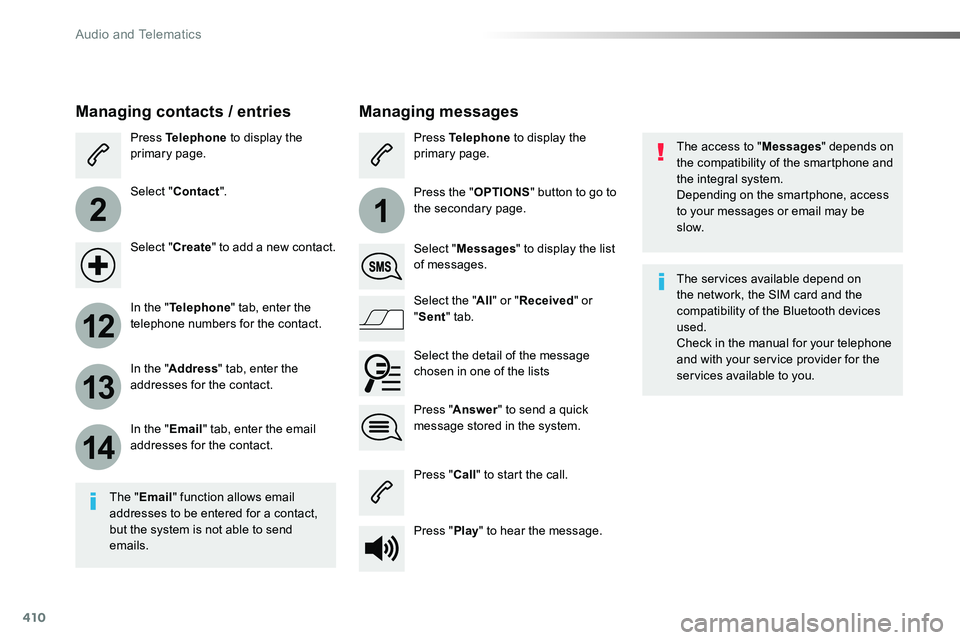
The access to "Messages" depends on the compatibility of the smartphone and the integral system.Depending on the smartphone, access to your messages or email may be
slow.
Managing messages
The "Email" function allows email addresses to be entered for a contact, but the system is not able to send emails.
Managing contacts / entries
Press Telephone to display the primary page.
Select "Contact".
Select "Create" to add a new contact.
In the "Telephone" tab, enter the telephone numbers for the contact.
In the "Address" tab, enter the addresses for the contact.
In the "Email" tab, enter the email addresses for the contact.
Press "Answer" to send a quick message stored in the system.
Press Telephone to display the primary page.
Press the "OPTIONS" button to go to the secondary page.
Select "Messages" to display the list of messages.
Select the "All" or "Received" or "Sent" tab.
Select the detail of the message chosen in one of the lists
Press "Call" to start the call.
Press "Play" to hear the message.
The services available depend on the network, the SIM card and the compatibility of the Bluetooth devices used.Check in the manual for your telephone and with your service provider for the services available to you.
Audio and Telematics
Page 411 of 516
411
11
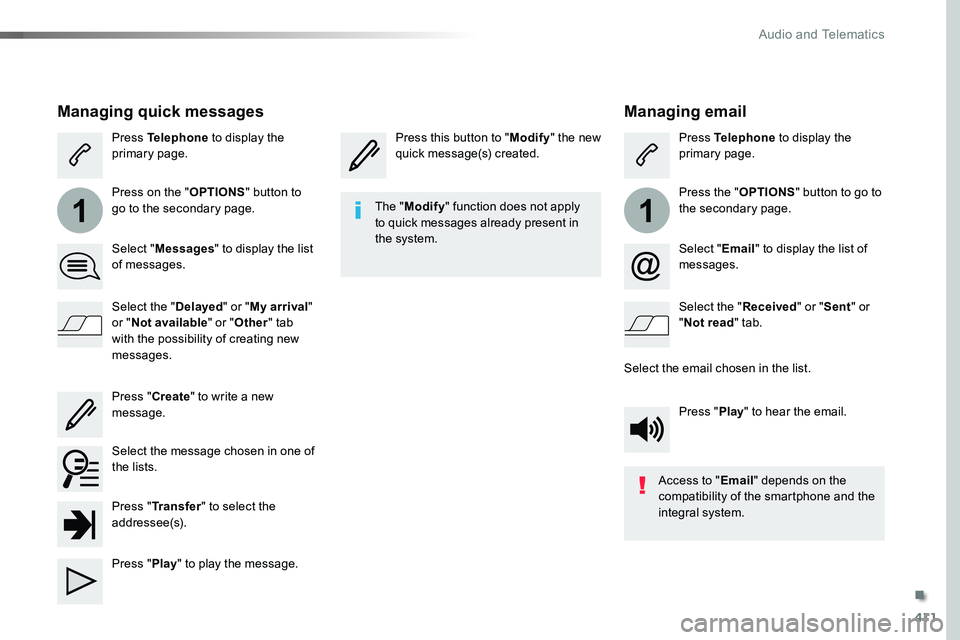
Managing email
Press this button to "Modify" the new quick message(s) created.Press Telephone to display the primary page.
Press the "OPTIONS" button to go to the secondary page.
Select "Email" to display the list of messages.
Select the "Received" or "Sent" or "Not read" tab.
Select the email chosen in the list.
Press "Play" to hear the email.
The "Modify" function does not apply to quick messages already present in the system.
Access to "Email" depends on the compatibility of the smartphone and the integral system.
Managing quick messages
Press Telephone to display the primary page.
Press on the "OPTIONS" button to go to the secondary page.
Select "Messages" to display the list of messages.
Select the "Delayed" or "My arrival" or "Not available" or "Other" tab with the possibility of creating new messages.
Select the message chosen in one of the lists.
Press "Create" to write a new message.
Press "Transfer" to select the addressee(s).
Press "Play" to play the message.
.
Audio and Telematics
Page 426 of 516
426
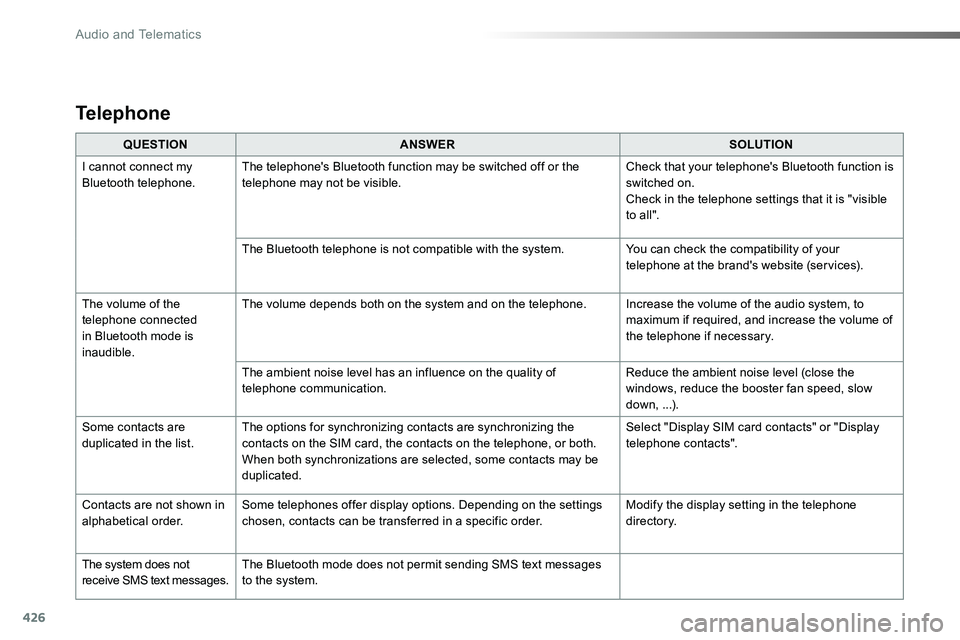
QUESTIONANSWERSOLUTION
I cannot connect my Bluetooth telephone.The telephone's Bluetooth function may be switched off or the telephone may not be visible.Check that your telephone's Bluetooth function is switched on.Check in the telephone settings that it is "visible to all ".
The Bluetooth telephone is not compatible with the system.You can check the compatibility of your telephone at the brand's website (services).
The volume of the telephone connected in Bluetooth mode is inaudible.
The volume depends both on the system and on the telephone.Increase the volume of the audio system, to maximum if required, and increase the volume of the telephone if necessary.
The ambient noise level has an influence on the quality of telephone communication.Reduce the ambient noise level (close the windows, reduce the booster fan speed, slow down, ...).
Some contacts are duplicated in the list.The options for synchronizing contacts are synchronizing the contacts on the SIM card, the contacts on the telephone, or both. When both synchronizations are selected, some contacts may be duplicated.
Select "Display SIM card contacts" or "Display telephone contacts".
Contacts are not shown in alphabetical order.Some telephones offer display options. Depending on the settings chosen, contacts can be transferred in a specific order.Modify the display setting in the telephone di r e c to r y.
The system does not receive SMS text messages.The Bluetooth mode does not permit sending SMS text messages to the system.
Telephone
Audio and Telematics
Page 429 of 516
429
To y o t a P r o To u c h
Connectivity - Multimedia audio - Bluetooth® telephone
ContentsFirst steps 430
Steering mounted controls 432
Menus 433
Connectivity 434
Radio Media 444
Telephone 456
Settings 468
Frequently asked questions 478
The system is protected in such a way that it will only operate in your vehicle.As a safety measure and because it requires sustained attention by the driver, the pairing of a Bluetooth mobile telephone with the Bluetooth hands-free system of your audio system must be done with the vehicle stationary and the ignition on.The display of the energy economy mode message signals that a change to standby is imminent. For more information on the Energy economy mode refer to the corresponding section.
.
Audio and Telematics
Page 431 of 516

431
12:13
23 °C531 kHz
Select the audio source (depending on version):- FM / DAB* / AM* stations.- Smartphone via MirrorLinkTM.- USB memory stick.- Media player connected to the auxiliary socket ( jack, cable not supplied).- Telephone connected by Bluetooth* and using Bluetooth* audio streaming.
* Depending on equipment.
Short-cuts: using the virtual buttons in the upper band of touch screen, it is possible to go directly to the selection of audio source, the list of stations (or titles, depending on the source), message notifications and emails.
In very hot conditions, the volume may be limited to protect the system. It may go into standby (screen and sound off) for at least 5 minutesThe return to normal takes place when the temperature in the passenger compartment drops.
In the "Settings" menu you can create a profile for just one person or a group of people with common points, with the possibility of entering a multitude of settings (radio presets, audio settings, contact favourites, ...); these settings are taken into account automatically.
.
Audio and Telematics
Page 432 of 516
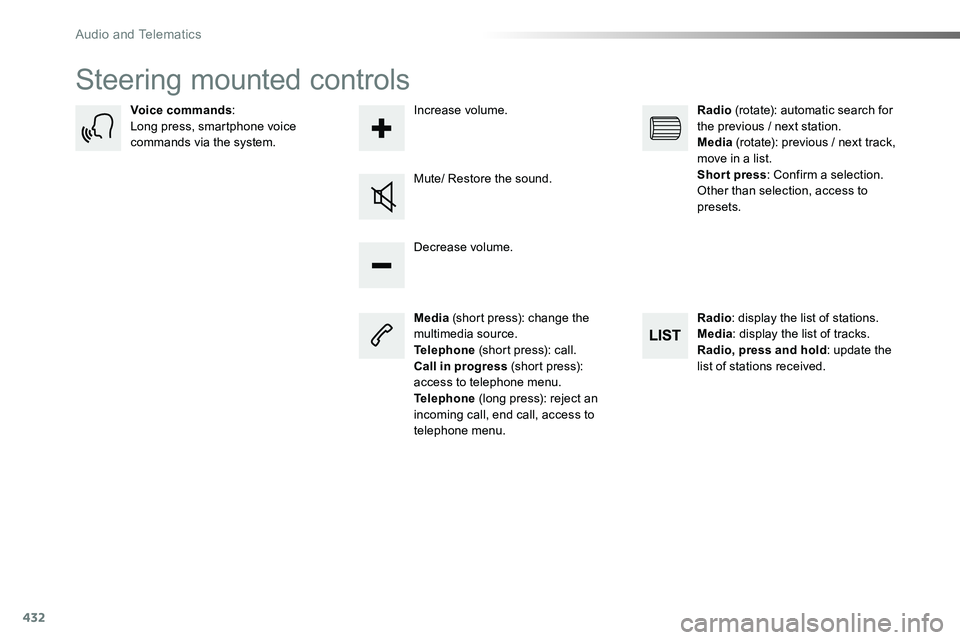
432
Steering mounted controls
Media (short press): change the multimedia source.Telephone (short press): call.Call in progress (short press): access to telephone menu.Telephone (long press): reject an incoming call, end call, access to telephone menu.
Decrease volume.
Voice commands:Long press, smartphone voice commands via the system.
Mute/ Restore the sound.
Radio (rotate): automatic search for the previous / next station.Media (rotate): previous / next track, move in a list.Short press: Confirm a selection. Other than selection, access to presets.
Radio: display the list of stations.Media: display the list of tracks.Radio, press and hold: update the list of stations received.
Increase volume.
Audio and Telematics