Page 428 of 516

428
QUESTIONANSWERSOLUTION
There is a difference in sound quality between the different audio sources.
For optimum sound quality, the audio settings for Loudness, Ambience, Treble, Bass and Volume can be adapted to the different sound sources, which may result in audible differences when changing source.
Check that the audio settings for Loudness, Ambience, Treble, Bass and Volume are adapted to the sources listened to. Adjust the Balance, Treble and Bass to the middle position, select the "None" musical ambience and set the loudness correction to the "Active" position in CD mode or to the "Inactive" position in radio mode.
With the engine off, the system switches off after a few minutes of use.
When the engine is switched off, the system's operating time depends on the state of charge of the battery.The switch-off is normal: the system switches to economy mode and switches off to prevent discharging of the vehicle's battery.
Start the vehicle's engine to increase the battery charge.
Audio and Telematics
Page 429 of 516
429
To y o t a P r o To u c h
Connectivity - Multimedia audio - Bluetooth® telephone
ContentsFirst steps 430
Steering mounted controls 432
Menus 433
Connectivity 434
Radio Media 444
Telephone 456
Settings 468
Frequently asked questions 478
The system is protected in such a way that it will only operate in your vehicle.As a safety measure and because it requires sustained attention by the driver, the pairing of a Bluetooth mobile telephone with the Bluetooth hands-free system of your audio system must be done with the vehicle stationary and the ignition on.The display of the energy economy mode message signals that a change to standby is imminent. For more information on the Energy economy mode refer to the corresponding section.
.
Audio and Telematics
Page 430 of 516
430
First steps
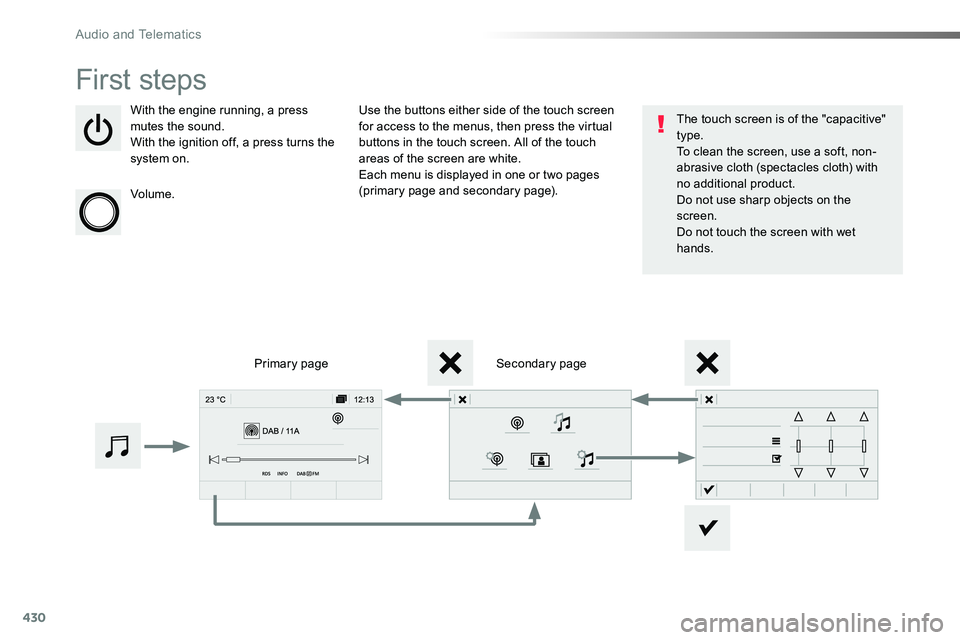
With the engine running, a press mutes the sound.With the ignition off, a press turns the system on.
Volume.
Use the buttons either side of the touch screen for access to the menus, then press the virtual buttons in the touch screen. All of the touch areas of the screen are white.Each menu is displayed in one or two pages (primary page and secondary page).
Secondary pagePrimary page
The touch screen is of the "capacitive" type.To clean the screen, use a soft, non-abrasive cloth (spectacles cloth) with no additional product.Do not use sharp objects on the screen.Do not touch the screen with wet hands.
Audio and Telematics
Page 435 of 516
435
1
1
1
6
7
8
2
3
4
5
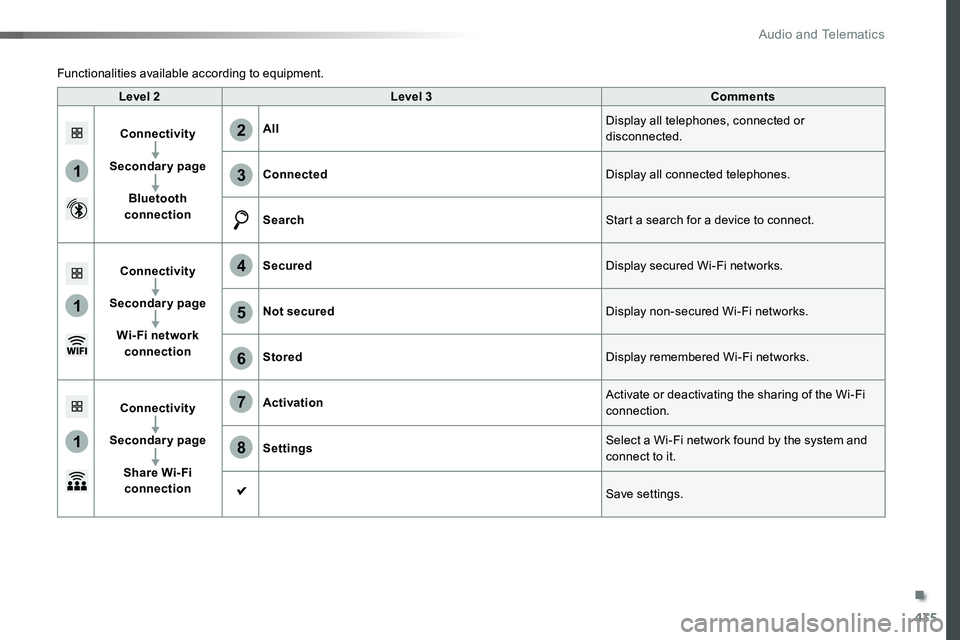
Level 2Level 3Comments
Connectivity
Secondary page
Bluetooth connection
AllDisplay all telephones, connected or disconnected.
ConnectedDisplay all connected telephones.
SearchStart a search for a device to connect.
Connectivity
Secondary page
Wi- Fi network connection
SecuredDisplay secured Wi-Fi networks.
Not securedDisplay non-secured Wi-Fi networks.
StoredDisplay remembered Wi-Fi networks.
Connectivity
Secondary page
Share Wi- Fi connection
ActivationActivate or deactivating the sharing of the Wi-Fi connection.
SettingsSelect a Wi-Fi network found by the system and connect to it.
Save settings.
Functionalities available according to equipment.
.
Audio and Telematics
Page 436 of 516
436
1
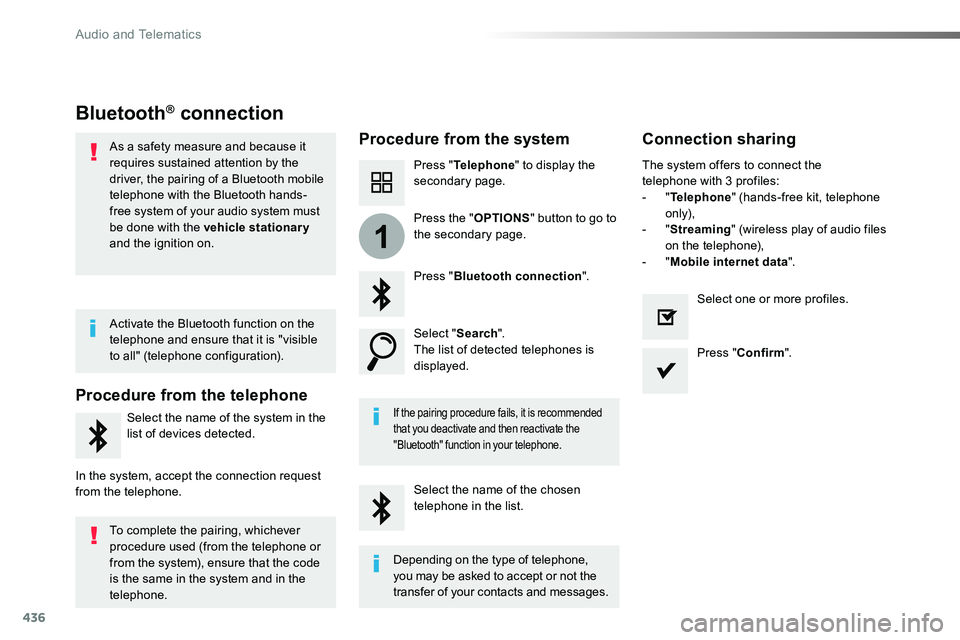
Bluetooth® connection
Procedure from the systemConnection sharing
Press "Telephone" to display the secondary page.
Press "Bluetooth connection".
Select "Search".The list of detected telephones is displayed.
If the pairing procedure fails, it is recommended that you deactivate and then reactivate the
"Bluetooth" function in your telephone.
The system offers to connect the telephone with 3 profiles:- "Telephone" (hands-free kit, telephone only),- "Streaming" (wireless play of audio files on the telephone),- "Mobile internet data".
Select the name of the chosen telephone in the list.
Press "Confirm".
Select one or more profiles.
Press the "OPTIONS" button to go to the secondary page.
As a safety measure and because it requires sustained attention by the driver, the pairing of a Bluetooth mobile telephone with the Bluetooth hands-free system of your audio system must
be done with the vehicle stationary and the ignition on.
Procedure from the telephone
Select the name of the system in the
list of devices detected.
In the system, accept the connection request from the telephone.
Activate the Bluetooth function on the telephone and ensure that it is "visible to all" (telephone configuration).
To complete the pairing, whichever procedure used (from the telephone or from the system), ensure that the code is the same in the system and in the
telephone.
Depending on the type of telephone, you may be asked to accept or not the
transfer of your contacts and messages.
Audio and Telematics
Page 437 of 516
437
11
7
8
Wi-Fi connectionSharing the Wi-Fi connection
To protect from any piracy and provide maximum security for your systems, it is recommended that you use a security code or complex password.The Wi-Fi connection and the sharing
of the Wi-Fi connection are exclusive.
Press "Confirm".
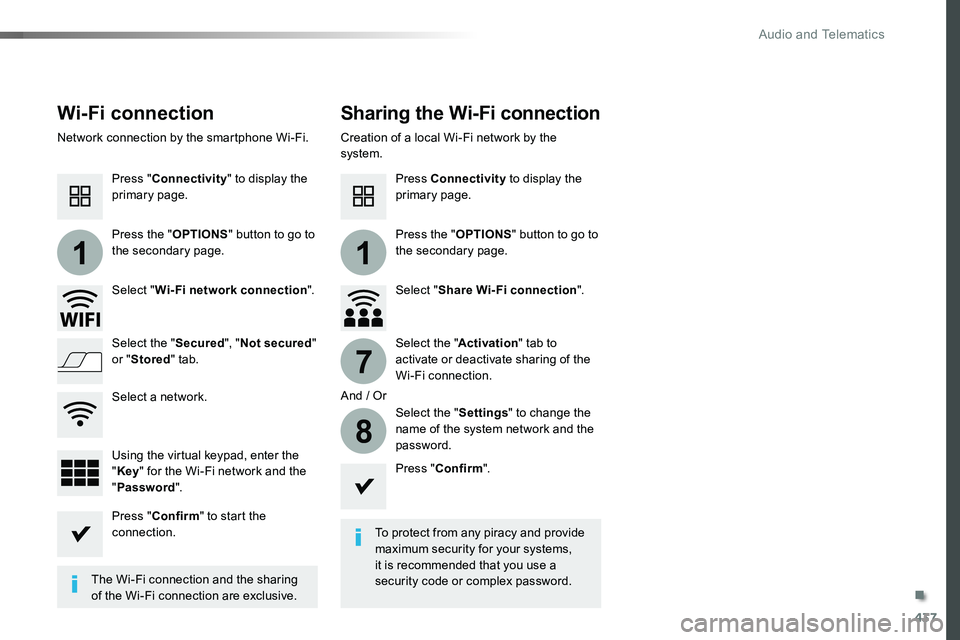
Press "Confirm" to start the connection.
Press "Connectivity" to display the primary page.
Network connection by the smartphone Wi-Fi.Creation of a local Wi-Fi network by the system.
Press Connectivity to display the primary page.
Press the "OPTIONS" button to go to the secondary page.Press the "OPTIONS" button to go to the secondary page.
Select "Wi-Fi network connection".Select "Share Wi-Fi connection".
And / Or
Select the "Secured", "Not secured" or "Stored" tab.Select the "Activation" tab to activate or deactivate sharing of the Wi-Fi connection.
Select the "Settings" to change the name of the system network and the password.Using the virtual keypad, enter the "Key" for the Wi-Fi network and the "Password".
Select a network.
.
Audio and Telematics
Page 439 of 516
439
As a safety measure and because it requires the sustained attention of the driver, using a smartphone when driving is prohibited.Operation must be with the vehicle stationary.
The synchronisation of a smartphone allows applications on a smartphone that are adapted to the MirrorLinkTM technology to be displayed in the vehicle's screen.The principles and standards are constantly evolving. For the communication process between the smartphone and the system to work correctly, the smartphone must be unlocked; update the operating system of your smar tphone as well as the date and time in the smartphone and the system.For the list of eligible smartphones, connect to the brand's internet website in your country.
The "MirrorLinkTM" function requires the use of a compatible smartphone
and applications.
There may be a wait for the availability of applications, depending on the quality of your network.
When connecting a smartphone to the system, it is recommended that Bluetooth® be star ted on the smar tphone.
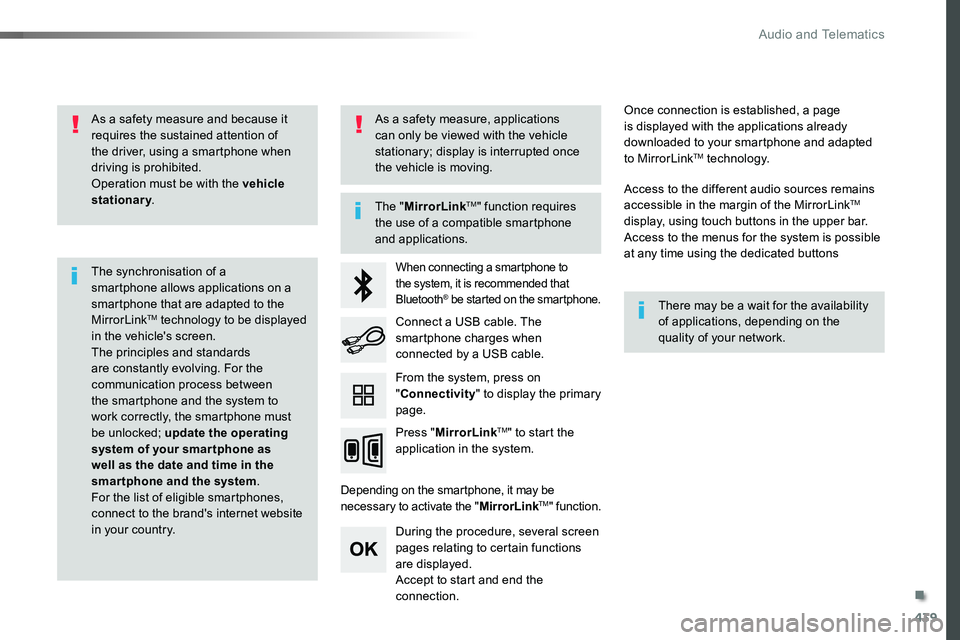
Depending on the smartphone, it may be necessary to activate the "MirrorLinkTM" function.
During the procedure, several screen pages relating to certain functions are displayed.Accept to start and end the connection.
Connect a USB cable. The smartphone charges when connected by a USB cable.
Press "MirrorLinkTM" to start the application in the system.
Once connection is established, a page is displayed with the applications already downloaded to your smartphone and adapted to MirrorLinkTM technology.
Access to the different audio sources remains accessible in the margin of the MirrorLinkTM display, using touch buttons in the upper bar.Access to the menus for the system is possible at any time using the dedicated buttons
From the system, press on "Connectivity" to display the primary page.
As a safety measure, applications can only be viewed with the vehicle stationary; display is interrupted once the vehicle is moving.
.
Audio and Telematics
Page 447 of 516
447
1
1
1
5
12
8
6
13
14
15
9
7
10
11
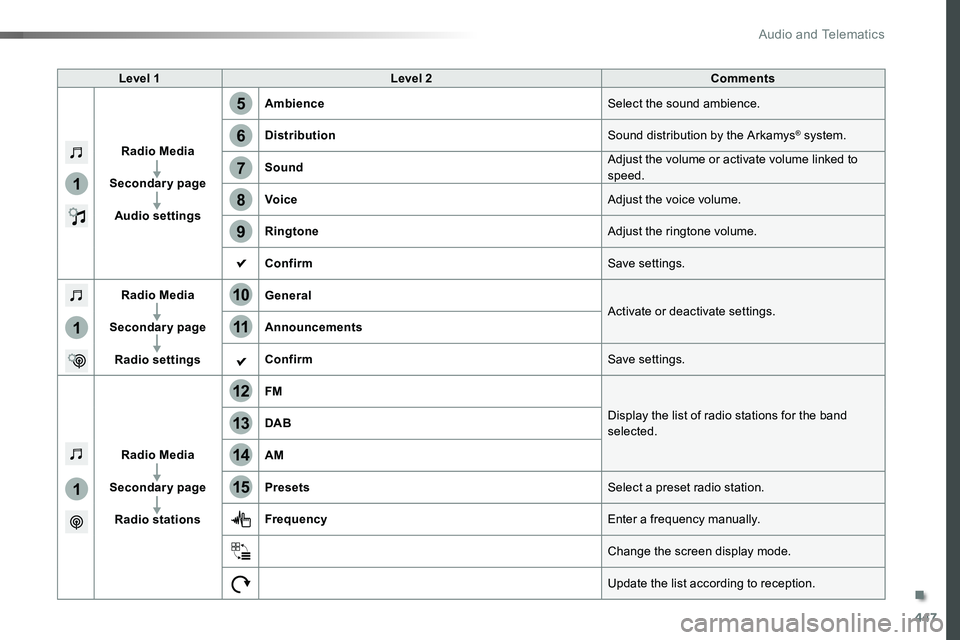
Level 1Level 2Comments
Radio Media
Secondary page
Audio settings
AmbienceSelect the sound ambience.
DistributionSound distribution by the Arkamys® system.
SoundAdjust the volume or activate volume linked to speed.
VoiceAdjust the voice volume.
RingtoneAdjust the ringtone volume.
ConfirmSave settings.
Radio Media
Secondary page
Radio settings
GeneralActivate or deactivate settings.Announcements
ConfirmSave settings.
Radio Media
Secondary page
Radio stations
FM
Display the list of radio stations for the band selected.DAB
AM
PresetsSelect a preset radio station.
FrequencyEnter a frequency manually.
Change the screen display mode.
Update the list according to reception.
.
Audio and Telematics