Page 105 of 820
PRIUS_OM_OM47B89U_(U)
1052. Instrument cluster
2
Instrument cluster
■Main display and multi-information display
*: The displayed indicator changes according to the current driving mode.
■
Multi-information display (symbol display*)
*: These symbols are displayed along with a message. Also, the symbol dis- plays listed here are only an example, and different symbols may be dis-
played according to the contents of the multi-information display.
Indicators and symbols displayed on the display
IndicatorsPages
EV drive mode indicator P. 237
*“ECO MODE” indicator P. 324
*“PWR MODE” indicatorP. 324
EV IndicatorP. 120
Symbol displayPages
Smart key system P. 231
Brake Override System/Drive-Start Control/
Intelligent Clearance Sonar (if equipped) P. 677
LDA (Lane Departure Alert with steering con-
trol) (if equipped)P. 303
P. 303
Low engine oil pressure warning
(Canada only) P. 677
Page 106 of 820

106
PRIUS_OM_OM47B89U_(U)
2. Instrument cluster
■BSM (Blind Spot Monitor) outsid e rear view mirror indicators
(if equipped) ( →P. 326)
• When the BSM function is enabled on the screen of the multi-infor- mation display, the power switch is turned to ON mode.
If the system is functioning correctly, the BSM outside rear view mirror indi-
cators will turn off after a few seconds.
If the BSM outside rear view mirror indicators do not illuminate or do not
turn off, there may be a malfunction in the system.
If this occurs, have the vehicle inspected by your Toyota dealer.
●
Indicators are also displayed on the out-
side rear view mirrors.
● In order to confirm operation, the BSM
outside rear view mirror indicators illumi-
nate in the following situations:
• When the power switch is in ON
mode, the BSM function is enabled
on the screen of the multi-infor-
mation display.
WARNING
■If a safety system warning light does not come on
Should a safety system light such as the ABS and SRS warning light not
come on when you start the hybrid system, this could mean that these sys-
tems are not available to help protect you in an accident, which could r\
esult
in death or serious injury. Have the vehicle inspected by your Toyota dealer
immediately if this occurs.
NOTICE
■To prevent damage to the engine and its components
The engine may be overheating if the high coolant temperature warning
light comes on or flashes. In this case, immediately stop the vehicle in a
safe place, and check the engine after it has cooled completely. ( →P. 735)
Page 117 of 820

PRIUS_OM_OM47B89U_(U)
1172. Instrument cluster
2
Instrument cluster
◆Energy monitor
The energy monitor can be used to check the vehicle drive status,
hybrid system operation status and energy regeneration status.
When energy is flowing, an arrow appears and a bright point of light
moves to show the direction of the flow of energy. When energy is
not flowing, the bright point of light are not displayed.
Gasoline engine
Electric motor
(traction motor)
Hybrid battery
(traction battery)
Tire
Bright point of light showing
the flow of energy
As an example, all arrows are shown in the illustration, but the actual con-
tents of the display will differ.
(Display example)
●When the hybrid battery (traction battery) is being charged, the
bright point of light moves towards .
● During driving, the bright point of light moves from or (or
both depending on the situation) towards .
*
●During driving, the image of the tires rotates.
*: The display may differ depending on the driving status.
1
2
3
4
5
3
12
4
Page 118 of 820
118
PRIUS_OM_OM47B89U_(U)
2. Instrument cluster
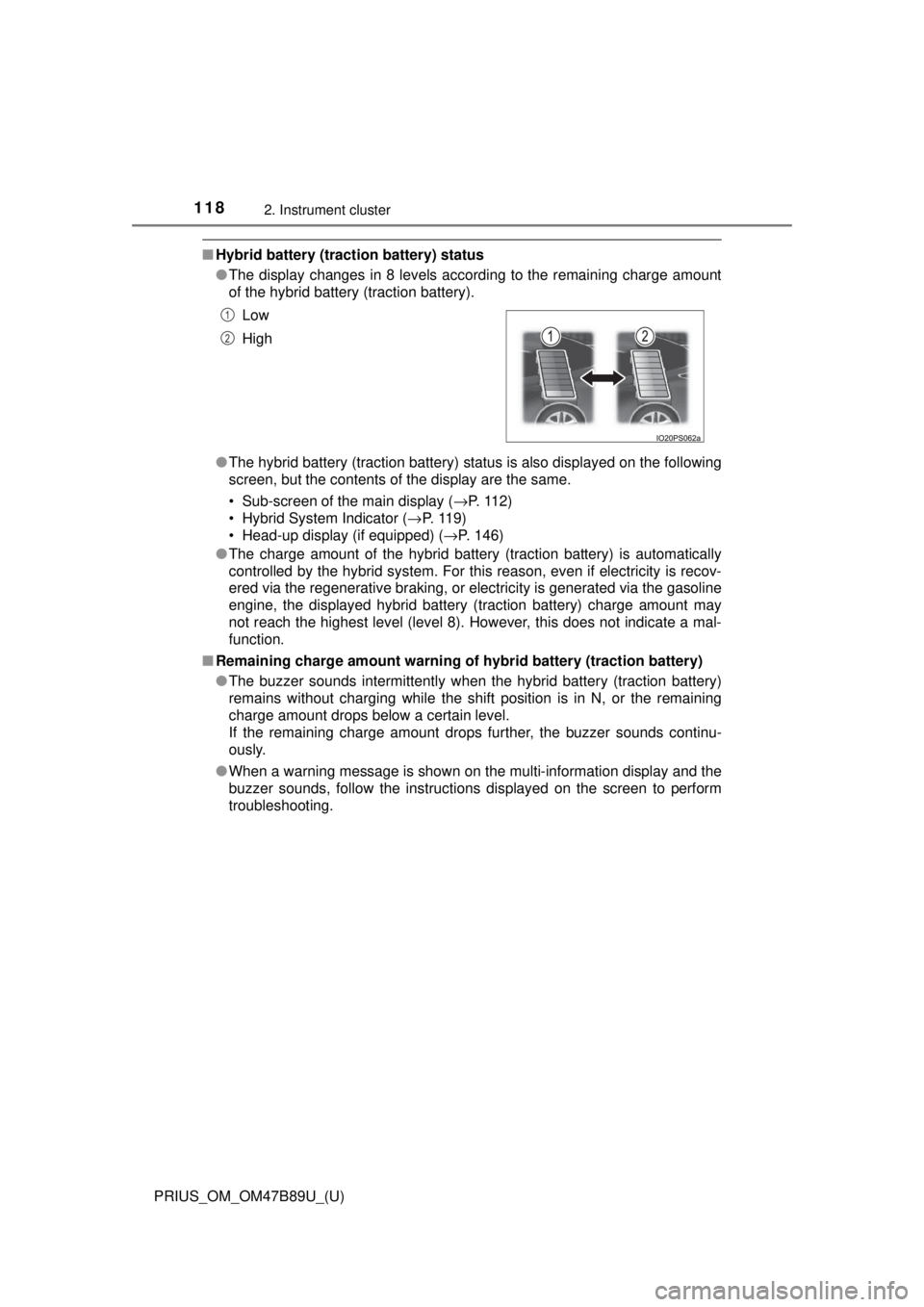
■Hybrid battery (tract ion battery) status
● The display changes in 8 levels according to the remaining charge amount
of the hybrid battery (traction battery).
● The hybrid battery (traction battery) status is also displayed on the following
screen, but the contents of the display are the same.
• Sub-screen of the main display ( →P. 112)
• Hybrid System Indicator ( →P. 11 9 )
• Head-up display (if equipped) ( →P. 146)
● The charge amount of the hybrid battery (traction battery) is automatically
controlled by the hybrid system. For this reason, even if electricity is recov-
ered via the regenerative braking, or electricity is generated via the gasoline
engine, the displayed hybrid battery (traction battery) charge amount may
not reach the highest level (level 8). However, this does not indicate a mal-
function.
■ Remaining charge amount warning of hybrid battery (traction battery)
●The buzzer sounds intermittently when the hybrid battery (traction battery)
remains without charging while the shift position is in N, or the remaining
charge amount drops below a certain level.
If the remaining charge amount drops further, the buzzer sounds continu-
ously.
● When a warning message is shown on the multi-information display and the
buzzer sounds, follow the instructions displayed on the screen to perform
troubleshooting.Low
High
1
2
Page 119 of 820
PRIUS_OM_OM47B89U_(U)
1192. Instrument cluster
2
Instrument cluster
◆Hybrid System Indicator
The display changes according to accelerator pedal operation and
displays the current driving status and energy regeneration status.
The Hybrid System Indicator can be displayed on the sub-screen of the
main display (→P. 112) and the head-up display (if equipped)
( →P. 146).
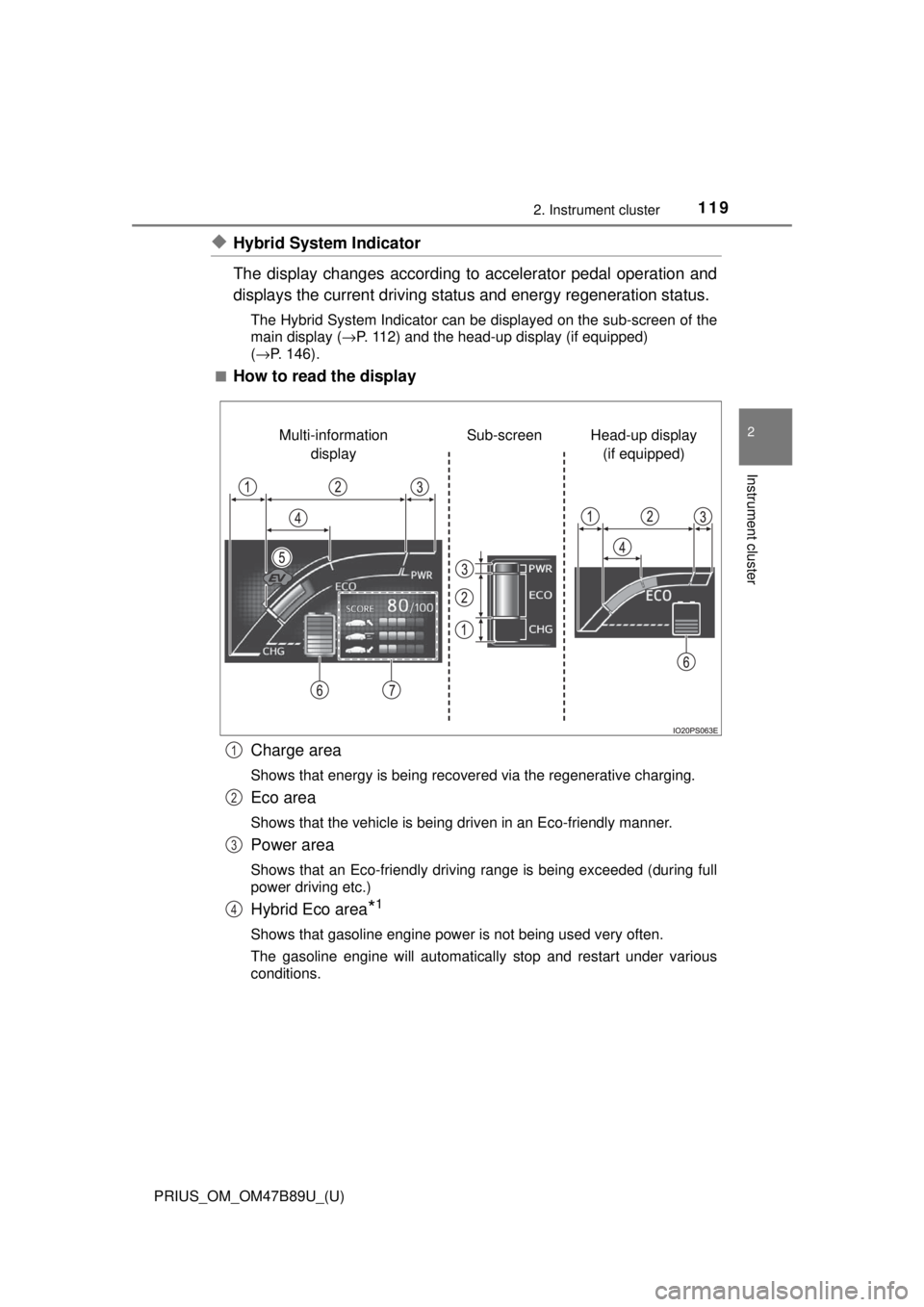
■
How to read the display
Charge area
Shows that energy is being recovered via the regenerative charging.
Eco area
Shows that the vehicle is being driven in an Eco-friendly manner.
Power area
Shows that an Eco-friendly driving range is being exceeded (during full
power driving etc.)
Hybrid Eco area*1
Shows that gasoline engine power is not being used very often.
The gasoline engine will automatically stop and restart under various
conditions.
Head-up display (if equipped)
Sub-screen
Multi-information
display
1
2
3
4
Page 120 of 820
120
PRIUS_OM_OM47B89U_(U)
2. Instrument cluster
EV indicator*2, 3
The EV indicator comes on when the vehicle is driven using only the
electric motor (traction motor) or the gasoline engine is stopped.
Hybrid battery (traction battery) status
→P. 1 1 8
Eco score
→P. 121
●By keeping the indicator within Ec o area, more Eco-friendly driv-
ing can be achieved.
● Charge area indicates regeneration
*4 status. Regenerated
energy will be used to charge the hybrid battery (traction battery).
*1: Not displayed on the sub-screen.
*2: Not displayed on the sub-screen or head-up display.
*3: The EV indicator function can be turned off in the “Meter Customize”
settings. ( →P. 142)
*4: When used in this manual, “regeneration” refers to the conversion of
energy created by the movement of the vehicle into electrical energy.
■
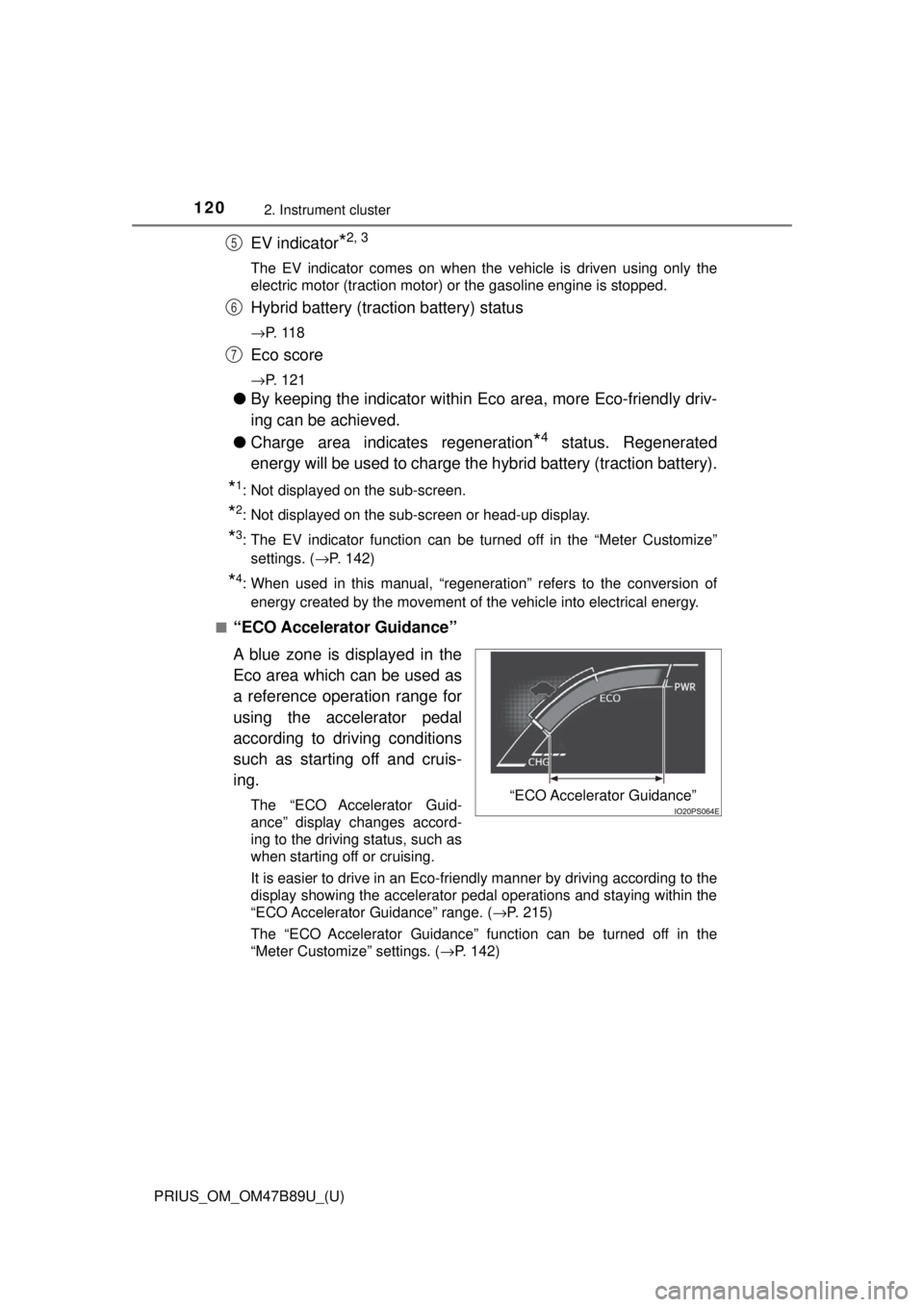
“ECO Accelerator Guidance”
A blue zone is displayed in the
Eco area which can be used as
a reference operation range for
using the accelerator pedal
according to driving conditions
such as starting off and cruis-
ing.
The “ECO Accelerator Guid-
ance” display changes accord-
ing to the driving status, such as
when starting off or cruising.
It is easier to drive in an Eco-friendly manner by driving according to the
display showing the accelerator pedal operations and staying within the
“ECO Accelerator Guidance” range. ( →P. 215)
The “ECO Accelerator Guidance” function can be turned off in the
“Meter Customize” settings. ( →P. 142)
5
6
7
“ECO Accelerator Guidance”
Page 154 of 820
154
PRIUS_OM_OM47B89U_(U)
2. Instrument cluster
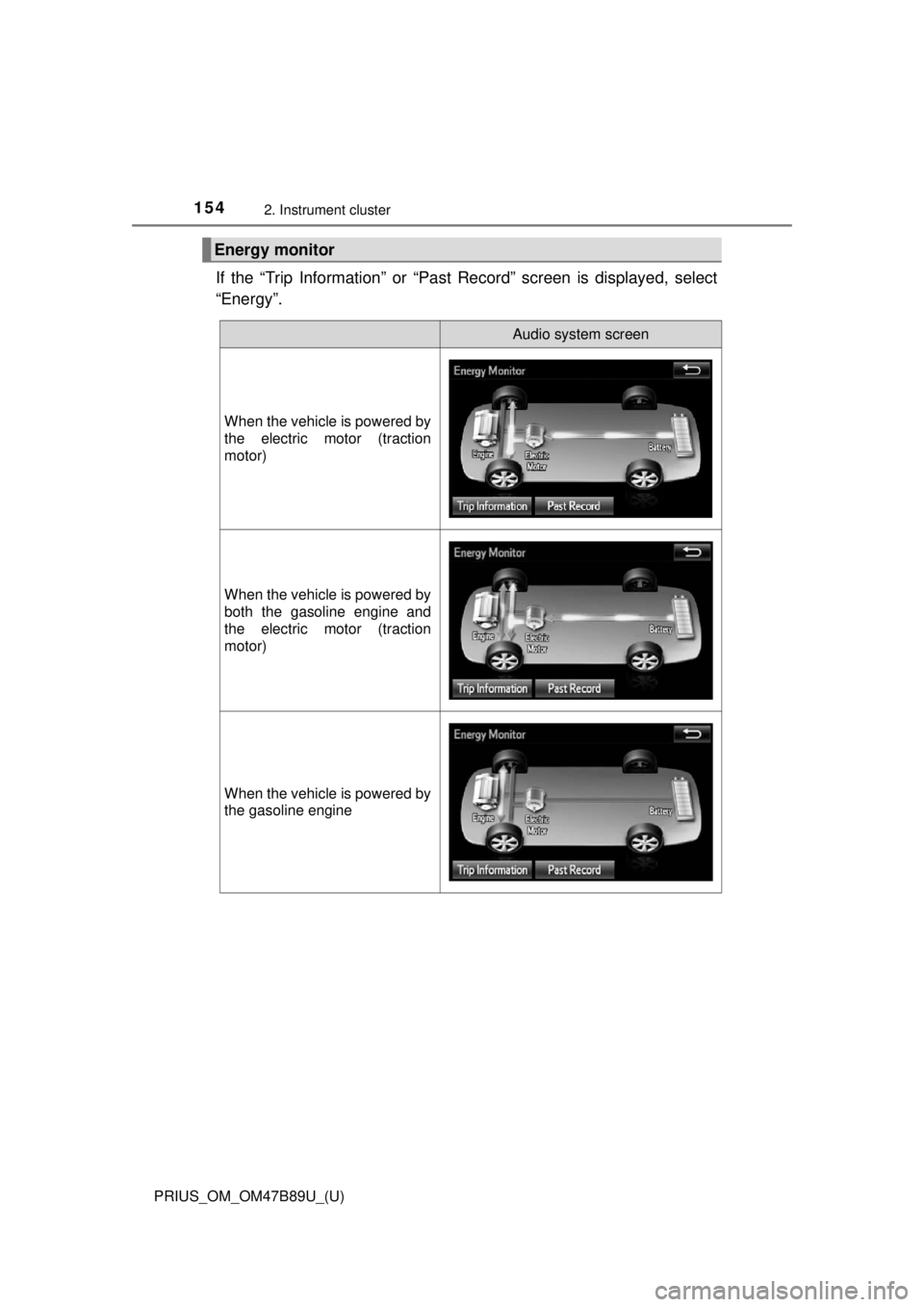
If the “Trip Information” or “Past Record” screen is displayed, select
“Energy”.
Energy monitor
Audio system screen
When the vehicle is powered by
the electric motor (traction
motor)
When the vehicle is powered by
both the gasoline engine and
the electric motor (traction
motor)
When the vehicle is powered by
the gasoline engine
Page 159 of 820

PRIUS_OM_OM47B89U_(U)
1592. Instrument cluster
2
Instrument cluster
■Display the power consumption of the air conditionerDisplay “Energy Monitor” screen.
Select on the upper right screen.
When you select the “ ×”, and close the screen.
■Function summary
The energy monitor can be used to check the vehicle drive status,
hybrid system operation status and energy regeneration status.
■Flow of energy and display details
When energy is flowing, an arrow appears and a bright point of light
moves to show the direction of the flow of energy. When energy is
not flowing, the bright point of light are not displayed.
● The display when the engine is operating is in blue while the
engine is being warmed up and yellow afterwards.
● The arrow from the engine to the motor and tires is displayed in
red.
● The arrow indicating energy consumption is displayed in yellow
and the arrow indicating energy regeneration or charging is dis-
played in green. Also, the hybr id battery (traction battery)
changes color accordingly.
● There is an icon , , on the lower side of the
screen. The screen switches to each point of view when you
select it.
● When you select , this screen is displayed in the lower half of
the screen, it will be displaye d together with the navigation
screen.
● These images are examples only, and may vary slightly from
actual conditions.
How to read the energy monitor
1
2