Page 290 of 820

290
PRIUS_OM_OM47B89U_(U)
4-5. Using the driving support systems
• When driving in inclement weather such as heavy rain, fog, snow or a
sandstorm
• When the vehicle is hit by water, snow, dust, etc. from a vehicle ahead
• When driving through steam or smoke
• When driving in a place where the surrounding brightness changes sud- denly, such as at the entrance or exit of a tunnel
• When a very bright light, such as the sun or the headlights of oncoming
traffic, shines directly into the camera sensor
• When the surrounding area is dim, such as at dawn or dusk, or while at night or in a tunnel
• After the hybrid system has started the vehicle has not been driven for a certain amount of time
• While making a left/right turn and for a few seconds after making a left/
right turn
• While driving on a curve and for a few seconds after driving on a curve
• If your vehicle is skidding
• If the wheels are misaligned
• If a wiper blade is blocking the camera sensor
• The vehicle is wobbling.
• The vehicle is being driven at extremely high speeds.
• When driving on a hill
• If the radar sensor or camera sensor is misaligned
● In some situations such as the following, sufficient braking force may not be
obtained, preventing the system from performing properly:
• If the braking functions cannot operate to their full extent, such as when
the brake parts are extremely cold, extremely hot, or wet
• If the vehicle is not properly maintained (brakes or tires are excessively worn, improper tire inflation pressure, etc.)
• When the vehicle is being driven on a gravel road or other slippery sur- face
• If the front of the vehicle is raised or
lowered
Page 292 of 820

292
PRIUS_OM_OM47B89U_(U)
4-5. Using the driving support systems
■If the PCS warning light flashes or illuminates and a warning message is
displayed on the mult i-information display
The pre-collision system may be tem porarily unavailable or there may be a
malfunction in the system.
● In the following situations, the warning light will turn off, the message will
disappear and the system will become operational when normal operating
conditions return:
• When the radar sensor or camera sensor or the area around either sen-
sor is hot, such as in the sun
• When the radar sensor or camera sensor or the area around either sen- sor is cold, such as in an extremely cold environment
• When a front sensor is dirty or covered with snow, etc.
• When the part of the windshield in front of the camera sensor is fogged up or covered with condensation or ice (Defogging the windshield:
→P. 520, 530)
• If the camera sensor is obstructed, such as when the hood is open or a sticker is attached to the windshield near the camera sensor
● If the PCS warning light continues to flash or remains illuminated or th\
e
warning message does not disappear even though the vehicle has returned
to normal, the system may be malfunctioning. Have the vehicle inspected by
your Toyota dealer immediately.
■ If VSC is disabled
●If VSC is disabled ( →P. 410), the pre-collision brake assist and pre-collision
braking functions are also disabled.
● The PCS warning light will turn on and “VSC Turned Off Pre-Collision Brake
System Unavailable” will be displayed on the multi-information display.
Page 297 of 820
PRIUS_OM_OM47B89U_(U)
2974-5. Using the driving support systems
4
Driving
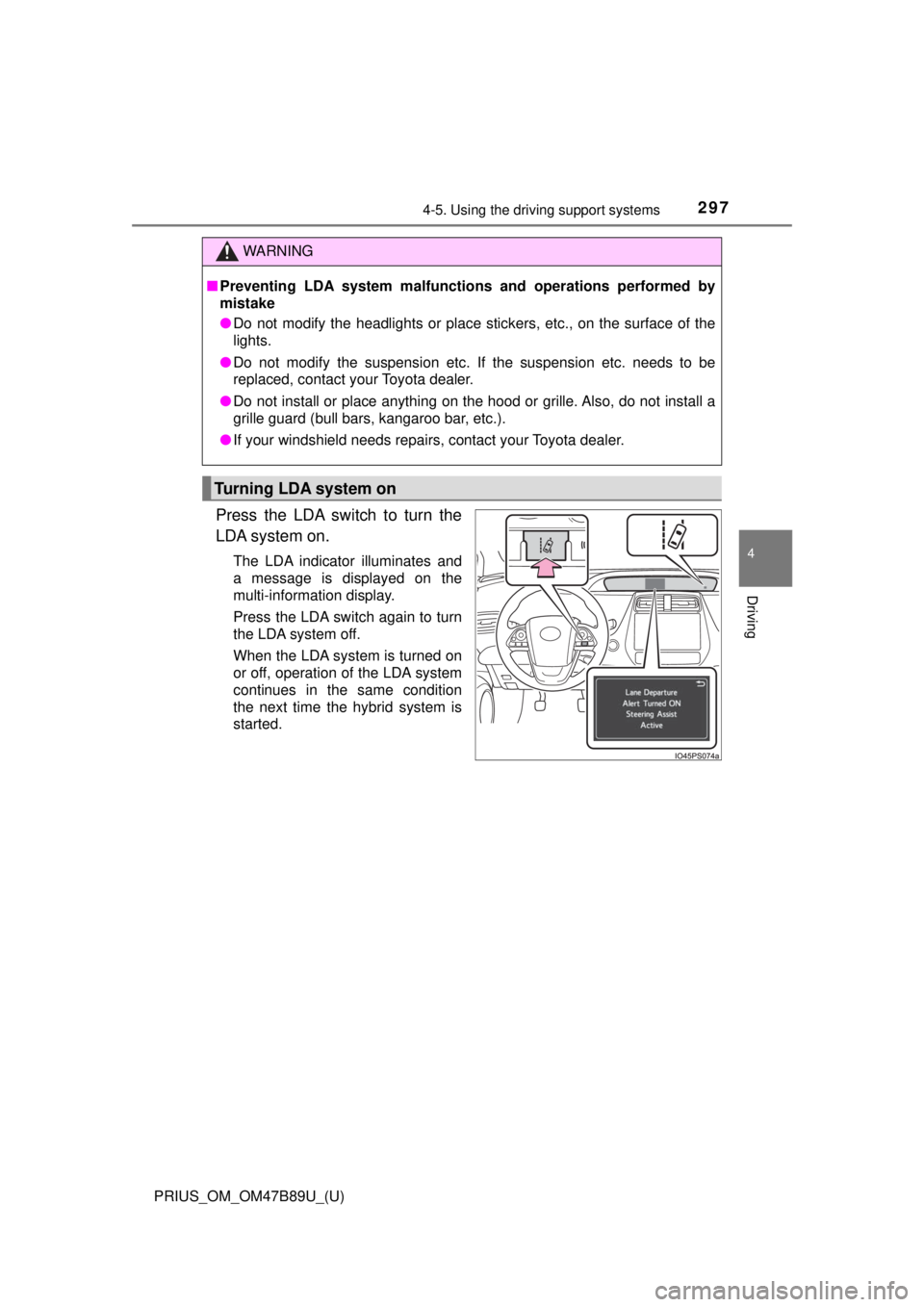
Press the LDA switch to turn the
LDA system on.
The LDA indicator illuminates and
a message is displayed on the
multi-information display.
Press the LDA switch again to turn
the LDA system off.
When the LDA system is turned on
or off, operation of the LDA system
continues in the same condition
the next time the hybrid system is
started.
WARNING
■Preventing LDA system malfunctio ns and operations performed by
mistake
● Do not modify the headlights or place stickers, etc., on the surface of the
lights.
● Do not modify the suspension etc. If the suspension etc. needs to be
replaced, contact your Toyota dealer.
● Do not install or place anything on the hood or grille. Also, do not install a
grille guard (bull bars, kangaroo bar, etc.).
● If your windshield needs repairs, contact your Toyota dealer.
Turning LDA system on
Page 301 of 820

PRIUS_OM_OM47B89U_(U)
3014-5. Using the driving support systems
4
Driving
■Conditions in which functions may not operate properly
In the following situations, the camera sensor may not detect white (yellow)
lines and various functions may not operate normally.
●There are shadows on the road that run parallel with, or cover, the white
(yellow) lines.
● The vehicle is driven in an area without white (yellow) lines, such as in front
of a tollgate or checkpoint, or at an intersection, etc.
● The white (yellow) lines are cracked, “Botts’ dots”, “Raised pavement
marker” or stones are present.
● The white (yellow) lines cannot be seen or are difficult to see due to sand,
etc.
● The vehicle is driven on a road surface that is wet due to rain, puddles, etc.
● The traffic lines are yellow (which may be more difficult to recognize than
lines that are white).
● The white (yellow) lines cross over a curb, etc.
● The vehicle is driven on a bright surface, such as concrete.
● The vehicle is driven on a surface that is bright due to reflected light, etc.
● The vehicle is driven in an area where the brightness changes suddenly,
such as at the entrances and exits of tunnels, etc.
● Light from the headlights of an oncoming vehicle, the sun, etc., enters the
camera.
● The vehicle is driven where the road diverges, merges, etc.
● The vehicle is driven on a slope.
● The vehicle is driven on a road which tilts left or right, or a winding road.
● The vehicle is driven on an unpaved or rough road.
● The vehicle is driven around a sharp curve.
● The traffic lane is excessively narrow or wide.
● The vehicle is extremely tilted due to carrying heavy luggage or having
improper tire pressure.
● The distance to the preceding vehicle is extremely short.
● The vehicle is moving up and down a large amount due to road conditions
during driving (poor roads or road seams).
● The headlight lenses are dirty and emit a faint amount of light at night, or the
beam axis has deviated.
● The vehicle is struck by a crosswind.
● The vehicle has just changed lanes or crossed an intersection.
● Snow tires, etc., are equipped.
Page 308 of 820

308
PRIUS_OM_OM47B89U_(U)
4-5. Using the driving support systems
Example of constant speed cruising
When there are no vehicles ahead
The vehicle travels at the speed set by the driver. The desired vehicle-to-
vehicle distance can also be set by operating the vehicle-to-vehicle dis-
tance switch.
Example of deceleration cruising and follow-up cruising
When a preceding vehicle driving slower than the set speed
appears
When a vehicle is detected running ahead of you, the system automatically
decelerates your vehicle. When a greater reduction in vehicle speed is
necessary, the system applies the brakes (the stop lights will come on at
this time). The system will respond to changes in the speed of the vehicle
ahead in order to maintain the vehicle-to-vehicle distance set by the driver.
Approach warning warns you when the system cannot decelerate suffi-
ciently to prevent your vehicle from closing in on the vehicle ahead.
When the vehicle ahead of you stops, your vehicle will also stop (vehicle is
stopped by system control). After the vehicle ahead starts off, pushing the
cruise control lever up or depressing the accelerator pedal will resume fol-
low-up cruising.
Example of acceleration
When there are no longer any preceding vehicles driving slower
than the set speed
The system accelerates until the set speed is reached. The system then
returns to constant speed cruising.
1
2
3
Page 328 of 820
328
PRIUS_OM_OM47B89U_(U)
4-5. Using the driving support systems
■The BSM outside rear view mirror indicators visibility
When under strong sunlight, the outside rear view mirror indicator may be dif-
ficult to see.
■ Rear Cross Traffic Alert buzzer hearing
Rear Cross Traffic Alert function may be difficult to hear over loud noises
such as high audio volume.
■ When “Blind Spot Monitor Unavailabl e” is shown on the multi-informa-
tion display
The sensor voltage has become abnormal, water, snow mud, etc., may be
built up in the vicinity of the sensor area of bumper (→P. 330). Removing the
water, snow, mud, etc., from the vicinity of the sensor area bumper should
return it to normal. Also, the sensor may not function normally when used in
extremely hot or cold weather.
Page 330 of 820

330
PRIUS_OM_OM47B89U_(U)
4-5. Using the driving support systems
WARNING
■Handling the radar sensor
● Keep the sensor and its surrounding area on the bumper clean at all times.
● Do not subject a sensor or its surrounding area on the rear bumper to a
strong impact.
If a sensor is moved even slightly off position, the system may malfunction
and vehicles may not be detected correctly.
In the following situations, have your vehicle inspected by your Toyota
dealer.
• A sensor or its surrounding area is subject to a strong impact.
• If the surrounding area of a sensor is scratched or dented, or part of
them has become disconnected.
● Do not disassemble the sensor.
● Do not attach accessories or stickers to the sensor or surrounding area on
the bumper.
● Do not modify the sensor or surrounding area on the bumper.
● Do not paint the rear bumper any color other than an official Toyota color.
One Blind Spot Monitor sensor is
installed inside the left and right side of
the vehicle rear bumper respectively.
Observe the following to ensure the Blind
Spot Monitor can function correctly.
Page 347 of 820

PRIUS_OM_OM47B89U_(U)
3474-5. Using the driving support systems
4
Driving
WARNING
■Sensors
Certain vehicle conditions and the surrounding environment may affect the
ability of the sensor to correctly detect obstacles. Particular instances where
this may occur are listed below.
● There is dirt, snow or ice on the sensor. (Wiping the sensors will resolve
this problem.)
● The sensor is frozen. (Thawing the area will resolve this problem.)
In especially cold weather, if a sensor is frozen, the screen may show an
abnormal display, or obstacles may not be detected.
● The sensor is covered in any way.
● In harsh sunlight or intense cold weather
● On an extremely bumpy road, on an incline, on gravel, or on grass
● The vicinity of the vehicle is noisy due to vehicle horns, motorcycle
engines, air brakes of large vehicles , or other loud noises producing ultra-
sonic waves.
● The sensor is splashed with water or drenched with heavy rain.
● The sensor is drenched with water on a flooded road.
● The vehicle is leaning considerably to one side.
● The vehicle is equipped with a fender pole or wireless antenna.
● The vehicle is approaching a tall or curved curb.
● The detection range is reduced due to an object such as a sign.
● The area directly under the bumpers is not detected.
● If obstacles draw too close to the sensor.
● The bumper or sensor receives a strong impact.
● A non-genuine Toyota suspension (lowered suspension etc.) is installed.
● There is another vehicle equipped with parking assist sensors in the vicin-
ity.
● Towing eyelets are installed.
● A backlit license plate is installed.
In addition to the examples above, depending on the shape and condition of
obstacles, detection may not be possible, or the detection range may be
shortened.