Page 89 of 660

89
1
1-3. Theft deterrent system
AVENSIS_OM_OM20C79E_(EE)
For safety and security
Alarm
The alarm uses light and sound to give an alert when an intrusion is
detected.
The alarm is triggered in the following situations when the alarm is
being set:
● A locked door or trunk/back door is unlocked or opened in any way
other than using the entry function (vehicles with smart entry & start
system) or wireless remote control. (The doors will lock again auto-
matically.)
● The hood is opened.
● If equipped, the intrusion sensor detects something moving inside
the vehicle. (An intruder gets in the vehicle.)
Close the doors, trunk/back door
and hood, and lock all the doors.
The system will be set automati-
cally after 30 seconds.
The indicator light changes from
being on to flashing when the sys-
tem is set.
Do one of the following to deactivate or stop the alarm.
● Unlock the doors or trunk/back door using the entry function (vehi-
cles with smart entry & start system) or wireless remote control.
● Start the engine. (The alarm will be deactivated or stopped after a
few seconds.)
: If equipped
The alarm
Setting the alarm system
Deactivating or stopping the alarm
Page 93 of 660
931-3. Theft deterrent system
1
AVENSIS_OM_OM20C79E_(EE)
For safety and security
■Intrusion sensor detection considerations
The sensor may trigger the alar m in the following situations:
● Unstable items, such as dangling accessories or clothes hanging on the
coat hooks, are in the vehicle.
● A window is open.
● The vehicle is inside an automatic or high-pressure car washer.
● The vehicle experiences impacts, such as hail, lightning strikes, or other
kinds of repeated impacts or vibrations.
● Persons or pets are in the vehicle.
● The vehicle is parked in a place where
extreme vibrations or noises occur, such
as in a parking garage.
● Ice or snow is removed from the vehicle,
causing the vehicle to receive repeated
impacts or vibrations.
● The wind or something similar causes a
frost cover to move.
Page 97 of 660
97
2Instrument cluster
AVENSIS_OM_OM20C79E_(EE)2. Instrument cluster
Warning lights and
indicators ........................... 98
Gauges and meters ........... 104
Multi-information display
(with monochrome
display) ............................ 108
Multi-information display
(with color display) ........... 111
Fuel consumption
information ....................... 117
Page 98 of 660
982. Instrument cluster
AVENSIS_OM_OM20C79E_(EE)
Warning lights and indicators
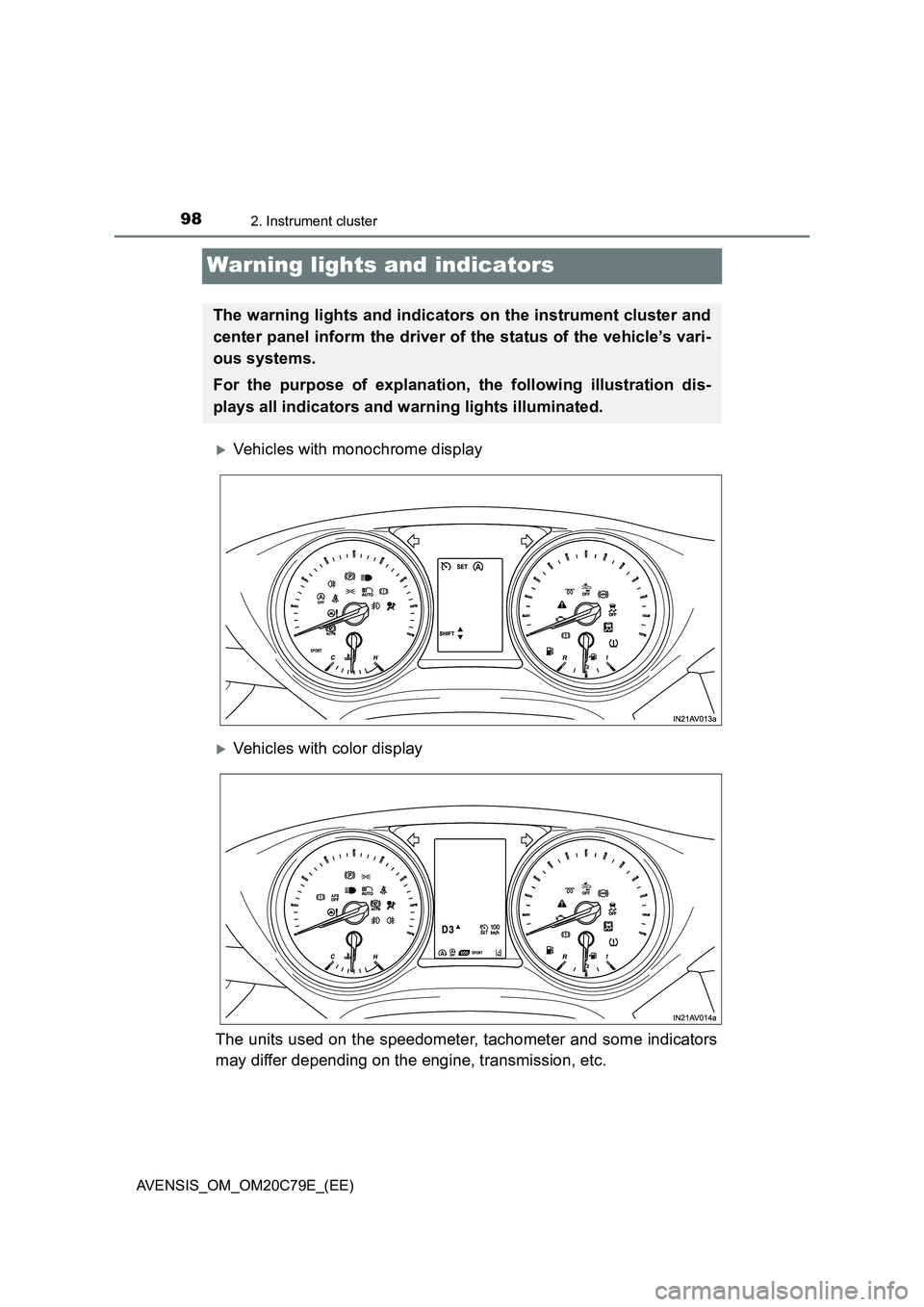
Vehicles with monochrome display
Vehicles with color display
The units used on the speedometer, tachometer and some indicators
may differ depending on the engine, transmission, etc.
The warning lights and indicators on the instrument cluster and
center panel inform the driver of the status of the vehicle’s vari-
ous systems.
For the purpose of explanation, the following illustration dis-
plays all indicators and warning lights illuminated.
Page 99 of 660
992. Instrument cluster
2
Instrument cluster
AVENSIS_OM_OM20C79E_(EE)
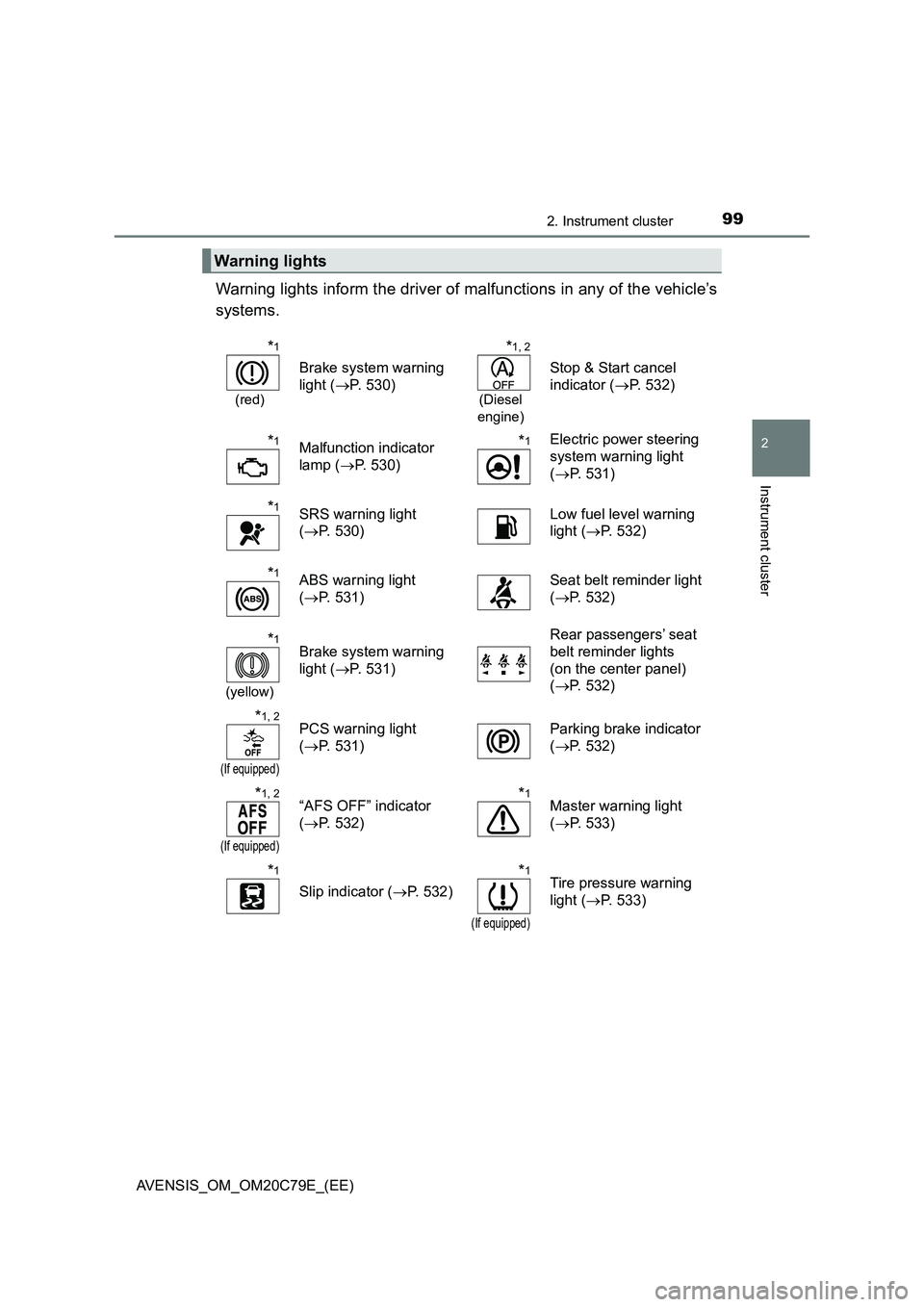
Warning lights inform the driver of malfunctions in any of the vehicle’s
systems.
Warning lights
*1
(red)
Brake system warning
light (P. 530)
*1, 2
(Diesel
engine)
Stop & Start cancel
indicator (P. 532)
*1Malfunction indicator
lamp (P. 530)*1Electric power steering
system warning light
(P. 531)
*1SRS warning light
(P. 530)Low fuel level warning
light (P. 532)
*1ABS warning light
(P. 531)Seat belt reminder light
(P. 532)
*1
(yellow)
Brake system warning
light (P. 531)Rear passengers’ seat
belt reminder lights
(on the center panel)
(P. 532)
*1, 2
(If equipped)
PCS warning light
(P. 531)Parking brake indicator
(P. 532)
*1, 2
(If equipped)
“AFS OFF” indicator
(P. 532)*1Master warning light
(P. 533)
*1
Slip indicator (P. 532)
*1
(If equipped)
Tire pressure warning
light (P. 533)
Page 100 of 660
1002. Instrument cluster
AVENSIS_OM_OM20C79E_(EE)
*1: These lights turn on when the engine switch is turned to the “ON” position
(vehicles without smart entry & start system) or IGNITION ON mode (vehi-
cles with smart entry & start system) to indicate that a system check is
being performed. They will turn off after the engine is started, or after a few
seconds. There may be a malfunction in a system if a light does not turn
on, or if the lights do not turn off. Have the vehicle inspected by any autho-
rized Toyota retailer or Toyota authorized repairer, or any reliable repairer.
*2: The light flashes to indicate a malfunction.
Page 101 of 660

1012. Instrument cluster
2
Instrument cluster
AVENSIS_OM_OM20C79E_(EE)
The indicators inform the driver of the operating state of the vehicle’s
various systems.
Indicators
Turn signal indicator
(P. 229)Security indicator (on
the center panel)
(P. 78)
Headlight high beam
indicator (P. 234)
(If equipped)
Cruise control indicator
(P. 289)
Tail light indicator
(P. 233)
*4
(If equipped)
Cruise control “SET”
indicator (P. 289)
(If equipped)
Front fog light indicator
(P. 241)*4
(If equipped)
Speed limiter indicator
(P. 292)
(If equipped)
Rear fog light indicator
(P. 241)*4
(If equipped)
LDA (Lane Departure
Alert) indicator
(P. 272)
(If equipped)
Automatic high beam
indicator (P. 278)*1, 3
(If equipped)
“AFS OFF” indicator
(P. 235)
*1, 2
Slip indicator (P. 307)
*1, 4
(If equipped)
Eco Driving Indicator
Light (P. 103)
*1, 3
VSC OFF indicator
(P. 307)
*1, 4
(Diesel
engine)
Stop & Start indicator
(P. 295)
(Diesel
engine)
Engine preheating
indicator (P. 209)
*1, 3, 5
(Diesel
engine)
Stop & Start cancel
indicator (P. 295)
Page 102 of 660

1022. Instrument cluster
AVENSIS_OM_OM20C79E_(EE)
*1: These lights turn on when the engine switch is turned to the “ON” position
(vehicles without smart entry & start system) or IGNITION ON mode (vehi-
cles with smart entry & start system) to indicate that a system check is
being performed. They will turn off after the engine is started, or after a few
seconds. There may be a malfunction in a system if a light does not turn
on, or if the lights do not turn off. Have the vehicle inspected by any autho-
rized Toyota retailer or Toyota authorized repairer, or any reliable repairer.
*2: The light flashes to indicate that the system is operating.
*3: The light turns on when the system is turned off.
*4: This light illuminates on the multi-information display.
*5: For vehicles with the color display, this light illuminates on the multi-infor-
mation display.
*1
(If equipped)
Auto P-off indicator
( P. 231)
*1, 3
(If equipped)
PCS warning light
( P. 262)
*4
(If equipped)
Shift position indicator
( P. 222)
*5
(If equipped)
“SPORT” indicator
( P. 220)
*4
(If equipped)
Shift position indicator
( P. 222)
Parking brake indicator
( P. 230)
*1, 4
(If equipped)
Gear Shift Indicator
( P. 226)(If equipped)
Low outside
temperature indicator
( P. 107)
“PASSENGER
AIRBAG” indicator
(on the center
panel) ( P. 5 2 )