Page 317 of 660
317
5Audio system
AVENSIS_OM_OM20C79E_(EE)5-1. Basic Operations
Audio system types ........... 318
Steering wheel audio
switches ........................... 321
AUX port/USB port ............ 322
5-2. Using the audio system
Optimal use of the audio
system ............................. 323
5-3. Using the radio
Radio operation ................. 325
5-4. Playing an audio CD and
MP3/WMA discs
CD player operation........... 331
5-5. Using an external device
Listening to an iPod ........... 342
Listening USB memory
device .............................. 351
Using the AUX port ............ 3595-6. Using Bluetooth
® devices
Bluetooth® audio/phone..... 360
Using the steering
wheel switches ................ 366
Registering a Bluetooth
®
device .............................. 367
5-7. “SETUP” menu
Using the “SETUP” menu
(“Bluetooth
*” menu)......... 368
Using the “SETUP” menu
(“TEL” menu) ................... 371
5-8. Bluetooth
® Audio
Operating a Bluetooth®
enabled portable
player ............................... 374
5-9. Bluetooth
® Phone
Making a phone call ........... 378
Receiving a phone call....... 380
Speaking on the phone ...... 381
5-10. Bluetooth
®
Bluetooth®......................... 383
*: Bluetooth is a registered trademark of Bluetooth SIG, Inc.
Page 320 of 660
3205-1. Basic Operations
AVENSIS_OM_OM20C79E_(EE)
■Using cellular phones
Interference may be heard through the audio system’s speakers if a cellular
phone is being used inside or close to the vehicle while the audio system is
operating.
WARNING
■ Certification for the CD player
This product is a class I laser product.
● Do not open the cover of the player or attempt to repair the unit by your-
self.
Refer servicing to qualified personnel.
● Laser power: No hazardous
NOTICE
■To prevent battery discharge
Do not leave the audio system on longer than necessary when the engine is
stopped.
■ To avoid damaging the audio system
Take care not to spill drinks or other fluids over the audio system.
Page 347 of 660
3475-5. Using an external device
5
Audio system
AVENSIS_OM_OM20C79E_(EE)
Press the tune/scroll knob (type A and B) or the “TEXT” button (type
C).
Track title, Artist name and Album title are shown on the display.
To return to the previous display, press the knob or the back button (type A
and B), or the “TEXT” button or [BACK] (type C).
■ About iPod
● “Made for iPod” and “Made for iPhone” mean that an electronic accessory
has been designed to connect specifically to iPod, or iPhone, respectively,
and has been certified by the developer to meet Apple performance stan-
dards.
● Apple is not responsible for the operation of this device or its compliance
with safety and regulatory standards. Please note that the use of this acces-
sory with iPod or iPhone may affect wireless performance.
● iPhone, iPod, iPod classic, iPod nano, iPod shuffle, and iPod touch are
trademarks of Apple Inc., registered in the U.S. and other countries.
■ iPod functions
● When an iPod is connected and the audio source is changed to iPod mode,
the iPod will resume play from the same point in which it was last used.
● Depending on the iPod that is connected to the system, certain functions
may not be available. Disconnecting the device and reconnecting it once
again may resolve some malfunctions.
● While connected to the system, the iPod cannot be operated with its own
controls. It is necessary to use the controls of the vehicle’s audio system
instead.
■ iPod problems
To resolve most problems encountered when using your iPod, disconnect
your iPod from the vehicle iPod connection and reset it.
For instructions on how to reset your iPod, refer to your iPod Owner’s Man-
ual.
Switching the display
Page 349 of 660
3495-5. Using an external device
5
Audio system
AVENSIS_OM_OM20C79E_(EE)■Compatible models
The following iPod
®, iPod nano®, iPod classic®, iPod touch® and iPhone®
devices can be used with this system.
●Made for
• iPod touch (4th generation)
• iPod touch (3rd generation)
• iPod touch (Late 2009)
• iPod touch (2nd generation)
• iPod touch (1st generation)
• iPod classic (Late 2009)
• iPod classic (2nd generation)
• iPod classic (1st generation)
• iPod (5th generation)
• iPod nano (6th generation)
• iPod nano (5th generation)
• iPod nano (4th generation)
• iPod nano (3rd generation)
• iPod nano (2nd generation)
• iPod nano (1st generation)
• iPhone 4
• iPhone 3GS
• iPhone 3G
• iPhone
Depending on differences between models or software versions etc., some
models might be incompatible with this system.
Items related to standards and limitations are as follows:
●Maximum number of lists in device: 9999
●Maximum number of songs in device: 65535
●Maximum number of songs per list: 65535
Page 360 of 660
3605-6. Using Bluetooth® devices
AVENSIS_OM_OM20C79E_(EE)
Bluetooth® audio/phone
◆Bluetooth® audio
The Bluetooth
® audio system enables you to enjoy music played on
a portable digital audio player (portable player) from the vehicle
speakers via wireless communication.
This audio system supports Bluetooth
®, a wireless data system
capable of playing portable audio music without cables. If your por-
table player does not support Bluetooth
®, the Bluetooth® audio sys-
tem will not function.
◆Bluetooth® phone (hands-free phone system)
This system supports Bluetooth
®, which allows you to make or
receive calls without using cables to connect a cellular phone and
the system, and without operating the cellular phone.
: If equipped
The following can be performed using Bluetooth® wireless com-
munication:
Page 361 of 660
3615-6. Using Bluetooth® devices
5
Audio system
AVENSIS_OM_OM20C79E_(EE)
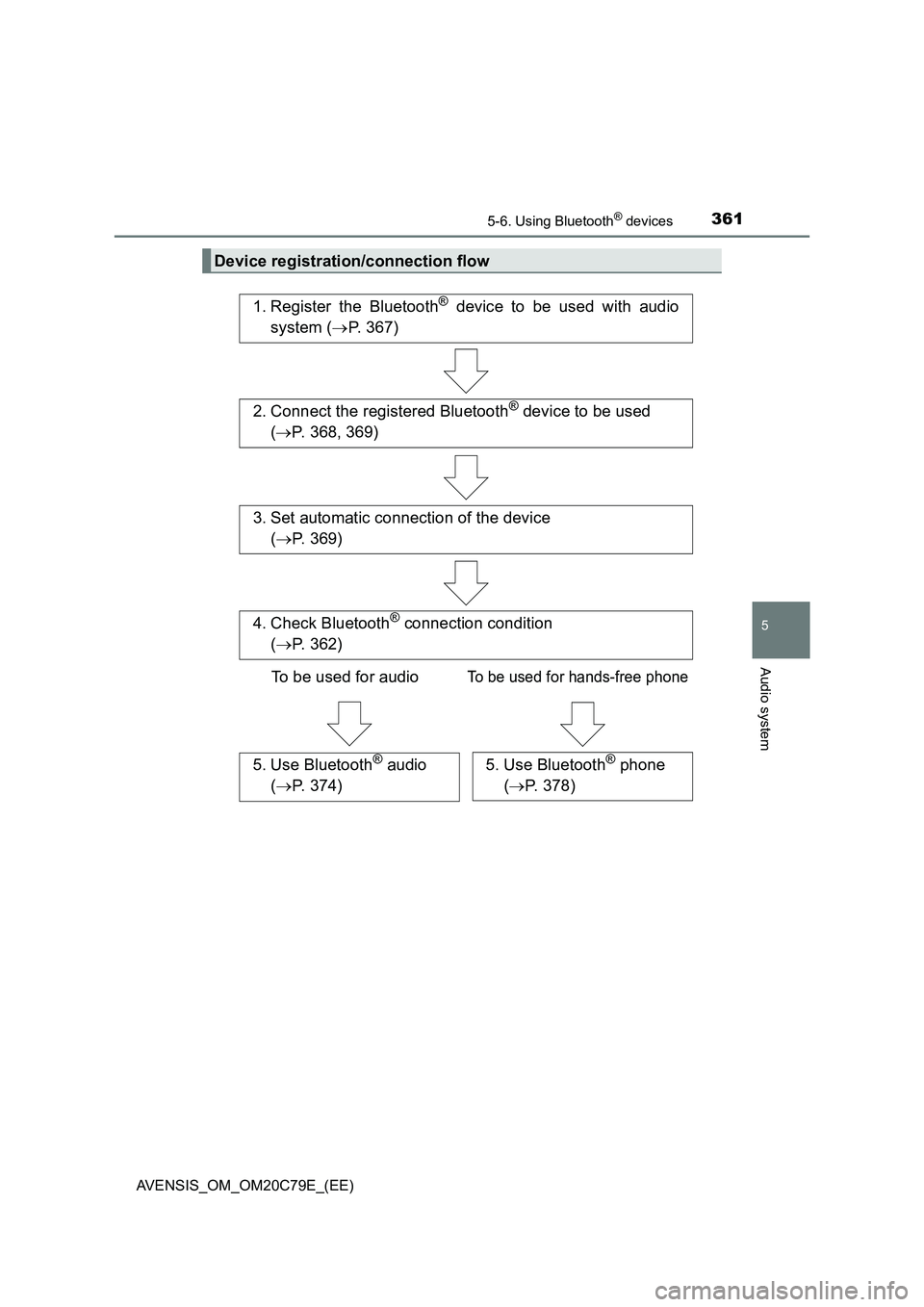
Device registration/connection flow
1. Register the Bluetooth® device to be used with audio
system (P. 367)
2. Connect the registered Bluetooth® device to be used
(P. 368, 369)
5. Use Bluetooth® audio
(P. 374)5. Use Bluetooth® phone
(P. 378)
3. Set automatic connection of the device
(P. 369)
4. Check Bluetooth® connection condition
(P. 362)
To be used for audio
To be used for hands-free phone
Page 362 of 660
3625-6. Using Bluetooth® devices
AVENSIS_OM_OM20C79E_(EE)
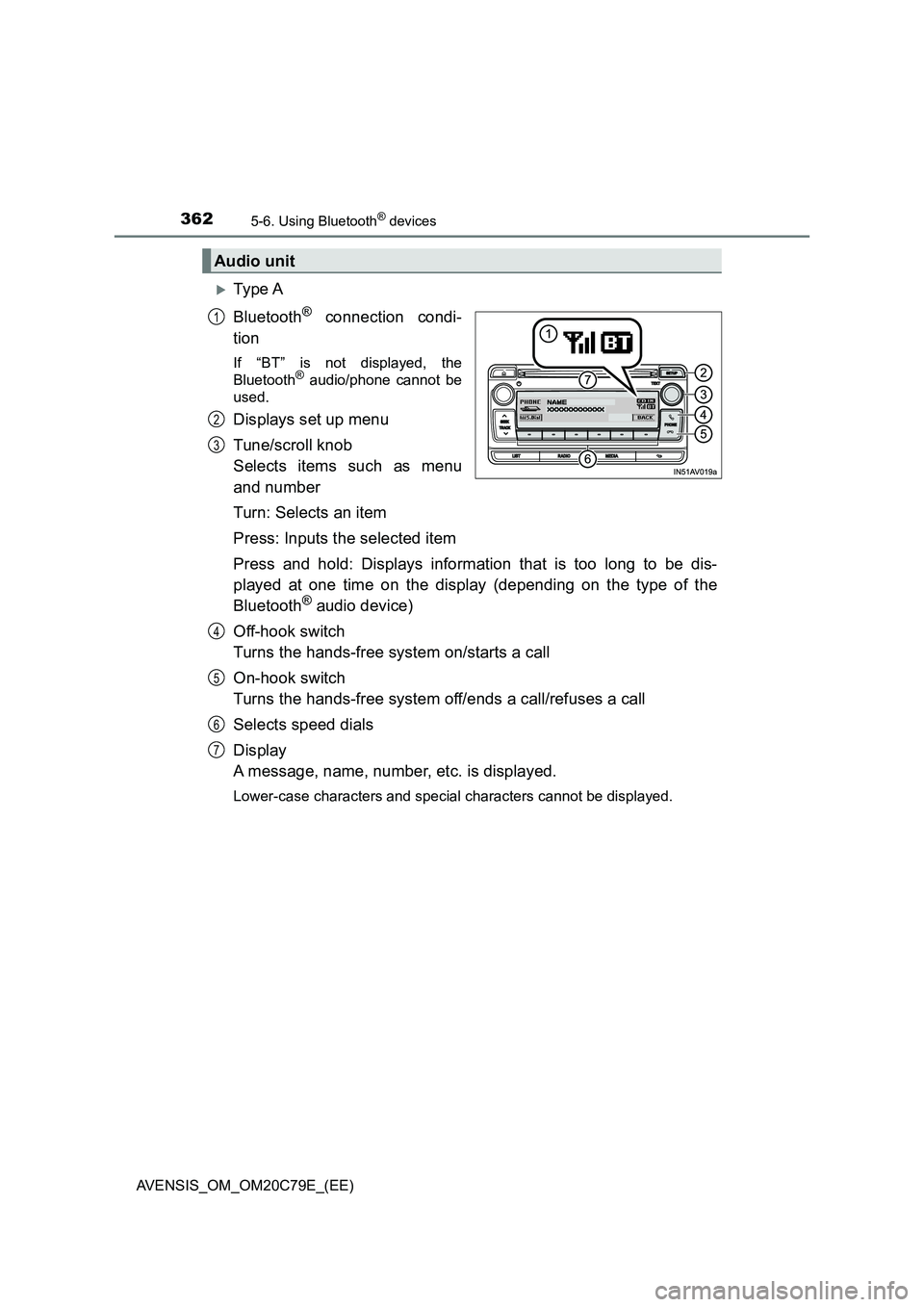
Ty pe A
Bluetooth
® connection condi-
tion
If “BT” is not displayed, the
Bluetooth® audio/phone cannot be
used.
Displays set up menu
Tune/scroll knob
Selects items such as menu
and number
Turn: Selects an item
Press: Inputs the selected item
Press and hold: Displays information that is too long to be dis-
played at one time on the display (depending on the type of the
Bluetooth
® audio device)
Off-hook switch
Turns the hands-free system on/starts a call
On-hook switch
Turns the hands-free system off/ends a call/refuses a call
Selects speed dials
Display
A message, name, number, etc. is displayed.
Lower-case characters and special characters cannot be displayed.
Audio unit
1
2
3
4
5
6
7
Page 363 of 660
3635-6. Using Bluetooth® devices
5
Audio system
AVENSIS_OM_OM20C79E_(EE)
Ty pe B
Bluetooth
® connection condi-
tion
If “BT” is not displayed, the
Bluetooth® audio/phone cannot be
used.
Displays set up menu
Tune/scroll knob
Selects items such as menu
and number
Turn: Selects an item
Press: Inputs the selected item
Off-hook switch
Turns the hands-free system on/starts a call
On-hook switch
Turns the hands-free system off/ends a call/refuses a call
Press and hold: Displays information that is too long to be dis-
played at one time on the display (depending on the type of the
Bluetooth
® audio device)
Selects speed dials
Display
A message, name, number, etc. is displayed.
Lower-case characters and special characters cannot be displayed.
1
2
3
Microphone
4
5
6
7
8