Page 184 of 660
1843-5. Opening and closing the windows
AVENSIS_OM_OM20C79E_(EE)
If you release the switch while the window is moving, start again from the
beginning. If the window continues to close but then re-open slightly even
after performing the above procedure correctly, have the vehicle inspected by
any authorized Toyota retailer or Toyota authorized repairer, or any reliable
repairer.
WARNING
Observe the following precautions.
Failing to do so may result in death or serious injury.
■ When closing the windows
● The driver is responsible for all the power window operations, including the
operation for the passengers. In order to prevent accidental operation,
especially by a child, do not let a child operate the power windows. It is
possible for children and other passengers to have body parts caught in
the power window. Also, when riding with a child, it is recommended to use
the window lock switch. ( P. 182)
● Check to make sure that all passengers do not have any part of their body
in a position where it could be caught when a window is being operated.
● When exiting the vehicle, turn the engine switch to the “LOCK” position
(vehicles without smart entry & start system) or off (vehicles with smart
entry & start system), carry the key and exit the vehicle along with the
child. There may be accidental operation, due to mischief, etc., that may
possibly lead to an accident.
■ Jam protection function
● Never use any part of your body to intentionally activate the jam protection
function.
● The jam protection function may not work if something gets caught just
before the window fully closes.
Page 191 of 660
1914-1. Before driving
4
Driving
AVENSIS_OM_OM20C79E_(EE)
WARNING
Observe the following precautions.
Failure to do so may result in death or serious injury.
■ When driving the vehicle
● Do not drive if you are unfamiliar with the location of the brake and accel-
erator pedals to avoid depressing the wrong pedal.
• Accidentally depressing the accelerator pedal instead of the brake
pedal will result in sudden acceleration that may lead to an accident.
• When backing up, you may twist your body around, leading to a diffi-
culty in operating the pedals. Make sure to operate the pedals properly.
• Make sure to keep a correct driving posture even when moving the
vehicle only slightly. This allows you to depress the brake and accelera-
tor pedals properly.
• Depress the brake pedal using your right foot. Depressing the brake
pedal using your left foot may delay response in an emergency, result-
ing in an accident.
● Do not drive the vehicle over or stop the vehicle near flammable materials.
The exhaust system and exhaust gases can be extremely hot. These hot
parts may cause a fire if there is any flammable material nearby.
● During normal driving, do not turn off the engine. Turning the engine off
while driving will not cause loss of steering or braking control, but the
power assist to these systems will be lost. This will make it more difficult to
steer and brake, so you should pull over and stop the vehicle as soon as it
is safe to do so.
However, in the event of an emergency, such as if it becomes impossible
to stop the vehicle in the normal way: P. 519
● Use engine braking (downshift) to maintain a safe speed when driving
down a steep hill.
Using the brakes continuously may cause the brakes to overheat and lose
effectiveness. ( P. 2 2 0 )
● Do not adjust the positions of the steering wheel, the seat, or the inside or
outside rear view mirrors while driving.
Doing so may result in a loss of vehicle control that can cause accidents.
● Always check that all passengers’ arms, heads or other parts of their body
are not outside the vehicle.
Page 209 of 660
209
4
4-2. Driving procedures
Driving
AVENSIS_OM_OM20C79E_(EE)
Engine (ignition) switch (vehicles without
smart entry & start system)
Multidrive
Push the parking brake switch to check that the parking brake is
set. (P. 230)
Parking brake indicator will come on.
Check that the shift lever is set in P.
Firmly depress the brake pedal.
Turn the engine switch to the “START” position to start the engine.
Manual transmission (gasoline engine)
Push the parking brake switch to check that the parking brake is
set. (P. 230)
Parking brake indicator will come on.
Check that the shift lever is set in N.
Firmly depress the clutch pedal.
Turn the engine switch to the “START” position to start the engine.
Manual transmission (diesel engine)
Push the parking brake switch to check that the parking brake is
set. (P. 230)
Parking brake indicator will come on.
Check that the shift lever is set in N.
Firmly depress the clutch pedal.
Turn the engine switch to the “ON” position.
indicator light turns on.
After indicator light goes out, turn the engine switch to the
“START” position to start the engine.
Starting the engine
1
2
3
4
1
2
3
4
1
2
3
4
5
Page 213 of 660
2134-2. Driving procedures
4
Driving
AVENSIS_OM_OM20C79E_(EE)
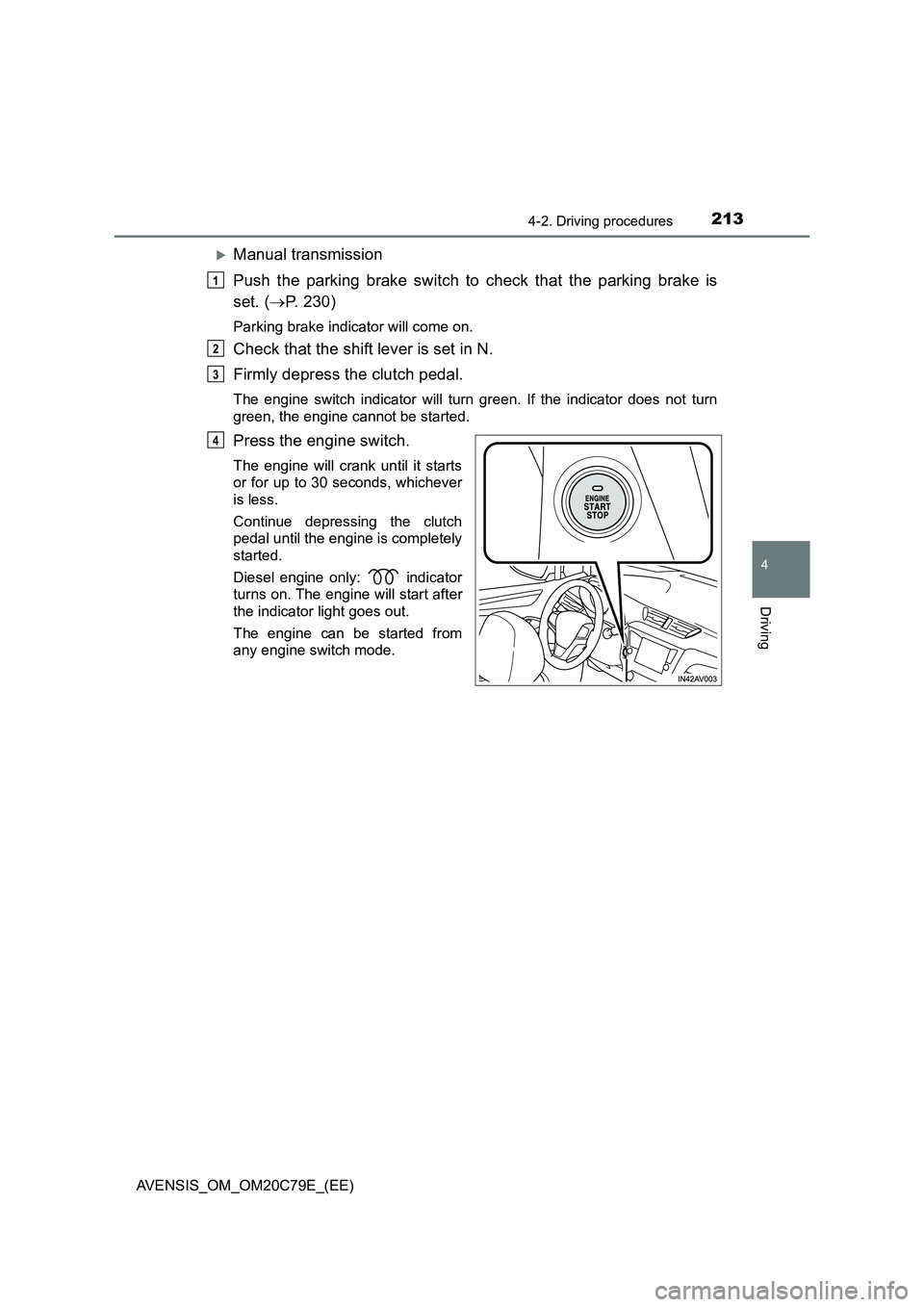
Manual transmission
Push the parking brake switch to check that the parking brake is
set. (P. 230)
Parking brake indicator will come on.
Check that the shift lever is set in N.
Firmly depress the clutch pedal.
The engine switch indicator will turn green. If the indicator does not turn
green, the engine cannot be started.
Press the engine switch.
The engine will crank until it starts
or for up to 30 seconds, whichever
is less.
Continue depressing the clutch
pedal until the engine is completely
started.
Diesel engine only: indicator
turns on. The engine will start after
the indicator light goes out.
The engine can be started from
any engine switch mode.
1
2
3
4
Page 218 of 660
2184-2. Driving procedures
AVENSIS_OM_OM20C79E_(EE)
NOTICE
■To prevent battery discharge
● Do not leave the engine switch in ACCESSORY or IGNITION ON mode
for long periods of time without the engine running.
● If the indicator on the engine switch is illuminated, the engine switch is not
off. When exiting the vehicle, always check that the engine switch is off.
● On vehicles with Multidrive, do not stop the engine when the shift lever is
in a position other than P. If the engine is stopped in another shift lever
position, the engine switch will not be turned off but instead be turned to
ACCESSORY mode. If the vehicle is left in ACCESSORY mode, battery
discharge may occur.
■ When starting the engine
● Do not race a cold engine.
● If the engine becomes difficult to start or stalls frequently, have your vehi-
cle checked by any authorized Toyota retailer or Toyota authorized
repairer, or any reliable repairer immediately.
■ Symptoms indicating a malfunction with the engine switch
If the engine switch seems to be operating somewhat differently than usual,
such as the switch sticking slightly, there may be a malfunction. Contact any
authorized Toyota retailer or Toyota authorized repairer, or any reliable
repairer immediately.
Page 229 of 660
229
4
4-2. Driving procedures
Driving
AVENSIS_OM_OM20C79E_(EE)
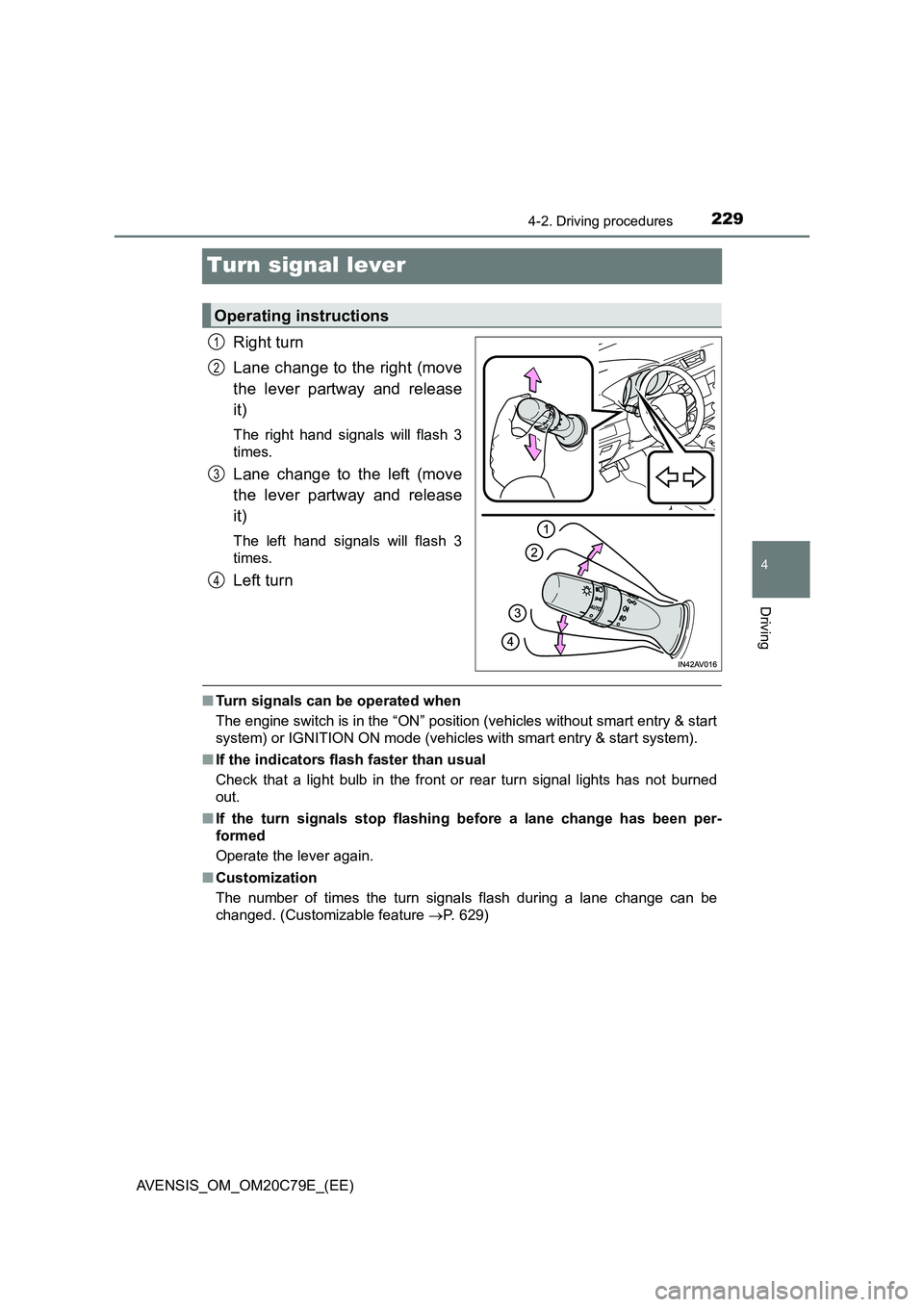
Turn signal lever
Right turn
Lane change to the right (move
the lever partway and release
it)
The right hand signals will flash 3
times.
Lane change to the left (move
the lever partway and release
it)
The left hand signals will flash 3
times.
Left turn
■ Turn signals can be operated when
The engine switch is in the “ON” position (vehicles without smart entry & start
system) or IGNITION ON mode (vehicles with smart entry & start system).
■ If the indicators flash faster than usual
Check that a light bulb in the front or rear turn signal lights has not burned
out.
■ If the turn signals stop flashing before a lane change has been per-
formed
Operate the lever again.
■ Customization
The number of times the turn signals flash during a lane change can be
changed. (Customizable feature P. 629)
Operating instructions
1
2
3
4
Page 245 of 660
2454-3. Operating the lights and wipers
4
Driving
AVENSIS_OM_OM20C79E_(EE)
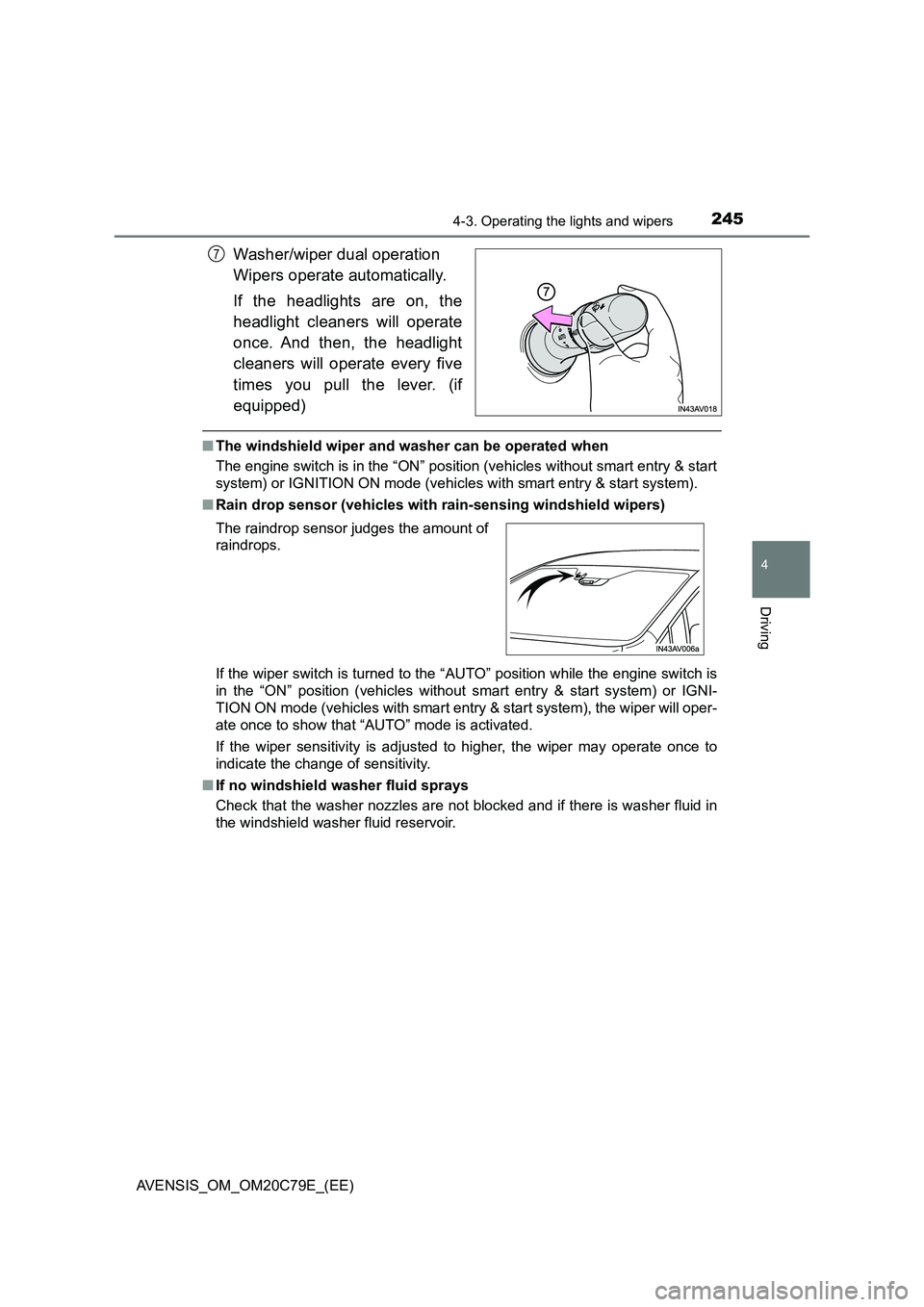
Washer/wiper dual operation
Wipers operate automatically.
If the headlights are on, the
headlight cleaners will operate
once. And then, the headlight
cleaners will operate every five
times you pull the lever. (if
equipped)
■The windshield wiper and washer can be operated when
The engine switch is in the “ON” position (vehicles without smart entry & start
system) or IGNITION ON mode (vehicles with smart entry & start system).
■Rain drop sensor (vehicles with rain-sensing windshield wipers)
If the wiper switch is turned to the “AUTO” position while the engine switch is
in the “ON” position (vehicles without smart entry & start system) or IGNI-
TION ON mode (vehicles with smart entry & start system), the wiper will oper-
ate once to show that “AUTO” mode is activated.
If the wiper sensitivity is adjusted to higher, the wiper may operate once to
indicate the change of sensitivity.
■If no windshield washer fluid sprays
Check that the washer nozzles are not blocked and if there is washer fluid in
the windshield washer fluid reservoir.
7
The raindrop sensor judges the amount of
raindrops.
Page 305 of 660

3054-6. Using the driving support systems
4
Driving
AVENSIS_OM_OM20C79E_(EE)
■ If the Stop & Start cancel indicator continues to flash
The Stop & Start system may be malfunctioning. Contact any authorized
Toyota retailer or Toyota authorized repairer, or any reliable repairer.
WARNING
■ When the Stop & Start system is operating
● Keep the shift lever in N and apply the brake pedal or parking brake for
safety while the engine is stopped due to the Stop & Start system (while
the Stop & Start indicator is on).
Unexpected accidents may occur due to the automatic engine start func-
tion.
● Do not leave the vehicle while the engine is stopped due to the Stop &
Start system (while the Stop & Start indicator is on).
Unexpected accidents may occur due to the automatic engine start func-
tion.
● Ensure that the engine is not stopped by the Stop & Start system while the
vehicle is in a poorly ventilated area. The engine may restart due to the
automatic engine start function, causing exhaust gases to collect and
enter the vehicle and resulting in death or a serious health hazard.
NOTICE
■ To ensure the system operates correctly
If any one of the following situations occurs, the Stop & Start system may
not operate correctly, thus, please have your vehicle checked by any autho-
rized Toyota retailer or Toyota authorized repairer, or any reliable repairer.
● While the driver’s seat belt is fastened, the seat belt reminder light flashes.
● Even when the driver’s seat belt is not fastened, the seat belt reminder
light remains off.
● Even when the driver’s door is closed, the open door warning is displayed
on the multi-information display, or the interior light comes on when the
interior light switch is in the door position.
● Even when the driver’s door is opened, the open door warning is not dis-
played on the multi-information display, or the interior light does not come
on when the interior light switch is in the door position.