2018 TESLA MODEL S ABS
[x] Cancel search: ABSPage 49 of 195
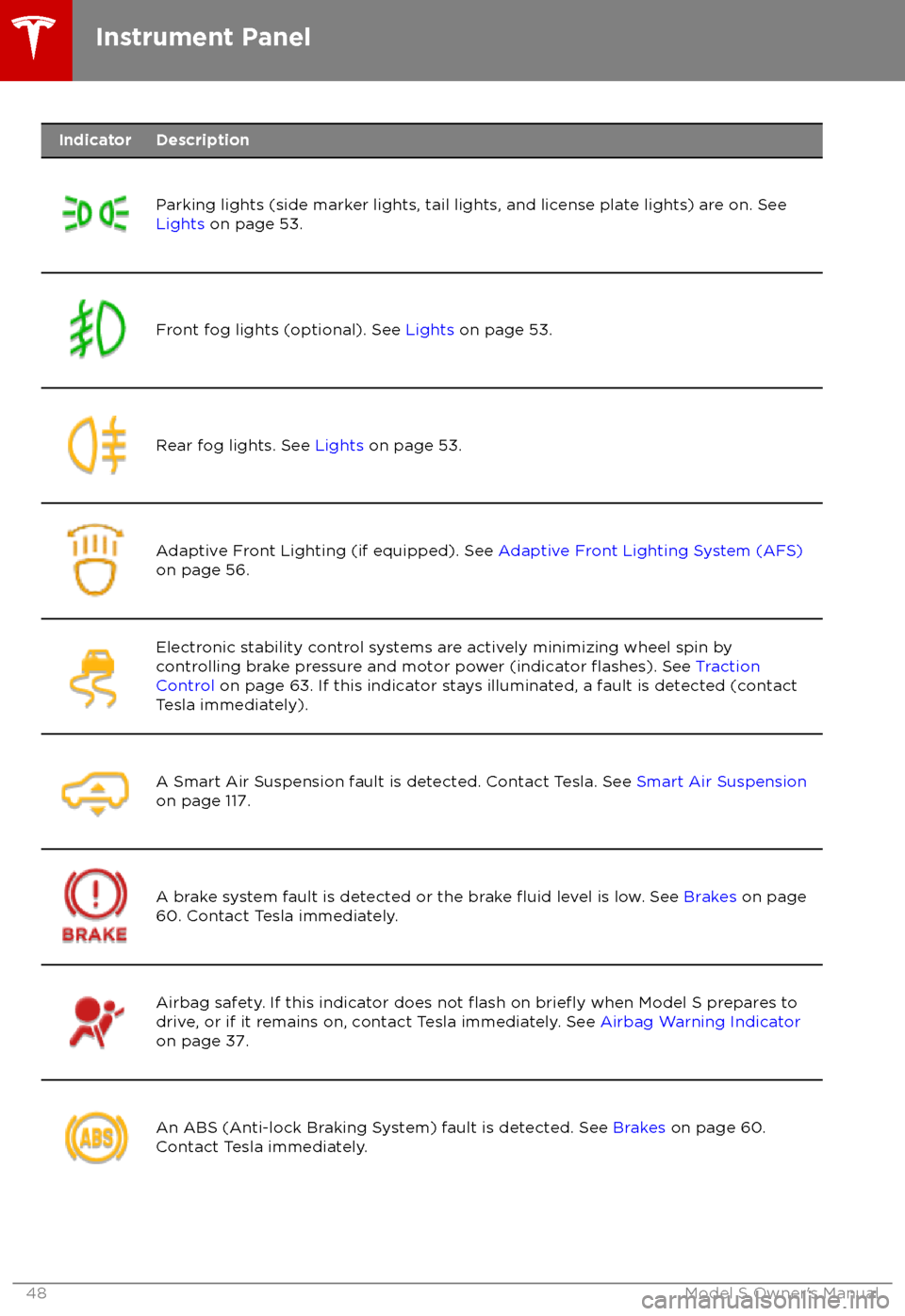
IndicatorDescription
Parking lights (side marker lights, tail lights, and license plate lights) are on. See
Lights on page 53.Front fog lights (optional). See Lights on page 53.Rear fog lights. See Lights on page 53.Adaptive Front Lighting (if equipped). See Adaptive Front Lighting System (AFS)
on page 56.Electronic stability control systems are actively minimizing wheel spin by
controlling brake pressure and motor power (indicator flashes). See Traction
Control on page 63. If this indicator stays illuminated, a fault is detected (contact
Tesla immediately).A Smart Air Suspension fault is detected. Contact Tesla. See Smart Air Suspension
on page 117.A brake system fault is detected or the brake fluid level is low. See Brakes on page
60. Contact Tesla immediately.Airbag safety. If this indicator does not flash on briefly when Model S prepares to
drive, or if it remains on, contact Tesla immediately. See Airbag Warning Indicator
on page 37.An ABS (Anti-lock Braking System) fault is detected. See Brakes on page 60.
Contact Tesla immediately.Instrument Panel
48Model S Owner
Page 61 of 195

Braking SystemsWarning: Properly functioning braking
systems are critical to ensure safety. If you experience a problem with the brake
pedal, brake caliper, or any component of
a Model S braking system, contact Tesla
immediately.
Model S has an anti-lock braking system
(ABS) that prevents the wheels from locking
when you apply maximum brake pressure. This
improves steering control during heavy
braking in most road conditions.
During emergency braking conditions, the
ABS constantly monitors the speed of each
wheel and varies the brake pressure according
to the grip available.
The alteration of brake pressure can be felt as
a pulsing sensation through the brake pedal.
This demonstrates that the ABS is operating
and is not a cause for concern. Keep
firm and
steady pressure on the brake pedal while
experiencing the pulsing.
The ABS indicator flashes briefly on
the instrument panel when you firststart Model S. If this indicator lights
up at any other time, an ABS fault
has occurred and the ABS is not
operating. Contact Tesla. The braking
system remains fully operational and
is not
affected by an ABS failure.
However, braking distances may
increase.
If the instrument panel displays this
indicator at any time other than
displaying
briefly when you first start
Model S, a brake system fault is
detected or the brake
fluid level is
low. Contact Tesla immediately.
Emergency Braking
In an emergency, fully press the brake pedal and maintain
firm pressure, even on low
traction surfaces. The ABS varies the braking
pressure to each wheel according to the
amount of traction available. This prevents
wheels from locking and ensures that you stop
as safely as possible.
Warning: Do not pump the brake pedal.
Doing so interrupts operation of the ABS
and can increase braking distance.Warning: Always maintain a safe distance
from the vehicle in front of you and beaware of hazardous driving conditions.
While the ABS can improve stopping
distance, it cannot overcome the laws of physics. It also does not prevent the
danger of hydroplaning (where a layer of
water prevents direct contact between the tires and the road).
Automatic Emergency Braking automatically
applies full braking in situations where a
collision is considered imminent (see Automatic Emergency Braking on page 94).
Warning: Automatic Emergency Braking
is not designed to prevent a collision. At best, it can minimize the impact of a
frontal collision by attempting to reduce
your driving speed. Depending on Automatic Emergency Braking to avoid a
collision can result in serious injury or death.
Brake Wear
Model S brake pads are equipped with wear
indicators. A wear indicator is a thin metal
strip attached to the brake pad that squeals as
it rubs against the rotor when the pad wears
down. This squealing sound indicates that the
brake pads have reached the end of their service life and require replacement. To
replace the brake pads, contact Tesla Service.
Brakes must be periodically inspected visually by removing the tire and wheel. For detailed
specifications and service limits for rotors and
brake pads, see Brakes on page 170.
Warning:
Neglecting to replace worn
brake pads damages the braking system
and can result in a braking hazard.
Regenerative Braking
Whenever Model S is moving and your foot is
off the accelerator, regenerative braking slows
down Model S and feeds any surplus energy
back to the Battery.
By anticipating your stops and reducing or
removing pressure from the accelerator pedal
to slow down, you can take advantage of regenerative braking to increase driving range.
Of course, this is no substitute for regular
braking when needed for safety.
Note: If regenerative braking is aggressively
slowing Model S (such as when your foot is
completely
off the accelerator pedal at
highway speeds), the brake lights turn on to
alert others that you are slowing down.
Brakes
60Model S Owner
Page 171 of 195

Brakes
Type
4-wheel anti-lock braking system (ABS)
with Electronic Brake Force Distribution,
Integrated Advanced Stability Control and
Electronic Accelerator pedal actuated
regenerative braking systemCalipersFour piston fixedRotor Diameters (ventilated)Front: 13.98”/355 mm
Rear: 14.37”/365 mmFront Rotor thicknessNew: 1.26”/32 mm
Service limit: 1.18”/30 mmRear Rotor thicknessNew: 1.10”/28 mm
Service limit: 1.02”/26 mmFront Brake Pad Thickness (excluding back plate)0.393”/10 mmRear Brake Pad Thickness (excluding back plate)Base: 0.354”/9 mmParking brakeElectrically actuated parking brake
calipers
Suspension
FrontIndependent, double wishbone, air spring
or coil spring/telescopic damper, sway barRearIndependent, multi-link, air spring or coil
spring/telescopic damper, sway bar (air
suspension vehicles only)
Battery - 12V
Rating33 amp hour or higherVoltage and Polarity12V negative (-) ground
Battery - High Voltage
TypeLiquid-cooled lithium ion (Li-ion)Rating60, 70, 75, 85, 90, or 100 kWh (at
beginning of life)Nominal Voltage - 85, 90, and 100 kWh
Nominal Voltage - 60, 70, and 75 kWh350 V DC
300 V DCTemperature RangeDo not expose Model S to ambient
temperatures above 60
Page 189 of 195

AABS (Anti-lock Braking System) 60
absolute speed limit 97
Acceleration (dual-motor) 104
Acceleration settings 67
access panel, removing 159accessoriesplugging into power socket 122
adaptive headlights 56
air circulation 112
air conditioning 111
air distribution 112
air
filter 115
air suspension 118
air vents 115
airbag, front passenger, disabling 37
airbags 35
alarm 132
all-season tires 151
always connected, setting 70
anti-lock braking (ABS) 60
audioplaying files 119
steering wheel buttons 41
volume control 119
Auto High Beam 56
Auto Lane Change 85
auto-raising suspension 117
automatic emergency braking 94
Autopark 87
Autopilot components 73
Autosteer 82
average range 70
B backup camera 72
battery (12V)complete discharge 140specifications 170Battery (high voltage)care of 140
coolant 159
specifications 170
temperature limits 140
battery (key), replacing 5
blind spot warning 91
Bluetoothdevices, playing audio files from 122
general information 124
phone, pairing and using 124
body repairs 163
body touch up 156
brake
fluid replacement 147
brakesautomatic in emergencies 94fluid level 160brakes (continued)overview of 60specifications 170
brightness of displays 107
C
Cabin Overheat Protection setting 107
cabin temperature control 111
Calendar app 131
camera (rear view) 72
cameras (autopilot) 73
car cover 156
car status, displaying 41, 42
car washes 154
cargo area 11
cargo volume 168
carpets, cleaning 155
CE
certifications 185
CHAdeMO 139
chains 151
change of ownership 110
charge port 142
charge port light 143
chargingcharge settings 144
components and equipment 138
instructions 142
public charging stations 139
scheduling 144
status of 145
charging locations, finding 127
child protectiondisabling liftgate and rear door handles 7
disabling rear window switches 9child seatscleaning 155
disabling front passenger airbag 37
installing and using 24
Tesla built-in rear facing 31
Chill acceleration 67
cleaning 154
climate controls 111
Climate Timer 114
Cold Weather controls 104
collision avoidance assist 93
console12V power socket 122
cup holders 17
USB ports 122
consumption chart 70
contact informationroadside assistance 177coolantBattery, checking level of 159
Battery, replacement interval 147
copyrights 182
Creep 104
Index
188Model S Owner