2018 SUBARU WRX instrument panel
[x] Cancel search: instrument panelPage 15 of 33

13
Windshield Wipers
To turn on the wipers, press the wiper control lever down one level for intermittent,
two levels for low, or three levels for high speed. Return the lever to the “OFF”
position to stop the wipers. For a single wipe, move the lever up. To spray washer
fluid, pull and hold the lever toward you.
Daytime Running Lights
Daytime running lights are standard on your vehicle. Only a reduced brightness
high beam will be automatically turned on when the engine has started, the parking
brake is fully released and the light switch is in the “OFF” or “
” position. The
brightness of the illumination of the high beam headlights is reduced by the daytime
running light system. You must always switch on your headlights when it is dark
outside by turning the light switch to the “
” position.
1
2
3
INT.
LOW
HIGH
OFF
Controls
3033672_18b_WRX_WRX_STI_QG_051617.indd 135/16/17 2:30 PM
Getting
StartedInstrument
Panel Gauges
Personalize ControlsWhile
Operating Safety/In Case
of Emergency Additional
Information
Page 17 of 33

15
Dual Zone Automatic Climate
Control System
(WRX STI only)
1. Automatic On and Off
This system automatically controls
outlet air temperature, fan speed,
air flow distribution, air inlet control,
and air conditioner compressor
operation. Press “AUTO” to activate.
Press “OFF” to turn off the system.
2. Temperature Control Dial Rotate the dial clockwise to
increase the temperature or
rotate the dial counterclockwise
to decrease the temperature and
maintain a comfortable climate
within the driver and passenger
compartment. The temperature is
displayed digitally on the screen.
Separate temperature settings
can be adjusted for the driver’s
side and passenger’s side.
Operation in Manual Mode
3. Recirculated/Outside Air Button
Press the air inlet selection button to
prevent outside air from being drawn
into the passenger compartment.
Press the button again to allow
outside air into the compartment.
TO PREVENT WINDSHIELD
FOGGING, DO NOT REMAIN IN
THE RECIRCULATED MODE FOR
AN EXTENDED PERIOD OF TIME. 4. Fan Speed Control Knob
Rotate the fan speed control
knob to select one of seven
different fan speed positions.
5. Air Flow Mode Selection Button Press the “MODE” button to select
the desired air flow mode. The
selected air flow mode – either
ventilation, bi-level, heat or heat-
defrost – is shown on the display.
6. Dual Button Press the “DUAL” button to activate
or deactivate the dual mode. Dual
mode makes it possible to have
separate temperature settings for the
driver’s side and passenger’s side.
7. Air Conditioner Button Press the “A/C” button to activate
the air conditioning. Press it again
to turn off the air conditioning.
8. Defroster Button Press the button to defrost or
dehumidify the windshield and
front door windows.
9. Rear Window Defogger Button Press the button to turn on the
defogger. It will automatically shut off
after about 15 minutes. If the window
clears before that time, you can
press the button again to turn it off.
Located in the
multi-function
display; top
center of dash
18
3
2
6
9
7
5
4
Controls
3033672_18b_WRX_WRX_STI_QG_051617.indd 155/16/17 2:30 PM
Getting
StartedInstrument
Panel Gauges
Personalize ControlsWhile
Operating Safety/In Case
of Emergency Additional
Information
Page 19 of 33

17
Controls
Cruise Control
Increase Speed
Push up the “RES/SET” switch to the
“RES” side; hold until your vehicle
reaches the desired speed and release.
To increase speed using the accelerator
pedal, press the pedal until you reach
the desired speed. Push down the
“RES/SET” switch to the “SET” side
to set the speed. Decrease Speed
Push down the “RES/SET” switch to
the “SET” side; hold until your vehicle
slows to the desired speed and release.
To decrease the speed using the brake
pedal, press the pedal to release
cruise control temporarily. When the
speed decreases to the desired speed,
push down the “RES/SET” switch to
the “SET” side to set the speed.
To activate the cruise control, press
the “
” button. The indicator light
on the instrument panel will turn
on. To deactivate cruise control,
press the “
” button again.
Press the accelerator pedal
until your vehicle reaches
the desired speed. Push
the switch to the “SET”
side and release. Ease
off the accelerator pedal.
Your vehicle will maintain
the desired speed.
To cancel the cruise
control, push the brake
pedal or press the
“CANCEL” button.
If you have a manual
transmission, you can
push in the clutch pedal. To resume your
speed after canceling,
push the switch to
the “RES” side.
SI-DRIVE (WRX only;
if equipped):
Press S#/I for Sport
Sharp mode, S/I
for Sport mode, or
either button for
Intelligent mode.
3033672_18b_WRX_WRX_STI_QG_051617.indd 175/16/17 2:30 PM
Getting
StartedInstrument
Panel Gauges
Personalize ControlsWhile
Operating Safety/In Case
of Emergency Additional
Information
Page 20 of 33

18
Paddle Shift Control Switches (if equipped)
• Temporary use: Even when the selector is in the
“D” (Drive) position, you can temporarily shift the
gear by pulling the “+” or “–” paddle shift control
switch. The transmission will automatically
switch back to Normal Mode.
• When the selector lever is in Manual Mode,
shift to the next higher gear by pulling the “+” paddle shift cont\
rol switch on the steering
wheel. Pull the “–” paddle shift control switch to shift into the next lower gear.
Manual Shifting Operation
• Arrow-shaped lights in the center of the instrument panel show whether an u\
pshift is
possible and whether a downshift is possible.
While Operating
Instrument Panel Switches (lower left)
Please refer to your Owner’s Manual for details on these switches.
1. Traction Mode/Vehicle Dynamics Control OFF Switch
2. Trunk lid opener switch
1
2
3033672_18b_WRX_WRX_STI_QG_051617.indd 185/16/17 2:30 PM
Page 21 of 33
19
1
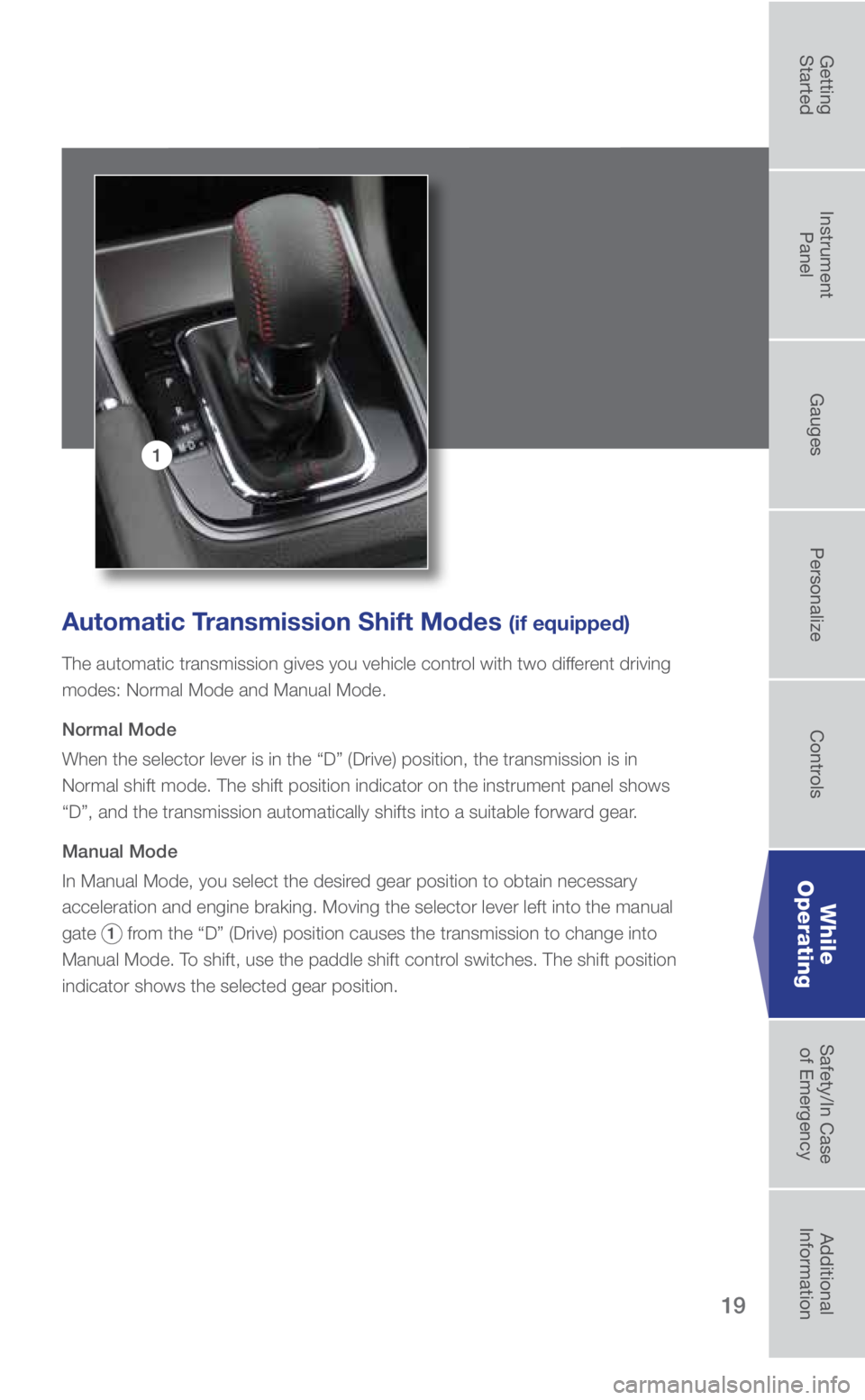
Automatic Transmission Shift Modes (if equipped)
The automatic transmission gives you vehicle control with two different driving
modes: Normal Mode and Manual Mode.
Normal Mode
When the selector lever is in the “D” (Drive) position, the tran\
smission is in
Normal shift mode. The shift position indicator on the instrument panel \
shows
“D”, and the transmission automatically shifts into a suitable for\
ward gear.
Manual Mode
In Manual Mode, you select the desired gear position to obtain necessary
acceleration and engine braking. Moving the selector lever left into the\
manual
gate
1 from the “D” (Drive) position causes the transmission to change in\
to
Manual Mode. To shift, use the paddle shift control switches. The shift position
indicator shows the selected gear position.
While
Operating
3033672_18b_WRX_WRX_STI_QG_051617.indd 195/16/17 2:30 PM
Getting
StartedInstrument
Panel Gauges
Personalize ControlsWhile
Operating Safety/In Case
of Emergency Additional
Information
Page 22 of 33

20
Auto Vehicle Hold Function
(if equipped)
The Auto Vehicle Hold function will
automatically keep the vehicle stopped
even after releasing the brake pedal
when the vehicle is stopped, such as at
traffic signals. To activate, press the Auto
Vehicle Hold switch. The Auto Vehicle
Hold ON indicator light on the instrument
panel will illuminate. To deactivate, press
the switch again. While the Auto Vehicle
Hold function is operating, the Auto
Vehicle Hold operation indicator light
on the instrument panel will illuminate.
Electronic Parking Brake
(if equipped)
To apply, push the brake pedal and pull
up the parking brake switch. The brake
system warning light on the instrument
panel and the indicator light on the
parking brake switch will illuminate.
To release, make sure all doors are
closed and your seatbelt is fastened,
then gently push the accelerator pedal.
Or, while the ignition switch is in the ON
position and the brake pedal is pushed
in, push down the parking brake switch.
While Operating
3033672_18b_WRX_WRX_STI_QG_051617.indd 205/16/17 2:30 PM
Page 23 of 33

21
6-Speed Manual Transmission
This manual transmission is a fully
synchromeshed 6-forward and 1-reverse
speed transmission. Before you can shift into
reverse gear, you must raise the slider ring
and hold it in that position. Only pull the slider
ring up when shifting into reverse gear.
REV Alarm System (WRX STI only)
The REV alarm system automatically issues a
warning using the REV indicator light whenever
the tachometer needle enters the red zone. This
feature can be turned on or off using the multi-
information display. The REV alarm level can be
set manually to an engine speed of your choosing
between 2,000 and 6,700 rpm using the multi-
information display. The multi-information display
is also used to select a warning alarm buzzer in
addition to the light. Please refer to your Owner’s
Manual for more detailed instructions on setting
the engine speed alarm level and selecting the
warning buzzer.
While
Operating
3033672_18b_WRX_WRX_STI_QG_051617.indd 215/16/17 2:30 PM
Getting
StartedInstrument
Panel Gauges
Personalize ControlsWhile
Operating Safety/In Case
of Emergency Additional
Information
Page 25 of 33

23
Driver Control Center Differential (DCCD)
(WRX STI only)
This electronically controlled system
adjusts the power-distribution ratio
between the front and rear wheels.
The system is designed to provide
optimum differential control for
improved vehicle cornering, stability,
and handling control to suit driving and
road surface conditions. The DCCD
can be operated automatically or
manually. When the system is in the
automatic mode, the “AUTO” indicator
light in the combination meter comes
on. The DCCD can be taken out of
“AUTO” mode and used manually by
pressing the “AUTO MANU” switch
located on the center console. Use the
DCCD control switch located on the
center console for manual operation. Pressing the “AUTO MANU” switch
again will return the system to “AUTO”
mode. When using the system
manually, if the control switch is set
closer to or at the “Lock” position,
the powertrain may make a vibration
or noise when the vehicle is in tight
turns at slow speeds (system binding).
In addition, if the rear differential
oil exceeds a certain temperature,
the DCCD will automatically cancel
the current torque-distribution ratio
setting and adopt its minimum ratio.
SI-Drive (WRX STI only)
Turn the selector toward S for Sport mode or toward S# for Sport Sharp mode.
Press down on the selector for Intelligent mode.
While
Operating
3033672_18b_WRX_WRX_STI_QG_051617.indd 235/16/17 2:31 PM
Getting
StartedInstrument
Panel Gauges
Personalize ControlsWhile
Operating Safety/In Case
of Emergency Additional
Information