2018 SUBARU WRX remote control
[x] Cancel search: remote controlPage 217 of 578

(222,1)
北米Model "A1700BE-B" EDITED: 2017/ 10/ 11
7. Return to the vehicle and firmly press,
hold for two seconds and release the
HomeLink button up to three times. At this
point programming is complete and your
device should operate when the HomeLink
button is pressed and released.
1) Status Indicators8. If status indicator arrows appear next
to the indicator light, please refer to
“Garage Door Two-Way Communication”
F3-81.
In the event that there are still program-
ming difficulties or questions, additional
HomeLink information and programming
videos can be found at
www.HomeLink.com and
www.youtube.com/HomeLinkGentex. For
Genie and Sommer garage door openers
please go directly to the HomeLink web-
site.!Gate Operator / Canadian Pro-
gramming
Canadian radio-frequency laws require
transmitter remote signals to“time-out”
(or quit) after several seconds of transmis-
sion, which may not be long enough for
HomeLink to pick up the signal during
programming. Similar to this Canadian
law, some U.S. gate operators are de-
signed to“time-out”in the same manner.
The indicator LED on the hand-held
remote will go off when the device times
out, indicating that it has finished transmit-
ting.
If you live in Canada or you are having
difficulties programming a gate operator or
garage door opener by using the program-
ming procedures, replace“Programming a
New HomeLink Button”step 3 with the
following:
While the HomeLink indicator light is
flashing orange, press and release (“cy-
cle”) your device’s hand-held remote every
two seconds until the HomeLink indicator
light changes from orange to green. You
may now release the hand-held remote
button.
NOTEIf programming a garage door opener
or gate operator, it is advised to unplug
Instruments and controls/Mirrors
3-80
Page 218 of 578

(223,1)
北米Model "A1700BE-B" EDITED: 2017/ 10/ 11
the device during the“cycling”process
to prevent possible overheating.
Proceed with“Programming a New
HomeLink Button”step 4 to complete.
!Using HomeLink
To operate, simply press and release the
programmed HomeLink button. Activation
will now occur for the trained device (i.e.
garage door opener, gate operator, secur-
ity system, entry door lock, home/office
lighting, etc.). For convenience, the hand-
held remote of the device may also be
used at any time.
!Erasing HomeLink Buttons
To erase programming from the three
buttons (individual buttons cannot be
erased but can be“reprogrammed”as
outlined below), follow the step noted:
Press and hold the two outer HomeLink
buttons for at least 10 seconds. The LED
indicator will change from continuously lit
to rapidly flashing. Release both buttons.
Do not hold for longer than 20 seconds.
HomeLink is now ready to be programmed
at any time beginning with“Programming a
New HomeLink Button”- step 1.!Reprogramming a Single
HomeLink Button
To program a previously trained button,
follow these steps:
1. Press and hold the desired HomeLink
button. DO NOT release the button.
2. The indicator light will begin to slowly
flash orange after 20 seconds. The
HomeLink button can be released at this
point. Proceed with“Programming a New
HomeLink Button”- step 3.
3. If you do not complete the program-
ming of a new device to the button, it will
revert to the previously stored program-
ming.
!Garage Door Two-Way Commu-
nication
HomeLink has the capability of commu-
nicating with your garage door opener.
HomeLink can receive and display“clos-
ing”or“opening”status messages from
compatible garage door opener systems.
At any time, HomeLink can also recall and
display the last recorded status commu-
nicated by the garage door opener to
indicate your garage door being“closed”
or“opened”.
HomeLink has the capability of receiving
this communication from the garage door
opener at a range up to 820 feet (250 m).Range may be reduced by obstacles such
as houses or trees. You may have to slow
your vehicle speed to successfully receive
the garage door opener communication.
!Programming Two-Way Commu-
nication
1) Status IndicatorsWithin five seconds after programming a
new HomeLink button, both of HomeLink’s
garage door status indicators will flash
rapidly green indicating that the garage
door two-way communication has been
enabled. If your garage door status in-
dicators flashed, two-way communication
programming is complete.
If the garage door status indicators do not
flash, additional HomeLink information
and programming videos can be found
–CONTINUED–
Instruments and controls/Mirrors
3-81
3
Page 221 of 578
(226,1)
北米Model "A1700BE-B" EDITED: 2017/ 10/ 11
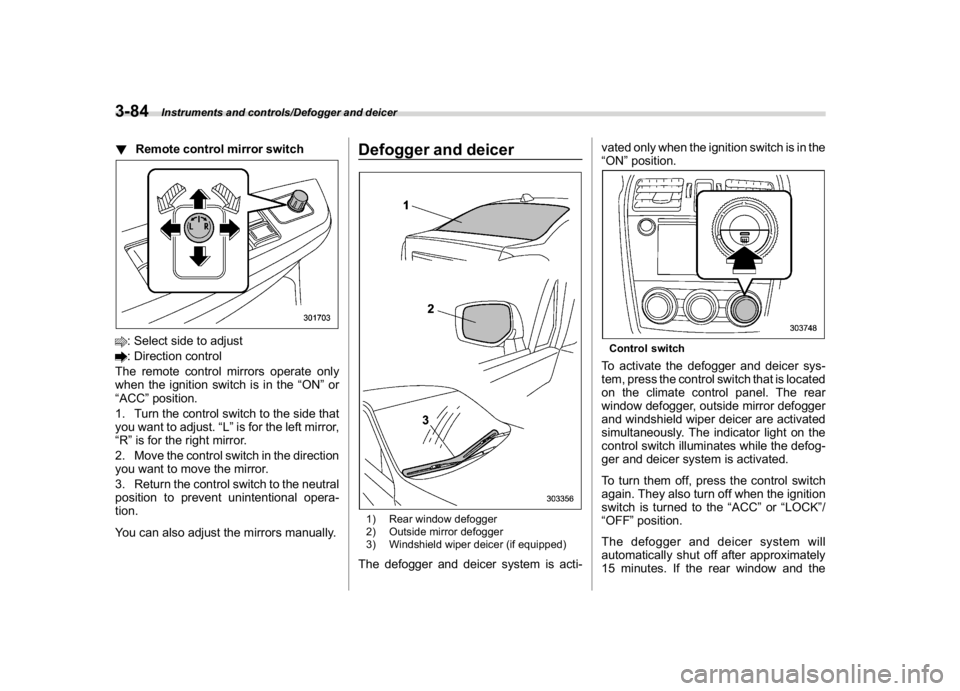
!Remote control mirror switch: Select side to adjust: Direction control
The remote control mirrors operate only
when the ignition switch is in the“ON”or
“ACC”position.
1. Turn the control switch to the side that
you want to adjust.“L”is for the left mirror,
“R”is for the right mirror.
2. Move the control switch in the direction
you want to move the mirror.
3. Return the control switch to the neutral
position to prevent unintentional opera-
tion.
You can also adjust the mirrors manually.
Defogger and deicer1) Rear window defogger
2) Outside mirror defogger
3) Windshield wiper deicer (if equipped)The defogger and deicer system is acti-vated only when the ignition switch is in the
“ON”position.
Control switchTo activate the defogger and deicer sys-
tem, press the control switch that is located
on the climate control panel. The rear
window defogger, outside mirror defogger
and windshield wiper deicer are activated
simultaneously. The indicator light on the
control switch illuminates while the defog-
ger and deicer system is activated.
To turn them off, press the control switch
again. They also turn off when the ignition
switch is turned to the“ACC”or“LOCK”/
“OFF”position.
The defogger and deicer system will
automatically shut off after approximately
15 minutes. If the rear window and the
Instruments and controls/Defogger and deicer
3-84
Page 350 of 578

(363,1)
北米Model "A1700BE-B" EDITED: 2017/ 10/ 11
Fuel..........................................................................7-3
Fuel requirements.................................................. 7-3
Fuel filler lid and cap............................................. 7-5
State emission testing (U.S.only).........................7-7
Preparing to drive...................................................7-8
Starting and stopping theengine..........................7-9
General precautions when starting/stopping
engine................................................................. 7-9
Models without push-button start systems............7-10
Models with push-button start systems ................. 7-11
Remote engine start system (dealer option)...........7-14
Manual transmission............................................7-16
Shifting speeds.....................................................7-17
Driving tips...........................................................7-18
Driver’s Control Center Differential
(C.DIFF/DCCD) (STI)...........................................7-18
To change mode of driver’s control center
differential..........................................................7-19
Auto mode............................................................7-20
Manual mode........................................................7-21
Temporary release................................................7-22
Continuously variable transmission....................7-23
Select lever...........................................................7-24
Selection of manual mode.....................................7-25
Shift lock function.................................................7-27
Driving tips...........................................................7-28
SI-DRIVE (if equipped)..........................................7-28
Intelligent (I) mode................................................7-28
Sport (S) mode.....................................................7-29
Sport Sharp (S#) mode..........................................7-29SI-DRIVE switch....................................................7-30
Limited slip differential (LSD)(STI).....................7-31
Power steering......................................................7-31
STI .......................................................................7-31
Except STI............................................................7-32
Braking..................................................................7-33
Braking tips..........................................................7-33
Brake system.......................................................7-33
Disc brake pad wear warning indicators................7-34
High performance brake system (STI)...................7-34
Red caliper with sports brake pad (if equipped) .... 7-34
ABS (Anti-lock BrakeSystem).............................7-35
ABS self-check.....................................................7-35
ABS warning light.................................................7-35
Electronic Brake Force Distribution (EBD)
system................................................................7-36
Steps to take if EBD system malfunctions .............7-36
Vehicle Dynamics Controlsystem......................7-37
Vehicle Dynamics Control system monitor ............7-39
Vehicle Dynamics Control OFF switch...................7-39
Tire pressure monitoring system (TPMS)
(U.S.-spec. models)...........................................7-40
Parking your vehicle............................................7-42
Parking brake (models without electronic parking
brake system)....................................................7-42
Electronic parking brake (models with electronic
parking brake system).......................................7-43
Parking tips..........................................................7-45
Auto Vehicle Holdfunction..................................7-46
To turn on/off the Auto Vehicle Hold function........7-47
To operate the Auto Vehicle Hold function ............7-48
Starting and operating
7
Page 364 of 578

(377,1)
北米Model "A1700BE-B" EDITED: 2017/ 10/ 11
!Before starting the engine
Before using the remote engine start
system to start the engine, confirm the
following conditions.
.The select lever is in the“P”position.
.All doors are closed.
.The engine hood is closed.
.The push-button ignition switch is in the
“OFF”position.
!Starting the engine
1. Press the lock button briefly. The
hazard warning flashers then flash once.
2. Within 2 seconds, press the lock button
briefly again. The hazard warning flashers
then flash once again.
3. After step 2, immediately press and
hold the lock button. The hazard warning
flashers then flash once.
4. Approximately 3 seconds after step 3,
release the lock button. The engine will
then start successfully.
!Stopping the engine
Press and hold the lock button to stop the
engine with remote engine start system.
!Automatic engine shutdown
The remote engine start system will auto-
matically shut down or will not start theengine under the following conditions.
.The total run-time has exceeded 20
minutes.
.Any door is opened.
.The select lever is moved to any
position other than“P”.
.The engine hood is opened.
.The push-button ignition switch is
pressed.
.The brake pedal is depressed.
.The engine speed is 3,000 rpm or more.
The time setting until the engine automa-
tically stops can be changed. To change it,
please contact your SUBARU dealer. Note
that some settings may violate state,
provincial, or local laws and regulations.
Check the laws in your area to determine
which setting is permitted.
!Entering the vehicle while it is run-
ning via remote start
1. Unlock the vehicle doors using the
keyless access function. If you unlock the
vehicle’s doors manually using the key, the
vehicle’s alarm system will trigger (if the
alarm system is armed prior to activating
the remote engine start system) and the
engine will turn off. Perform either of the
following procedures to disarm the alarm
system. Refer to“Alarm system”F2-24.
.Switch the ignition to the“ACC”or“ON”state by pressing the push-button
ignition switch once or twice, respec-
tively.
.Press any button on the access key
fob/transmitter.
2. Enter the vehicle.
3. The engine will shut down when any
door is opened.
4. Press the push-button ignition switch
while depressing the brake pedal to restart
the engine.
!Entering the vehicle following re-
mote engine start shutdown
An alarm trigger may occur if the vehicle is
opened by the remote keyless entry
transmitter within a few seconds immedi-
ately following remote engine start shut-
down.
!Pre-heating or pre-cooling the in-
terior of the vehicle
Before exiting the vehicle, set the tem-
perature controls to the desired setting and
operation. After the system starts the
engine, the heater or air conditioning will
activate and heat or cool the interior to
your setting.
–CONTINUED–
Starting and operating/Starting and stopping the engine
7-15
7
Page 530 of 578
(551,1)
北米Model "A1700BE-B" EDITED: 2017/ 10/ 11
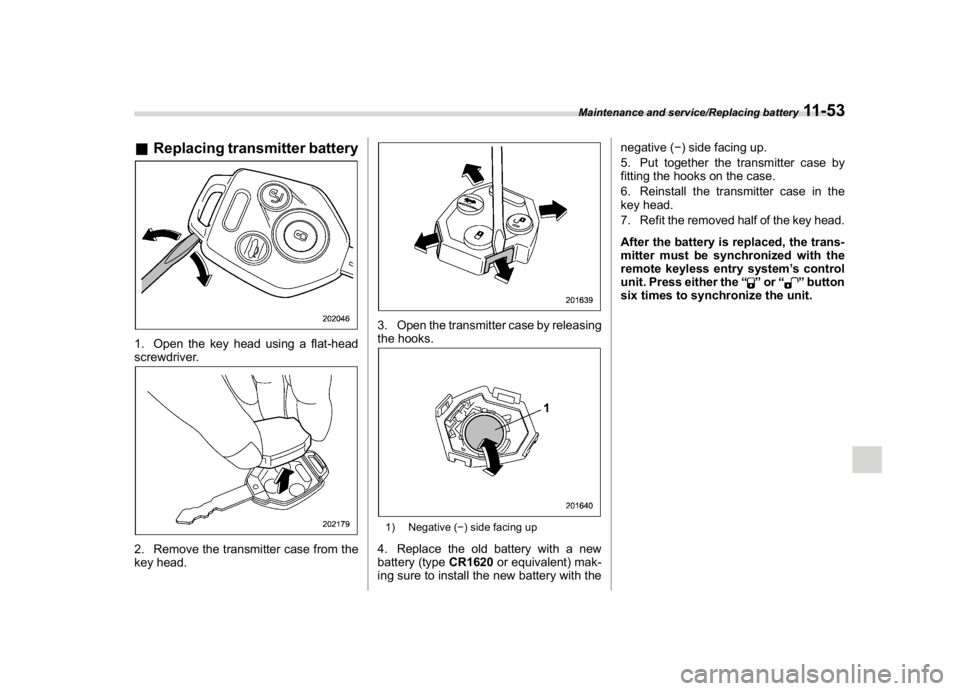
&Replacing transmitter battery1. Open the key head using a flat-head
screwdriver.2. Remove the transmitter case from the
key head.
3. Open the transmitter case by releasing
the hooks.1) Negative () side facing up4. Replace the old battery with a new
battery (typeCR1620or equivalent) mak-
ing sure to install the new battery with thenegative () side facing up.
5. Put together the transmitter case by
fitting the hooks on the case.
6. Reinstall the transmitter case in the
key head.
7. Refit the removed half of the key head.
After the battery is replaced, the trans-
mitter must be synchronized with the
remote keyless entry system’s control
unit. Press either the“
”or“
”button
six times to synchronize the unit.
Maintenance and service/Replacing battery
11-53
11