2018 SUBARU WRX fog light
[x] Cancel search: fog lightPage 204 of 578

(209,1)
北米Model "A1700BE-B" EDITED: 2017/ 10/ 11
NOTE.You cannot lower the sensitivity of
the high beam assist function in the
following conditions.
–Cruise control or Adaptive Cruise
Control is in operation
–The EyeSight warning indicator
(yellow) is illuminated
.The sensitivity of the high beam
assist function returns to normal level
the next time the ignition switch is
turned to the“LOCK”/“OFF”position
and the engine is restarted.
!How to change the headlight
mode manually
Change to the low beam:
Return the turn signal lever to the center
position to turn off the high beam assist
function. Then the high beam assist
indicator will turn off.
Change to the high beam:
Turn the light control switch to the“
”
position to change the headlight mode to
the high beam.
At this time, the high beam assist function
will turn off, the high beam assist indicator
will turn off and the high beam indicator
light will turn on.
NOTEAfter manually selecting the high beam
mode:
.If you want to turn on the high beam
assist function, return the light control
switch to the“AUTO”position.
.Turn the light control switch to the
“
”position to turn on the instrument
panel illumination, parking lights, front
side marker lights, rear side marker
lights, tail lights and license plate
lights.
!Tips for the high beam assist
function
.The high beam assist function recog-
nizes the condition surrounding the vehicle
based on the brightness of illumination
ahead of your vehicle, etc. Therefore, the
headlight mode may switch in some
situations that do not match to the driver’s
sense.
.A bicycle or cargo cycle may not be
detected.
.Under the following situations, the high
beam assist function may not work prop-
erly. As a result, the glare of the high beam
may disturb the oncoming vehicle or
vehicle ahead. Also, the low beam mode
may continue although there are no
oncoming vehicles and vehicles ahead.In the such cases, change the headlight
mode manually.
–In bad weather (fog, snow, sand
storm, heavy rain, etc.)
–When the windshield glass is dirty,
fogged, cracked or damaged
–Whenthestereocameraisde-
formed or the stereo camera lenses
are dirty
–If there are lights similar to the
headlights or the tail lights in the
surrounding area
–When an oncoming vehicle or ve-
hicle ahead is driven without its head-
lights and tail lights on
–If the headlights of an oncoming
vehicle or the tail lights of a vehicle
ahead are dirty or discolored, or if the
light beams are not aimed correctly
–When a rapid change of brightness
continues while driving
–When driving on a road with many
ups and downs, uneven surfaces or
curves
–When there are some objects that
reflect light strongly, such as a road
sign or a mirror in vehicle ahead
–When the rear part of the vehicle
ahead, such as a container, reflects
light strongly
–When the headlights of your vehicle
are damaged or dirty
–CONTINUED–
Instruments and controls/Light control switch
3-67
3
Page 205 of 578
(210,1)
北米Model "A1700BE-B" EDITED: 2017/ 10/ 11
–When your vehicle is tilted, such as
in case the vehicle has a flat tire or is
being towed
–Immediately after the engine has
started
.In the following conditions, the head-
light mode will not be automatically chan-
ged from the high beam to the low beam.
–When your vehicle passes an on-
coming vehicle suddenly in a blind
curve
–When another vehicle passes in
front of your vehicle
–When an oncoming vehicle or ve-
hicle ahead comes in and out of view
because of continuous curves, median
strips, roadside trees, etc.
.If the stereo camera detects the light of
the front fog lights of an oncoming vehicle,
the headlight mode may change from the
high beam to the low beam automatically.
.The headlight mode may change from
the high beam to the low beam, or the low
beam mode may continue, when affected
by a street light, traffic signal, illumination
of an advertisement board, or a reflective
object such as a road sign and signboard.
.The timing of the change of headlight
mode may differ due to the following
factors.
–the vehicle condition (e.g., the num-
ber of passengers or the weight ofloaded cargo)
–surrounding situation (e.g., the
movement and direction of an oncom-
ing vehicle or vehicle ahead)
–detection limitations of the camera
angle
&Headlight flasher
CAUTION
Do not hold the lever in the flashing
position for more than just a few
seconds.
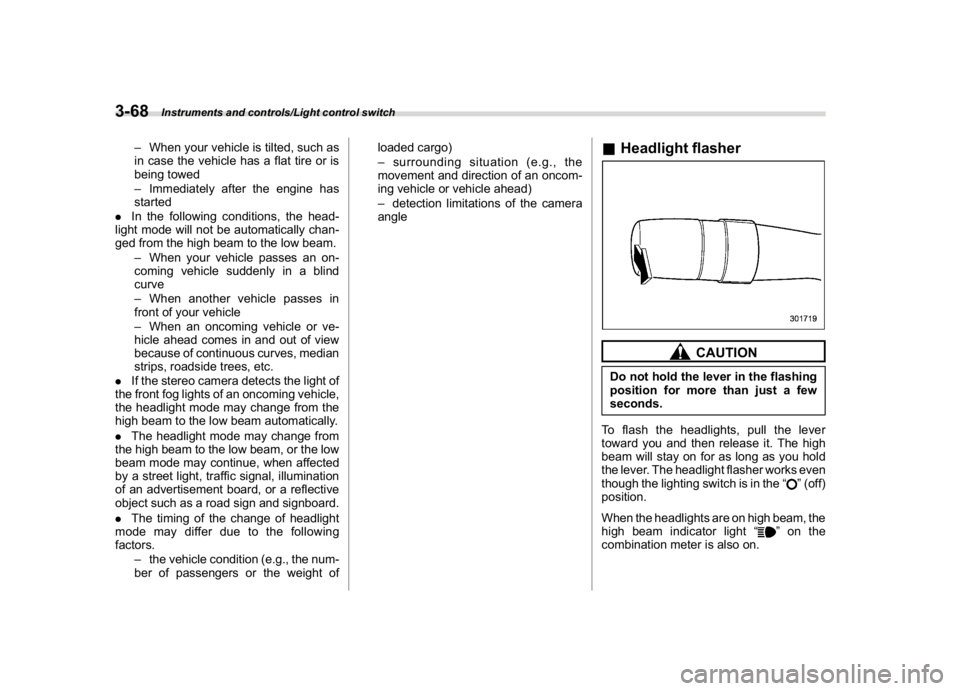
To flash the headlights, pull the lever
toward you and then release it. The high
beam will stay on for as long as you hold
the lever. The headlight flasher works even
though the lighting switch is in the“
”(off)
position.
When the headlights are on high beam, the
high beam indicator light“
”on the
combination meter is also on.
Instruments and controls/Light control switch
3-68
Page 209 of 578

(214,1)
北米Model "A1700BE-B" EDITED: 2017/ 10/ 11
Fog light switch (if equipped)1) Headlight switch
2) Fog light switchThe front fog lights will turn on when the
fog light switch is placed in the“
”position
while the headlights are on (e.g., the
headlight switch is in the“
”position.)
To turn off the front fog lights, turn the
switch back down to the“”position.
Front fog light indicator lightThe indicator light on the combination
meter will illuminate when the front fog
lights are illuminated.
Wiper and washer
WARNING
In freezing weather, do not use the
windshield washer until the wind-
shield is sufficiently warmed by the
defroster.
Otherwise the washer fluid can
freeze on the windshield, blocking
your view.
CAUTION
.Do not operate the washer con-
tinuously for more than 10 sec-
onds, or when the washer fluid
tank is empty. This may cause
overheating of the washer motor.
Check the washer fluid level fre-
quently, such as at fuel stops.
.Do not operate the wipers when
the windshield is dry. This may
scratch the glass, damage the
blade rubbers and might cause
the wiper motor to fail. Before
operating the wiper on a dry
windshield, always use the wind-
shield washer.
.In freezing weather, be sure that
Instruments and controls/Fog light switch
3-72
Page 221 of 578
(226,1)
北米Model "A1700BE-B" EDITED: 2017/ 10/ 11
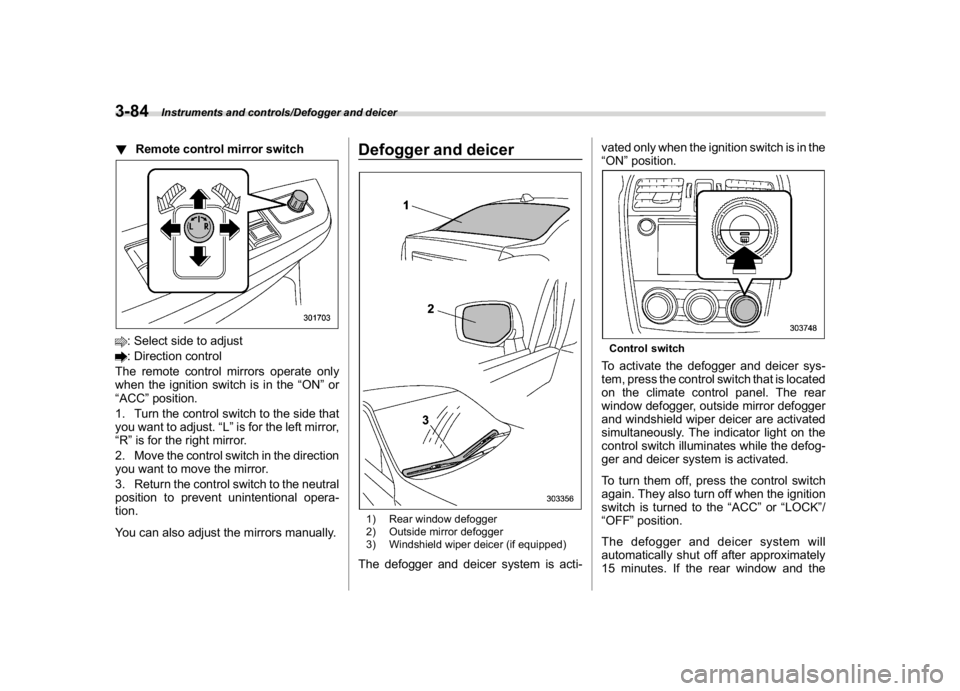
!Remote control mirror switch: Select side to adjust: Direction control
The remote control mirrors operate only
when the ignition switch is in the“ON”or
“ACC”position.
1. Turn the control switch to the side that
you want to adjust.“L”is for the left mirror,
“R”is for the right mirror.
2. Move the control switch in the direction
you want to move the mirror.
3. Return the control switch to the neutral
position to prevent unintentional opera-
tion.
You can also adjust the mirrors manually.
Defogger and deicer1) Rear window defogger
2) Outside mirror defogger
3) Windshield wiper deicer (if equipped)The defogger and deicer system is acti-vated only when the ignition switch is in the
“ON”position.
Control switchTo activate the defogger and deicer sys-
tem, press the control switch that is located
on the climate control panel. The rear
window defogger, outside mirror defogger
and windshield wiper deicer are activated
simultaneously. The indicator light on the
control switch illuminates while the defog-
ger and deicer system is activated.
To turn them off, press the control switch
again. They also turn off when the ignition
switch is turned to the“ACC”or“LOCK”/
“OFF”position.
The defogger and deicer system will
automatically shut off after approximately
15 minutes. If the rear window and the
Instruments and controls/Defogger and deicer
3-84
Page 228 of 578

(235,1)
北米Model "A1700BE-B" EDITED: 2017/ 10/ 11
Automatic climate control
operationWhen this mode is selected, the fan speed,
airflow distribution, air-inlet control, and air
conditioner compressor operation are
automatically controlled. To activate this
mode, perform the following.NOTE.Operate the automatic climate con-
trol system when the engine is running.
.Even when cooling is not necessary,
the air conditioner compressor will
automatically turn on if the temperature
is set much lower than the current
outlet air temperature. Even in this
case, the“A/C”indicator light on the
control panel illuminates.
1. Depress the“AUTO”button. The in-
dicator“FULL AUTO”on the display
illuminates.
2. Set the preferred temperature using
the temperature control dial.NOTE.The controllable temperature range
may vary depending on the regional
specifications of the vehicle.
.During FULL AUTO mode operation,
a small amount of air may flow from the
foot outlets when ventilation mode is
displayed.
.If you operate any of the buttons on
the control panel other than the“OFF”
button, rear window defogger button
and temperature control dial(s) during
FULL AUTO mode operation, the
“FULL”indicator on the control panel
will turn off and the“AUTO”indicator
will remain illuminated. You can then
manually control the system as desired
using the button you operated. To
change the system back to the FULL
AUTO mode, press the“AUTO”button.
.When the climate control system
turns off, the air inlet is fixed to the
outside air mode.
To turn off the climate control system,
press the“OFF”button.
&Sensors1) Interior air temperature sensor
2) Solar sensorThe automatic climate control system
employs several sensors.
The sensors are located as follows.
–CONTINUED–
Climate control/Automatic climate control operation
4-5
4
Page 231 of 578

(238,1)
北米Model "A1700BE-B" EDITED: 2017/ 10/ 11
control dial
Press the“DUAL”button to cancel the
“DUAL”mode.
When the“DUAL”mode is selected:
Turn the driver’s side dial to set the driver’s
side temperature. Turn the front passen-
ger’s side dial to set the front passenger’s
side temperature.
When the“DUAL”mode is canceled:
Turn the driver’s side dial to set the desired
temperature.
When the“DUAL”mode is canceled, only
the driver’s side temperature is displayed.&Fan speed controlThe fan operates only when the ignition
switch is in the“ON”position. Turn the fan
speed control dial to select the preferred
fan speed.
&Air conditioner controlThe air conditioner operates only when the
engine is running.
Press the air conditioner button while the
fan is in operation to turn on the air
conditioner. When the air conditioner is
on, the“A/C”indicator light illuminates.
To turn off the air conditioner, press the
button again.NOTEFor efficient defogging or dehumidify-
ing in cold weather, turn on the air
conditioner. However, if the ambient
temperature decreases to approxi-
mately 328F(08C), the air conditioner
compressor will stop operating.&Air inlet selectionSelect the air inlet by pressing the air inlet
selection button.
ON position (recirculation):Interior air is
recirculated inside the vehicle. Press the
air inlet selection button to the ON position
for fast cooling with the air conditioner or
when driving on a dusty road.
OFF position (outside air):Outside air is
drawn into the passenger compartment.
Press the air inlet selection button to the
OFF position when the interior has cooledto a comfortable temperature and the road
is no longer dusty.
WARNING
Continued operation in the ON posi-
tion may fog up the windows. Switch
to the OFF position as soon as the
outside conditions are no longer
dusty.NOTEWhen the battery is disconnected or the
battery voltage drops, the air inlet
selection operation indicator light may
blink. This does not indicate a malfunc-
tion. However, if the indicator light
blinks every time you start the engine,
a malfunction may occur in the elec-
trical circuit. Have the vehicle in-
spected at the nearest SUBARU dealer.
Climate control/Manual climate control operation
4-8
Page 348 of 578

(359,1)
北米Model "A1700BE-B" EDITED: 2017/ 10/ 11
WARNING
Because the range of the image
captured by the camera is limited,
always check the traffic around the
vehicle directly with your eyes when
driving the vehicle.NOTE.The range of the displayed image
may differ depending on the vehicle
status or the road surface status.
.Because the Front View Monitor
system uses a specially designed lens,
the sense of distance in the displayed
image is different from the actual dis-
tance.
.The camera image may be difficult to
view in the following situations. This is
not a malfunction.
–Dark place (at night)
–High or low temperature around
the lens
–Water contacts lens or in high
humidity (rainy weather)
–There is foreign materials (such
as mud) around the camera
–Sunlight or headlight beam di-
rectly shines towards the camera
lens
.Under an artificial light such as afluorescent lamp, sodium-vapor lamp
or mercury lamp, the lighted portion
may look like it is flickering (flicker
phenomenon).
.While the display has cooled down,
the image may leave traces or become
darker than usual, causing a difficulty
in viewing the screen. Always check the
traffic around the vehicle directly with
your eyes while driving the vehicle.
.The following incidents should not
be deemed a malfunction.
–The camera lens may become
foggy when the humidity is high on
a rainy day.
–The light from a vehicle or build-
ing located ahead may be reflected
towards the camera image while
driving at night.
–In a dark place or while driving at
night, the camera image may be
adjusted to make noises less visi-
ble. Therefore, the image may look
like a monochromatic image or the
image colors may differ from the
actual colors. The camera image
may be deteriorated in regard to
sharpness at the center and four
corners of the screen. This is not a
malfunction.
&Guiding line1) Guiding line
2) Warning messageThe guiding line that indicates the width
and the front end of your vehicle is
displayed on the display.&Handling of camera
CAUTION
Observe the following instructions.
Otherwise, the system may malfunc-
tion.
.Do not apply any strong impact to
the camera such as banging it or
hitting it with an object. The
mounting angle may change.
–CONTINUED–
Interior equipment/Front View Monitor
6-21
6
Page 358 of 578

(371,1)
北米Model "A1700BE-B" EDITED: 2017/ 10/ 11
CAUTION
Trapping small animals in the cool-
ing fan and belts of the engine may
result in a malfunction. Check that
no small animal enters the engine
compartment and under the vehicle
before starting the engine.NOTEEngine oil, engine coolant, brake fluid,
washer fluid and other fluid levels
should be checked daily, weekly or at
fuel stops.
Starting and stopping the en-
gine&General precautions when
starting/stopping engine
WARNING
.Never start the engine from out-
side the vehicle. It may result in
an accident.
.Do not start the engine near dry
foliage, paper, or other flammable
substances. The exhaust pipe
and exhaust emissions can cre-
ate a fire hazard at high tempera-
tures.
.Do not leave the engine running
in locations with poor ventilation,
such as a garage and indoors.
The exhaust gas may enter the
vehicle or indoors, and it may
result in carbon monoxide poi-
soning.
CAUTION
.Do not stop the engine while
driving. Otherwise, the catalyst
may overheat and burn.
.When starting the engine, be sureto sit in the driver’s seat (except
when using the remote engine
start system).
NOTE.Avoid rapid acceleration immedi-
ately after the engine has started. In
addition, always avoid rapid racing.
.Until the engine is warmed up suffi-
ciently, the engine speed is maintained
high. The engine speed will gradually
drop as the engine warms up.
.On rare occasions, it may be difficult
to start the engine depending on the
fuel used and the driving condition
(repeated short trips when the engine
is not warmed up sufficiently). In such
cases, it is recommended to switch to a
different brand of fuel.
.On rare occasions, transient knock-
ing may be heard from the engine when
the accelerator is operated rapidly such
as a rapid start-up and a rapid accel-
eration. This is not a malfunction.
.The engine starts more easily when
the headlights, air conditioner and rear
window defogger are turned off.
.It may be difficult to start the engine
when the battery has been discon-
nected and reconnected (for mainte-
nance or other purposes). This diffi-
culty is caused by the electronically
–CONTINUED–
Starting and operating/Starting and stopping the engine
7-9
7