2018 SUBARU WRX warning
[x] Cancel search: warningPage 283 of 578

(292,1)
北米Model "A1700BE-B" EDITED: 2017/ 10/ 11
&Pandora
®(if equipped)
Pandora is an application for a smart-
phone. This can automatically select and
play recommended tracks.
By rating the track currently playing, tracks
that better match your preference will be
recommended.
In order to connect to this system, use a
USB port for an iPhone or iPod touch and
Bluetooth for Android devices.
Depending on differences between mod-
els or software version etc., some models
might be incompatible with this system.
This function is not available if the Pandora
application has not been installed on the
smartphone.
WARNING
Do not operate the player’s controls
or connect the smartphone while
driving. Doing so may result in loss
of control of your vehicle and cause
an accident or serious injury.
CAUTION
.Do not leave your smartphone in
the car. In particular, high tem-
peratures inside the vehicle may
damage the smartphone.
.Do not push down on or apply
unnecessary pressure to the
smartphone while it is connected
as this may damage the smart-
phone or its terminal.
.Do not insert foreign objects into
the port as this may damage the
smartphone or its terminal.NOTEFollow the specific operation proce-
dures for the smartphone application.
Audio/Audio set
5-48
Page 288 of 578

(297,1)
北米Model "A1700BE-B" EDITED: 2017/ 10/ 11
&USB memoryAudio files on the USB memory can be
played.
WARNING
Do not operate the player’s controls
or connect the USB memory while
driving. Doing so may result in
losing control of your vehicle and
cause an accident or serious injury.
CAUTION
.Do not leave your USB memory in
the car. In particular, high tem-
peratures inside the vehicle may
damage the USB memory.
.Do not push down on or apply
unnecessary pressure to the USB
memory while it is connected as
this may damage the USB mem-
ory or its terminal.
.Do not insert foreign objects into
the port as this may damage the
USB memory or its terminal.!Control screen and audio panel
No. Function&1
Select to display the audio source
selection screen.
&2
Select to display the play mode
currently selected. Refer to“
Select
play mode”F5-54.
&3
Select to display folder list.
&4
Shows progress.
&5
The tracks in the folder are played
back 10 seconds each from the
beginning of the track.
&6
Select to choose a folder.
&7
Turn to adjust volume.
Press to turn the audio system on/off.No. Function
&8
Turn to select a file/track.
Press to select an audio source. Refer
to“
Selecting an audio source”F5-17.
&9
Press to display the sound setting
screen. Refer to“
Unit settings”F5-18.
&10
Press to select a file/track.
Press and hold to fast forward/rewind.
–CONTINUED–
Audio/Audio set
5-53
5
Page 289 of 578

(298,1)
北米Model "A1700BE-B" EDITED: 2017/ 10/ 11
!Connecting a USB device
You can connect a USB device to the
vehicle USB port. Refer to“Connecting
and disconnecting a USB memory/porta-
ble device”F5-16.
!How to change the source
The USB Audio playback screen can be
reached by the following methods:
.Connect a USB memory. Refer to
“Connecting and disconnecting a USB
memory/portable device”F5-16.
.Select the“USB/iPod”key on the
source select screen. Refer to“Selecting
an audio source”F5-17.!Select play mode
The play mode settings display will appear
when play mode key is touched. Select the
preferred play mode from the following
items.
Icon Function
Touch to start 1 track repeat.Touch to start repeat all.Touch to start folder repeat.Touch to start shuffle all.Touch to start shuffle folder.Return to the control screen.
&iPodAudio files on the iPod can be played.
WARNING
Do not operate the player’s controls
or connect the iPod while driving.
Doing so may result in loss of
control of your vehicle and cause
an accident or serious injury.
CAUTION
.Do not leave your portable player
in the car. In particular, high
temperatures inside the vehicle
may damage the portable player.
.Do not push down on or apply
unnecessary pressure to the por-
table player while it is connected
as this may damage the portable
player or its terminal.
.Do not insert foreign objects into
the port as this may damage the
portable player or its terminal.
Audio/Audio set
5-54
Page 291 of 578

(300,1)
北米Model "A1700BE-B" EDITED: 2017/ 10/ 11
!How to change the source
The iPod operation screen can be reached
by the following methods:
.Connect an iPod. Refer to“Connecting
and disconnecting a USB memory/porta-
ble device”F5-16.
.Select the“USB/iPod”key on the
source select screen. Refer to“Selecting
an audio source”F5-17.
!Select play mode
The play mode settings display will appear
when play mode key is touched. Select the
preferred play mode from the following
items.
Icon Function
Touch to start 1 track repeat.Touch to start repeat all.Touch to start shuffle all.Touch to turn off shuffle.Touch to start shuffle album.Return to the control screen.
!iPod settings
You can choose the following items from
the list screen after touching the
tab on
the screen.
Icon Function
Select to display the play list.Select to display tracks list.Select to display artists list.Select to display albums list.Select to open other list (“Gen-
res”,“Composers”,“Audiobooks”
and“Podcast”).Select to open“Genres”list.Select to open“Composers”list.Select to open“Audiobooks”list.Select to open“Podcasts”list.
&Bluetooth audioThe Bluetooth audio system enables users
to enjoy listening to music that is played on
a portable player on the vehicle speakers
via wireless communication.
This audio system supports Bluetooth, a
wireless data system capable of playing
portable audio music without cables. If
your device does not support Bluetooth,
the Bluetooth audio system will not func-
tion.
WARNING
.Do not operate the player’s con-
trols or connect to the Bluetooth
audio system while driving.
Doing so may result in loss of
control of your vehicle and cause
an accident or serious injury.
.Your audio unit is fitted with
Bluetooth antennas. People with
implantable cardiac pacemakers,
cardiac resynchronization ther-
apy-pacemakers or implantable
cardioverter defibrillators should
maintain a reasonable distance
between themselves and the
Bluetooth antennas. The radio
waves may affect the operation
of such devices.
Audio/Audio set
5-56
Page 294 of 578
(303,1)
北米Model "A1700BE-B" EDITED: 2017/ 10/ 11
Icon Function
Return to the control screen.
NOTEIf the connected device does not sup-
port the group repeat mode, the group
functions are not available.&AUX
WARNING
Do not operate the player’s controls
or connect the portable audio device
while driving. Doing so may result in
loss of control of your vehicle and
cause an accident or serious injury.
CAUTION
.Do not leave portable audio de-
vice in the vehicle. The tempera-
ture inside the vehicle may be-
come high, resulting in damage
to the player.
.Do not push down on or apply
unnecessary pressure to the por-
table audio device while it is
connected as this may damage
the portable audio device or itsterminal.
.Do not insert foreign objects into
the port as this may damage the
portable audio device or its term-
inal.
–CONTINUED–
Audio/Audio set
5-59
5
Page 299 of 578
(308,1)
北米Model "A1700BE-B" EDITED: 2017/ 10/ 11
Bluetooth
®settingsWARNING
Be sure to park the vehicle in a safe
location before connecting or oper-
ating a Bluetooth phone or audio
device. Failure to do so may result in
loss of control of your vehicle and
cause an accident or serious injury.&Regulatory informationThe Bluetooth
®word mark and logos are
registered trademarks owned by Bluetooth
SIG, Inc.
&Registering/connecting
Bluetooth
®device
You can register up to five devices,
regardless of whether they are Bluetooth
phones or audio devices.NOTE.Once the phone has been registered,
it is possible to use the hands-free
system or Bluetooth audio.
.Devices cannot be registered whiledriving.
!Registering a Bluetooth phone for
the first time
To use the hands-free system, it is
necessary to register a Bluetooth phone
with the system.
For details about registering a Bluetooth
device: Refer to“Registering a Bluetooth
Audio device for the first time”F5-65.
1. Turn the Bluetooth connection setting
of your cell phone on.
.This function is not available when
Bluetooth connection setting of your
cell phone is set to off.
2. Press the HOME button and select the
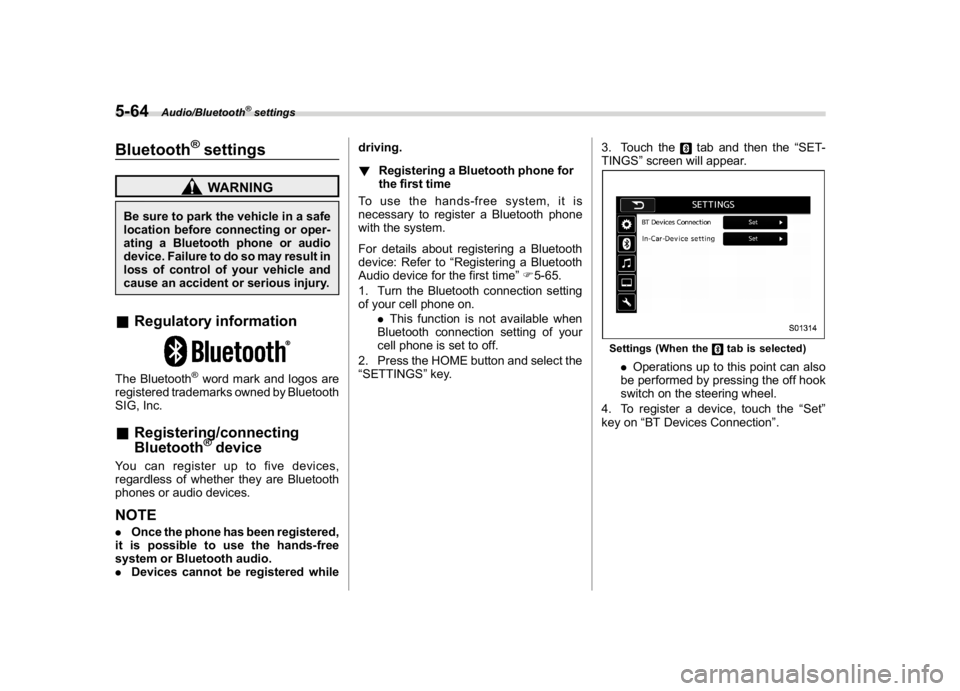
“SETTINGS”key.3. Touch the
tab and then the“SET-
TINGS”screen will appear.
Settings (When the
tab is selected)
.Operations up to this point can also
be performed by pressing the off hook
switch on the steering wheel.
4. To register a device, touch the“Set”
key on“BT Devices Connection”.
Audio/Bluetooth
®settings
5-64
Page 304 of 578
(313,1)
北米Model "A1700BE-B" EDITED: 2017/ 10/ 11
Hands-free phone systemThe hands-free system enables calls to be
made and received without having to take
your hands off the steering wheel.
This system supports Bluetooth. Bluetooth
is a wireless data system that enables cell
phones to be used without being con-
nected by a cable or placed in a cradle.
The operating procedure of the phone is
explained here.
WARNING
.While driving, do not use a cell
phone or connect the Bluetooth
phone. Doing so may result in
loss of control of your vehicle
and cause an accident or serious
injury.
.Your audio unit is fitted with
Bluetooth antennas. People with
implantable cardiac pacemakers,
cardiac resynchronization ther-
apy-pacemakers or implantable
cardioverter defibrillators should
maintain a reasonable distance
between themselves and the
Bluetooth antennas. The radio
waves may affect the operation
of such devices..Before using Bluetooth devices,
users of any electrical medical
device other than implantable
cardiac pacemakers, cardiac re-
synchronization therapy-pace-
makers or implantable cardiover-
ter defibrillators should consult
the manufacturer of the device
for information about its opera-
tion under the influence of radio
waves. Radio waves could have
unexpected effects on the opera-
tion of such medical devices.
CAUTION
Do not leave your cell phone in the
vehicle. The temperature inside may
rise to a level that could damage the
phone.NOTE.If your cell phone does not support
Bluetooth, this system cannot function.
.In the following conditions, the sys-
tem may not function:
–The cell phone is turned off.
–The current position is outside
the communication area.
–The cell phone is not connected.
–The cell phone has a low battery..When using the hands free function
and other Bluetooth functions at the
same time, the following problems may
occur:
–The Bluetooth connection may
be cut.
–Noise may be heard when playing
back voice with the Bluetooth func-
tion.
.The other party’s voice will be heard
from the front speakers. The audio/
visual system will be muted during
phone calls or when hands-free voice
commands are used.
.Talk alternately with the other party
on the phone. If both parties speak at
the same time, the other party may not
hear what has been said. (This is not a
malfunction.)
.Keep call volume down. Otherwise,
the other party’s voice may be audible
outside the vehicle and voice echo may
increase. When talking on the phone,
speak clearly towards the microphone.
.The other party may not hear you
clearly when:
–Driving on an unpaved road.
(Making excessive traffic noise.)
–Driving at high speeds.
–The moonroof or windows are
open.
–The air conditioning vents are
–CONTINUED–
Audio/Hands-free phone system
5-69
5
Page 326 of 578
(335,1)
北米Model "A1700BE-B" EDITED: 2017/ 10/ 11
Appendix&Certification.Bluetooth
The Bluetooth word mark and logo are
registered trademarks of Bluetooth SIG,
Inc. and any use of such marks by Clarion
Co., Ltd. is under license..SiriusXM Satellite Radio (if
equipped)
SiriusXM
TM
and all related marks and
logos are trademarks of SiriusXM Radio
Inc. All rights reserved.
.Pandora (if equipped)
Pandora, the Pandora logo, and other
Pandora marks are trademarks or regis-
tered trademarks of Pandora Media, Inc.,
or its subsidiaries worldwide.
If you have any issues with the Pandora
application on your mobile phone, please
direct them to
[email protected].
.iPod
“Made for iPod”and“Made for iPhone”
mean that an electronic accessory has
been designed to connect specifically to
iPod or iPhone respectively, and has been
certified by the developer to meet Apple
performance standards. Apple is not re-
sponsible for the operation of this device or
its compliance with safety and regulatory
standards. Please note that the use of this
accessory with iPod or iPhone may affect
wireless performance.
iPhone, iPod, iPod classic, iPod nano,
iPod touch, and iTunes are trademarks of
Apple Inc., registered in the U.S. and other
countries..How to get the source code using the
open source
This system implements software using
theopensource.Forcustomerswho
would like to get the source code of the
software, it is available by downloading it
from the web site of Clarion Co., Ltd.
For details, refer to the following web site.http://www.clarion.com/us/en/support/in-
dex.html
&Certification for the Hands-
free system.U.S.-spec. models
CAUTION
FCC WARNING
Changes or modifications not ex-
pressly approved by the party re-
sponsible for compliance could void
the user’s authority to operate the
equipment.
This device complies with part 15 of the
FCC Rules. Operation is subject to the
following two conditions: (1) This device
may not cause harmful interference, and
(2) this device must accept any interfer-
ence received, including interference that
may cause undesired operation.
–CONTINUED–
Audio/Appendix
5-91
5