2018 SUBARU WRX ignition
[x] Cancel search: ignitionPage 393 of 578

(406,1)
北米Model "A1700BE-B" EDITED: 2017/ 10/ 11
function”F7-27.
–Use tire stops under the tires
to prevent the vehicle from
moving.
.Never drive with the parking
brake applied. Doing so will
cause unnecessary wear on the
brake linings. Before driving off,
always make sure that the park-
ing brake has been released and
the brake system warning light
has turned off.
Your vehicle is equipped with an electronic
parking brake. You can apply/release the
parking brake by operating the parking
brake switch.
To apply:Depress the brake pedal and
pull up the parking brake switch.
To release:Press the parking brake
switch firmly while the ignition switch is in
the“ON”position and the brake pedal is
depressed.
When the parking brake is applied while
the ignition switch is in the“ON”position,
the electronic parking brake indicator light
and the indicator light on the parking brake
switch illuminate. Refer to“Brake system
warning light”F3-21.
NOTE.If you press the parking brake switch
under the following conditions, the
parking brake will not be released.
–The ignition switch is in the
“ACC”or“LOCK”/“OFF”position.
–You are not depressing the brake
pedal.
.The electronic parking brake system
uses motors to apply the parking brake.
Therefore, operating sounds from the
motors will be heard when applying or
releasing the parking brake. Make sure
that the motor sounds are heard when
applying or releasing the parking
brake.
.If you operate the parking brake
switch under the following conditions,
a chirp will sound and the electronic
parking brake indicator light will flash.
–when the electronic parking
brake system has a malfunction
–when the electronic parking
brake operation is prohibited tem-
porarily
.When you cannot release the park-
ing brake due to, for example, a system
malfunction, contact your SUBARU
dealer and have your SUBARU dealer
release the parking brake.
.If you stop operating the electronicparking brake switch midway or oper-
ate extremely slowly, the system may
detect an error and turn on the brake
system warning light. However, this
does not indicate a malfunction if the
brake system warning light turns off
after operating the switch.
.When the electronic parking brake
has not been used for a long period of
time, the electronic parking brake may
operate automatically after the ignition
switch is turned to the“LOCK”/“OFF”
position. This occurs due to checking
the proper operation of the electronic
parking brake and does not indicate a
malfunction.
.If you cannot release the electronic
parking brake due to the switch mal-
function, refer to the instructions de-
scribed in“Automatic release function
by accelerator pedal”F7-45.
After activating the electronic parking
brake, you may hear a short sound
several minutes after the electronic
parking brake indicator light illumi-
nates as the system confirms proper
engagement. This sound is different
from the apply and release sound.
This can occur:
–If the brakes are extremely hot.
–If the car is parked on a steep
incline.
Starting and operating/Parking your vehicle
7-44
Page 394 of 578

(407,1)
北米Model "A1700BE-B" EDITED: 2017/ 10/ 11
–If the electronic parking brake is
applied after the ignition switch is
turned OFF.
This is a normal operating sound under
any of these conditions.
!Automatic release function by ac-
celerator pedal
The parking brake will be automatically
released by depressing the accelerator
pedal. However, the automatic release
function does not operate under the
following conditions.
.Any door (other than the trunk lid) is
open.
.The driver’s seatbelt is not fastened.
If the parking brake is automatically
released, the electronic parking brake
indicator light and the indicator light on
the parking brake switch turn off.
!Emergency brake
CAUTION
Use the emergency brake only in
case of an emergency. If the emer-
gency brake is excessively used, the
brake parts will wear down faster or
the brake may not work sufficiently
due to brake overheating.
NOTEWhile using the emergency brake:
.The electronic parking brake indica-
tor light and the indicator light on the
parking brake switch illuminate and a
chirp sounds.
.A sound may be heard from the
engine compartment. This is the oper-
ating sound of the brake that is acti-
vated by the Vehicle Dynamics Control
system, and does not indicate a mal-
function.
If the foot brake has a malfunction, you can
stop the vehicle by pulling the parking
brake switch continuously.
While applying the emergency brake, the
electronic parking brake indicator light and
the indicator light on the parking brake
switch illuminate and a chirp sounds.
!Electronic parking brake system
warning
CAUTION
If the brake system warning light
turns on, the electronic parking
brake system may be malfunction-
ing. Immediately stop your vehicle in
the nearest safe location and con-
tact your SUBARU dealer.If a malfunction occurs in the electronic
parking brake system, the brake system
warning light turns on. Refer to“Electronic
parking brake indicator light (models with
electronic parking brake system)”F3-23.
&Parking tipsWhen parking your vehicle, always per-
form the following items.
.Apply the parking brake firmly.
.For MT models, put the shift lever in the
“1”(1st) for upgrade or“R”(Reverse) for a
downgrade.
.For CVT models, put the select lever in
the“P”(Park) position.
Never rely on the mechanical friction of the
transmission alone to hold the vehicle.When parking on a hill, always turn the
–CONTINUED–
Starting and operating/Parking your vehicle
7-45
7
Page 396 of 578

(409,1)
北米Model "A1700BE-B" EDITED: 2017/ 10/ 11
–When passengers are getting
in or out of the vehicle
–When you are loading or un-
loading
.When using the Auto Vehicle
Hold function, do not release the
brake pedal before the Auto Ve-
hicle Hold operation indicator
illuminates. The vehicle may
move unexpectedly, causing ser-
ious injury or accidents.
.Deactivate the Auto Vehicle Hold
function in the following cases.
Otherwise, the vehicle may move
unexpectedly, causing serious
injury or accidents.
–When washing your vehicle in
an automatic car wash
–When being towed
–When towing a vehicle
CAUTION
When stopping on a steep slope with
the Auto Vehicle Hold function
turned on, the electronic parking
brake may be automatically applied.
Then the electronic parking brake
indicator light will flash. In such a
case, depress and hold the brakepedal while stopping. Otherwise, the
vehicle may move.
NOTEWe recommend turning on the Auto
Vehicle Hold function when stopping
on an incline. If the Auto Vehicle Hold
function is turned off, the vehicle may
roll backward when driving off.&To turn on/off the Auto Vehi-
cle Hold functionAuto Vehicle Hold switch
Auto Vehicle Hold ON indicator lightTo turn on:
Press the Auto Vehicle Hold switch when
the Auto Vehicle Hold ON indicator light is
OFF. Then the Auto Vehicle Hold ON
indicator light will illuminate.
Even after turning on the Auto Vehicle
Hold function, it will automatically turn off
once the ignition switch is turned to the
“LOCK”/“OFF”position. The function will
remain turned off when the ignition switch
is turned back to the“ON”position.
To turn off:
Press the Auto Vehicle Hold switch when
the Auto Vehicle Hold ON indicator light
illuminates. Then the Auto Vehicle Hold
ON indicator light will turn off.
–CONTINUED–
Starting and operating/Auto Vehicle Hold function
7-47
7
Page 397 of 578

(410,1)
北米Model "A1700BE-B" EDITED: 2017/ 10/ 11
NOTE.IfyoupressandholdtheAuto
Vehicle Hold switch for more than 30
seconds, the Auto Vehicle Hold ON
indicator light will turn off, and the
system will ignore any further pressing
of the switch. To activate the switch
again, restart the engine.
.When the Auto Vehicle Hold function
is deactivated while the Auto Vehicle
Hold function has a malfunction, if you
press the Auto Vehicle Hold switch, a
chirp will sound&To operate the Auto Vehicle
Hold functionStop the vehicle by depressing the brake
pedal when all of the following conditions
are met. Then the Auto Vehicle Hold
function will operate.
.All doors are closed.
.The driver’s seatbelt is fastened.
.The select lever is in a position other
than the“P”position.
Auto Vehicle Hold operation indicator lightWhile the vehicle is kept stopped by the
Auto Vehicle Hold function, the Auto
Vehicle Hold operation indicator light will
illuminate.&To release the Auto Vehicle
Hold functionPerform any of the following operations to
release the Auto Vehicle Hold function.
.Depress the accelerator pedal.
.Depress the brake pedal again.
.Apply the electronic parking brake.
.Shift the select lever to the“P”position
with the brake pedal pressed.
.Press the Auto Vehicle Hold switch with
the brake pedal pressed.When the Auto Vehicle Hold function is
released, the Auto Vehicle Hold operation
indicator light will turn off.
Under any of the following conditions, the
Auto Vehicle Hold function will be auto-
matically released and the electronic
parking brake will be automatically ap-
plied.
.The Auto Vehicle Hold function has
been in operation for 10 minutes.
.The driver’s seatbelt is unfastened.
.The driver’s door is opened.
.The ignition switch is turned to the
“LOCK”/“OFF”position.
.The vehicle is stopped on a steep
slope.
.The Auto Vehicle Hold function is
malfunctioning.
In such cases, the Auto Vehicle Hold
operation indicator light will turn off and
the indicator light on the parking brake
switch will illuminate.
&Tips.When the electronic parking brake is
automatically applied with the vehicle kept
stopped by the Auto Vehicle Hold function,
release the electronic parking brake by
either of the following operations before
starting off. Then make sure that the
Starting and operating/Auto Vehicle Hold function
7-48
Page 398 of 578

(411,1)
北米Model "A1700BE-B" EDITED: 2017/ 10/ 11
electronic parking brake indicator light is
off.
–Depress the accelerator pedal with
the driver’s seatbelt fastened and with
the doors closed.
–Press the electronic parking brake
switch with the brake pedal depressed.
.Under certain conditions, including a
malfunction of the Auto Vehicle Hold, a
warning buzzer will sound and a warning
message will appear on the combination
meter display (color LCD). All warning
messages should be strictly observed.
.On a steep slope, the vehicle cannot be
kept stopped by the Auto Vehicle Hold
function. In such a case, depress and hold
the brake pedal.
.When stopping on a steep slope with
the Auto Vehicle Hold function activated,
the electronic parking brake may automa-
tically be applied after stopping, then the
electronic parking brake indicator light
may flash. In such a case, depress and
hold the brake pedal while stopped.
Otherwise, the vehicle may move. When
getting out of the vehicle, stop the vehicle
on a flat surface, then apply the electronic
parking brake.
.If the Auto Vehicle Hold ON indicator
light does not illuminates even after
pressing the Auto Vehicle Hold switch with
the operating conditions met, the functionmay have a malfunction. Contact your
SUBARU dealer for an inspection.
.You may hear a sound while the Auto
Vehicle Hold function is keeping your
vehicle stopped. This is normal, and does
not represent a malfunction.
.While the vehicle is kept stopped by the
Auto Vehicle Hold function, the brake
pedal may feel stiff. However, this is not a
malfunction.
.When using the Auto Vehicle Hold
function, depress the brake pedal firmly.
Otherwise, the Auto Vehicle Hold may not
operate.
.When the Auto Vehicle Hold switch is
pressed and held for more than 30
seconds, the Auto Vehicle Hold ON in-
dicator light will turn off and further opera-
tion of the switch will be ignored. To make
the switch usable again, turn the ignition
switch to the“LOCK”/“OFF”position and
then turn it to the“ON”position.
Hill start assist system
WARNING
.The Hill start assist system is a
device only for helping the driver
to START the vehicle on an uphill
grade. To prevent accidents
when the vehicle is parked on a
slope, be sure to firmly set the
parking brake. When setting the
parking brake, make sure that the
vehicle remains stationary when
the clutch pedal (MT models) and
brake pedal (both MT and CVT
models) are released.
.Do not turn the ignition switch to
the“LOCK”/“OFF”position while
the Hill start assist system is
operating. The Hill start assist
system will be deactivated, caus-
ing an accident.NOTEFor models with the electronic parking
brake system:
.The Hill start assist system will
activate when the Auto Vehicle Hold
function is deactivated.
.The Hill start assist system will
–CONTINUED–
Starting and operating/Hill start assist system
7-49
7
Page 400 of 578
(413,1)
北米Model "A1700BE-B" EDITED: 2017/ 10/ 11
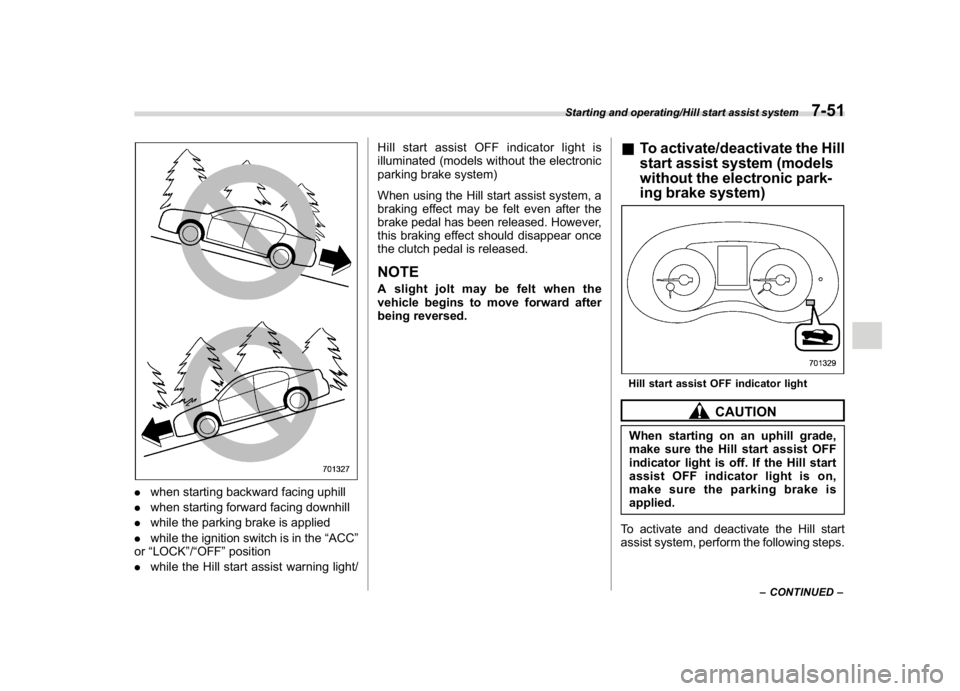
.when starting backward facing uphill
.when starting forward facing downhill
.while the parking brake is applied
.while the ignition switch is in the“ACC”
or“LOCK”/“OFF”position
.while the Hill start assist warning light/Hill start assist OFF indicator light is
illuminated (models without the electronic
parking brake system)
When using the Hill start assist system, a
braking effect may be felt even after the
brake pedal has been released. However,
this braking effect should disappear once
the clutch pedal is released.
NOTEA slight jolt may be felt when the
vehicle begins to move forward after
being reversed.
&To activate/deactivate the Hill
start assist system (models
without the electronic park-
ing brake system)Hill start assist OFF indicator light
CAUTION
When starting on an uphill grade,
make sure the Hill start assist OFF
indicator light is off. If the Hill start
assist OFF indicator light is on,
make sure the parking brake is
applied.
To activate and deactivate the Hill start
assist system, perform the following steps.
–CONTINUED–
Starting and operating/Hill start assist system
7-51
7
Page 401 of 578
(414,1)
北米Model "A1700BE-B" EDITED: 2017/ 10/ 11
NOTEIf you make an error when performing
any steps in the following procedure,
place the ignition switch in the“LOCK”/
“OFF”position once and then start
over again.
!To deactivate
1. Park your vehicle in a flat and safe
location and apply the parking brake.
2. Turn the ignition switch to the“LOCK”/
“OFF”position.
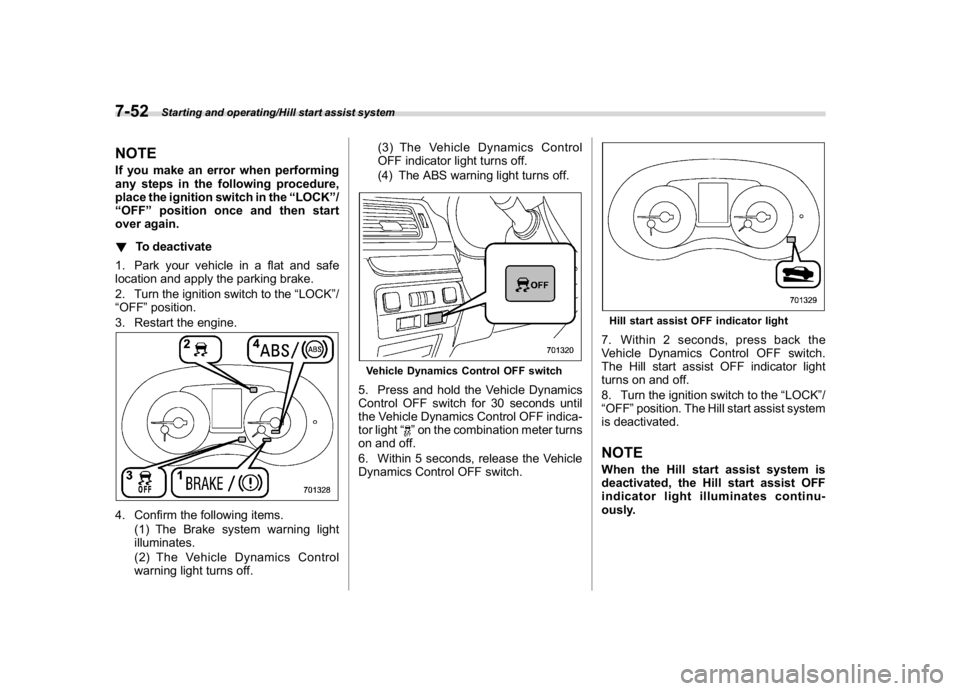
3. Restart the engine.4. Confirm the following items.
(1) The Brake system warning light
illuminates.
(2) The Vehicle Dynamics Control
warning light turns off.(3) The Vehicle Dynamics Control
OFF indicator light turns off.
(4) The ABS warning light turns off.
Vehicle Dynamics Control OFF switch5. Press and hold the Vehicle Dynamics
Control OFF switch for 30 seconds until
the Vehicle Dynamics Control OFF indica-
tor light“
”on the combination meter turns
on and off.
6. Within 5 seconds, release the Vehicle
Dynamics Control OFF switch.
Hill start assist OFF indicator light7. Within 2 seconds, press back the
Vehicle Dynamics Control OFF switch.
The Hill start assist OFF indicator light
turns on and off.
8. Turn the ignition switch to the“LOCK”/
“OFF”position. The Hill start assist system
is deactivated.NOTEWhen the Hill start assist system is
deactivated, the Hill start assist OFF
indicator light illuminates continu-
ously.
Starting and operating/Hill start assist system
7-52
Page 404 of 578

(417,1)
北米Model "A1700BE-B" EDITED: 2017/ 10/ 11
tion to the“D”indication.&To temporarily cancel the
cruise controlYou can temporarily cancel the cruise
control in the following ways..Press the“CANCEL”button.
.Depress the brake pedal.
.Depress the clutch pedal (MT models
only).
WARNING
For CVT models, you can cancel the
cruise control by shifting the select
lever into the“N”position. However,
do not shift the lever into the“N”
position while driving except in case
of emergency. If the select lever isshifted into the“N”position, the
engine brake will no longer work.
This could result in an accident.
The cruise control set indicator in the
combination meter disappears when the
cruise control is canceled.
To resume the cruise control after it has
been temporarily canceled and with vehi-
cle speed of approximately 20 mph (30
km/h) or more, press the“RES/SET”
switch to the“RES”side to return to the
original cruising speed automatically.
The cruise control set indicator in the
combination meter will automatically ap-
pear at this time.
&To turn off the cruise controlThere are two ways to turn off the cruise
control:
.Press the cruise control main button
again.
.Turn the ignition switch to the“ACC”or
“LOCK”/“OFF”position (but only when the
vehicle is completely stopped).&To change the cruising speed!To increase the speed (by the“RES/
SET”switch)Press the“RES/SET”switch to the“RES”
side and hold it until the vehicle reaches
the desired speed. Then, release the
switch. The vehicle speed at that moment
will be memorized and treated as the new
set speed.
–CONTINUED–
Starting and operating/Cruise control
7-55
7