Page 5 of 474

(4,1)
北米Model "A1320BE-C" EDITED: 2017/ 10/ 10
Chapter 4: Climate control
This chapter informs you how to operate
the climate control.
Chapter 5: Audio
This chapter informs you about your audio
system.
Chapter 6: Interior equipment
This chapter informs you how to operate
interior equipment.
Chapter 7: Starting and operating
This chapter informs you how to start and
operate your SUBARU.
Chapter 8: Driving tips
This chapter informs you how to drive your
SUBARU in various conditions and ex-
plains some safety tips on driving.
Chapter 9: In case of emergency
This chapter informs you what to do if you
have a problem, such as a flat tire or
engine overheating.
Chapter 10: Appearance care
This chapter informs you how to keep your
SUBARU looking good.
Chapter 11: Maintenance and service
This chapter informs you when you need to
take your SUBARU to the dealer for
scheduled maintenance and informs you
how to keep your SUBARU running
properly.Chapter 12: Specifications
This chapter informs you about dimen-
sions and capacities of your SUBARU.
Chapter 13: Consumer information and
Reporting safety defects
This chapter informs you about Uniform
tire quality grading standards and Report-
ing safety defects.
Chapter 14: Index
This is an alphabetical listing of all that’sin
this manual. You can use it to quickly find
something you want to read.
For models with EyeSight system:
For details about the EyeSight system,
refer to the Owner’s Manual supplement
for the EyeSight system.
&Safety warningsYou will find a number of WARNINGs,
CAUTIONs and NOTEs in this manual.
These safety warnings alert you to poten-
tial hazards that could result in injury to you
or others.
Please read these safety warnings as well
as all other portions of this manual care-
fully in order to gain a better understanding
of how to use your SUBARU vehicle safely.
WARNING
A WARNING indicates a situation in
which serious injury or death could
result if the warning is ignored.
CAUTION
A CAUTION indicates a situation in
which injury or damage to your
vehicle, or both, could result if the
caution is ignored.NOTEA NOTE gives information or sugges-
tions how to make better use of your
vehicle.
2
Page 14 of 474
(1,1)
北米Model "A1320BE-C" EDITED: 2017/ 10/ 10
Table of contentsSeat, seatbelt and SRS airbags
1
Keys and doors
2
Instruments and controlsClimate control
4
Audio
5
Interior equipment
6
Starting and operating
7
Driving tips
8
In case of emergency
9
Appearance care
10
Maintenance and service
11
Specifications
12
Consumer information and Reporting safety defects
13
Index
143
Page 19 of 474
(18,1)
北米Model "A1320BE-C" EDITED: 2017/ 10/ 10
&Instrument panel
1) Steering responsive fog lights OFF
switch (page 3-74)/Steering Responsive
Headlight off switch (page 3-72)
2) Illumination brightness control
(page 3-12)
3) Combination meter (page 3-8)
4) Type A multi-function display (black and
white) (page 3-42)/Type B multi-function
display (color LCD) (page 3-47)
5) Audio*
6) Hazard warning flasher switch (page 3-8)
7) Climate control (page 4-2)
8) Tilt/Telescopic steering (page 3-90)
9) BSD/RCTA OFF switch (page 7-52)
10) Fuse box (page 11-34)
11) Hood lock release knob (page 11-5)
12) Vehicle Dynamics Control OFF switch
(page 7-37)*: For details about how to use the audio
and navigation system (if equipped), refer
to the separate navigation/audio Owner’s
Manual.NOTEFor models with the EyeSight system:
Refer to the Owner’s Manual supple-
ment for the EyeSight system.
16
Page 28 of 474

(27,1)
北米Model "A1320BE-C" EDITED: 2017/ 10/ 10
Function settingsA SUBARU dealer can change the settings of the functions shown in the following table to meet your personal requirements. Contact the
nearest SUBARU dealer for details. If your vehicle is equipped with a combination meter display (color LCD)*, audio unit or navigation
unit*, the settings for some of these functions can be changed using the display. For details, refer to“Combination meter display (color
LCD)”F3-33.
*: if equippedItem Function Possible settings Default setting
Alarm system Alarm system Operation/Non-operation Operation
Monitoring start delay time (after
closure of doors)0 seconds/30 seconds 30 seconds
Dome light, cargo area light, and
map lights illuminationON/OFF OFF
Keyless Access (if equipped) Hazard warning flasher Operation/Non-operation Operation
Audible signal Operation/Non-operation Operation
Audible signal volume Level 1 to 7 Level 5
Door unlock selection function (dri-
ver’s door unlock)Driver’s door only/All doors Driver’s door only
Door unlock selection function (rear
gate unlock)Rear gate only/All doors Rear gate only
Remote keyless entry system Hazard warning flasher Operation/Non-operation Operation
Audible signal Operation/Non-operation Operation
Audible signal volume Level 1 to 7 Level 5
Key lock-in prevention Key lock-in prevention Operation/Non-operation Operation
Defogger and deicer system for
models with the automatic climate
control systemRear window defogger, outside mir-
ror defogger and windshield wiper
deicerOperation for 15 minutes/
Continuous operationOperation for 15 minutes
–CONTINUED–
25
0
Page 183 of 474

(188,1)
北米Model "A1320BE-C" EDITED: 2017/ 10/ 10
&Basic screens1) Clock
2) Climate control*
3) Outside temperature
4) Information screen
*: This is not displayed on the multi-function
display (color LCD) when the ignition switchis in the“ACC”position.
While the ignition switch is in the“ACC”or
“ON”position, the basic screen will be
displayed.
!Outside temperature indicator
The outside temperature is displayed on
the multi-function display (color LCD).NOTE.The outside temperature indicator
shows the temperature around the
sensor. Therefore, the temperature in-
dication may differ from the actual
outside air temperature.
.The temperature unit cannot be
changed.!Climate control screen
The climate control status is displayed on
the multi-function display (color LCD).
Climate control screen
1) Set temperature indicator (left-hand side)
2) FULL AUTO indicator
3) AUTO indicator
4) Airflow mode indicator
5) Set temperature indicator (right-hand
side)*
1
6) Air inlet selection indicator
7) SYNC indicator*
1
8) Fan speed indicator
9) Air conditioner ON indicator
*1: Models with the SYNC function onlyWhen operating the climate control sys-
tem, the basic screen switches to the
climate control screen. For details about
Instruments and controls/Multi-function display (color LCD)
3-50
Page 184 of 474
(189,1)
北米Model "A1320BE-C" EDITED: 2017/ 10/ 10
climate control operation, refer to“Climate
control panel”F4-2.
!Clock
The clock can be displayed in either 12-
hour display or 24-hour display. For details
about the setting, refer to“Clock”F3-63.
–CONTINUED–
Instruments and controls/Multi-function display (color LCD)
3-51
3
Page 193 of 474

(198,1)
北米Model "A1320BE-C" EDITED: 2017/ 10/ 10
the ignition switch is turned to the“ON”or
“ACC”position, the screen will be restored.
The screen will be restored with the basic
screen that was displayed when the
screen was turned off.NOTEWhile the screen is off, the screen
switches to the climate control screen
only when the climate control system is
operated.
!Favorite setting
1. Select the“Favorite”from the 2nd
menu in setting screen. Refer to“Setting
screen”F3-57.2. Set the desired items by using the
control switches. For details about items,
refer to“Favorite screen”F3-54.3. Select“Set”to exit settings. Select“Go
Back”to return to the previous screen
without applying the setting changes.
NOTE.You can display a maximum of the 3
items.
.The same item cannot be selected
for the left, center or right location.
.Weather information for 3 hours
later or 6 hours later can be displayed.
!Bypass screen setting
1. Select“Bypass Screen”from the 2nd
menu in the setting screen. Refer to
“Setting screen”F3-57.2. Select“On”or“Off”to turn the display
of items on or off by using the controlswitches.
3. Select“Set”to exit settings. Select“Go
Back”to return to the previous screen
without applying the setting changes.
NOTETraffic information setting is only dis-
played for the audio unit with SiriusXM
satellite radio.
!Beep setting
1. Select“Beep”from the 2nd menu in the
setting screen. Refer to“Setting screen”
F3-57.2. Set the beep volume by using the
control switches.
3. Select“Set”to exit settings. Select“Go
Back”to return to the previous screen
Instruments and controls/Multi-function display (color LCD)
3-60
Page 222 of 474
(227,1)
北米Model "A1320BE-C" EDITED: 2017/ 10/ 10
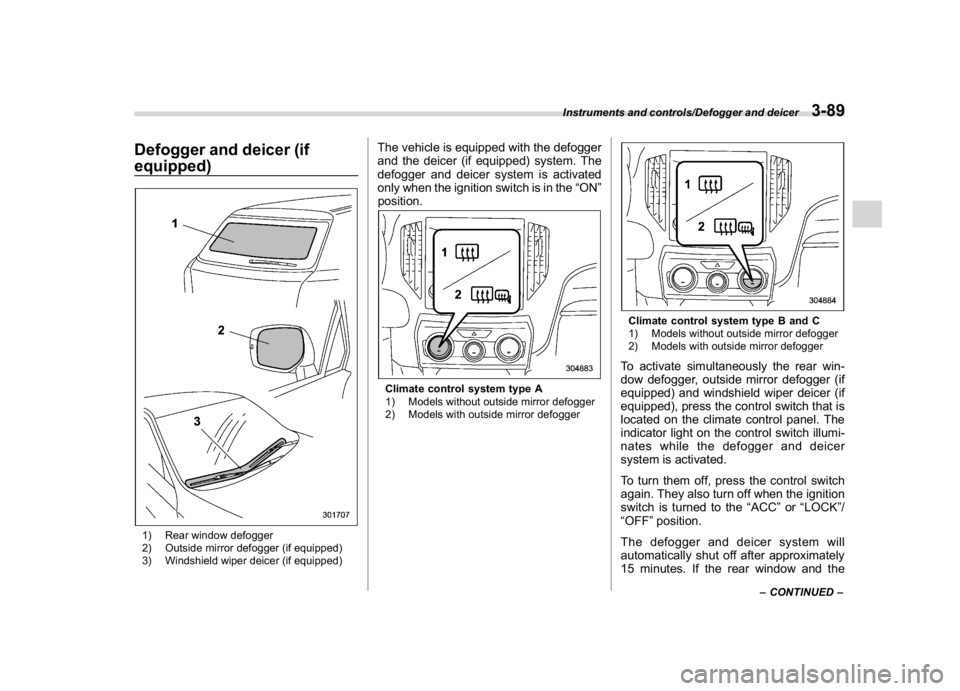
Defogger and deicer (if
equipped)1) Rear window defogger
2) Outside mirror defogger (if equipped)
3) Windshield wiper deicer (if equipped)
The vehicle is equipped with the defogger
and the deicer (if equipped) system. The
defogger and deicer system is activated
only when the ignition switch is in the“ON”
position.Climate control system type A
1) Models without outside mirror defogger
2) Models with outside mirror defogger
Climate control system type B and C
1) Models without outside mirror defogger
2) Models with outside mirror defoggerTo activate simultaneously the rear win-
dow defogger, outside mirror defogger (if
equipped) and windshield wiper deicer (if
equipped), press the control switch that is
located on the climate control panel. The
indicator light on the control switch illumi-
nates while the defogger and deicer
system is activated.
To turn them off, press the control switch
again. They also turn off when the ignition
switch is turned to the“ACC”or“LOCK”/
“OFF”position.
The defogger and deicer system will
automatically shut off after approximately
15 minutes. If the rear window and the
–CONTINUED–
Instruments and controls/Defogger and deicer
3-89
3