2018 SUBARU CROSSTREK battery
[x] Cancel search: batteryPage 161 of 474

(166,1)
北米Model "A1320BE-C" EDITED: 2017/ 10/ 10
Inside warning
chimeOutside warning
chimeOperation indicator
on push-button igni-
tion switchStatus Action
Long beep
(continuous)——Select lever position warning (CVT
models):
The driver’s door was opened while the
push-button ignition switch is in a position
other than“OFF”and the select lever is in
a position other than the“P”position.Shift the select lever to the“P”position,
switch the push-button ignition switch to
“OFF”and exit the vehicle.
Ding——The battery of the access key fob is low. Replace the battery of the access key fob.
Ding—Flashes in green
(15 seconds max.)Steering lock warning:
The engine start procedure was per-
formed, but the steering is still locked.While turning the steering wheel right and
left lightly, depress the brake pedal and
press the push-button ignition switch.
Ding—Flashes in orange
(15 seconds max.)System malfunction warning:
A malfunction was detected in the power
system or steering lock.Contact a SUBARU dealer immediately
and have the vehicle inspected.
Instruments and controls/Warning and indicator
3-28
Page 179 of 474

(184,1)
北米Model "A1320BE-C" EDITED: 2017/ 10/ 10
time a complete hour has elapsed. If the
display is giving a reading other than the
journey time, the display switches to the
journey time, flashes for 5 seconds, and
returns to its original reading each time a
complete hour has elapsed.NOTEThe journey time is reset when the
ignition switch is turned to the“ACC”
or“LOCK”/“OFF”position.
!Average vehicle speed1) When units in miles is selected
2) When units in km is selectedThis display shows the average vehicle
speed since the trip meter was last reset.
Pressing the TRIP RESET switch toggles
the display between the average vehiclespeed corresponding to the A trip meter
display and the average vehicle speed
corresponding to the B trip meter display.
When either of the trip meter displays is
reset, the corresponding average vehicle
speed value is also reset.
NOTEWhen either trip meter display is reset,
the average vehicle speed correspond-
ing to that trip meter display is not
shown until the vehicle has subse-
quently covered a distance of 1 mile
(or 1 km).
!Turn off display of driving informa-
tion display
Select the blank space in the menu to exit
the driving information display selection.NOTE.The average fuel consumption and
average vehicle speed are calculated
even while the driving information dis-
play is not displayed.
.Even if you turn off the driving
information display, the display will
automatically turn on when the battery
voltage is disconnected and then re-
connected for battery replacement or
fuse replacement.
&Outside temperature indica-
tor1) U.S.-spec. models
2) Except U.S.-spec. modelsNOTE.The outside temperature indicator
shows the temperature around the
sensor. Therefore, the temperature in-
dication may differ from the actual
outside air temperature.
.The temperature unit cannot be
changed.
Instruments and controls/Multi-function display (black and white)
3-46
Page 186 of 474
(191,1)
北米Model "A1320BE-C" EDITED: 2017/ 10/ 10
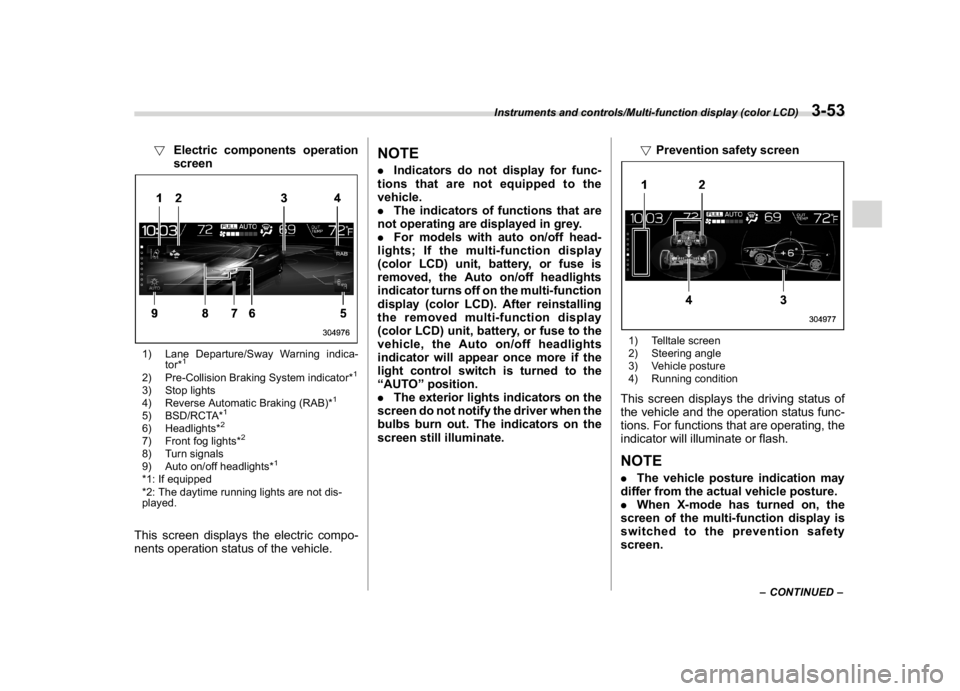
!Electric components operation
screen1) Lane Departure/Sway Warning indica-
tor*
1
2) Pre-Collision Braking System indicator*
1
3) Stop lights
4) Reverse Automatic Braking (RAB)*
1
5) BSD/RCTA*
1
6) Headlights*
2
7) Front fog lights*
2
8) Turn signals
9) Auto on/off headlights*
1
*1: If equipped
*2: The daytime running lights are not dis-
played.This screen displays the electric compo-
nents operation status of the vehicle.
NOTE.Indicators do not display for func-
tions that are not equipped to the
vehicle.
.The indicators of functions that are
not operating are displayed in grey.
.For models with auto on/off head-
lights; If the multi-function display
(color LCD) unit, battery, or fuse is
removed, the Auto on/off headlights
indicator turns off on the multi-function
display (color LCD). After reinstalling
the removed multi-function display
(color LCD) unit, battery, or fuse to the
vehicle, the Auto on/off headlights
indicator will appear once more if the
light control switch is turned to the
“AUTO”position.
.The exterior lights indicators on the
screen do not notify the driver when the
bulbs burn out. The indicators on the
screen still illuminate.!Prevention safety screen
1) Telltale screen
2) Steering angle
3) Vehicle posture
4) Running conditionThis screen displays the driving status of
the vehicle and the operation status func-
tions. For functions that are operating, the
indicator will illuminate or flash.NOTE.The vehicle posture indication may
differ from the actual vehicle posture.
.When X-mode has turned on, the
screen of the multi-function display is
switched to the prevention safety
screen.
–CONTINUED–
Instruments and controls/Multi-function display (color LCD)
3-53
3
Page 199 of 474
(204,1)
北米Model "A1320BE-C" EDITED: 2017/ 10/ 10
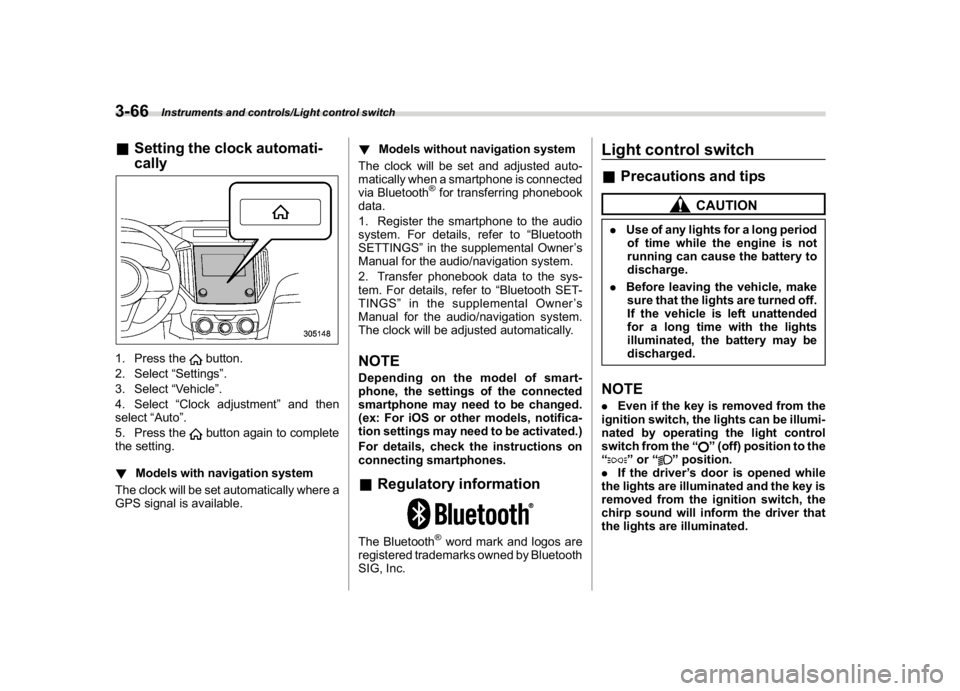
&Setting the clock automati-
cally1. Press the
button.
2. Select“Settings”.
3. Select“Vehicle”.
4. Select“Clock adjustment”and then
select“Auto”.
5. Press thebutton again to complete
the setting.
!Models with navigation system
The clock will be set automatically where a
GPS signal is available.!Models without navigation system
The clock will be set and adjusted auto-
matically when a smartphone is connected
via Bluetooth
®for transferring phonebook
data.
1. Register the smartphone to the audio
system. For details, refer to“Bluetooth
SETTINGS”in the supplemental Owner’s
Manual for the audio/navigation system.
2. Transfer phonebook data to the sys-
tem. For details, refer to“Bluetooth SET-
TINGS”in the supplemental Owner’s
Manual for the audio/navigation system.
The clock will be adjusted automatically.
NOTEDepending on the model of smart-
phone, the settings of the connected
smartphone may need to be changed.
(ex: For iOS or other models, notifica-
tion settings may need to be activated.)
For details, check the instructions on
connecting smartphones.&Regulatory informationThe Bluetooth
®word mark and logos are
registered trademarks owned by Bluetooth
SIG, Inc.
Light control switch&Precautions and tips
CAUTION
.Use of any lights for a long period
of time while the engine is not
running can cause the battery to
discharge.
.Before leaving the vehicle, make
sure that the lights are turned off.
If the vehicle is left unattended
for a long time with the lights
illuminated, the battery may be
discharged.NOTE.Even if the key is removed from the
ignition switch, the lights can be illumi-
nated by operating the light control
switch from the“
”(off) position to the
“
”or“
”position.
.If the driver’s door is opened while
the lights are illuminated and the key is
removed from the ignition switch, the
chirp sound will inform the driver that
the lights are illuminated.
Instruments and controls/Light control switch
3-66
Page 215 of 474
(220,1)
北米Model "A1320BE-C" EDITED: 2017/ 10/ 10
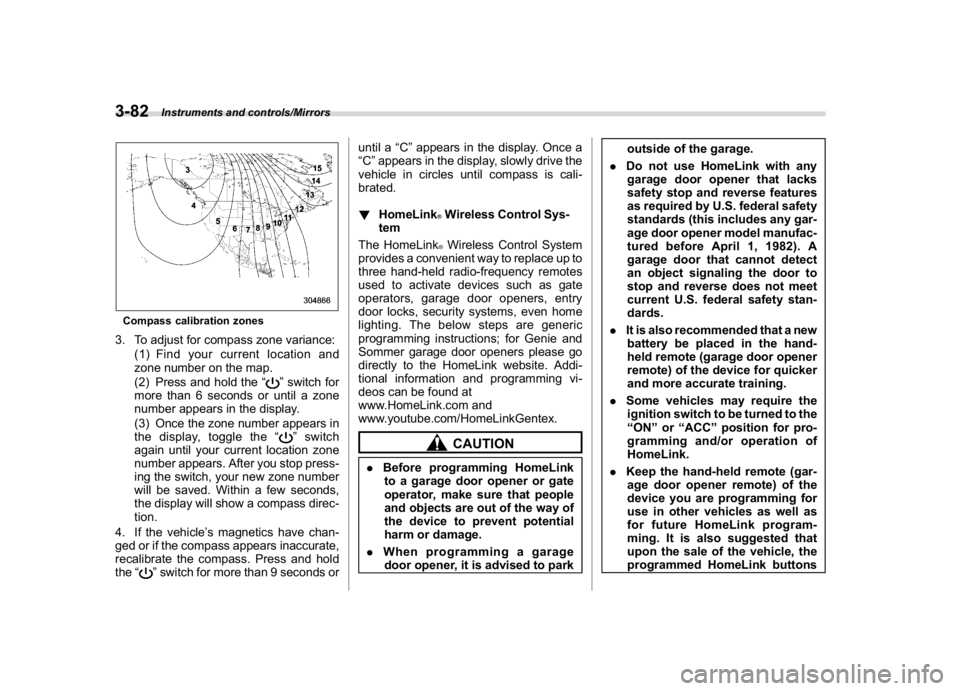
Compass calibration zones3. To adjust for compass zone variance:
(1) Find your current location and
zone number on the map.
(2) Press and hold the“
”switch for
more than 6 seconds or until a zone
number appears in the display.
(3) Once the zone number appears in
the display, toggle the“”switch
again until your current location zone
number appears. After you stop press-
ing the switch, your new zone number
will be saved. Within a few seconds,
the display will show a compass direc-
tion.
4. If the vehicle’s magnetics have chan-
ged or if the compass appears inaccurate,
recalibrate the compass. Press and hold
the“
”switch for more than 9 seconds oruntil a“C”appears in the display. Once a
“C”appears in the display, slowly drive the
vehicle in circles until compass is cali-
brated.
!HomeLink
®Wireless Control Sys-
tem
The HomeLink®Wireless Control System
provides a convenient way to replace up to
three hand-held radio-frequency remotes
used to activate devices such as gate
operators, garage door openers, entry
door locks, security systems, even home
lighting. The below steps are generic
programming instructions; for Genie and
Sommer garage door openers please go
directly to the HomeLink website. Addi-
tional information and programming vi-
deos can be found at
www.HomeLink.com and
www.youtube.com/HomeLinkGentex.CAUTION
.Before programming HomeLink
to a garage door opener or gate
operator, make sure that people
and objects are out of the way of
the device to prevent potential
harm or damage.
.When programming a garage
door opener, it is advised to parkoutside of the garage.
.Do not use HomeLink with any
garage door opener that lacks
safety stop and reverse features
as required by U.S. federal safety
standards (this includes any gar-
age door opener model manufac-
tured before April 1, 1982). A
garage door that cannot detect
an object signaling the door to
stop and reverse does not meet
current U.S. federal safety stan-
dards.
.It is also recommended that a new
battery be placed in the hand-
held remote (garage door opener
remote) of the device for quicker
and more accurate training.
.Some vehicles may require the
ignition switch to be turned to the
“ON”or“ACC”position for pro-
gramming and/or operation of
HomeLink.
.Keep the hand-held remote (gar-
age door opener remote) of the
device you are programming for
use in other vehicles as well as
for future HomeLink program-
ming. It is also suggested that
upon the sale of the vehicle, the
programmed HomeLink buttons
Instruments and controls/Mirrors
3-82
Page 223 of 474
(228,1)
北米Model "A1320BE-C" EDITED: 2017/ 10/ 10
outside mirrors have been cleared and the
windshield blade rubbers have been
deiced completely before that time, press
the control switch to turn them off.
For climate control system (type B and
C),it is possible for the defogger and
deicer system to be set to continuous
operation mode by a SUBARU dealer.
Consult your SUBARU dealer for details.
Also, for models with a combination meter
display (color LCD), it is possible to set the
defogger and deicer system for the con-
tinuous operation mode. For details, refer
to“Vehicle Setting”F3-41.
CAUTION
.To prevent the battery from being
discharged, do not operate the
defogger and deicer system con-
tinuously for any longer than
necessary.
.Do not use sharp instruments or
window cleaner containing abra-
sives to clean the inner surface of
the rear window. They may da-
mage the conductors printed on
the window.
NOTE.Turn on the defogger and deicer
system if the wipers are frozen to the
windshield.
.If the windshield is covered with
snow, remove the snow so that the
windshield wiper deicer works effec-
tively.
.While the defogger and deicer sys-
tem is in the continuous operation
mode:
–If the vehicle speed remains at 9
mph (15 km/h) or lower for 15
minutes, the windshield wiper dei-
cer system automatically stops op-
erating. However, the rear window
defogger system and outside mirror
defogger system maintain continu-
ous operation in this condition.
–If the vehicle battery voltage
drops below the permissible level,
continuous operation of the defog-
ger system and deicer system is
canceled and the system stops
operating.
Tilt/telescopic steering wheel
WARNING
.Do not adjust the steering wheel
tilt/telescopic position while driv-
ing. This may cause loss of
vehicle control and result in per-
sonal injury.
.If the lever cannot be raised to the
fixed position, adjust the steering
wheel again. It is dangerous to
drive without locking the steering
wheel. This may cause loss of
vehicle control and result in per-
sonal injury.
Instruments and controls/Tilt/telescopic steering wheel
3-90
Page 224 of 474
(229,1)
北米Model "A1320BE-C" EDITED: 2017/ 10/ 10
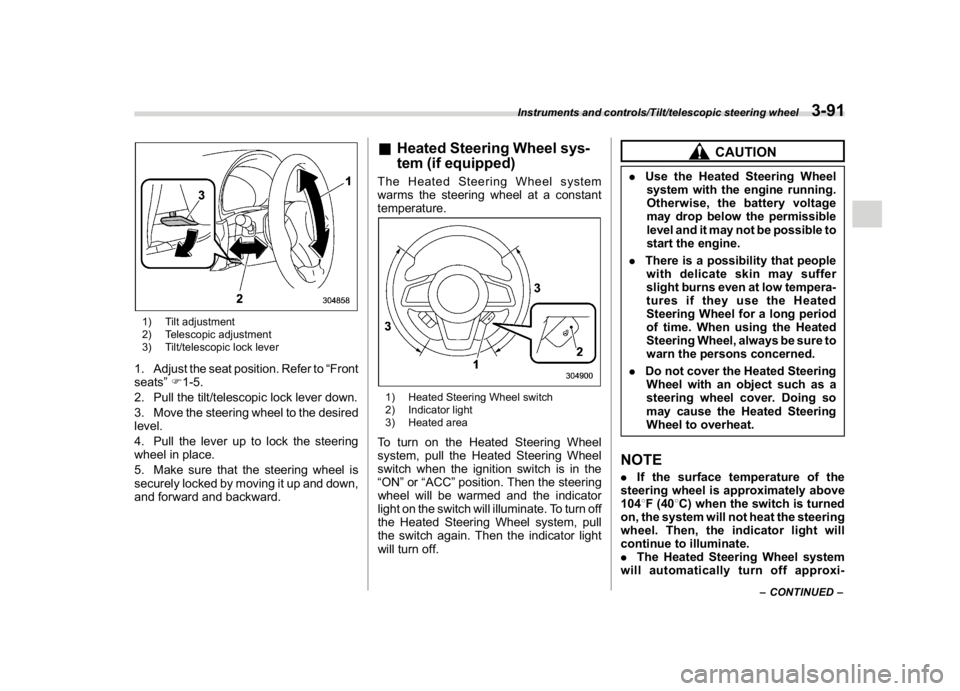
1) Tilt adjustment
2) Telescopic adjustment
3) Tilt/telescopic lock lever1. Adjust the seat position. Refer to“Front
seats”F1-5.
2. Pull the tilt/telescopic lock lever down.
3. Move the steering wheel to the desired
level.
4. Pull the lever up to lock the steering
wheel in place.
5. Make sure that the steering wheel is
securely locked by moving it up and down,
and forward and backward.
&Heated Steering Wheel sys-
tem (if equipped)The Heated Steering Wheel system
warms the steering wheel at a constant
temperature.1) Heated Steering Wheel switch
2) Indicator light
3) Heated areaTo turn on the Heated Steering Wheel
system, pull the Heated Steering Wheel
switch when the ignition switch is in the
“ON”or“ACC”position. Then the steering
wheel will be warmed and the indicator
light on the switch will illuminate. To turn off
the Heated Steering Wheel system, pull
the switch again. Then the indicator light
will turn off.
CAUTION
.Use the Heated Steering Wheel
system with the engine running.
Otherwise, the battery voltage
may drop below the permissible
level and it may not be possible to
start the engine.
.There is a possibility that people
with delicate skin may suffer
slight burns even at low tempera-
tures if they use the Heated
Steering Wheel for a long period
of time. When using the Heated
Steering Wheel, always be sure to
warn the persons concerned.
.Do not cover the Heated Steering
Wheel with an object such as a
steering wheel cover. Doing so
may cause the Heated Steering
Wheel to overheat.NOTE.If the surface temperature of the
steering wheel is approximately above
1048F (408C) when the switch is turned
on, the system will not heat the steering
wheel. Then, the indicator light will
continue to illuminate.
.The Heated Steering Wheel system
will automatically turn off approxi-
–CONTINUED–
Instruments and controls/Tilt/telescopic steering wheel
3-91
3
Page 245 of 474
(252,1)
北米Model "A1320BE-C" EDITED: 2017/ 10/ 10
Interior lights
CAUTION
When leaving your vehicle, make
sure the lights are turned off to
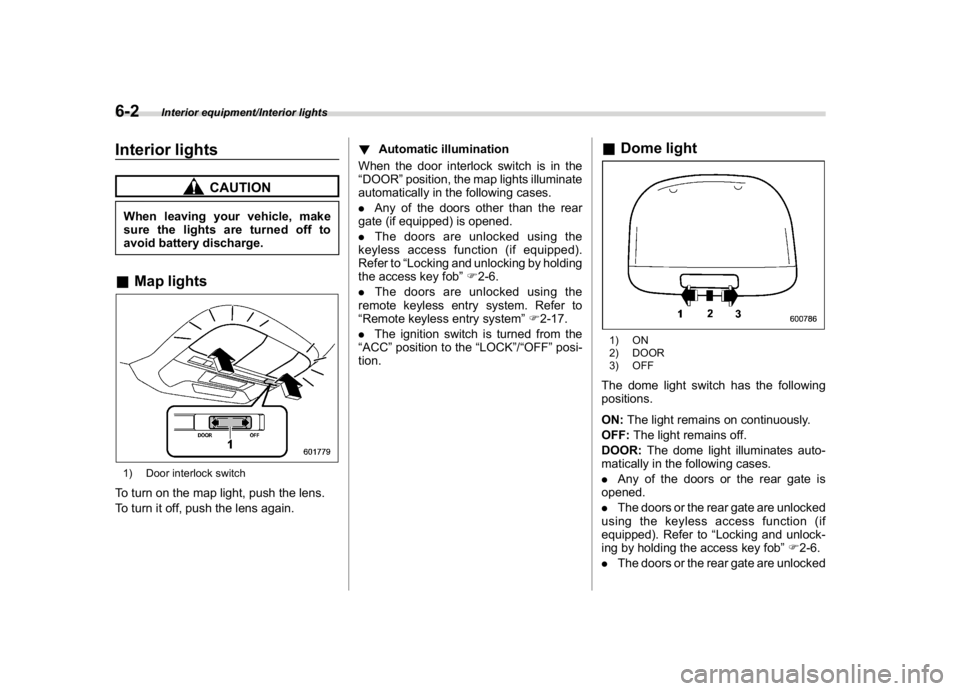
avoid battery discharge.&Map lights1) Door interlock switchTo turn on the map light, push the lens.
To turn it off, push the lens again.!Automatic illumination
When the door interlock switch is in the
“DOOR”position, the map lights illuminate
automatically in the following cases.
.Any of the doors other than the rear
gate (if equipped) is opened.
.The doors are unlocked using the
keyless access function (if equipped).
Refer to“Locking and unlocking by holding
the access key fob”F2-6.
.The doors are unlocked using the
remote keyless entry system. Refer to
“Remote keyless entry system”F2-17.
.The ignition switch is turned from the
“ACC”position to the“LOCK”/“OFF”posi-
tion.
&Dome light1) ON
2) DOOR
3) OFFThe dome light switch has the following
positions.
ON:The light remains on continuously.
OFF:The light remains off.
DOOR:The dome light illuminates auto-
matically in the following cases.
.Any of the doors or the rear gate is
opened.
.The doors or the rear gate are unlocked
using the keyless access function (if
equipped). Refer to“Locking and unlock-
ing by holding the access key fob”F2-6.
.The doors or the rear gate are unlocked
Interior equipment/Interior lights
6-2