2018 SUBARU CROSSTREK display
[x] Cancel search: displayPage 118 of 474
(121,1)
北米Model "A1320BE-C" EDITED: 2017/ 10/ 10
and the rear gate) is extremely short,
the system may not respond.&Unlocking the rear gatePress the rear gate unlock button to unlock
the rear gate.
An electronic chirp will sound twice and the
hazard warning flashers will flash twice.&Vehicle finder functionUse this function to find your vehicle
parked among many vehicles in a large
parking lot. Provided you are within 30 feet
(10 meters) of the vehicle, pressing the
lock/arm button three times in a 5-second
period will cause your vehicle’s horn to
sound once and its hazard warning
flashers to flash three times.NOTEIf the interval between presses is too
short when you press the lock/arm
button three times, the system may
not respond to the signals from the
remote transmitter.
&Sounding a panic alarmTo activate the alarm, press the“PANIC”
button once.
The horn will sound and the hazard
warning flashers will flash.
To deactivate the panic alarm, press any
button on the remote transmitter. Unless a
button on the remote transmitter is
pressed, the alarm will be deactivated
after approximately 30 seconds.&Setting audible signal opera-
tion (models without“keyless
access with push-button start
system”)Using an electronic chirp, the system will
give you an audible signal when the doors
lock and unlock. If desired, you may turn
the audible signal off.
Perform the following steps to deactivate
the audible signal. You can also use the
same steps to restore the function.
1. Sit in the driver’s seat and shut all
doors and the rear gate.
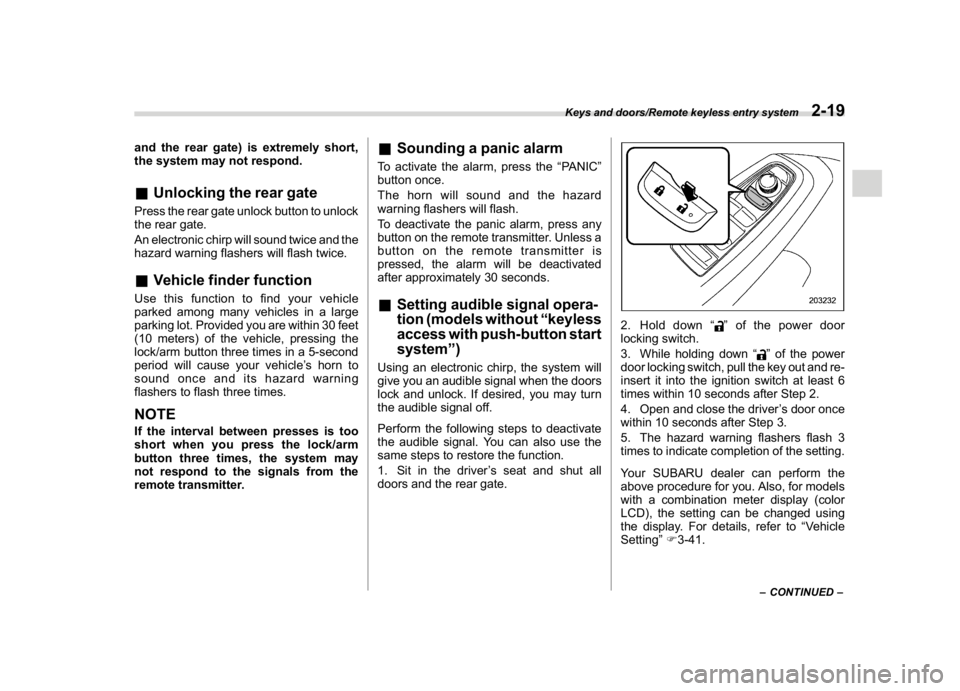
2. Hold down“
”of the power door
locking switch.
3. While holding down“
”of the power
door locking switch, pull the key out and re-
insert it into the ignition switch at least 6
times within 10 seconds after Step 2.
4. Open and close the driver’s door once
within 10 seconds after Step 3.
5. The hazard warning flashers flash 3
times to indicate completion of the setting.
Your SUBARU dealer can perform the
above procedure for you. Also, for models
with a combination meter display (color
LCD), the setting can be changed using
the display. For details, refer to“Vehicle
Setting”F3-41.–CONTINUED–
Keys and doors/Remote keyless entry system
2-19
2
Page 126 of 474

(129,1)
北米Model "A1320BE-C" EDITED: 2017/ 10/ 10
seconds without releasing the switch. The
setting will then be changed as follows.
.Type A combination meterSetting
statusCombination
meter displayHorn
Activate ALon Once
Deactivate ALoFTwice.Type B combination meter
Setting
statusCombination
meter displayHorn
Activate AL ON Once
Deactivate AL OFFTwice
NOTEYou may have the above setting change
done by your SUBARU dealer.
&If you have accidentally trig-
gered the alarm system!To stop the alarm
Do any of the following operations:
.Press any button on the access key fob/
remote transmitter.
.Turn the ignition switch to the“ON”
position (models without“keyless access
with push-button start system”).
.Turn the push-button ignition to the
“ACC”position (models with“keyless
access with push-button start system”).NOTEOnly registered keys will stop the
alarm. If the immobilizer transponder
is not registered, the alarm will not
stop.
&Valet modeWhen you choose the valet mode, the
alarm system does not operate. In valet
mode, the remote transmitter is used only
for locking and unlocking the doors and
rear gate and panic activation.
To enter the valet mode, change the
setting of your vehicle’s alarm system for
deactivation mode. Refer to“Alarm system
setting”F2-26. The security indicator light
will continue to flash once every 3 seconds
indicating that the system is in the valet
mode.
To exit valet mode, change the setting of
your vehicle’s alarm system for activation
mode. Refer to“Alarm system setting”F2-
26.
Keys and doors/Alarm system
2-27
2
Page 135 of 474

(140,1)
北米Model "A1320BE-C" EDITED: 2017/ 10/ 10
Cruise control indicator light (if equipped).............3-31
Cruise control set indicator light (if equipped).......3-31
Automatic headlight beam leveler warning light
(models with LED headlights)..............................3-31
LED headlight warning light (models with LED
headlights)..........................................................3-31
Steering Responsive Headlight warning light/
Steering Responsive Headlight OFF indicator
light (if equipped)................................................3-31
Front fog light indicator light (if equipped) ............3-31
Headlight indicator light (if equipped)....................3-31
Steering responsive fog lights warning indicator/
Steering responsive fog lights OFF indicator
(if equipped).......................................................3-31
X-mode indicator (if equipped)..............................3-32
Hill descent control indicator (if equipped) ............3-32
BSD/RCTA warning indicator (if equipped).............3-32
BSD/RCTA OFF indicator (if equipped)..................3-32
RAB warning indicator (if equipped)......................3-32
RAB OFF indicator light (if equipped)....................3-32
Icy road surface warning indicator (if equipped)....3-32
Combination meter display (color LCD)
(if equipped).......................................................3-33
Basic operation.....................................................3-34
Welcome screen and Good-bye screen..................3-34
Warning screen.....................................................3-35
Telltale screen.......................................................3-35
Basic screens.......................................................3-36
Menu screens.......................................................3-38
Multi-function display (black andwhite).............3-42
Driving information display...................................3-43
Outside temperature indicator...............................3-46X-mode indicator (if equipped)..............................3-47
Clock....................................................................3-47
Multi-function display (color LCD)
(if equipped).......................................................3-47
Features...............................................................3-48
Welcome screen...................................................3-48
Self-check screen.................................................3-48
Interruption screen...............................................3-49
Basic operation....................................................3-49
Basic screens.......................................................3-50
Setting screen......................................................3-57
How to get the source code using the open
source...............................................................3-62
Clock......................................................................3-63
Setting the clock manually....................................3-63
Setting the clock automatically.............................3-66
Regulatory information.........................................3-66
Light control switch.............................................3-66
Precautions and tips.............................................3-66
Headlights............................................................3-67
High/low beam change (dimmer) ...........................3-68
Headlight flasher..................................................3-69
High beam assist function (if equipped)................3-69
Daytime running light system...............................3-72
Steering Responsive Headlight (SRH)
(if equipped).......................................................3-72
Headlight beam leveler
(models with LEDheadlights)..........................3-73
Fog light switch (ifequipped)..............................3-74
Steering responsive fog lights system
(if equipped)......................................................3-74
Instruments and controls
Page 141 of 474
(146,1)
北米Model "A1320BE-C" EDITED: 2017/ 10/ 10
.If the indicator light on the push-
button ignition switch flashes in green
when the push-button ignition switch is
pressed, steering is locked. When this
occurs, press the push-button ignition
switch while turning the steering wheel
left and right.
!Battery drainage prevention func-
tion
When the push-button ignition switch is left
in the“ACC”or“ON”position for approxi-
mately 1 hour, the push-button ignition
switch will be automatically switched to
“OFF”to prevent the battery from going
dead.&When access key fob does
not operate properlyRefer to“Access key fob–if access key
fob does not operate properly”F9-17.
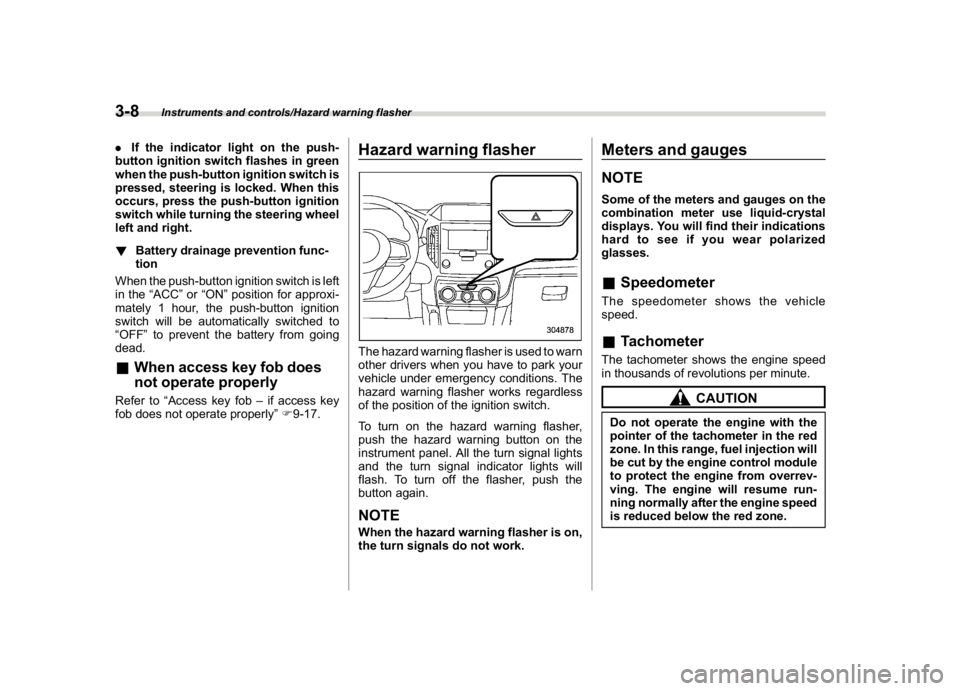
Hazard warning flasherThe hazard warning flasher is used to warn
other drivers when you have to park your
vehicle under emergency conditions. The
hazard warning flasher works regardless
of the position of the ignition switch.
To turn on the hazard warning flasher,
push the hazard warning button on the
instrument panel. All the turn signal lights
and the turn signal indicator lights will
flash. To turn off the flasher, push the
button again.NOTEWhen the hazard warning flasher is on,
the turn signals do not work.
Meters and gaugesNOTESome of the meters and gauges on the
combination meter use liquid-crystal
displays. You will find their indications
hard to see if you wear polarized
glasses.&SpeedometerThe speedometer shows the vehicle
speed.&TachometerThe tachometer shows the engine speed
in thousands of revolutions per minute.
CAUTION
Do not operate the engine with the
pointer of the tachometer in the red
zone. In this range, fuel injection will
be cut by the engine control module
to protect the engine from overrev-
ving. The engine will resume run-
ning normally after the engine speed
is reduced below the red zone.
Instruments and controls/Hazard warning flasher
3-8
Page 142 of 474
(147,1)
北米Model "A1320BE-C" EDITED: 2017/ 10/ 10
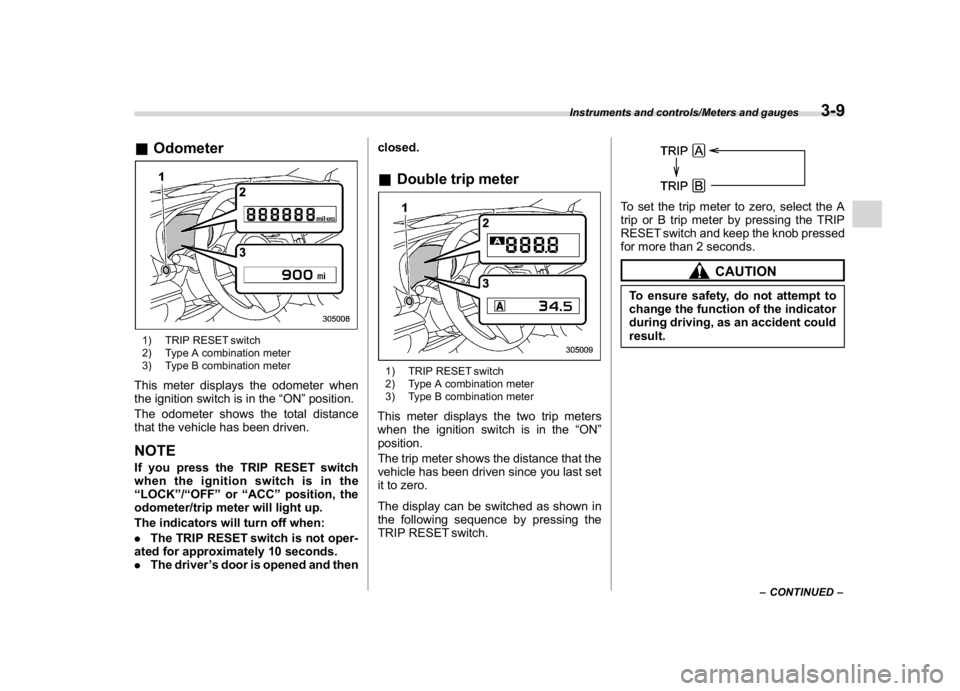
&Odometer1) TRIP RESET switch
2) Type A combination meter
3) Type B combination meterThis meter displays the odometer when
the ignition switch is in the“ON”position.
The odometer shows the total distance
that the vehicle has been driven.NOTEIf you press the TRIP RESET switch
when the ignition switch is in the
“LOCK”/“OFF”or“ACC”position, the
odometer/trip meter will light up.
The indicators will turn off when:
.The TRIP RESET switch is not oper-
ated for approximately 10 seconds.
.The driver’s door is opened and thenclosed.
&Double trip meter1) TRIP RESET switch
2) Type A combination meter
3) Type B combination meterThis meter displays the two trip meters
when the ignition switch is in the“ON”
position.
The trip meter shows the distance that the
vehicle has been driven since you last set
it to zero.
The display can be switched as shown in
the following sequence by pressing the
TRIP RESET switch.
To set the trip meter to zero, select the A
trip or B trip meter by pressing the TRIP
RESET switch and keep the knob pressed
for more than 2 seconds.
CAUTION
To ensure safety, do not attempt to
change the function of the indicator
during driving, as an accident could
result.
–CONTINUED–
Instruments and controls/Meters and gauges
3-9
3
Page 143 of 474
(148,1)
北米Model "A1320BE-C" EDITED: 2017/ 10/ 10
NOTE.If the connection between the com-
bination meter and battery is broken for
any reason such as vehicle mainte-
nance or fuse replacement, the data
recorded on the trip meter will be lost.
.If you press the TRIP RESET switch
when the ignition switch is in the
“LOCK”/“OFF”or“ACC”position, the
odometer/trip meter will light up. It is
possible to switch between the A trip
meter and B trip meter indications while
the odometer/trip meter is lit up.
In addition, it is possible to reset the trip
meter by pressing and holding the TRIP
RESET switch.
The indicators will turn off when:
–The TRIP RESET switch is not
operated for approximately 10 sec-
onds.
–The driver’s door is opened and
then closed.
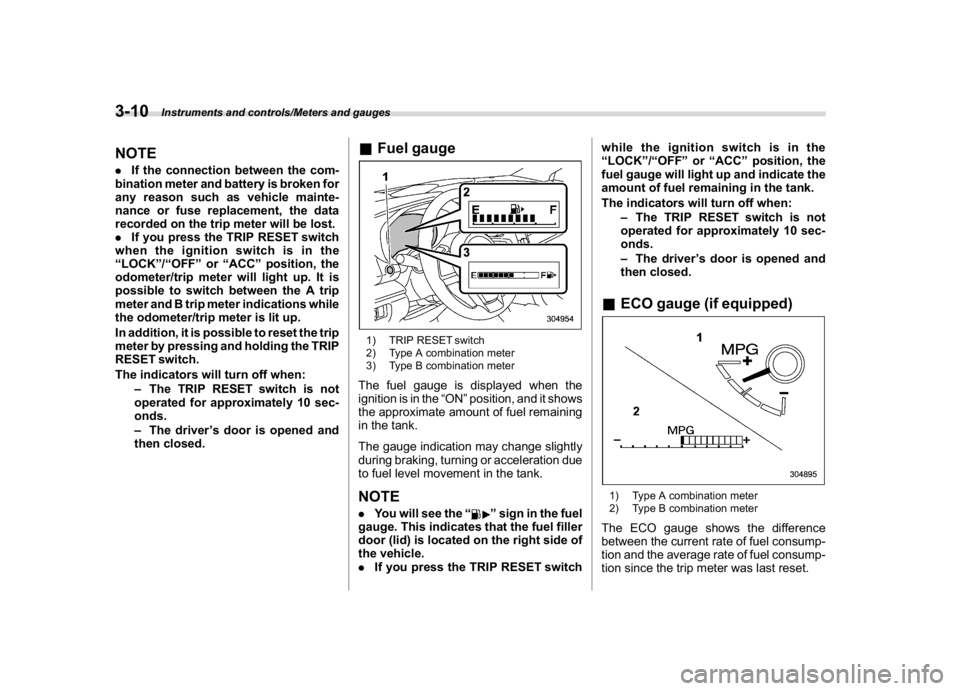
&Fuel gauge1) TRIP RESET switch
2) Type A combination meter
3) Type B combination meterThe fuel gauge is displayed when the
ignition is in the“ON”position, and it shows
the approximate amount of fuel remaining
in the tank.
The gauge indication may change slightly
during braking, turning or acceleration due
to fuel level movement in the tank.NOTE.You will see the“
”sign in the fuel
gauge. This indicates that the fuel filler
door (lid) is located on the right side of
the vehicle.
.If you press the TRIP RESET switchwhile the ignition switch is in the
“LOCK”/“OFF”or“ACC”position, the
fuel gauge will light up and indicate the
amount of fuel remaining in the tank.
The indicators will turn off when:
–The TRIP RESET switch is not
operated for approximately 10 sec-
onds.
–The driver’s door is opened and
then closed.
&ECO gauge (if equipped)1) Type A combination meter
2) Type B combination meterThe ECO gauge shows the difference
between the current rate of fuel consump-
tion and the average rate of fuel consump-
tion since the trip meter was last reset.
Instruments and controls/Meters and gauges
3-10
Page 144 of 474
(149,1)
北米Model "A1320BE-C" EDITED: 2017/ 10/ 10
If the ECO gauge moves towards the +
side, this indicates better fuel efficiency.NOTE.The ECO gauge shows only an
approximate indication of fuel effi-
ciency.
.After resetting the trip meter, the
average rate of fuel consumption is not
shown until you have driven for 1 mile
(or 1 km). Before that time, the ECO
gauge does not operate.&Combination meter settingsMeter and vehicle settings can be set on
the combination meter.
!Type A combination meter
Various adjustments can be made, such
as switching units shown on the combina-
tion meter and adjusting the warning tone
volume.
While the ignition switch is in the“OFF”
position, each press of TRIP RESET
switch results in items shown in the table
below being switched.
ItemCombination
meter displayPossible
settings
A trip
—
B trip—
Gauge
needle
sweep
function
On/Off
Changing
the unit*mile/km
Warning
volume*Lv. 1/Lv. 2/Lv. 3
*: if available
NOTE.If you switch the units on the combi-
nation meter, the units on the multi-
function display (black and white) also
switches accordingly.
.If either of the following conditions
is met, the combination meter setting
mode will be canceled.
–The driver’s door is opened.
–The TRIP RESET switch is not
operated for approximately 10 sec-
onds or more.!Switching method
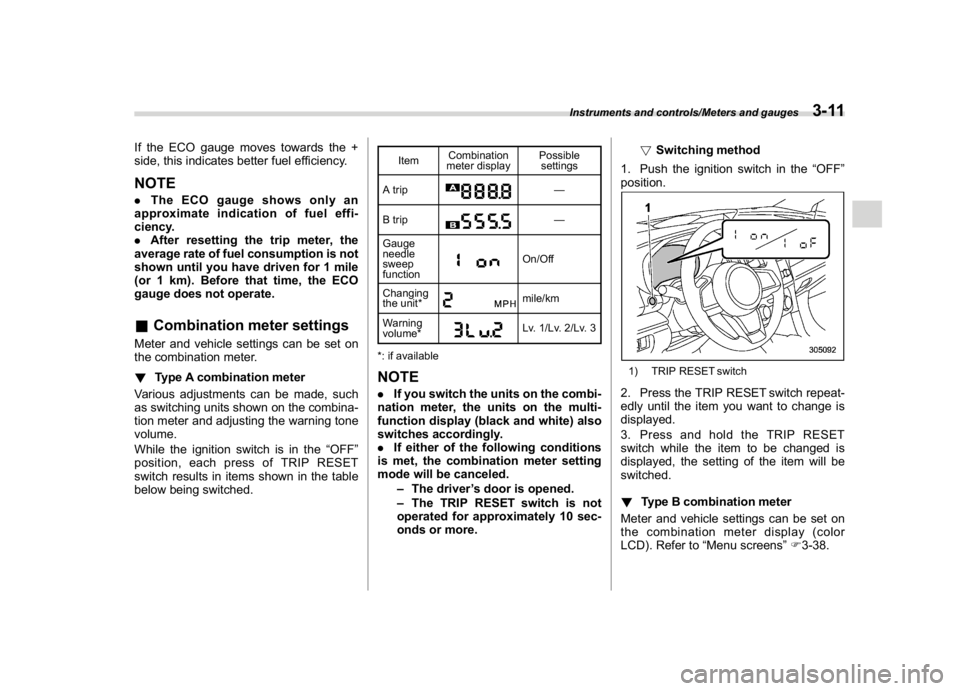
1. Push the ignition switch in the“OFF”
position.
1) TRIP RESET switch2. Press the TRIP RESET switch repeat-
edly until the item you want to change is
displayed.
3. Press and hold the TRIP RESET
switch while the item to be changed is
displayed, the setting of the item will be
switched.
!Type B combination meter
Meter and vehicle settings can be set on
the combination meter display (color
LCD). Refer to“Menu screens”F3-38.
Instruments and controls/Meters and gauges
3-11
3
Page 148 of 474

(153,1)
北米Model "A1320BE-C" EDITED: 2017/ 10/ 10
&SRS airbag system
warning light
WARNING
If the warning light exhibits any of
the following conditions, there may
be a malfunction in the seatbelt
pretensioners and/or SRS airbag
system. Immediately take your vehi-
cle to your nearest SUBARU dealer
to have the system checked. Unless
checked and properly repaired, the
seatbelt pretensioners and/or SRS
airbag will not operate properly in
the event of a collision, which may
increase the risk of injury.
.Flashing or flickering of the warn-
ing light
.No illumination of the warning
light when the ignition switch is
first turned to the“ON”position
.Continuous illumination of the
warning light
.Illumination of the warning light
while driving
For details about the components mon-
itored by the warning light, refer to“SRS
airbag system monitors”F1-66.
&Front passenger’s frontal air-
bag ON and OFF indicatorsON
: Front passenger’s frontal airbag ON
indicator: Front passenger’s frontal airbag OFF
indicator
The front passenger’s frontal airbag ON
and OFF indicators show you the status of
the front passenger’s SRS frontal airbag.
The indicator is displayed near the map
lights.
When the ignition switch is turned to the
“ON”position, both the ON and OFF
indicators illuminate for 6 seconds during
which time the system is checked. Follow-
ing the system check, both indicators turn
off for 2 seconds. After that, one of the
indicators illuminates depending on the
status of the front passenger’s SRS frontalairbag determined by the SUBARU ad-
vanced frontal airbag system monitoring.
If the front passenger’s SRS frontal airbag
is activated, the passenger’s frontal airbag
ON indicator will illuminate while the OFF
indicator will remain off.
If the front passenger’s SRS frontal airbag
is deactivated, the passenger’s frontal
airbag ON indicator will remain off while
the OFF indicator will illuminate.
With the ignition switch turned to the“ON”
position, if both the ON and OFF indicators
remain illuminated or off simultaneously
even after the system check period, the
system is malfunctioning. Contact your
SUBARU dealer immediately for an in-
spection.
&CHECK ENGINE warn-
ing light/Malfunction in-
dicator light
CAUTION
If the CHECK ENGINE light illumi-
nates while you are driving, have
your vehicle checked/repaired by
your SUBARU dealer as soon as
possible. Continued vehicle opera-
tion without having the emission
control system checked and re-
paired as necessary could cause
–CONTINUED–
Instruments and controls/Warning and indicator
3-15
3