2018 SUBARU CROSSTREK buttons
[x] Cancel search: buttonsPage 216 of 474
(221,1)
北米Model "A1320BE-C" EDITED: 2017/ 10/ 10
be erased for security purposes.
Refer to“Erasing HomeLink But-
tons”F3-85.
!Programming a New HomeLink
Button
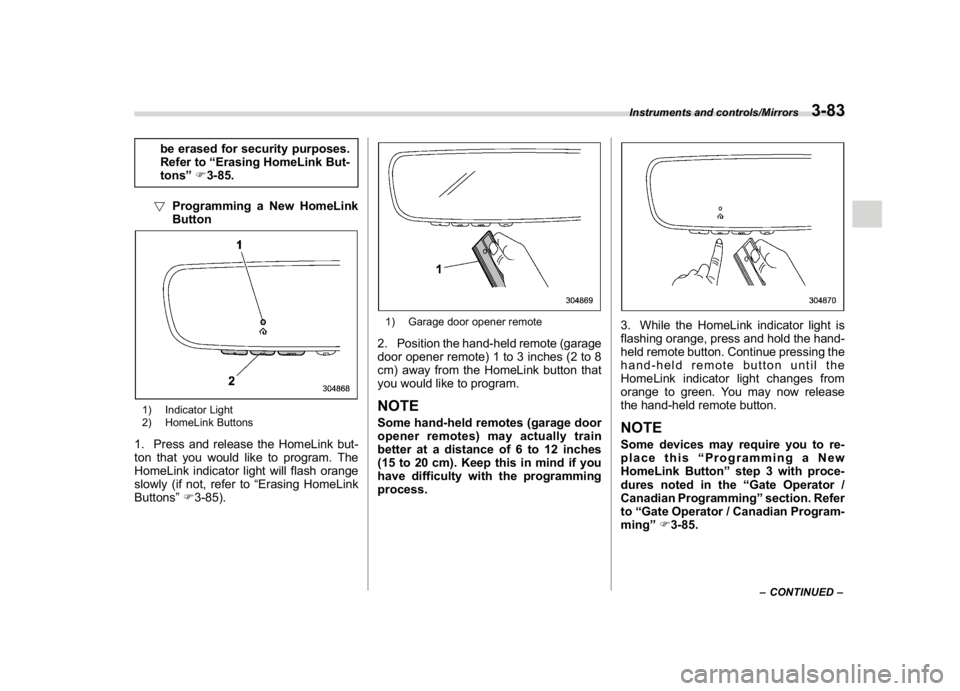
1) Indicator Light
2) HomeLink Buttons1. Press and release the HomeLink but-
ton that you would like to program. The
HomeLink indicator light will flash orange
slowly (if not, refer to“Erasing HomeLink
Buttons”F3-85).
1) Garage door opener remote2. Position the hand-held remote (garage
door opener remote) 1 to 3 inches (2 to 8
cm) away from the HomeLink button that
you would like to program.NOTESome hand-held remotes (garage door
opener remotes) may actually train
better at a distance of 6 to 12 inches
(15 to 20 cm). Keep this in mind if you
have difficulty with the programming
process.
3. While the HomeLink indicator light is
flashing orange, press and hold the hand-
held remote button. Continue pressing the
hand-held remote button until the
HomeLink indicator light changes from
orange to green. You may now release
the hand-held remote button.NOTESome devices may require you to re-
place this“Programming a New
HomeLink Button”step 3 with proce-
dures noted in the“Gate Operator /
Canadian Programming”section. Refer
to“Gate Operator / Canadian Program-
ming”F3-85.
–CONTINUED–
Instruments and controls/Mirrors
3-83
3
Page 218 of 474
(223,1)
北米Model "A1320BE-C" EDITED: 2017/ 10/ 10
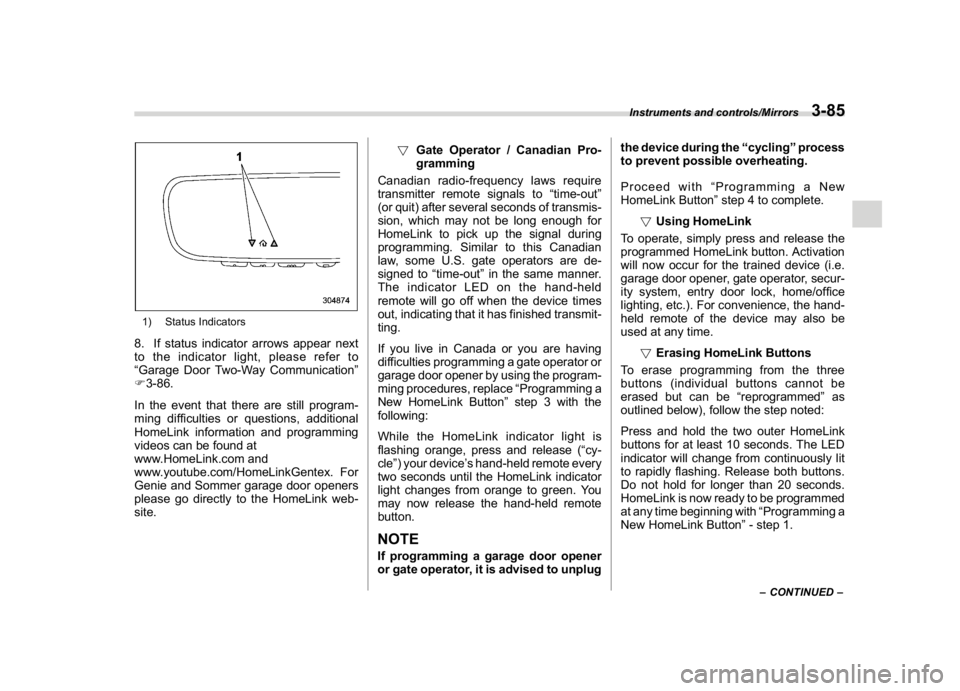
1) Status Indicators8. If status indicator arrows appear next
to the indicator light, please refer to
“Garage Door Two-Way Communication”
F3-86.
In the event that there are still program-
ming difficulties or questions, additional
HomeLink information and programming
videos can be found at
www.HomeLink.com and
www.youtube.com/HomeLinkGentex. For
Genie and Sommer garage door openers
please go directly to the HomeLink web-
site.!Gate Operator / Canadian Pro-
gramming
Canadian radio-frequency laws require
transmitter remote signals to“time-out”
(or quit) after several seconds of transmis-
sion, which may not be long enough for
HomeLink to pick up the signal during
programming. Similar to this Canadian
law, some U.S. gate operators are de-
signed to“time-out”in the same manner.
The indicator LED on the hand-held
remote will go off when the device times
out, indicating that it has finished transmit-
ting.
If you live in Canada or you are having
difficulties programming a gate operator or
garage door opener by using the program-
ming procedures, replace“Programming a
New HomeLink Button”step 3 with the
following:
While the HomeLink indicator light is
flashing orange, press and release (“cy-
cle”) your device’s hand-held remote every
two seconds until the HomeLink indicator
light changes from orange to green. You
may now release the hand-held remote
button.
NOTEIf programming a garage door opener
or gate operator, it is advised to unplugthe device during the“cycling”process
to prevent possible overheating.
Proceed with“Programming a New
HomeLink Button”step 4 to complete.
!Using HomeLink
To operate, simply press and release the
programmed HomeLink button. Activation
will now occur for the trained device (i.e.
garage door opener, gate operator, secur-
ity system, entry door lock, home/office
lighting, etc.). For convenience, the hand-
held remote of the device may also be
used at any time.
!Erasing HomeLink Buttons
To erase programming from the three
buttons (individual buttons cannot be
erased but can be“reprogrammed”as
outlined below), follow the step noted:
Press and hold the two outer HomeLink
buttons for at least 10 seconds. The LED
indicator will change from continuously lit
to rapidly flashing. Release both buttons.
Do not hold for longer than 20 seconds.
HomeLink is now ready to be programmed
at any time beginning with“Programming a
New HomeLink Button”- step 1.
–CONTINUED–
Instruments and controls/Mirrors
3-85
3
Page 219 of 474
(224,1)
北米Model "A1320BE-C" EDITED: 2017/ 10/ 10
!Reprogramming a Single
HomeLink Button
To program a previously trained button,
follow these steps:
1. Press and hold the desired HomeLink
button. DO NOT release the button.
2. The indicator light will begin to slowly
flash orange after 20 seconds. The
HomeLink button can be released at this
point. Proceed with“Programming a New
HomeLink Button”- step 3.
3. If you do not complete the program-
ming of a new device to the button, it will
revert to the previously stored program-
ming.
!Garage Door Two-Way Commu-
nication
HomeLink has the capability of commu-
nicating with your garage door opener.
HomeLink can receive and display“clos-
ing”or“opening”status messages from
compatible garage door opener systems.
At any time, HomeLink can also recall and
display the last recorded status commu-
nicated by the garage door opener to
indicate your garage door being“closed”
or“opened”.
HomeLink has the capability of receiving
this communication from the garage door
opener at a range up to 820 feet (250 m).Range may be reduced by obstacles such
as houses or trees. You may have to slow
your vehicle speed to successfully receive
the garage door opener communication.
!Programming Two-Way Commu-
nication
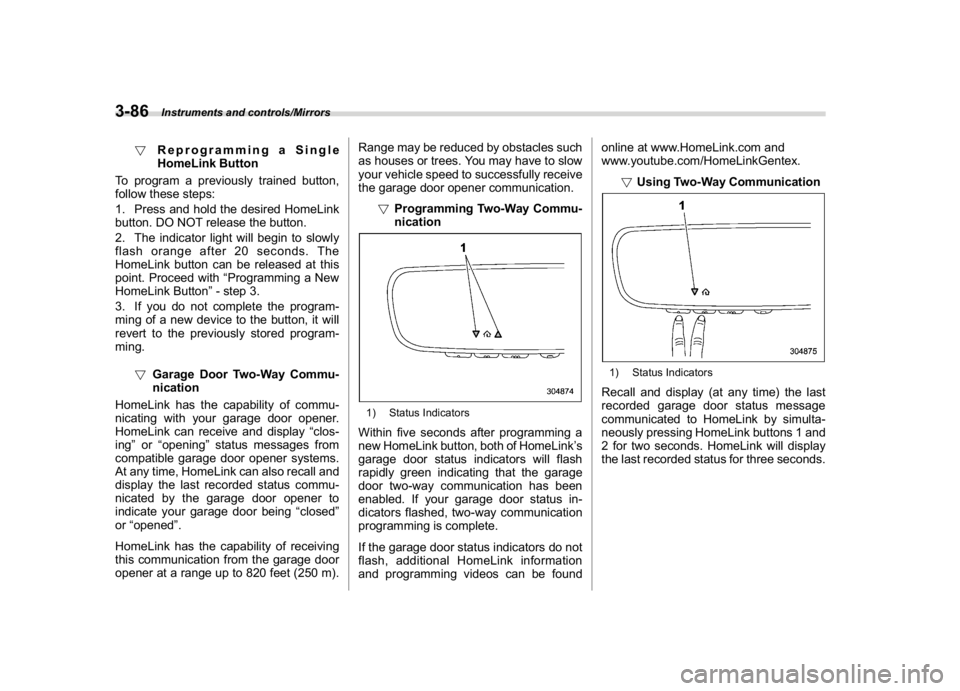
1) Status IndicatorsWithin five seconds after programming a
new HomeLink button, both of HomeLink’s
garage door status indicators will flash
rapidly green indicating that the garage
door two-way communication has been
enabled. If your garage door status in-
dicators flashed, two-way communication
programming is complete.
If the garage door status indicators do not
flash, additional HomeLink information
and programming videos can be foundonline at www.HomeLink.com and
www.youtube.com/HomeLinkGentex.
!Using Two-Way Communication
1) Status IndicatorsRecall and display (at any time) the last
recorded garage door status message
communicated to HomeLink by simulta-
neously pressing HomeLink buttons 1 and
2 for two seconds. HomeLink will display
the last recorded status for three seconds.
Instruments and controls/Mirrors
3-86
Page 231 of 474

(238,1)
北米Model "A1320BE-C" EDITED: 2017/ 10/ 10
Automatic climate control
operation (type B and C)When this mode is selected, the fan speed,
airflow distribution, air-inlet control, and air
conditioner compressor operation are
automatically controlled. To activate this
mode, perform the following.
1. Press the AUTO button. The indicator
light“FULL AUTO”on the multi-function
display (color LCD) illuminates.
2. Set the preferred temperature using
the temperature control dial.NOTE.Operate the automatic climate con-
trol system when the engine is running.
.Even when cooling is not necessary,
the air conditioner compressor will
automatically turn on if the temperature
is set much lower than the current
outlet air temperature. Even in this
case, the“A/C”indicator light on the
control panel illuminates.
.The controllable temperature range
may vary depending on the regional
specifications of the vehicle.
.If you operate any of the buttons on
the control panel other than the ON/
OFF button, rear window defogger
button, SYNC button and temperature
control dial(s) during FULL AUTO modeoperation, the“FULL”indicator light on
the multi-function display (color LCD)
will turn off and the“AUTO”indicator
light will remain illuminated. You can
then manually control the system as
desired using the button you operated.
To change the system back to the FULL
AUTO mode, press the AUTO button.
To turn off the climate control system,
press the ON/OFF button. Then the air
inlet selection will be set to the following.
.When the air inlet selection is set to
auto mode: Outside air circulation
.When the air inlet selection is set to
manual mode: No change
&SensorsThe sensors are located as follows.1) Interior air temperature sensor
2) Solar sensorThe automatic climate control system
employs several sensors. These sensors
Climate control/Automatic climate control operation (type B and C)
4-6
Page 370 of 474
(381,1)
北米Model "A1320BE-C" EDITED: 2017/ 10/ 10
Access key fob–if access key
fob does not operate properly
CAUTION
Keep metallic objects, magnetic
sources and signal transmitters
away from the area between the
access key fob and the push-button
ignition switch. They may interfere
with the communication between
the access key fob and the push-
button ignition switch.
The following functions may be inoperable
because of strong radio signals in the
surrounding area or a low battery condition
of the access key fob.
.Locking/unlocking doors (including the
rear gate)
.Switching power status
.Starting engine
In such cases, perform the following
procedure. When the battery of the access
key fob is discharged, replace it with a new
one. Refer to“Replacing battery of access
key fob”F11-43.
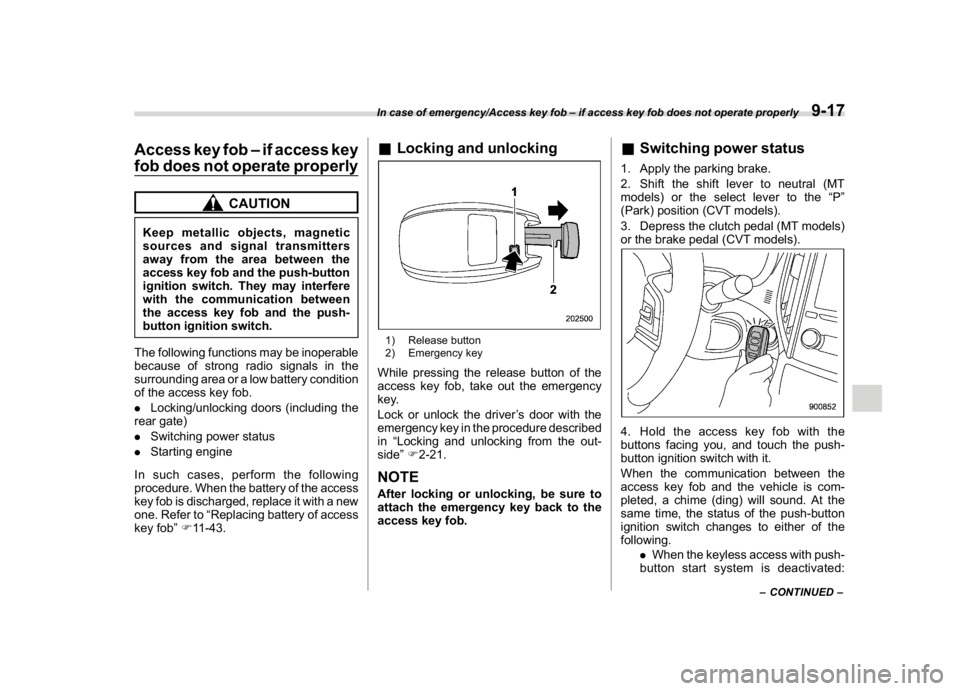
&Locking and unlocking1) Release button
2) Emergency keyWhile pressing the release button of the
access key fob, take out the emergency
key.
Lock or unlock the driver’s door with the
emergency key in the procedure described
in“Locking and unlocking from the out-
side”F2-21.NOTEAfter locking or unlocking, be sure to
attach the emergency key back to the
access key fob.
&Switching power status1. Apply the parking brake.
2. Shift the shift lever to neutral (MT
models) or the select lever to the“P”
(Park) position (CVT models).
3. Depress the clutch pedal (MT models)
or the brake pedal (CVT models).4. Hold the access key fob with the
buttons facing you, and touch the push-
button ignition switch with it.
When the communication between the
access key fob and the vehicle is com-
pleted, a chime (ding) will sound. At the
same time, the status of the push-button
ignition switch changes to either of the
following.
.When the keyless access with push-
button start system is deactivated:
–CONTINUED–
In case of emergency/Access key fob–if access key fob does not operate properly
9-17
9
Page 371 of 474
(382,1)
北米Model "A1320BE-C" EDITED: 2017/ 10/ 10
“ACC”
.Under other conditions:“ON”
5. When the keyless access with push-
button start system is deactivated, press
the push-button ignition switch with the
clutch pedal (MT models) or the brake
pedal (CVT models) released. The status
of the push-button ignition switch then
changes to“ON”.
NOTEIf the power does not switch even
though the above procedure was fol-
lowed precisely, contact your SUBARU
dealer.
&Starting engine1. Apply the parking brake.
2. Shift the shift lever to neutral (MT
models) or the select lever to the“P”
(Park) position (CVT models).
3. Depress the brake pedal.
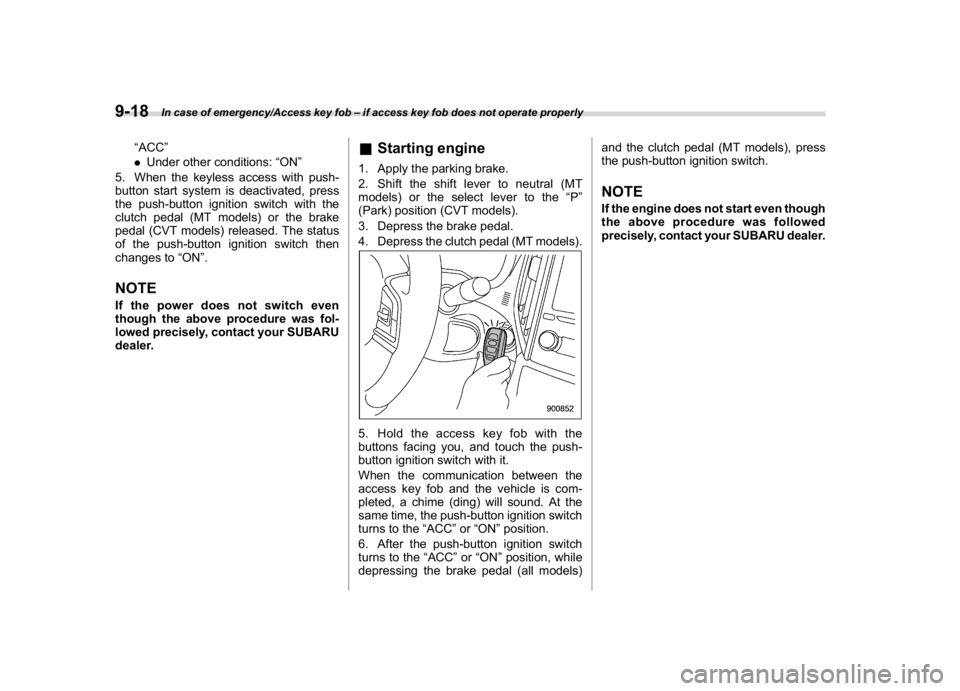
4. Depress the clutch pedal (MT models).5. Holdtheaccesskeyfobwiththe
buttons facing you, and touch the push-
button ignition switch with it.
When the communication between the
access key fob and the vehicle is com-
pleted, a chime (ding) will sound. At the
same time, the push-button ignition switch
turns to the“ACC”or“ON”position.
6. After the push-button ignition switch
turns to the“ACC”or“ON”position, while
depressing the brake pedal (all models)and the clutch pedal (MT models), press
the push-button ignition switch.
NOTEIf the engine does not start even though
the above procedure was followed
precisely, contact your SUBARU dealer.
In case of emergency/Access key fob–if access key fob does not operate properly
9-18