2018 Seat Ateca acc
[x] Cancel search: accPage 115 of 348

Controls and displays
Operation
C ontr
o
ls and displays
General instrument panel Door release lever
Centr
al
locking switch . . . . . . . . . . . .128
Control for the electric adjustment
of the ext
erior mirrors . . . . . . . . . . . . . 155
Air outlets . . . . . . . . . . . . . . . . . . . . . . . . 174
Control lever for:
– Turn s ign
als and main beam
headlights . . . . . . . . . . . . . . . . . . . . . 145
– Lane Ass i
st . . . . . . . . . . . . . . . . . . . . . 230
– Main beam a
ssist . . . . . . . . . . . . . . . 146
– Cruise c
ontrol system (CCS) . . . . .212
Depending on equipment fitted:
– Lev er f
or cruise control . . . . . . . . . .212
Steering wheel with horn and – Driver airbag . . . . . . . . . . . . . . . . . . . 21
– On-boar d c
omputer controls . . . .36
– Contro
ls for radio, telephone,
navigation and speech dialogue
system ›››
Booklet Radio
– Paddle levers for tiptronic gear-
shift (automatic gearbox) . . . . . . .195
Instrument panel . . . . . . . . . . . . . . . . . 114
1 2
3
4
5
6
7
8 Control lever for:
– Wind
s
creen wipers and washer . .153
– Wipe and wa
sh system . . . . . . . . . . 153
– On-board c
omputer . . . . . . . . . . . . . 36
Depending on equipment fitted: ra-
dio or disp
lay for Easy Connect
(navigation, radio, TV/video) . . . . . .120
Depending on the equipment, but-
tons
for:
– Start-Stop system . . . . . . . . . . . . . . . 208
– Park a
ssist system . . . . . . . . . . . . . . 262
– Hazard w
arning lights . . . . . . . . . .149
– Tyr
e pressure switch . . . . . . . . . . . .313
– Airbag off di
splay . . . . . . . . . . . . . . . 88
Depending on the equipment,
glov e c
ompartment with: . . . . . . . . .161
– CD pl a
yer* and/or SD card*
››› Booklet Radio
Front passenger airbag . . . . . . . . . . .21
Front passenger airbag switch . . . .88
Passenger seat heating control . . . .158
Depending on the equipment, con-
tro l
s for:
– Heating and ventilation system or
manual air conditioner . . . . . . . . . .54, 53
– Autom atic
air conditioner . . . . . . .51
Depending on the equipment:
– USB/A UX-IN inp
ut . . . . . . . . . . . . . . 123
9
10
11
12
13
14
15
16
17 –
Light er/po
w
er socket . . . . . . . . . . . 162
– Connectivity
Box/Wireless Charg-
er* . . . . . . . . . . . . . . . . . . . . . . . . . . . . . 123
– Storag
e compartment
Gear lever for: – Manual gearbox . . . . . . . . . . . . . . . . 192
– Automatic
gearbox . . . . . . . . . . . . . 193
Rotating control(Driving Experience
button) f
or driving modes . . . . . . . . .242
Auto Hold switch . . . . . . . . . . . . . . . . . 211
Electronic parking brake switch . . .186
Starter button (Keyless Access lock-
ing and ignition sys
tem) . . . . . . . . . . 183
Driver's seat heating control . . . . . .158
Ignition lock (vehicles without Key-
les
s Access) . . . . . . . . . . . . . . . . . . . . . . 181
Steering column adjustment lev-
er . . . . . . . . . . . . . . . . . . . . . . . . . . . . . . . . 20
Knee airbag . . . . . . . . . . . . . . . . . . . . . . 23
Bonnet lock release . . . . . . . . . . . . . . .299
Headlight range control . . . . . . . . . . .151
Headlight switch . . . . . . . . . . . . . . . . . 144
Electric windows . . . . . . . . . . . . . . . . . 139 Note
● Some of the equipment li
sted in this sec-
tion is only fitted on certain models or are op-
tional extras. » 18
19
20
21
22
23
24
25
26
27
28
29
30
113
Technical data
Advice
Operation
Emergencies
Safety
Page 117 of 348

Instruments and warning/control lamps
engine hot. However, it is advisable to
c h
an
ge up a gear or move the selector
lever to D (or lift your foot off the acceler-
ator) before the needle reaches the red
zone ››› .
En gine c
oo
lant temperature display
››› page 117.
Displays on the screen ››› page 115.
Adjuster button and display
››› page 117.
Speedometer.
Fuel gauge ››› page 118. WARNING
Any distraction may lead to an accident, with
the risk of
injury.
● Do not operate the instrument panel con-
trol
s when driving. CAUTION
● To pr ev
ent damage to the engine, the rev
counter needle should only remain in the red
zone for a short period of time.
● When the engine is cold, avoid high revs
and heavy ac
celeration and do not make the
engine work hard. For the sake of the environment
Changing up a gear in time reduces fuel con-
sumption and noi se.2
3
4
5
6 Revolution counter
The rev counter indicates the number of en-
gine rev
o
lutions per minute ››› Fig. 119 1 .
Tog ether w
ith the gear-change indicator, the
rev counter offers you the possibility of using
the engine of your vehicle at a suitable
speed.
The start of the red zone on the dial indicates
the maximum engine speed which may be
used briefly when the engine is warm and af-
ter it has been run in properly. Before reach-
ing this range, you should change to a higher
gear for vehicles with a manual gearbox or for
automatic gearboxes put the selector lever in
“D” or take your foot off the accelerator ped-
al.
We recommend that you avoid high revs and
that you follow the recommendations on the
gear-change indicator. Consult the additional
information in ›››
page 41, Gear-change
indicator. CAUTION
Never allow the rev counter needle 1 ›››
Fig. 119 to g o int
o the red zone on the
scale for more than a very brief period, other-
wise there is a risk of engine damage. For the sake of the environment
Changing up a gear early will help you to save
fuel and minimi
se emissions and engine
noise. Indications on the display
A variety of information can be viewed on the
ins
trument
panel display ››› Fig. 119 3 , de-
pending on the v
ehicle equipment:
● Bonnet, rear lid and doors open
›› ›
page 40.
● Warning and information messages
›››
page 40.
● Distance travelled ›››
page 117.
● Time ›››
page 116.
● Navigation instructions.
● Outside temperature ›››
page 41.
● Compass ›››
page 116.
● Shift lever position ›››
page 193.
● Recommended gear (manual gearbox)
›››
page 41.
● Multifunction display (MFD) and menus
with differ
ent setting options ›››
page 36.
● Service interval display ›››
page 43.
● Second speed display ›››
page 116.
● Speed warning function ›››
page 42. »
115
Technical data
Advice
Operation
Emergencies
Safety
Page 120 of 348

Operation
The coolant temperature gauge only works
when the ignition i s
sw
itched on ››› Fig. 121.
In order to avoid engine damage, please read
the following notes for the different tempera-
ture ranges.
Engine cold
If only the diodes in the lower part of the
scale light up, this indicates that the engine
has not yet reached operating temperature.
Avoid high revs and heavy acceleration and
do not make the engine work hard.
Normal temperature
If in normal operations, the diodes light up
until the central zone, it means that the en-
gine has reached operating temperature. At
high outside temperatures and when making
the engine work hard, the diodes may contin-
ue lighting up and reach the upper zone. This
is no cause for concern, provided the control
lamp does not light up on the instrument
panel digital display.
Heat range
When the diodes light up in the upper area of
the display and the control lamp appears
on the instrument panel display, the coolant
temperature is excessive ››› page 302. CAUTION
● To en s
ure a long useful life for the engine,
avoid high revs, driving at high speed and
making the engine work hard for approxi-
mately the first 15 minutes when the engine
is cold. The phase until the engine is warm al-
so depends on the outside temperature. If
necessary, use the engine oil temperature*
››› page 42 as a guide.
● Additional lights and other accessories in
front of
the air inlet reduce the cooling effect
of the coolant. At high outside temperatures
and high engine loads, there is a risk of the
engine overheating.
● The front spoiler also ensures proper distri-
bution of the c
ooling air when the vehicle is
moving. If the spoiler is damaged this can re-
duce the cooling effect, which could cause
the engine to overheat. Seek specialist assis-
tance. Fuel level
Fig. 122
Fuel gauge. The display
››
› Fig. 122 only works when the
ignition is switched on. When the display rea-
ches the reserve mark, the lower diode lights
up in red and the control lamp appears
››› page 114. When the fuel level is very low,
the lower diode flashes in red.
The distance to empty fuel level is displayed
on the instrument panel 3
› ›
› Fig. 119
.
The capacity of the fuel tank of your vehicle is
given in the Technical data section
››› page 56. CAUTION
Never run the fuel tank completely dry. An ir-
re gu
lar fuel supply could cause misfiring. In
this way the unburned fuel can reach the ex-
haust system, which could cause the catalytic
converter to overheat resulting in damage. 118
Page 121 of 348

Instruments and warning/control lamps
Control lamps W arnin
g and c
ontrol lampsRead the additional information carefully
›› ›
page 46.
The control and warning lamps are indicators
of warnings, ››› , faults
››› or certain func-
tions. Some c
ontrol and warning lamps come
on when the ignition is switched on, and
switch off when the engine starts running, or
while driving.
Depending on the model, additional text
messages may be viewed on the instrument
panel display. These may be purely informa-
tive or they may be advising of the need for
action ›››
page 114, Instruments.
Depending upon the equipment fitted in the
vehicle, instead of a warning lamp, some-
times a symbol may be displayed on the in-
strument panel.
When certain control and warning lamps are
lit, an audible warning is also heard. WARNING
If the warning lamps and messages are ignor-
ed, the v ehic
le may stall in traffic, or may
cause accidents and severe injuries.
● Never ignore the warning lamps or text
mess
ages.
● Stop the vehicle safely as soon as possible. ●
Park the
vehicle away from traffic and en-
sure that there are no highly flammable ma-
terials under the vehicle that could come into
contact with the exhaust system (e.g. dry
grass, fuel).
● A faulty vehicle represents a risk of acci-
dent for the driv
er and for other road users. If
necessary, switch on the hazard warning
lamps and put out the warning triangle to ad-
vise other drivers.
● Before opening the bonnet, switch off the
engine and al
low it to cool.
● In any vehicle, the engine compartment is a
hazar
dous area and could cause severe inju-
ries ››› page 298. CAUTION
Failure to heed the control lamps and text
mes s
ages when they appear may result in
faults in the vehicle. 119
Technical data
Advice
Operation
Emergencies
Safety
Page 122 of 348
Operation
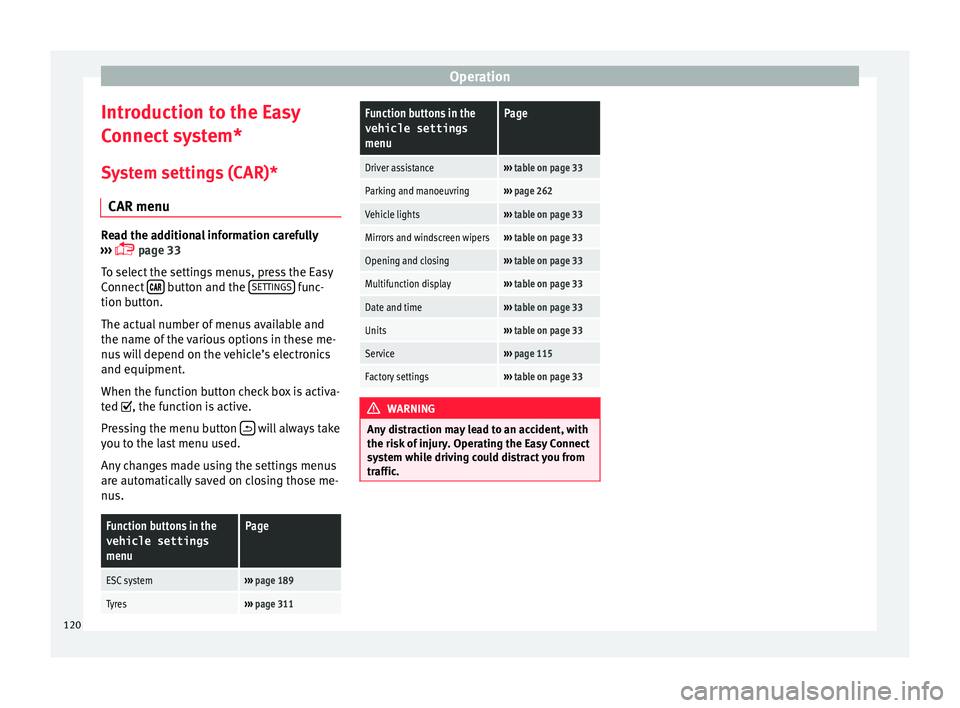
Introduction to the Easy
C onnect
sy
stem*
System settings (CAR)* CAR menu Read the additional information carefully
›› ›
page 33
To select the settings menus, press the Easy
Connect button and the
S
ET
TINGS func-
tion b utt
on.
The act
ual number of menus available and
the name of the various options in these me-
nus will depend on the vehicle’s electronics
and equipment.
When the function button check box is activa-
ted , the function is active.
Pressing the menu button will always take
y ou t
o the l
ast menu used.
Any changes made using the settings menus
are automatically saved on closing those me-
nus.
Function buttons in the vehicle settings
menuPage
ESC system››› page 189
Tyres››› page 311
Function buttons in the
vehicle settings
menuPage
Driver assistance››› table on page 33
Parking and manoeuvring››› page 262
Vehicle lights››› table on page 33
Mirrors and windscreen wipers››› table on page 33
Opening and closing››› table on page 33
Multifunction display››› table on page 33
Date and time››› table on page 33
Units››› table on page 33
Service››› page 115
Factory settings››› table on page 33 WARNING
Any distraction may lead to an accident, with
the risk of
injury. Operating the Easy Connect
system while driving could distract you from
traffic. 120
Page 124 of 348

OperationButtonRadioMedia (except AUX)AUXTelephone
a)Navigation a)
C /
DSearch for the previous/next
station b)
.
Short press: Switch to the pre-
vious/next song.
Hold down: Fast rewind/for-
ward c)
.
No function
– There is no active call: Ra-
dio/Media functionality (ex-
cept AUX)
– Active call: no functionNo function for the other
modes (navigation, assistants,
vehicle status, travel data).
E / Fa)Change instrument panel menu.
This function can be used from any mode (audio, media, navigation, assistants, vehicle status, travel data).
GColoured instrument panel:
switch to the previous menu.
Monochrome instrument panel: switch to the previous function.
HTurn
Coloured instrument panel: List
of stations available (only if
the instrument panel is in au-
dio menu).Coloured instrument panel:
next track (only if the instru-
ment panel is in audio menu).No function
– There is no active call: List of
latest calls.
– Active call: access the call
options list (call on hold, hang
up, mute microphone, private
number, etc.).– Active route: access the view
to halt guidance to destination.
– No active route: list of recent
destinations.
HPressActs on the instrument panel or confirms the instrument panel menu option depending on the menu option.
a) According to the vehicle's equipment package.
b) This action can be performed when you are listening to the radio; there is no need to be in audio-radio mode.
c) These actions can be performed when you are listening to media; there is no need to be in audio-radio mode.
122
Page 127 of 348

Opening and closing
Opening and closing C entr
a
l locking
Description Read the additional information carefully
›› ›
page 15
The vehicle can be locked and unlocked via
the central locking system. There are several
methods, depending on the vehicle equip-
ment:
● key with remote control ››
›
page 127 ,
● lock on driver door (emergency opening
›››
page 15) or
● interior central locking switch ›››
page 128.
Unlocking one side of the vehicle only
When you lock the vehicle with the key, the
doors and the rear lid are locked. When you
open the door, you can either unlock only the
driver door, or all the vehicle doors. To select
the required option, use Easy Connect*
››› page 128.
Auto Lock*
The Auto Lock function locks the doors and
the rear lid when the vehicle exceeds a speed
of about 15 km/h (9 mph). The vehicle is unlocked again when the igni-
tion key i
s removed. Alternatively, the vehicle
can also be unlocked via the central locking
switch or by pulling one of the inside door
handles. The Auto Lock function can be
switched on and off on the sound system or
on the Easy Connect* system ››› page 128.
In the event of an accident in which the air-
bags inflate, the doors will be automatically
unlocked to facilitate access and assistance.
Anti-theft alarm system*
If the anti-theft alarm system senses interfer-
ence with the vehicle it triggers an audible
and visible alarm.
The anti-theft alarm system is automatically
switched on when locking the vehicle. It
switches off when the vehicle is unlocked
from a distance.
When the driver door is unlocked with the
key, you should switch on the ignition within
15 seconds. Otherwise the alarm will be trig-
gered. On some export versions, the alarm is
triggered immediately when you open a door.
To deactivate the alarm, press the button
on the remote control key, or switch on the
ignition. After a certain time, the alarm will
automatically switch off.
Switch off the vehicle interior monitoring and
tow-away protection if you wish to prevent the alarm from being triggered accidentally
››› page 136.
Turn signals
The turn signals will flash twice when the ve-
hicle is unlocked and once when the vehicle
is locked.
If it does not flash, this indicates that one of
the doors, the rear lid or the bonnet is not
closed correctly.
Accidental lock-out
The central locking system prevents you from
being locked out of the vehicle in the follow-
ing situations: ● If the driver door is open, the vehicle can-
not be lock
ed with the central locking switch
››› page 128.
Lock the vehicle with the remote control key,
when all the doors and the rear lid have been
closed. This prevents the accidental locking
of the vehicle. WARNING
Do not leave anyone (especially children) in
the v ehic
le if it is locked from the outside and
the anti-theft security system* is enabled, as
the doors and windows cannot then be
opened from the inside. Locked doors could
delay assistance in an emergency, potentially
putting lives at risk. » 125
Technical data
Advice
Operation
Emergencies
Safety
Page 129 of 348

Opening and closing
The vehicle keys or new spare keys can be
o bt
ained fr
om a SEAT Official Service, a spe-
cialised workshop or an approved key service
qualified to create this kind of key.
New keys or spare keys must be synchron-
ised before use ››› page 134. CAUTION
All of the vehicle keys contain electronic com-
ponents. Pr ot
ect them from damage, impacts
and humidity. Note
● Only u
se the key button when you require
the corresponding function. Pushing the but-
ton unnecessarily could accidentally unlock
the vehicle or trigger the alarm. It is also pos-
sible even when you are outside the radius of
action.
● Key operation can be greatly influenced by
overl
apping radio signals close to the vehicle
working in the same range of frequencies, for
example, radio transmitters or mobile tele-
phones.
● Obstacles between the remote control and
the vehic
le, bad weather conditions and dis-
charged batteries can considerably reduce
the range of the remote control.
● If the buttons of the vehicle key are press-
ed ›››
Fig. 128 or ››› Fig. 129 or one of the cen-
tral locking buttons ››› page 128 is pressed
repeatedly in short succession, the central
locking briefly disconnects as protection against overloading. The vehicle is then un-
lock
ed. L
ock it if necessary. Unlocking/Locking by remote control
Read the additional information carefully
›› ›
page 15
The vehicle will be locked again automatical-
ly if you do not open one of the doors or the
rear lid within 30 seconds after unlocking the
car. This function prevents the vehicle from
remaining unlocked if the unlocking button is
pressed by mistake. This does not apply if
you press the button for at least one sec-
ond.
In vehicles with a security central locking
feature (selective unlocking of side doors)
››› page 127, when the button is pressed
once, only the driver door and the fuel tank
flap are unlocked. When the button is press-
ed a second time, all the vehicle doors are unlocked. WARNING
Observe the safety warnings ›››
in Descrip-
tion on pag e 125
. Note
● Do not u se the r
emote control key until the
vehicle is visible. ●
Other fu nction
s of the remote control key
››› page 140, Convenience opening and clos-
ing. Selective unlocking system
The selective unlocking system allows you to
only
u
nlock the driver door and the fuel tank
flap. All other doors and the rear lid remain
locked.
Unlocking the driver door and tank flap
– Press ( once) the b utt
on on the remote
control key or turn the key once in the
opening direction.
Unlocking all the doors, the rear lid and the
tank flap simultaneously. – Within 5 seconds, press ( twice) the
but-
ton on the remote control key, or turn the
key twice within 5 seconds in the opening
direction.
The anti-theft security system* and the anti-
theft alarm* are immediately disabled if you
unlock only the driver door, without unlock-
ing the other doors.
In vehicles with Easy Connect*, you can pro-
gramme the security central locking system
directly ››› page 128.
127
Technical data
Advice
Operation
Emergencies
Safety