2018 Seat Alhambra engine
[x] Cancel search: enginePage 114 of 324

Operation
Opening and closing V ehic
l
e key set
Vehicle key Fig. 123
Vehicle keys Fig. 124
Vehicle key for vehicles with electric
s lidin
g door
s Vehicle keys
W
ith the v
ehicle key ››› Fig. 123 or ››› Fig. 124
the vehicle may be locked or unlocked re-
motely.
The vehicle key includes an emitter and bat-
teries. The receiver is in the interior of the ve-
hicle. The range of the vehicle key with re-
mote control and new batteries is several me-
tres around the vehicle.
If it is not possible to open or close the vehi-
cle using the remote control key, this should
be re-synchronised ››› page 114 or the bat-
tery changed ››› page 113.
Different keys belonging to the vehicle may
be used.
Folding the key shaft in and out
When the button is pressed A , the key shaft
i s
r
eleased and unfolds.
To fold it press button A and fold the key
sh af
t
in until it locks in place.
Spare key
To obtain a spare key and other vehicle keys,
the vehicle chassis number is required.
Each new key must contain a microchip and
be coded with the data from the vehicle elec-
tronic immobiliser. A vehicle key will not work
if it does not contain a microchip or the mi-
crochip has not been encoded. This is also
true for keys cut for the vehicle. The vehicle keys or new spare keys can be
obtained fr
om a technical service centre, a
specialised workshop or approved key serv-
ice qualified to provide this kind of key.
New keys or spare keys must be synchron-
ised before use ››› page 114. WARNING
Careless or incorrect use of vehicle keys may
re s
ult in severe injury and accident.
● Always take all the keys with you whenever
you le
ave the vehicle. Children and unauthor-
ised individuals could lock the doors or the
boot hatch, start the engine or turn on the ig-
nition, activating electrical systems, the elec-
tric windows, for example.
● Never leave children or disabled people
alone in the car
. They could be trapped in the
car in an emergency and will not be able to
get themselves to safety. For example, de-
pending on the time of the year, tempera-
tures inside a locked and closed vehicle can
be extremely high or extremely low resulting
in serious injuries and illness or even death,
particularly for young children.
● Never remove the key from the ignition if
the vehic
le is in motion. The steering may
lock and it will not be possible to turn the
steering wheel. 112
Page 119 of 324

Opening and closing
Locking and unlocking the vehicle
w ith K
eyl
ess Access Fig. 130
Keyless Access locking and ignition
sy s
t
em: in the proximity of the car. Fig. 131
Keyless Access locking and ignition
sy s
t
em: sensor surface A for unlocking in-
s ide the door h
andl
e and sensor surface Bfor locking on the exterior of the handle.
Keyless Access is a key-free locking and igni-
tion sy
s
t
em to unlock and lock the vehicle
without actively using its key. For this, only a valid vehicle key is required to be in an area
near
››
› Fig. 130 the vehicle and one of the
sensor surfaces to be touched on the door
handles ››› Fig. 131.
General information
If a valid key is located in the proximity of the
car ››› Fig. 130, the Keyless Access lock and
ignition system gives the key entry as soon
as one of the sensor surfaces on the door
handles is touched or the push button on the
boot hatch is operated. The following fea-
tures are then available without having to
use the vehicle key actively:
● Keyless-Entry: unlocking of the vehicle with
the handle
s on the four doors or the button
located on the boot hatch.
● Keyless-Go: engine ignition and driving. For
this t
o occur, there has to be a valid key in-
side the vehicle and the ignition push button
needs to be pressed ››› page 183.
● Keyless-Exit: unlocking of the vehicle with
one of the four door h
andle.
The central locking and locking systems oper-
ate in the same way as a normal locking and
unlocking system. Only the controls change.
Unlocking the vehicle is confirmed with a
double flash of the indicator lights; locking
by a single flash. The vehicle will lock again after a few sec-
onds if
you unlock the vehicle but fail to open
any door or boot hatch.
Unlocking and opening the doors (Keyless-
Entry)
● Grip the door handle. In doing this, the
sensor sur
face ››› Fig. 131 A (arrow) is
t ouc
hed on the h
andle and the vehicle un-
locks.
● Open the door.
On vehic
les without the Safe security sys-
tem: shutting and locking doors (Keyless-Ex-
it)
● Switch the ignition off.
● Close the driver's door.
● Touch the surface sensor B onc
e (arrow)
on the door h andl
e. The door being operated
must be closed.
On vehicles with the Safe security system:
shutting and locking doors (Keyless-Exit)
● Switch the ignition off.
● Close the driver's door.
● Touch the surface sensor B onc
e (arrow)
on the door h andl
e. The vehicle locks with
the Safe security system ››› page 119. The
door being operated must be closed. »
117
Technical data
Advice
Operation
Emergencies
Safety
Page 120 of 324

Operation
● Touc
h
the sensor surface B twice (arrow)
on the door h andl
e t
o lock the vehicle with-
out the Safe security system ››› page 119.
Unlocking and locking the boot hatch
When the vehicle is locked, the hatch auto-
matically unlocks on opening if ››› Fig. 130
there is a valid vehicle key in the proximity.
Open or close the hatch normally
››› page 124.
After closing, the hatch locks automatically.
In the following instances, the rear lid does
not lock automatically after closing:
● If the entire vehicle is unlocked.
● If the key used last is inside the vehicle. All
vehicl
e indicator lights flash four times. The
vehicle will lock again after a few seconds if
no door or boot hatch are opened.
Locking the vehicle with a second key
If there is a vehicle key inside the vehicle and
it is locked from the outside with a second
vehicle key, the key inside the vehicle is
blocked for engine ignition ››› page 183. In
order to enable engine ignition, the button
on the key inside the vehicle needs to be
pressed ››› Fig. 128.
Automatically disabling sensors
If the vehicle is not locked or unlocked for a
long period of time, the proximity sensor on the passenger door is automatically disa-
bled.
If
the exterior sensor on the door handle is
often activated unusually with the vehicle
locked (e.g. by the branches of a bush rub-
bing against it), all proximity sensors are dis-
abled for a time. If this only happens with the
exterior sensor on the driver's door, only this
sensor is disabled.
Sensors will again be enabled:
● After a time.
● OR: if the vehicle is unlocked with the
butt
on on the key.
● OR: if the boot is opened.
Keyl
ess Access temporary disconnection
function*
You can deactivate the vehicle's Keyless Ac-
cess unlocking for a locking and unlocking
cycle.
● Move the gear lever to position P (if the v
e-
hicle has automatic gearbox), since other-
wise the vehicle cannot be locked.
● Close the door.
● Push the central locking button on the
remote c
ontrol and touch the locking sensor
surface ›››
Fig. 131 B on the driver door han-
dl e onc e w
ithin the following 5 seconds. Do
not grip the door handle, otherwise the vehi-
cle will not lock. Deactivation is also possible if the vehicle is locked through the driver’s
door lock.
●
To c
heck that the function has been deacti-
vated, w
ait at least 10 seconds, grip and pull
on the door handle. The door should not
open.
The next time the door can only be unlocked
via the remote control or the lock cylinder.
The next time the door is locked/unlocked,
Keyless Access will be active again.
Convenience functions
To close all electric windows, the sun roof
and electric tilting panoramic roof with the
convenience feature, keep your finger for a
few seconds on the lock sensor surface B located on the exterior part of the driver or
p
a
s
senger door handle until the windows
and roof close.
Opening the doors by touching the sensor
surface on the handle takes places in accord-
ance with the settings activated on the menu
Configuration - Convenience
››› page 27. CAUTION
The sensor surfaces on the door handles
cou l
d engage if hit with a water jet or high
pressure steam if there is a valid vehicle key
in the nearby area. If at least one of the win-
dows is open and the sensor surface B on
one of the h andl
e permanently activates, all 118
Page 131 of 324

Opening and closing
Panoramic sliding sunroof* P anor
amic
sliding sunroof: operatingRead the additional information carefully
›› ›
page 14
The panoramic sliding sunroof will only work
with the ignition on. It can be opened or
closed for a few minutes after the ignition
has been switched off, provided the driver
door and the front passenger door are not
opened.
Convenience open/close function
The panoramic sliding sunroof can be
opened or closed from outside the vehicle
using the vehicle key:
● Keep the vehicle unlocking or locking but-
ton pr e
ssed. The panoramic sliding sunroof
is adjusted or closes.
● Release the unlock or lock button to stop
the function.
D
uring convenience closing, first the win-
dows and then the panoramic sliding sunroof
will be closed. WARNING
Careless or uncontrolled use of the panoram-
ic s lidin
g sunroof can cause serious injuries. ●
Only c
lose the panoramic sliding sunroof
and the sun blind when nobody is in the way.
● Always take all the keys with you whenever
you le
ave the vehicle.
● Never leave children or disabled persons in
the vehic
le, particularly if they have access to
the keys. Uncontrolled use of the key could
lock the vehicle, start the engine, turn on the
ignition and operate the panoramic sliding
sunroof.
● The panoramic sliding sunroof can be oper-
ated for up t
o about ten minutes after the ig-
nition has been switched off, provided the
driver door and the front passenger door are
not opened. Note
● In ca se of
a fault in the operation of the
panoramic sliding sunroof, the anti-trap func-
tion will not operate correctly. Visit a special-
ised workshop.
● The rotary button of the panoramic sliding
sunr
oof remains in the last position selected
if the roof is closed using convenience clos-
ing from outside the vehicle, and will have to
be re-positioned the next time you drive. Opening or closing the sun blind
Fig. 138
On the interior roof lining: switches
f or the s
u
n blind
FunctionNecessary operations
To open com-
pletely (automat-
ic):Press button ››› Fig. 138 1 briefly.
To stop automatic
operation:Briefly press the button
››› Fig. 138
1 o ››› Fig. 138 2.
To set the inter-
mediate position:Hold the button
››› Fig. 138 1or
››› Fig. 138 2 until the required
position is reached.
To close com-
pletely (automat-
ic):Press button ››› Fig. 138 2 briefly. The panoramic sliding sunroof can be operat-
ed f
or up t
o about
ten minutes after the igni-
tion has been switched off, provided the driv-
er door and the front passenger door are not
opened. 129
Technical data
Advice
Operation
Emergencies
Safety
Page 136 of 324

Operation“Coming home”: necessary operations
To switch
system on:
– Switch off the ignition.
– Briefly flash the headlights
for approxi-
mately one second ››› page 131.
The “Coming home” lighting comes on
when the driver door is opened. The de-
lay in switching off the headlights is
counted from when the last door or boot
hatch is closed.
To switch
system off:
– Automatically at the end of the delay
period.
– Automatically, if 30 seconds after com-
ing on, a vehicle door or the boot hatch
remains open.
– When the light switch is turned to posi-
tion
.
– When the ignition is switched on.
“Leaving home”: necessary operations
To switch
system on:– Unlock the vehicle when the light
switch is in position and the photo
sensor detects darkness.
To switch
system off:
– Automatically, at the end of the delay
period.
– When the vehicle is locked.
– When the light switch is turned to posi-
tion
.
– When the ignition is switched on. Lighting around the exterior mirrors
The lightin
g ar
ou
nd the exterior mirrors illu-
minates the door area on entering and leav-
ing the vehicles. It comes on when the vehi-
cle is unlocked, when the vehicle door is opened and when the “Coming home” or
“Leav
ing home” function is switched on. If
the equipment includes the light sensor, the
lighting around the exterior mirrors only
comes when it is dark. Note
● The time tak en f
or the headlights to go off
can be changed in the Lights & Visibil- ity menu and the function can be switched
on or off ›››
page 27.
● When the “Coming home” function is on, if
the vehic
le door is opened there is no audible
warning signal to advise that the light is still
on. Hazard warning lights
Fig. 139
In the centre of the dash panel: push
b utt
on f
or hazard warning lights. Read the additional information carefully
› ›
›
page 26 Always fulfil legal requirements for securing a
broken do
wn vehicle. In a number of coun-
tries it is now obligatory, for example, to turn
on the hazard warning lights and use a re-
flective safety vest ››› page 83.
When being towed with the hazard warning
lights on, a change in direction or traffic lane
can be indicated as usual using the turn sig-
nal lever. The hazard lights will be interrup-
ted temporarily.
If your vehicle breaks down:
Park the vehicle a safe distance from
traffic and on suitable ground ››› .
T urn on the h
az
ard warning lights with
the button ››› Fig. 139.
Connect the electronic parking brake
››› page 188.
Move the selector lever to its intermedi-
ate position or to P ››› page 193.
Stop the engine and remove the key
from the ignition ››› page 183.
Have all occupants leave the vehicle and
move to safety, for example behind a
guard rail.
When leaving the vehicle, take all keys
with you.
Place an emergency warning triangle to
indicate the position of your vehicle to
other road users.
1.
2.
3.
4.
5.
6.
7.
8.
134
Page 137 of 324

Lights and visibility
Allow the engine to cool and check if a
s pec
i
alist is required.
If the hazard warning lights are not working,
you must use an alternative method of draw-
ing attention to your vehicle. This method
must comply with traffic legislation. WARNING
A faulty vehicle in traffic represents a risk of
acc ident
for the driver and for other road
users.
● Stop the vehicle safely as soon as possible.
Park the
vehicle a safe distance from sur-
rounding traffic to lock all the doors in case of
an emergency. Turn on the hazard warning
lights to warn other road users.
● Never leave children or disabled people
alone in the v
ehicle if the doors are to be
locked. In case of an emergency, passengers
will be trapped inside the vehicle. Individuals
locked in the vehicle can be exposed to very
high or very low temperatures. WARNING
The components of the exhaust system reach
ver y
high temperatures. This could cause a
fire and considerable damage.
● Always park your vehicle so that no part of
the exhau
st system can come in contact with
flammable materials (such as dried grass or
fuel). 9.
Note
● The v ehic
le battery will discharge and run
down if the hazard warning lights remain on
for too long (even with the ignition turned
off).
● In some vehicles, the brake lights will flash
when brakin
g abruptly at speeds of approxi-
mately 80 km/h (50 mph) to warn vehicles
travelling behind. If braking continues, the
hazard warning lights system will automati-
cally be turned on at a speed of less than ap-
proximately 10 km/h (6 mph). The brake
lights remain lit. Upon accelerating, the haz-
ard warning lights will be automatically
turned off. Adhesive strips for headlights or ad-
ju
s
tin
g headlights In those countries where vehicles drive on
the other s
ide of
the r
oad to the home coun-
try, the asymmetric dipped beam may dazzle
drivers of oncoming vehicles. Therefore,
when driving abroad, adhesive strips should
be attached to the headlights or the head-
lights should be adjusted accordingly.
The direction of the headlights can be adjus-
ted from the instrument panel, in the Tou-
rist light submenu of the Configura-
tion menu ›››
page 31.
For those vehicles in which it is not possible
to adjust the headlights from the menu, ad- hesive strips are used to cover certain parts
of the hea
dlamp cover or the headlights may
be adjusted at a specialised workshop. For
further information, please refer to a special-
ised workshop. SEAT recommends visiting a
technical service. Note
Use of the Tourist light option and the
adhe s
ives on the headlights is only allowed if
they are to be used for a short period of time.
To modify the direction of the headlights per-
manently, please take the vehicle to a speci-
alised workshop. SEAT recommends visiting a
technical service centre. Headlight range control, lighting of
the in
s
trument
panel and controls Fig. 140
Next to the steering wheel: instru-
ment and sw it
ch lighting control 1 and
he a
dlight
range control 2 »
135
Technical data
Advice
Operation
Emergencies
Safety
Page 175 of 324
Transport and practical equipment
WARNING
Incorrect use of the ashtray may cause a fire
or burn s
and other serious injuries.
● Never put paper or other flammable objects
in the ashtra
y. Cigarette lighter
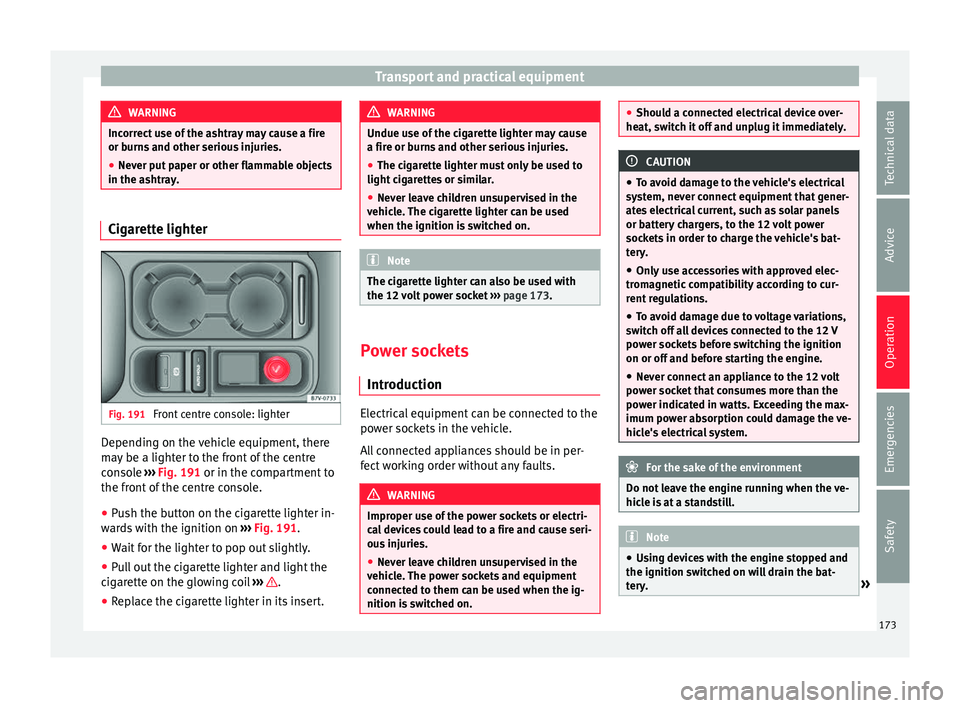
Fig. 191
Front centre console: lighter Depending on the vehicle equipment, there
m
a
y
be a lighter to the front of the centre
console ››› Fig. 191 or in the compartment to
the front of the centre console.
● Push the button on the cigarette lighter in-
ward
s with the ignition on ››› Fig. 191.
● Wait for the lighter to pop out slightly.
● Pull out the cigarette lighter and light the
cigar
ette on the glowing coil ››› .
● Replace the cigarette lighter in its insert. WARNING
Undue use of the cigarette lighter may cause
a fire or b urn
s and other serious injuries.
● The cigarette lighter must only be used to
light cig
arettes or similar.
● Never leave children unsupervised in the
vehicl
e. The cigarette lighter can be used
when the ignition is switched on. Note
The cigarette lighter can also be used with
the 12 v o
lt power socket ››› page 173. Power sockets
Intr oduction Electrical equipment can be connected to the
po
w
er soc
kets in the vehicle.
All connected appliances should be in per-
fect working order without any faults. WARNING
Improper use of the power sockets or electri-
ca l
devices could lead to a fire and cause seri-
ous injuries.
● Never leave children unsupervised in the
vehicl
e. The power sockets and equipment
connected to them can be used when the ig-
nition is switched on. ●
Shoul d a c
onnected electrical device over-
heat, switch it off and unplug it immediately. CAUTION
● To av oid d
amage to the vehicle's electrical
system, never connect equipment that gener-
ates electrical current, such as solar panels
or battery chargers, to the 12 volt power
sockets in order to charge the vehicle's bat-
tery.
● Only use accessories with approved elec-
tromagnetic
compatibility according to cur-
rent regulations.
● To avoid damage due to voltage variations,
switc
h off all devices connected to the 12 V
power sockets before switching the ignition
on or off and before starting the engine.
● Never connect an appliance to the 12 volt
power soc
ket that consumes more than the
power indicated in watts. Exceeding the max-
imum power absorption could damage the ve-
hicle's electrical system. For the sake of the environment
Do not leave the engine running when the ve-
hicl e i
s at a standstill. Note
● Us in
g devices with the engine stopped and
the ignition switched on will drain the bat-
tery. » 173
Technical data
Advice
Operation
Emergencies
Safety
Page 176 of 324

Operation
●
Unshiel ded equipment
can cause interfer-
ence on the radio equipment and the vehi-
cle's electrical system.
● Interference can occur on the radio's AM
wave
band if electrical appliances are used
near the rear window aerial. Vehicle power sockets
Fig. 192
Centre console, rear section: 12 volt
soc k
et Fig. 193
Rear centre console: 230 Volt Euro
pow er soc
ket Depending on your vehicle version, you may
h
av
e a 12-
volt power socket and/or a 230
volt power socket.
Maximum power consumption
Power sock-
etMaximum power consumption
12 Volts120 Watts
230 Volts150 Watts (300 Watt peak) The maximum capacity of each power socket
mu
s
t
not be exceeded. The power consump-
tion is indicated on the rating plate of each
appliance.
Where two or more appliances are connected
at the same time, the total rating of all the
connected devices must never exceed 190
Watts ››› .12 volt power socket
The 12
v
o
lt power socket will only work with
the ignition on.
Using electrical appliances with the engine
stopped and the ignition switched on will
drain the battery. Therefore, electrical devi-
ces connected to the power socket can only
be used when the engine is running.
To prevent voltage variations from causing
damage, switch off the electrical consumer
connected to the 12 volt power socket before
switching the ignition on or off and before
starting the engine.
12 volt power sockets can be found in the fol-
lowing locations in the vehicle:
● Compartment in the centre of the centre
conso
le.
● Compartment in the front centre console.
● Storage compartment in the front central
armres
t.
● Rear centre console ›››
Fig. 192.
● At the rear right of the luggage compart-
ment.
230 V
olt Euro power socket*
The power socket only works when the en-
gine is running ››› .
C onn e
cting an electrical appliance: plug the
device into the power socket as far as possi-
ble to unlock the built-in childproof lock. The
174