2018 Seat Alhambra ABS
[x] Cancel search: ABSPage 99 of 324
Fuses and bulbs Rear light, leftRear light, right
4.Unscrew the attachment screw
››› Fig. 112 2 us-
ing the screwdriver from the vehicle tool kit
››› page 83. The bolt is secured in its position.
5.Extract the rear light from the bodywork by careful-
ly pulling backwards.
6.Pull the red strip on the connector and extract the connector.
7.Disassemble the tail light unit and place it on aflat, clean surface.To change the bulb
8.To release the bulb holder, press on the attach-
ment tabs
››› Fig. 113 1 to 4 in the direction of
the arrow.
9.Remove the bulb holder from the rear light unit.
10.Replace the faulty bulb with a new identical bulb.
11.Place the bulb holder in the tail light unit. The at-
tachment tabs should audibly click into place.
12.Insert the connector and press the red attachment
strip in so that the connector is locked into place. Assembling the rear light units
C
omp
l
ete operations only in the sequence
given:
Rear light, leftRear light, right
13.Carefully insert the tail light unit into the opening in the bodywork. To do this, insert the upper rear light unit guide into the attachment ring.
14.Tighten the white attachment screw using the screwdriver from the vehicle tool kit.
15.Ensure that the tail light unit has been correctly fitted and is firmly secured.
16.
Replace the cap
››› Fig. 112 1 and ro-
tate it 90° in the oppo-
site direction of the ar-
row.Move the 12 V power
socket support up-
wards gently until it is
correctly closed.
17.Close the storage com-
partment.
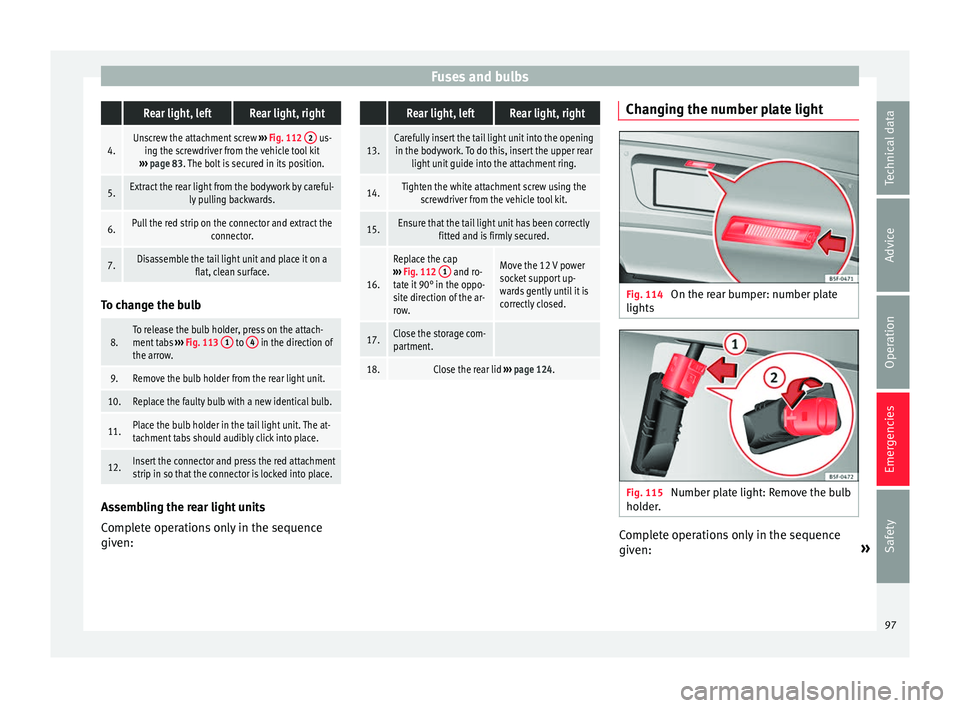
18.Close the rear lid ››› page 124. Changing the number plate light
Fig. 114
On the rear bumper: number plate
lights Fig. 115
Number plate light: Remove the bulb
ho l
der
. Complete operations only in the sequence
giv
en: »
97
Technical data
Advice
Operation
Emergencies
Safety
Page 100 of 324

Emergencies Fixed number plate
lightBolted number plate light
1.
Press the flat part of the
screwdriver included in
the vehicle on-board
tools (››› Fig. 99) in the
direction of the arrow,
in the groove of the
number plate light
››› Fig. 114.
Unscrew the number
plate light screws using
the screwdriver from
the vehicle tool kit
(››› Fig. 99).
2.Detach the number plate light.
3.
Turn the connector lock
››› Fig. 115 in the direc-
tion of arrow 1
and
pull on the connector.
Separate the attach-
ment tabs from the rear
panel of the number
plate light by pressing.
4.
Rotate the bulb holder
in the direction of the
arrow ››› Fig. 115 2
and extract it together
with the bulb.
Take the bulb holder
out of the number plate
light.
5.Replace the faulty bulb with a new identical bulb.
6.
Insert the bulb holder
into the number plate
light and rotate all the
way in the opposite di-
rection to the arrow
››› Fig. 115 2
.
Insert the bulb holder
into the number plate
light.
7.Plug the connector into
the bulb holder.
Press on the attach-
ment tabs. The bulb
holder must be firmly
attached to the number
plate light.
Fixed number plate
lightBolted number plate light
8.Insert the number plate light carefully into the
opening on the bumper. Ensure that the number plate light is in the correct position.
9.
Insert the number plate
light into the bumper
until it audibly clicks in-
to place.Tighten the attachment
screws for the number
plate light using the
screwdriver.98
Page 175 of 324
Transport and practical equipment
WARNING
Incorrect use of the ashtray may cause a fire
or burn s
and other serious injuries.
● Never put paper or other flammable objects
in the ashtra
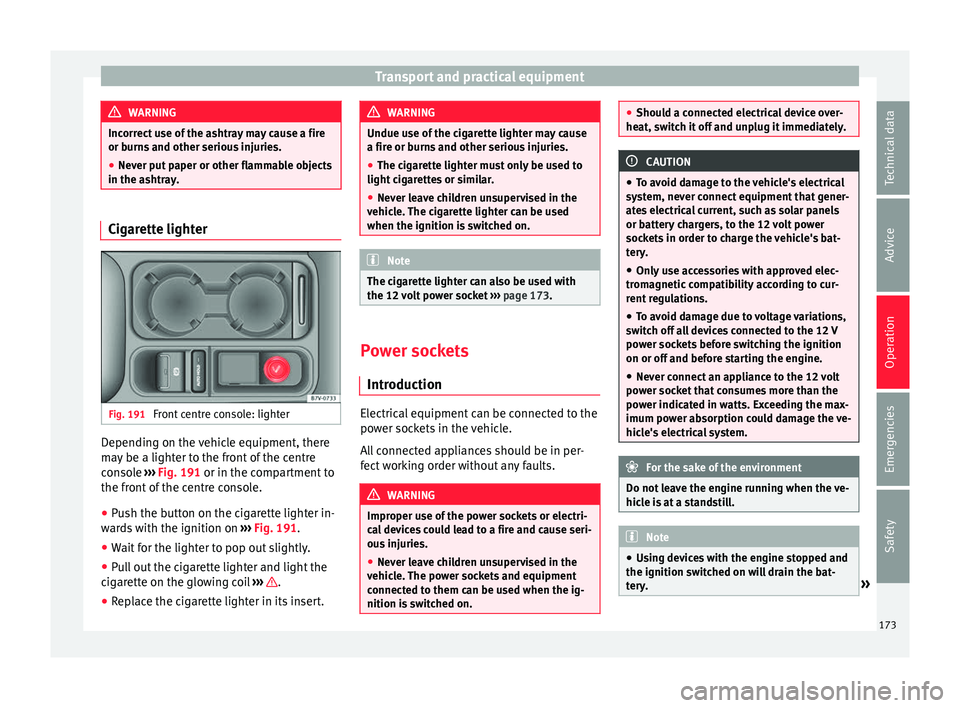
y. Cigarette lighter
Fig. 191
Front centre console: lighter Depending on the vehicle equipment, there
m
a
y
be a lighter to the front of the centre
console ››› Fig. 191 or in the compartment to
the front of the centre console.
● Push the button on the cigarette lighter in-
ward
s with the ignition on ››› Fig. 191.
● Wait for the lighter to pop out slightly.
● Pull out the cigarette lighter and light the
cigar
ette on the glowing coil ››› .
● Replace the cigarette lighter in its insert. WARNING
Undue use of the cigarette lighter may cause
a fire or b urn
s and other serious injuries.
● The cigarette lighter must only be used to
light cig
arettes or similar.
● Never leave children unsupervised in the
vehicl
e. The cigarette lighter can be used
when the ignition is switched on. Note
The cigarette lighter can also be used with
the 12 v o
lt power socket ››› page 173. Power sockets
Intr oduction Electrical equipment can be connected to the
po
w
er soc
kets in the vehicle.
All connected appliances should be in per-
fect working order without any faults. WARNING
Improper use of the power sockets or electri-
ca l
devices could lead to a fire and cause seri-
ous injuries.
● Never leave children unsupervised in the
vehicl
e. The power sockets and equipment
connected to them can be used when the ig-
nition is switched on. ●
Shoul d a c
onnected electrical device over-
heat, switch it off and unplug it immediately. CAUTION
● To av oid d
amage to the vehicle's electrical
system, never connect equipment that gener-
ates electrical current, such as solar panels
or battery chargers, to the 12 volt power
sockets in order to charge the vehicle's bat-
tery.
● Only use accessories with approved elec-
tromagnetic
compatibility according to cur-
rent regulations.
● To avoid damage due to voltage variations,
switc
h off all devices connected to the 12 V
power sockets before switching the ignition
on or off and before starting the engine.
● Never connect an appliance to the 12 volt
power soc
ket that consumes more than the
power indicated in watts. Exceeding the max-
imum power absorption could damage the ve-
hicle's electrical system. For the sake of the environment
Do not leave the engine running when the ve-
hicl e i
s at a standstill. Note
● Us in
g devices with the engine stopped and
the ignition switched on will drain the bat-
tery. » 173
Technical data
Advice
Operation
Emergencies
Safety
Page 190 of 324

Operation
Note
The correct operation of the vehicle is only
guarant eed when origin
al SEAT keys are
used. Braking and parking
Introduction The assisted braking systems include the an-
ti-loc
k
braking system (ABS), the brake assist
system (BAS), the electronic differential lock
(EDL), the traction control system (ASR) and
the electronic stability control (ESC). WARNING
Driving with worn brake pads or a faulty
brak e sy
stem may lead to serious accident.
● If lights, alone or accompanied by a
warnin
g message on the instrument panel
display, please go immediately to a special-
ised workshop to check the brake pads and to
replace them if they are worn. WARNING
Careless parking can cause serious injury.
● Never remove the key from the ignition if
the v ehic
le is in motion. The steering lock
may engage and lock the steering wheel mak-
ing the vehicle impossible to control. ●
Alw a
ys park your vehicle so that no part of
the exhaust system can come in contact with
flammable materials (such as wood, leaves,
dried grass, spilled fuel, etc.).
● Always apply the electronic parking brake
when you l
eave your vehicle and when you
park.
● Never leave children or disabled people
alone in the v
ehicle. They could release the
electronic parking brake, activate the selec-
tor lever or gear stick and start the vehicle
moving. This could result in a serious acci-
dent.
● Always take all the keys with you whenever
you le
ave the vehicle. The engine could acci-
dentally be started and electrical equipment
such as the windows could accidentally be
operated resulting in serious injury.
● Never leave children or disabled people
alone in the car
. They could be trapped in the
car in an emergency and will not be able to
get themselves to safety. For example, de-
pending on the time of the year, tempera-
tures inside a locked and closed vehicle can
be extremely high or extremely low resulting
in serious injuries and illness or even death,
particularly for young children. CAUTION
● Spec i
al care should be taken when parking
in areas with high kerbs or fixed barriers. Ob-
jects protruding from the ground may dam-
age the bumper or other parts of the vehicle during manoeuvres. To avoid damage, stop
befor
e the wheel
s touch the barrier or kerb.
● Special attention is required when driving
through entranc
es, over ramps, kerbs or oth-
er objects. The vehicle underbody, bumpers,
mudguards and running gear, and the engine
and exhaust system could be damaged as
you drive over these objects. Control and warning lamps
It lights up red
Together with the control lamp on the
button: Electronic
parking brake on.›››
page 190
Fault in the brake sys-
tem Stop the vehicle!
Seek professional assistance!
››› page 192.
Brake fluid level inad-
equate. Do not drive on!
Check brake fluid level
››› page 282.
Together with the ABS
control lamp : ABS
fault.Contact a specialised work-
shop. The vehicle can be
braked without ABS.
It lights up red
Brake pedal not press-
ed!Press brake pedal to the floor.
188
Page 191 of 324

Driving
It lights up yellow
Front brake pads
worn.Contact a specialised work-
shop immediately. Inspect
all
the brake pads and replace as
necessary.
It lights up yellow
ESC disconnected by
the system.Switching the ignition on and
off If necessary, drive for a
short distance.
Fault in the ESC.Contact a specialised work-
shop.
Together with the ABS
control lamp : Fault
in the ABS.Contact a specialised work-
shop. The vehicle can be
braked without ABS.
The battery has been
reconnected.››› page 283
It lights up yellow
ASR manually deacti-
vated.Switch on ASR
››› page 207.
ASR is automatically activated
when the ignition is switched
on or off.
It lights up yellow
Together with the ESC
control lamp : Fault
in the ABS.Contact a specialised work-
shop. The vehicle can be
braked without ABS.
Together with the
warning lamp o: ABS fault.
It lights up yellow
Together with the warning lamp flash-
ing: electronic parking
brake faulty.Contact a specialised work-
shop.
It lights up green
Brake pedal not press-
ed.
Press the brake pedal to select
a gear range.
Press the brake pedal to dis-
connect the electronic parking
brake
››› page 190.
Flashes red
Electronic parking
brake faulty. At the
same time the
con-
trol lamp may light up
or the
control lamp
on the button may
flash.
Contact a specialised work-
shop, as it may not be possi-
ble to park the vehicle in safe-
ty.
It flashes yellow
ESC or ASR regulating.Take your foot off the accelera-
tor. Adjust your driving style to
the road conditions.
Several warning and control lamps light up
f
or a f
ew sec
onds when the ignition is switch-
ed on, signalling that the function is being
verified. They will switch off after a few sec-
onds. WARNING
Observe the safety warnings ›››
in Control
and warnin g l
amps on page 107. WARNING
Driving with brakes in bad condition could re-
su lt
in a serious accident.
● If the brake warning lamp does not
turn
off or if it lights up when driving, the brake
fluid level in the reservoir is too low or there
is a fault in the brake system. Obtain profes-
sional assistance immediately ››› page 281,
Checking the brake fluid level.
● If the brake warning lamp lights up t
o-
gether with the ABS warning lamp , the
ABS regulation could be malfunctioning. As a
result, the rear wheels can lock relatively
easily when braking. If the rear wheels lock
this could result in loss of vehicle control! If
possible, reduce your speed and drive care-
fully to a specialised workshop close by to
check the brake system. During the following
journey, avoid sudden braking and manoeu-
vres.
● If the ABS warning lamp does not
go out
or if it lights up while driving, the ABS is not
working properly. The vehicle can only be
stopped using normal braking without ABS.
The protection provided by the ABS is not
available. Visit a specialised workshop as
soon as possible.
● If the lights up
, alone or accompanied by
a warning message on the instrument panel » 189
Technical data
Advice
Operation
Emergencies
Safety
Page 207 of 324

Driver assistance systems
● Do not driv
e f
aster than a pedestrian.
● Do not stop in the water, use reverse gear
or switc
h off the engine.
● Oncoming traffic will cause waves which
raise the l
evel of the water, making it difficult
to cross the water.
The Start/Stop system must be deactivated
when driving through flooded areas WARNING
When driving through water, mud, melted
sno w
, etc., please remember that due to
damp or frozen brake discs and shoes in win-
ter, the braking effect may be delayed, there-
fore the required braking distance is greater.
● “Dry the brakes and remove ice” by braking
caref
ully. Ensure that you are not endanger-
ing other road-users or breaking traffic regu-
lations in the process.
● After driving through water, avoid sudden
sharp manoeu
vres. CAUTION
● Drivin g thr
ough flooded areas may severely
damage vehicle components such as the en-
gine, transmission, drive train or electrical
system.
● Never drive through salt water as salt cau-
ses c
orrosion. Always rinse any parts of the
vehicle which have been in contact with salt
water. Driver assistance systems
Br ak
in
g and stability systems
Brake assist systems The brake assist systems ESC, ABS, BAS, ASR
and EDL on
ly
operate when the ignition is
switched on. They contribute significantly to
increasing active safety.
Electronic Stability Control (ESC)
ESC reduces the risk of skidding and increa-
ses the vehicle stability by braking individual
wheels under specific driving conditions. ESC
detects critical handling situations, such as
understeer, oversteer and wheelspin on the
driven wheels. The system stabilises the ve-
hicle by braking individual wheels or by re-
ducing the engine torque.
The ESC has limits. It is important to realise
that the ESC is also subject to the laws of
physics. ESC will not be able to deal with all
situations with which drivers may be faced.
For example, if the road surface changes sud-
denly then ESC will not be useful in all cases.
If the vehicle suddenly enters a section cov-
ered by water, mud or snow then ESC will not
provide assistance in the same way as on dry
ground. If the vehicle loses its grip on the
ground and moves on a film of water (“aqua-
planing”), the ESC will not be able to assist the driver to control the vehicle as the loss of
adher
enc
e with the road surface will prevent-
ing braking and steering. If the vehicle is
driven through series of bends at high
speed, the ESC will not always be as effec-
tive: the vehicle reaction to aggressive driv-
ing is not the same as at reduced speeds.
When driving with a trailer, ESC does not pro-
vide the same amount of vehicle control as
without a trailer.
Adjust your speed and driving style to road,
traffic and weather conditions. ESC cannot
push the limits of the laws of physics; im-
prove the transmission available or maintain
the vehicle on the road if a lack of driver at-
tention creates an inevitable situation. Other-
wise, ESC assists in maintaining vehicle con-
trol in extreme situations and uses the move-
ments of the steering made by the driver to
maintain the vehicle moving in the desired
direction. If the vehicle is driven at such a
speed that it will leave the road before ESC
can intervene then the system cannot pro-
vide assistance.
The ABS, BAS, ASR and EDL systems are in-
corporated into the ESC. The ESC is always
on. The ESC should only be turned off using
the ASR button ›››
Fig. 204 when traction is
insufficient. Always remember to turn on the
ASR once more when the vehicle has traction
again. »
205
Technical data
Advice
Operation
Emergencies
Safety
Page 208 of 324

Operation
Anti-lock system (ABS)
ABS c
an pr
event the wheels from locking dur-
ing braking until just before the vehicle stops
thus helping the driver to steer the vehicle
and maintain control. This means that, even
during full braking, the risk of skidding is re-
duced:
● Press and hold the brake pedal fully. Do not
remov
e your foot from the brake pedal or re-
duce braking force!
● Do not “pump” the brake pedal, or reduce
brakin
g force!
● Maintain vehicle direction when braking
ful
ly.
● When the brake pedal is released or when
the brake f
orce is reduced, ABS is turned off.
ABS control can be observed by vibration of
the brake pedal and noise. You should never
expect the ABS to reduce the braking dis-
tance under any circumstances. This distance
will increase when driving on gravel, recent
snow or on icy and slippery ground.
When driving on loose ground, the all-terrain
configuration of the ABS is automatically
turned on. When ABS is activated, the front
wheels may lock briefly. This shortens the
braking distance in off-road situations as the
wheels are prevented from digging into loose
surfaces. All-terrain ABS only intervenes
when driving in a straight line. When the front wheels are turned, the normal ABS is
activated.
Br
ake assist system (BAS)
The brake assist system may reduce the re-
quired braking distance. The brake assist
system boosts the braking force if you press
the brake pedal quickly in an emergency. As
a result, the braking pressure increases rap-
idly, the braking force is multiplied and the
braking distance is reduced. This enables the
ABS to be activated more quickly and effec-
tively.
¡Do not lift your foot off the brake pedal!
When the brake pedal is released or when
the brake force is reduced, braking assist au-
tomatically turns off the brake servo.
Traction control when accelerating (ASR)
In the event of wheelspin, the traction control
system reduces the engine torque to match
the amount of grip available. The ASR makes
some situations easier, for example, when
starting, accelerating or going uphill, even in
unfavourable road conditions.
The ASR can be switched on or off manually
››› page 207.
Electronic differential lock system (EDS)
EDL is available when driving in straight lines
under normal conditions. When the EDL de-
tects wheelspin, it brakes the spinning wheel and directs the power to the other drive
wheels. T
o prevent the disc brake of the
braked wheel from overheating, the EDL cuts
out automatically if subjected to excessive
loads. The EDL will switch on again automati-
cally when the brake has cooled down.
Electronic drive torque management (XDS)
When taking a curve, the driveshaft differen-
tial mechanism allows the outer wheel to turn
at a higher speed than the inner wheel. In
this way, the wheel that is turning faster (out-
er wheel) receives less drive torque than the
inner wheel. This may mean that in certain
situations the torque delivered to the inner
wheel is too high, causing the wheels to
spin. On the other hand, the outer wheel is
receiving a lower drive torque than it could
transmit. This causes an overall loss of lateral
grip on the front axle, resulting in understeer
or “lengthening” of the trajectory.
The XDS system can detect and correct this
effect via the sensors and signals of the ESC.
Via the ESC, the XDS will brake the inside
wheel and counter the excess driving torque
of that wheel. This means that the driver's
desired trajectory is much more precise.
The XDS system works in combination with
the ESC and is always active, even when ASR
traction control is disconnected.
206
Page 209 of 324

Driver assistance systems
WARNING
Driving at high speed on icy, slippery wet
grou nd c
an result in loss of vehicle control
and serious injury to the driver and passen-
gers.
● Adjust your speed and driving style to visi-
bility
, road, traffic and weather conditions.
Even though the brake assist systems, ABS,
BAS, EDL, ASR and ESC, provide more securi-
ty, do not take unnecessary risks while driv-
ing.
● Brake assist systems can not overcome the
law
s of physics. Even with ESC and other sys-
tems, slippery and wet roads will always be
dangerous.
● Driving to quickly on wet ground can result
in the wheels lo
sing contact with the ground
in an effect known as “aquaplaning”. Without
adherence, it is impossible to brake, steer or
control the vehicle.
● Brake assist systems cannot avoid acci-
dents if
, for example, the driver does not re-
spect safety distances or drives to quickly in
difficult conditions.
● Even though brake assist systems are ex-
tremely eff
ective and help control the vehicle
in difficult situations, remember that the ve-
hicle stability depends on tyre grip.
● When accelerating on a slippery surface,
for ex
ample on ice or snow, press the acceler-
ator carefully. The wheels can still slip even
with brake assist systems resulting in loss of
vehicle control. WARNING
The effectiveness of the ESC can be consider-
ably r
educed if other components and sys-
tems affecting driving dynamics are not main-
tained or are not functioning correctly. This
includes, among others, brakes, tyres and
other systems already mentioned.
● Remember that changing and fitting other
components
to the vehicle can affect opera-
tion of the ABS, BAS, ASL EDL and ESC.
● Changes to the vehicle suspension or using
unap
proved wheel/tyre combinations can af-
fect operation of the ABS, BAS, ASL EDL and
ESC, as well as their effectiveness.
● Likewise, the effectiveness of ESC depends
on the use of s
uitable tyres ››› page 287. Note
● To en s
ure that the ESC and ASR work prop-
erly, all four wheels must be fitted with iden-
tical tyres. Any differences in the rolling radi-
us of the tyres can cause the system to re-
duce engine power when this is not desired.
● If a malfunction should occur in the ABS,
the ESC, EDL and ASR w
ill also be out of ac-
tion.
● Noises may be heard while any of the
above sy
stems are operating. Switching ASR on and off
Fig. 204
Detailed view of the centre console:
b utt
on u
sed to switch ASR on and off (vehi-
cles with ESC) The electronic stability control ESC consists
of
ABS, EDL
and ASR and on
ly works when
the engine is running.
The ASR can be switched off while the engine
is running by pressing the button
››› Fig. 204. The ASR (and similar) is only
switched off when the required traction is not
obtained:
● When driving through deep snow or on
loose grou
nd (gravel, etc.).
● When “freeing” a trapped vehicle.
Turn the ASR bac
k on by pressing the
button ››› Fig. 204.
207
Technical data
Advice
Operation
Emergencies
Safety