Page 102 of 364

1.96
EXTERIOR LIGHTING AND SIGNALS (2/6)
Automatic main beam
headlights
Depending on the vehicle, this system
switches the main beam headlights on
and off automatically. It uses a camera
located behind the interior rear-view
mirror to detect vehicles that are being
followed and those coming in the oppo-
site direction.
The main beam headlights come on au-
tomatically if:
– exterior light is weak;
– no other vehicles or lighting are de-tected;
– the vehicle speed is above approxi- mately 25 mph (40 km/h).
If any of the above conditions are not
fulfilled, the system switches to dipped
beam headlights.
The “automatic main beam
headlights” system should
under no circumstances be
used to replace driver atten-
tion and responsibility with regard
to vehicle lighting and adapting to
light, visibility and traffic conditions.
The system may encounter difficul-
ties under certain conditions, inclu-
ding :
– extreme weather conditions (rain, snow, fog, etc.);
– obstruction in front of the wind- screen or camera;
– when a following or oncoming ve- hicle has weak or hidden lighting;
– incorrect settings for the front headlights;
– reflective systems;
– ...
Switching on
Vehicle fitted with a navigation
system
From the multifunction screen 4, select
the “Vehicle” menu, then “Driving as-
sistance”, “Automaticmain beam lights”
then choose “ON” or “OFF”.
4
Page 103 of 364

1.97
3
2
1
Vehicles without a navigation
system
– With the vehicle stationary, press and hold the OK switch 5 to access
the settings menu;
– repeatedly press the control 6 up
or down until you reach the “Driving
assistance” menu. Press the OK
switch 5;
56
– repeatedly press control 6 up or down
until you reach the “Automaticmain
beam lights” menu, then press the
OK switch 5;
– press the OK switch 5 again to acti- vate or deactivate the function.
Activation/deactivation
To activate automatic main beam
headlights:
– turn ring 3 until the AUTO symbol is
opposite mark 2;
– push stalk 1.
Warning light
comes on the in-
strument panel.To deactivate automatic main beam
headlights:
– pull stalk 1 towards you;
– or turn ring 3 to a position other than AUTO.
Warning light
goes out on the in-
strument panel.
Note: make sure the windscreen is not
obscured (dirt, mud, snow, condensa-
tion etc.).
EXTERIOR LIGHTING AND SIGNALS (3/6)
Each time you start the engine, pull
and then push the stalk 1 to reacti-
vate the system.
Page 104 of 364

1.98
EXTERIOR LIGHTING AND SIGNALS (4/6)
Using the portable naviga-
tion system at night in the
windscreen area below the
camera may disturb the op-
eration of the “automatic main beam
headlights” system (risk of reflection
on the windscreen).
Automatic main beam
headlights (continued)
Operating faults
When the message “Check auto li-
ghting” appears on the instrument
panel, the system is deactivated.
Consult an approved dealer.
Operating faults
When the message “Check lighting”
with warning light
© is displayed
and warning light
k flashes on the
instrument panel, this indicates that
there is a lighting fault.
Consult an approved dealer.
Switching off the lights
There are two possibilities:
– manually, move ring 3 to position 0;
– automatically, the lights will go out when the engine is switched off, the
driver’s door is opened or the vehicle
is locked. In this case, the next time
the engine is started the lights will be
switched back on according to the
position of the ring 3.
Lights-on reminder buzzer
A warning beep sounds when the driv-
er’s door is opened to warn you that the
lights are still on.
Daytime running lights
function
The daytime running lights come on
automatically with no action on stalk 1
when the engine is started, and they go
off once the engine is switched off.
3
1
Page 105 of 364
1.99
EXTERIOR LIGHTING AND SIGNALS (5/6)
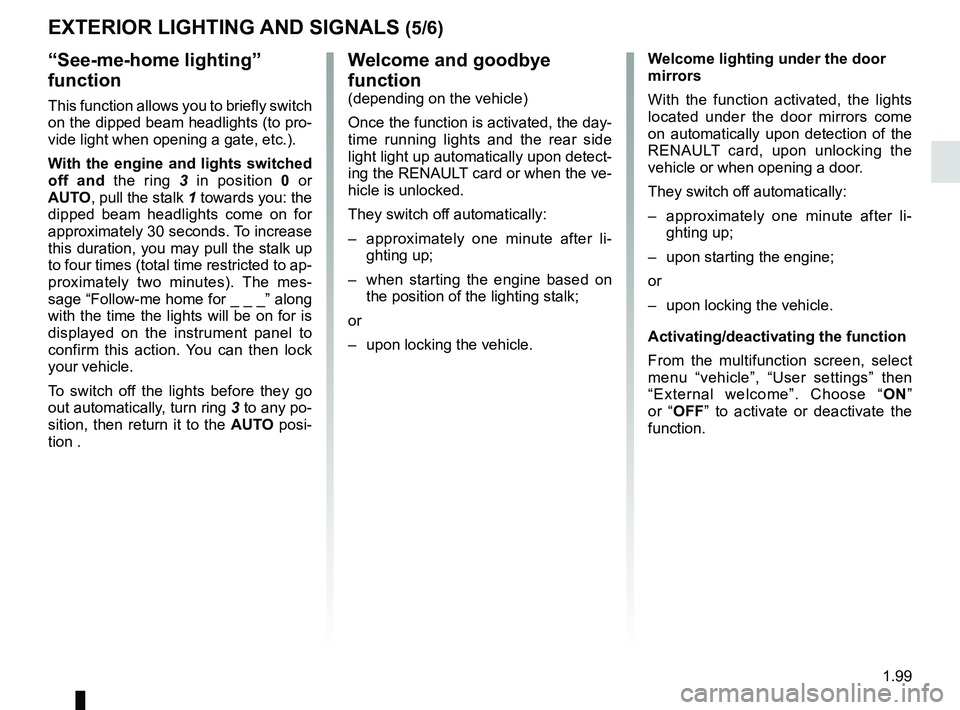
“See-me-home lighting”
function
This function allows you to briefly switch
on the dipped beam headlights (to pro-
vide light when opening a gate, etc.).
With the engine and lights switched
off and the ring 3 in position 0 or
AUTO, pull the stalk 1 towards you: the
dipped beam headlights come on for
approximately 30 seconds. To increase
this duration, you may pull the stalk up
to four times (total time restricted to ap-
proximately two minutes). The mes-
sage “Follow-me home for _ _ _” along
with the time the lights will be on for is
displayed on the instrument panel to
confirm this action. You can then lock
your vehicle.
To switch off the lights before they go
out automatically, turn ring 3 to any po-
sition, then return it to the AUTO posi-
tion .
Welcome and goodbye
function
(depending on the vehicle)
Once the function is activated, the day-
time running lights and the rear side
light light up automatically upon detect-
ing the RENAULT card or when the ve-
hicle is unlocked.
They switch off automatically:
– approximately one minute after li- ghting up;
– when starting the engine based on the position of the lighting stalk;
or
– upon locking the vehicle. Welcome lighting under the door
mirrors
With the function activated, the lights
located under the door mirrors come
on automatically upon detection of the
RENAULT card, upon unlocking the
vehicle or when opening a door.
They switch off automatically:
– approximately one minute after li-
ghting up;
– upon starting the engine;
or
– upon locking the vehicle.
Activating/deactivating the function
From the multifunction screen, select
menu “vehicle”, “User settings” then
“External welcome”. Choose “ ON”
or “OFF” to activate or deactivate the
function.
Page 106 of 364
1.100
EXTERIOR LIGHTING AND SIGNALS (6/6)
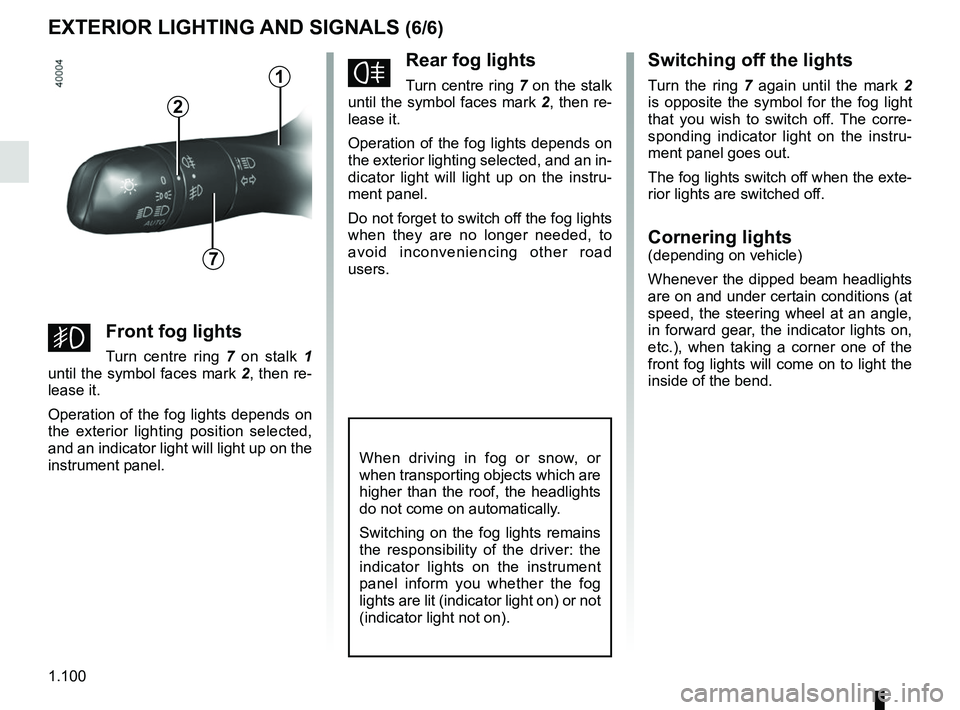
fRear fog lights
Turn centre ring 7 on the stalk
until the symbol faces mark 2, then re-
lease it.
Operation of the fog lights depends on
the exterior lighting selected, and an in-
dicator light will light up on the instru-
ment panel.
Do not forget to switch off the fog lights
when they are no longer needed, to
avoid inconveniencing other road
users.
Switching off the lights
Turn the ring 7 again until the mark 2
is opposite the symbol for the fog light
that you wish to switch off. The corre-
sponding indicator light on the instru-
ment panel goes out.
The fog lights switch off when the exte-
rior lights are switched off.
Cornering lights(depending on vehicle)
Whenever the dipped beam headlights
are on and under certain conditions (at
speed, the steering wheel at an angle,
in forward gear, the indicator lights on,
etc.), when taking a corner one of the
front fog lights will come on to light the
inside of the bend.
When driving in fog or snow, or
when transporting objects which are
higher than the roof, the headlights
do not come on automatically.
Switching on the fog lights remains
the responsibility of the driver: the
indicator lights on the instrument
panel inform you whether the fog
lights are lit (indicator light on) or not
(indicator light not on).
7
2
gFront fog lights
Turn centre ring 7 on stalk 1
until the symbol faces mark 2, then re-
lease it.
Operation of the fog lights depends on
the exterior lighting position selected,
and an indicator light will light up on the
instrument panel.
1
Page 107 of 364
1.101
HEADLIGHT BEAM ADJUSTMENT (1/2)
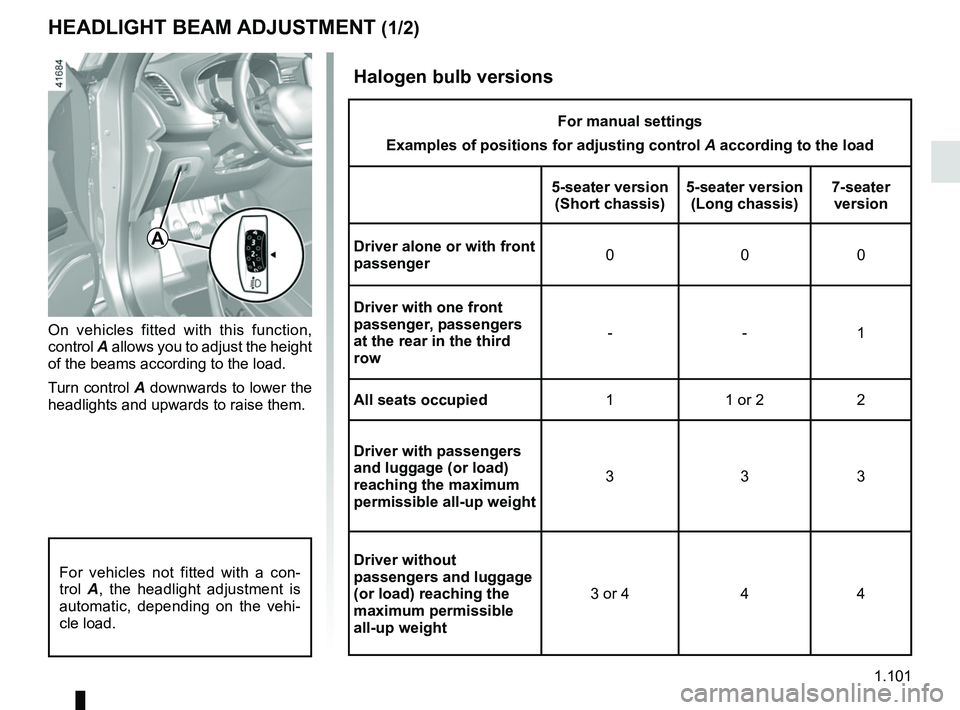
On vehicles fitted with this function,
control A allows you to adjust the height
of the beams according to the load.
Turn control A downwards to lower the
headlights and upwards to raise them.
A
For vehicles not fitted with a con-
trol A, the headlight adjustment is
automatic, depending on the vehi-
cle load.
Halogen bulb versions
For manual settings
Examples of positions for adjusting control A according to the load
5-seater version (Short chassis) 5-seater version
(Long chassis) 7-seater
version
Driver alone or with front
passenger 000
Driver with one front
passenger, passengers
at the rear in the third
row --1
All seats occupied 1 1 or 2 2
Driver with passengers
and luggage (or load)
reaching the maximum
permissible all-up weight 333
Driver without
passengers and luggage
(or load) reaching the
maximum permissible
all-up weight 3 or 4 4 4
Page 108 of 364
1.102
HEADLIGHT BEAM ADJUSTMENT (2/2)
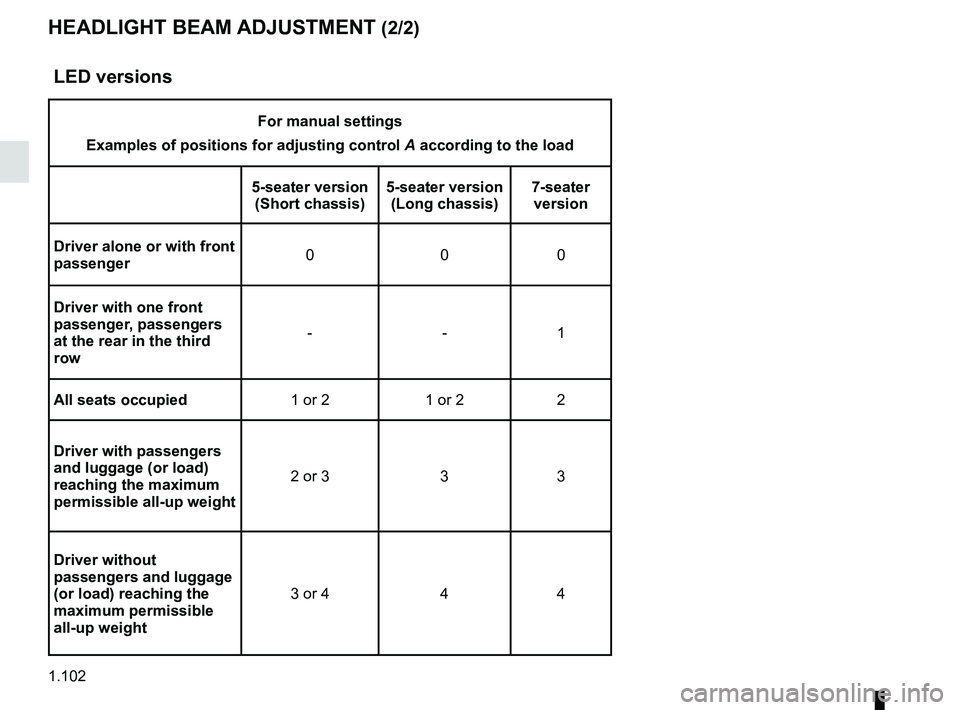
LED versions
For manual settings
Examples of positions for adjusting control A according to the load
5-seater version (Short chassis) 5-seater version
(Long chassis) 7-seater
version
Driver alone or with front
passenger 000
Driver with one front
passenger, passengers
at the rear in the third
row --1
All seats occupied 1 or 2 1 or 2 2
Driver with passengers
and luggage (or load)
reaching the maximum
permissible all-up weight 2 or 3 3 3
Driver without
passengers and luggage
(or load) reaching the
maximum permissible
all-up weight 3 or 4 4 4
Page 114 of 364
1.108
WINDSCREEN WASH, WIPE (6/6)
Note:
To ensure the headlight washers op-
erate correctly in winter, remove snow
from the jet trims and de-ice the jet
trims using an aerosol de-icer.
You are recommended to regularly
remove dirt encrusted on the headlight
glass.
When the windscreen washer fluid level
reaches minimum:
– the message “Windscreen wash fluid shortage” is displayed on the instru-
ment panel;
– the headlight washer system may be deprimed.
Fill the windscreen washer fluid and
then activate the windscreen washer,
with the engine running , to reprime
the system.
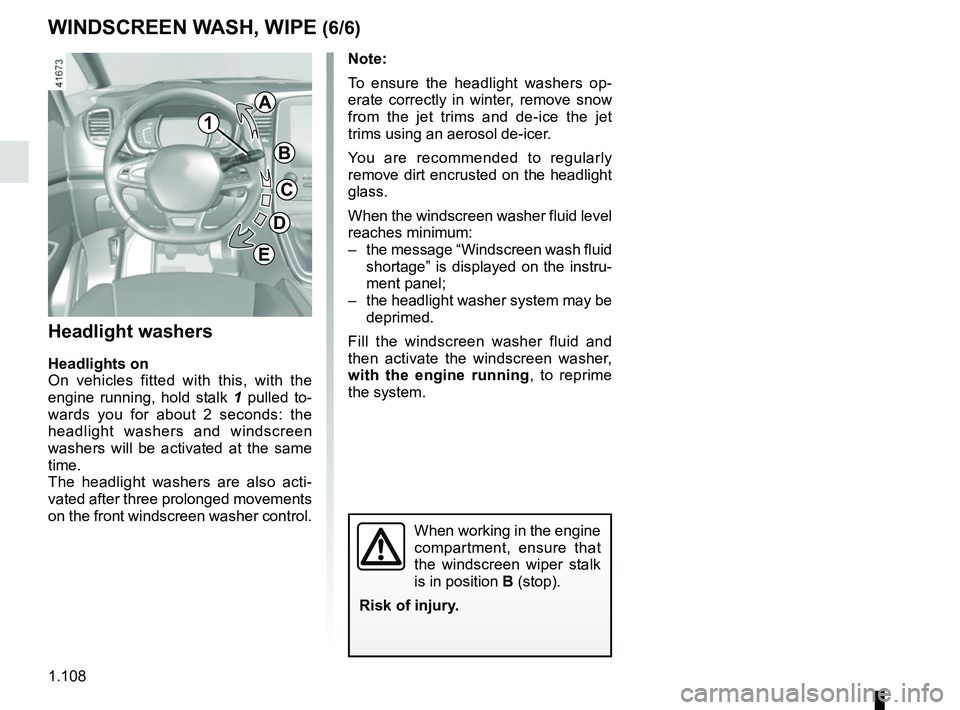
Headlight washers
Headlights on
On vehicles fitted with this, with the
engine running, hold stalk 1 pulled to-
wards you for about 2 seconds: the
headlight washers and windscreen
washers will be activated at the same
time.
The headlight washers are also acti-
vated after three prolonged movements
on the front windscreen washer control.
When working in the engine
compartment, ensure that
the windscreen wiper stalk
is in position B (stop).
Risk of injury.
1
A
B
C
D
E