2018 RENAULT SCENIC radio
[x] Cancel search: radioPage 320 of 364

Allocation of fuses
(the presence of certain fuses depends on the vehicle equipment level)\
Symbol Allocation SymbolAllocation
HWindscreen washer“Hybrid Assist” system
ëThi")
5.28
FUSES (2/2)
Allocation of fuses
(the presence of certain fuses depends on the vehicle equipment level)\
Symbol Allocation SymbolAllocation
HWindscreen washer“Hybrid Assist” system
ëThird row accessories socket, boot accessories
socketÝTowbar socket
ÆFront cigarette lighter, front and rear second row
accessories socketDiagnostic socket, audio alarm
Not usedÌHorn
Heated door mirrorsInstrument panel, dashboard control lighting
×Brake lights, passenger compartment central unitRear electric windows
\bParking brakefFront windscreen wiper
Additional servoDDirection indicator lights, hazard warning lights
îRadio, multifunction screen, multimedia acces-
sories sockets, parking brake controlRear USB sockets on console
Passenger compartment centre unit, rear wiper,
rear fog light
OLocking the doors and luggage compartment
Page 324 of 364
5.32
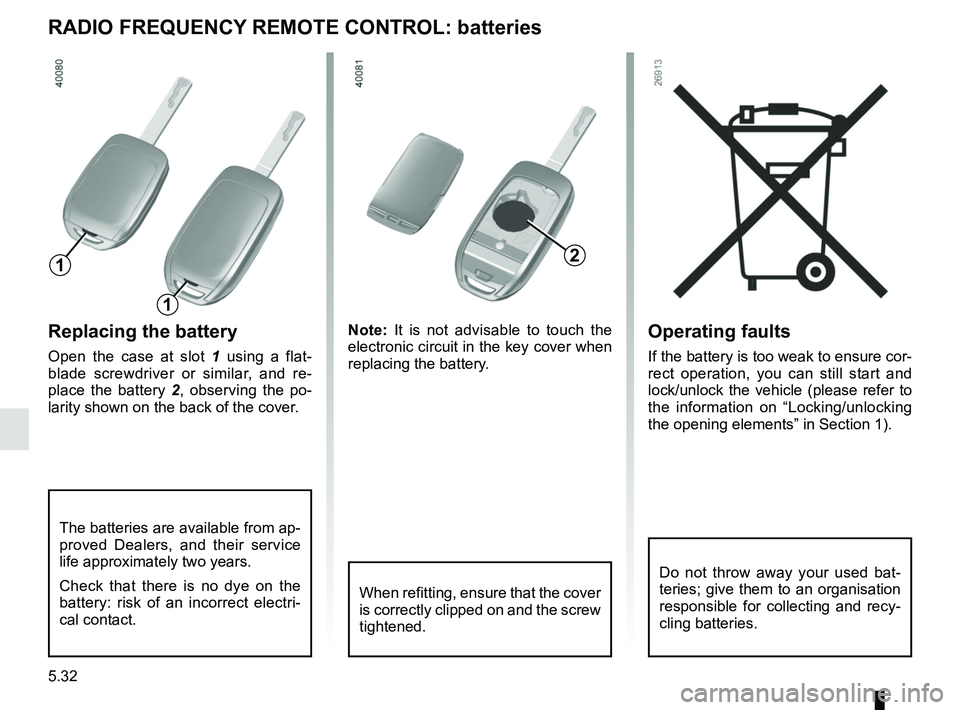
Operating faults
If the battery is too weak to ensure cor-
rect operation, you can still start and
lock/unlock the vehicle (please refer to
the information on “Locking/unlocking
the opening elements” in Section 1).
Replacing the battery
Open the case at slot 1 using a flat-
blade screwdriver or similar, and re-
place the battery 2 , observing the po-
larity shown on the back of the cover. Note:
It is not advisable to touch the
electronic circuit in the key cover when
replacing the battery.
RADIO FREQUENCY REMOTE CONTROL: batteries
When refitting, ensure that the cover
is correctly clipped on and the screw
tightened.
The batteries are available from ap-
proved Dealers, and their service
life approximately two years.
Check that there is no dye on the
battery: risk of an incorrect electri-
cal contact.
2
1
1
Do not throw away your used bat-
teries; give them to an organisation
responsible for collecting and recy-
cling batteries.
Page 325 of 364

5.33
ACCESSORIES
Electrical and electronic accessories
Before installing this type of accessory (particularly for transmitters\
/receivers: frequency bandwidth, power level, po-
sition of the aerial, etc.), make sure it is compatible with your vehic\
le. You can get advice from an authorised dealer.
Connect accessories with a maximum power of 120 Watts only. Fire hazard. When several accessory sockets are
used at the same time, the total power of the connected accessories must\
not exceed 180 watts.
No work may be carried out on the vehicle’s electrical or radio circuits, except by authorised dealers: an incorre\
ctly connecte d
system may result in damage being caused to the electrical equipment and\
/or the components connected to it.
If the vehicle is fitted with any aftermarket electrical equipment, make\
sure that the installation is correctly protected by a fuse.
Establish the rating and position of this fuse.
Using the diagnostic socket
The use of electronic accessories on the diagnostic socket may cause ser\
ious disturbance to the vehicle’s electronic systems.
For your safety we recommend that you use only electronic accessories ap\
proved by the manufacturer, consult an Approved
Dealer. Serious accident risk.
Use of transmitting/receiving devices (telephones, CB equipment etc.).\
Telephones and CB equipment with integrated aerials may cause interferenc\
e to the electronic systems originally fitted to the
vehicle: it is advisable only to use equipment with an external aerial. \
Furthermore, we remind you of the need to conform
to the legislation in force concerning the use of such equipment.
Fitting aftermarket accessories
If you wish to install accessories on the vehicle: please contact an aut\
horised dealer. Also, to ensure the correct operation o f
your vehicle, and to avoid any risk to your safety, we recommend that you use only accessories specifically designed for y\
our
vehicle, which are the only accessories for which the manufacturer will \
provide a warranty.
If you are using an anti-theft device, only attach it to the brake pedal\
.
Obstructions to the driver
On the driver’s side, only use mats suitable for the vehicle, attached with the pre-fi\
tted components, and check the fitting re gu-
larly. Do not lay one mat on top of another. There is a risk of wedging the pedals.
Page 360 of 364

7.4
ALPHABETICAL INDEX (4/6)
lighting:exterior ....................................................1.7, 1.95 → 1.102
instrument panel .......................................................... 1.95
interior ..........................................3.27 – 3.28, 5.24 → 5.26
lights adjustment .................................................... 1.101 – 1.102
changing bulbs .................................................. 5.17 – 5.18
front ................................................................... 5.17 – 5.18
lights: adjusting ....................................................... 1.101 – 1.102
adjustment of headlight beam height ............ 1.101 – 1.102
brake lights .................................................................. 5.19
dipped beam headlights ........................... 1.95, 5.17 – 5.18
direction indicators ..................................1.94, 5.17 → 5.19
electric beam height adjustment ................... 1.101 – 1.102
fog lights ........................................................... 1.100, 5.19
hazard warning ............................................................ 1.94
main beam headlights ..................... 1.96, 1.98, 5.17 – 5.18
number plate lights ...................................................... 5.23
reversing lights ............................................................. 5.19
side lights ............................................................ 1.95, 5.19
locking the doors ........................ 1.4, 1.6 → 1.12, 1.16 → 1.18
luggage compartment cover .............................................. 3.48
luggage retaining net .............................................3.53 → 3.55
M
maintenance ............................................................\
.......... 2.30
maintenance: bodywork .........................................................4.15 → 4.17
interior trim ........................................................ 4.18 – 4.19
mechanical .........................................4.2 – 4.3, 6.9 → 6.14
manual air conditioning..............................................3.6 → 3.8
map reading lights .................................................. 3.27 – 3.28
menu for customising the vehicle settings .............. 1.88 – 1.89
methods of restraint in addition to the seat belts ...1.36 → 1.38
mulitfunction display ..............................................1.72 → 1.77multifunction screen...............................................1.72
→ 1.77
multimedia (equipment) .......................................... 3.22 – 3.23
multimedia equipment ............................................ 3.22 – 3.23
Multi-Sense................................................................. 3.2 – 3.3
N
navigation ............................................................... 3.22 – 3.23
navigation system ................................................... 3.22 – 3.23
O
oil change ..................................................................... 4.4, 4.7
opening the doors ..................................................1.13 → 1.17
operating faults ......................................................5.38 → 5.44
overspeed warning .......................................1.72, 2.64 → 2.66
P
paintwork maintenance ....................................................4.15 → 4.17
parking assistance: assisted parking 2.82 → 2.86, 2.89 → 2.92
parking distance control.........................................2.82 → 2.86
P
pedestrian detection ..............................................2.40 → 2.46
P
power-assisted steering..................................................... 1.91
puncture................................................. 5.2 → 5.4, 5.9 → 5.13
R
radio........................................................................\
3.22 – 3.23
radio frequency remote control/key use ....................................................................\
...1.2 → 1.4
rear parcel shelf ............................................. 3.37, 3.47 – 3.48
rear screen de-icing/demisting .......................................... 3.13
rear seats functions ..........................................................3.40 → 3.45