2018 RENAULT MEGANE seat
[x] Cancel search: seatPage 94 of 348
1.88
Halogen bulb versions
HEADLIGHT BEAM ADJUSTMENT (1/2)
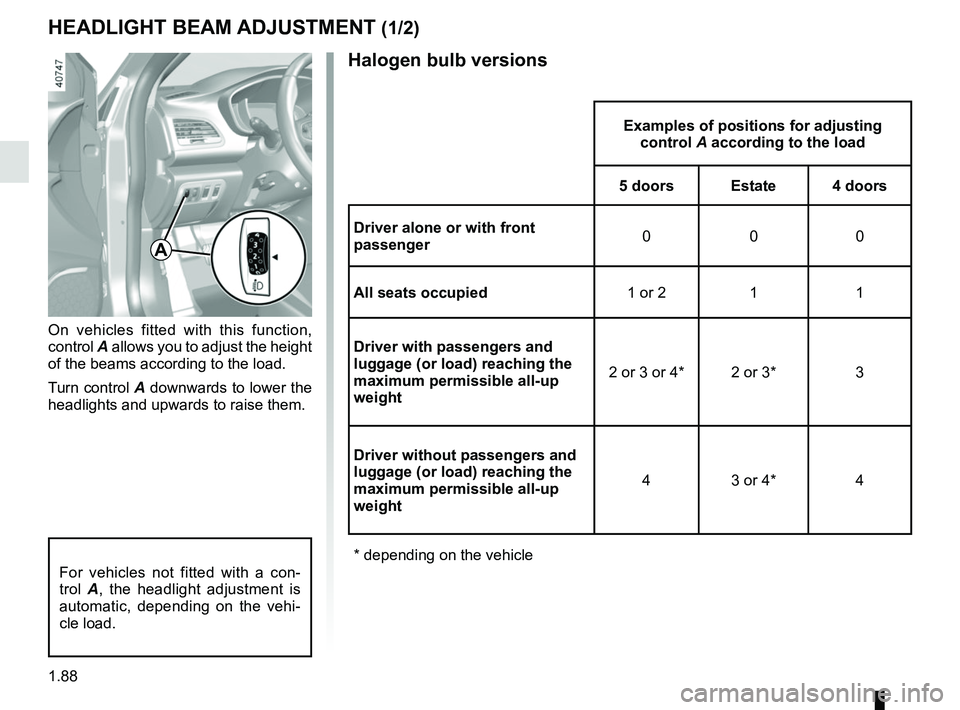
On vehicles fitted with this function,
control A allows you to adjust the height
of the beams according to the load.
Turn control A downwards to lower the
headlights and upwards to raise them.
Examples of positions for adjusting control A according to the load
5 doors Estate 4 doors
Driver alone or with front
passenger 000
All seats occupied 1 or 2 1 1
Driver with passengers and
luggage (or load) reaching the
maximum permissible all-up
weight 2 or 3 or 4* 2 or 3* 3
Driver without passengers and
luggage (or load) reaching the
maximum permissible all-up
weight 4 3 or 4* 4
* depending on the vehicle
A
For vehicles not fitted with a con-
trol A, the headlight adjustment is
automatic, depending on the vehi-
cle load.
Page 95 of 348
1.89
LED versions
HEADLIGHT BEAM ADJUSTMENT (2/2)
Examples of positions for adjusting control A according to the load
5 doors Estate 4 doors
Driver alone or with front
passenger 000
All seats occupied 111
Driver with passengers and
luggage (or load) reaching the
maximum permissible all-up
weight 2 or 3* 2 or 3* 3
Driver without passengers and
luggage (or load) reaching the
maximum permissible all-up
weight 3 or 4* 3 3 or 4*
* depending on the vehicle
Page 124 of 348

2.12
FUNCTION STOP AND START (3/4)
Conditions preventing the
standby of the engine
Certain conditions prevent the system
from using the engine standby function,
including when:
for vehicles equipped with a
RENAULT card:
– the driver’s door is not closed;
– the driver’s seatbelt is not fastened.
for all vehicles:
– reverse gear is engaged;
– the bonnet is not locked;
– the outdoor temperature is too low or too high (less than around 5°C or
higher than around 35°C);
– the battery is not sufficiently charged;
– the difference between the vehicle interior temperature and the auto-
matic climate control instruction is
too high;
– parking distance control is in opera- tion; – for vehicles with automatic gear-
boxes, the gradient is steeper than
approximately 12%;
– the “Clear View” function is activated (please see “Automatic climate con-
trol” in Section 3);
– the engine temperature is too low;
– the emission control system is being regenerated;
– Multi-Sense Sport mode is activated (depending on the vehicle);
– ...
Warning light
is displayed on the
instrument panel. This notifies you that
engine standby is not available.
Deactivate the Stop and
Start function for any opera-
tion performed in the engine
compartment.
Special case for vehicles with
a RENAULT card
With the engine on standby (traffic jam,
traffic lights, etc.), if the driver unfas-
tens the seat belt and opens the driv-
er’s door, or gets out of the seat, the
ignition is switched off.
The assisted parking brake is applied
automatically.
To restart and reactivate the Stop and
Start system, start the engine (please
refer to the information on "Starting,
stopping the engine" in Section 2).
Special case of vehicles with
a key
With the engine on standby (traffic
jam, traffic lights, etc.), if you get out of
the vehicle, a beep warns you that the
engine is on standby and has not been
stopped.
Page 130 of 348

2.18
ELECTRONIC PARKING BRAKE (2/3)Special cases
To park on a slope or while towing a
trailer, for example, pull switch 2 for
a few seconds to gain the maximum
braking.
To park the vehicle without applying the
electronic parking brake (if there is a
risk of freezing, for example):
– with the engine running, while simul- taneously keeping the brake pedal
and switch 2 depressed, switch off
the engine by pressing the engine
Start/Stop button 1;
– in gear, release the brake pedal and switch 2.
For vehicles fitted with the Stop and
Start function, with the engine on
standby, the electronic parking brake is
automatically activated if the driver un-
fastens their seat belt or opens the driv-
er's door or gets out of their seat.
Brief stop
To manually activate the electronic
parking brake, (when stopping at a red
light, or stopping when the engine is
running, etc.): pull and release switch 2.
The brake is released as soon as the
vehicle is started up again.
Manual operationYou can control the electronic parking
brake manually.
Applying the electronic parking
brake
Pull switch 2. Warning light 3 and warn-
ing light
} on the instrument panel
light up.
Releasing the electronic parking
brake
With the ignition on, depress the brake
pedal then press switch 2: warning
light 3 and warning light
} go out.
1
Special feature related to the Stop and Start function: if the driver's \
seat
is unfastened before the engine goes into standby due to the Stop and
Start function, make sure that the parking brake is applied: the
} in-
dicator light on the instrument panel confirms this. Risk of loss of immobilisa-
tion.
3
2
Page 195 of 348

3.1
Section 3: Your comfort
Multi-Sense . . . . . . . . . . . . . . . . . . . . . . . . . . . . . . . . . . . .\
. . . . . . . . . . . . . . . . . . . . . . . . . . . . . . . . 3.2
Air Vents . . . . . . . . . . . . . . . . . . . . . . . . . . . . . . . . . . . .\
. . . . . . . . . . . . . . . . . . . . . . . . . . . . . . . . . . 3.4
Manual air conditioning/heating system . . . . . . . . . . . . . . . . . . . . . . . . . . . . . . . . . . . .\
. . . . . . . . . . 3.6
Automatic climate control . . . . . . . . . . . . . . . . . . . . . . . . . . . . . . . . . . . .\
. . . . . . . . . . . . . . . . . . . . . 3.9
Air conditioning: information and advice on use . . . . . . . . . . . . . . . . . . . . . . . . . . . . . . . . . . . .\
. . . . 3.19
Outside air quality and deodorisation functions . . . . . . . . . . . . . . . . . . . . . . . . . . . . . . . . . . . . \
. . . . . 3.21
Electric windows . . . . . . . . . . . . . . . . . . . . . . . . . . . . . . . . . . . .\
. . . . . . . . . . . . . . . . . . . . . . . . . . . . 3.22
Electric sunroof . . . . . . . . . . . . . . . . . . . . . . . . . . . . . . . . . . . .\
. . . . . . . . . . . . . . . . . . . . . . . . . . . . . 3.24
Interior lighting . . . . . . . . . . . . . . . . . . . . . . . . . . . . . . . . . . . . \
. . . . . . . . . . . . . . . . . . . . . . . . . . . . . . 3.27
Sun visor/blinds . . . . . . . . . . . . . . . . . . . . . . . . . . . . . . . . . . . . \
. . . . . . . . . . . . . . . . . . . . . . . . . . . . . 3.29
Passenger compartment storage/fittings . . . . . . . . . . . . . . . . . . . . . . . . . . . . . . . . . . . . \
. . . . . . . . . . 3.30
Accessories socket . . . . . . . . . . . . . . . . . . . . . . . . . . . . . . . . . . . .\
. . . . . . . . . . . . . . . . . . . . . . . . . . 3.34
Ashtray . . . . . . . . . . . . . . . . . . . . . . . . . . . . . . . . . . . .\
. . . . . . . . . . . . . . . . . . . . . . . . . . . . . . . . . . . 3.34
Cigarette lighter . . . . . . . . . . . . . . . . . . . . . . . . . . . . . . . . . . . . \
. . . . . . . . . . . . . . . . . . . . . . . . . . . . . 3.34
Rear headrests . . . . . . . . . . . . . . . . . . . . . . . . . . . . . . . . . . . .\
. . . . . . . . . . . . . . . . . . . . . . . . . . . . . 3.36
Rear bench seat . . . . . . . . . . . . . . . . . . . . . . . . . . . . . . . . . . . .\
. . . . . . . . . . . . . . . . . . . . . . . . . . . . 3.38
Luggage compartment. . . . . . . . . . . . . . . . . . . . . . . . . . . . . . . . . . . . \
. . . . . . . . . . . . . . . . . . . . . . . . 3.40
Rear parcel shelf . . . . . . . . . . . . . . . . . . . . . . . . . . . . . . . . . . . . \
. . . . . . . . . . . . . . . . . . . . . . . . . . . . 3.44
Luggage cover . . . . . . . . . . . . . . . . . . . . . . . . . . . . . . . . . . . . \
. . . . . . . . . . . . . . . . . . . . . . . . . . . . . . 3.45
Luggage net. . . . . . . . . . . . . . . . . . . . . . . . . . . . . . . . . . . . \
. . . . . . . . . . . . . . . . . . . . . . . . . . . . . . . . 3.46
Luggage compartment storage space/fittings . . . . . . . . . . . . . . . . . . . . . . . . . . . . . . . . . . . .\
. . . . . . 3.48
Transporting objects in the luggage compartment . . . . . . . . . . . . . . . . . . . . . . . . . . . . . . . . . . . .\
. . 3.53
Transporting objects: towbar . . . . . . . . . . . . . . . . . . . . . . . . . . . . . . . . . . . . \
. . . . . . . . . . . . . . . . . . . 3.54
Roof bars . . . . . . . . . . . . . . . . . . . . . . . . . . . . . . . . . . . . \
. . . . . . . . . . . . . . . . . . . . . . . . . . . . . . . . . . 3.55
Multimedia equipment . . . . . . . . . . . . . . . . . . . . . . . . . . . . . . . . . . . . \
. . . . . . . . . . . . . . . . . . . . . . . . 3.57
Page 196 of 348

3.2
MULTI-SENSE (1/2)
Depending on the mode selected and
depending on the vehicle, the Multi-
Sense system controls the driving,
the ambient lighting, and the tone and
smoothness of the engine:
– modes Sport, Eco, Neutral and Comfort are preset and associated
with customisable light environments
and engine noise;
– mode Perso is fully customisable.
The drive modes affect the:
– power-assisted steering;
– the rear wheel steering;
– engine and gearbox responsiveness;
– heating level.
They also affect the:
– the light environment and the instru- ment panel lighting;
– the information on the instrument panel and multimedia screen;
– engine noise;
– massage seat.
After each start-up, the vehicle uses the
mode set at the time the engine was
last switched off.Mode Eco
Mode Eco is geared towards saving
energy and the environment. The
steering is smooth, engine and gearbox
management enable fuel consumption
to be lowered. Air conditioning is man-
aged to be used only when necessary.
Please refer to the information on
“Driving advice, Eco-driving” in
Section 2.
Note: for vehicles without ECOmode,
the Comfort mode becomes the most
suitable mode in terms of energy econ-
omy and respect for the environment.
Mode Neutral
Default mode, mode Neutral selects the
vehicle factory settings.
Multi-Sense
Sport Eco
Neutral Comfort Perso
Sport mode
This mode permits an increased re-
sponsiveness from the engine and the
gearbox. The steering is firmer.
Note: depending on the vehicle, this
mode can inhibit the Stop and Start
(refer to the information on the "Stop
and Start Function" in section 2).
In any mode, you can change the colour of the ambient lighting as well a\
s the
format of the information displayed on the instrument panel and multimed\
ia
screen. You can also reset to the default settings.
Please refer to the multimedia equipment instructions.
Page 197 of 348

3.3
MULTI-SENSE (2/2)Accessing the menu
You can access Multi-Sense, depend-
ing on the vehicle:
– from the multimedia screen 1. Select
the Vehicle menu, then Multi-Sense;
– using switch 2;
– depending on the vehicle, by press- ing the 3 Eco button which automati-
cally starts Eco mode, or the 3 R.S
Drive button which automatically
starts Sport mode. In both cases
this opens the "Multi-Sense" menu
on the multimedia screen 1 for a few
seconds.
Mode Comfort
This mode favours smooth steering.
The interior environment is softened.
Depending on the vehicle, the driver’s
seat massage function is activated.
Mode Perso
This mode enables you to manually
configure the drive, comfort, light envi-
ronment and engine noise.
1
2
3
Depending on the vehicle, once the
“Multi-Sense" menu is displayed on the
multimedia screen 1, pressing switch 2
enables you to toggle between the two
preferential modes you have selected.
Refer to the handbook for the equip-
ment.
Stopping the engine in Sport
mode, or Perso mode with
engine setting in Sport mode.
When you restart the vehicle, a mes-
sage asks you if you wish to keep
the engine setting in Sportmode.
Page 199 of 348
3.5
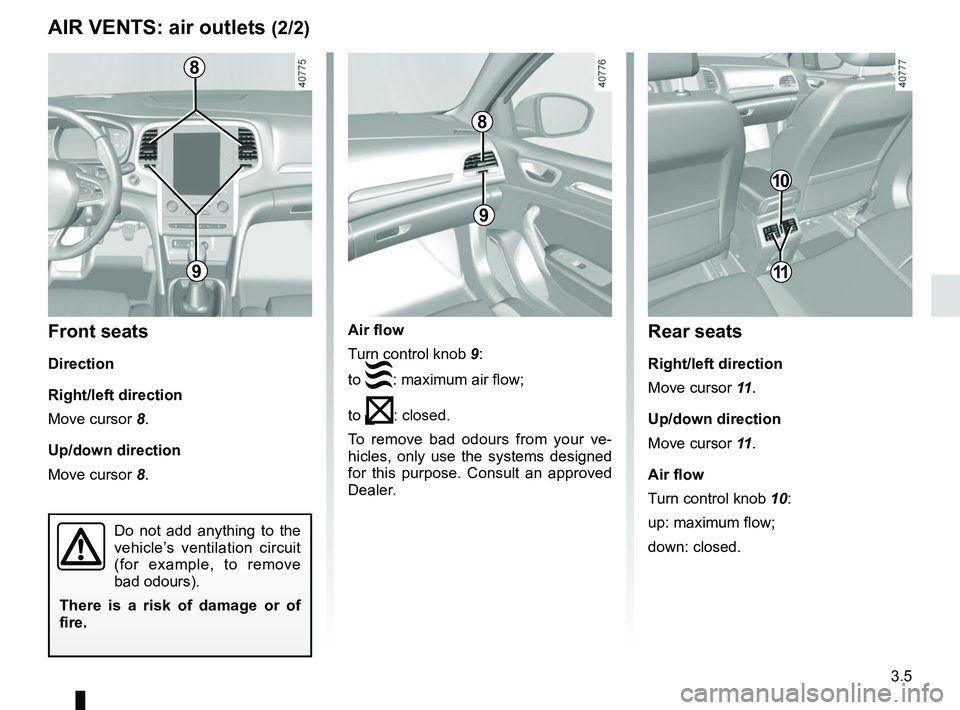
Air flow
Turn control knob 9:
to
: maximum air flow;
to
: closed.
To remove bad odours from your ve-
hicles, only use the systems designed
for this purpose. Consult an approved
Dealer.
AIR VENTS: air outlets (2/2)
8
9
8
9
Front seats
Direction
Right/left direction
Move cursor 8.
Up/down direction
Move cursor 8.
Do not add anything to the
vehicle’s ventilation circuit
(for example, to remove
bad odours).
There is a risk of damage or of
fire.
10
Rear seats
Right/left direction
Move cursor 11 .
Up/down direction
Move cursor 11 .
Air flow
Turn control knob 10:
up: maximum flow;
down: closed.
11