Page 60 of 348

1.54
CHILD SAFETY: deactivating, activating the front passenger air bag (3/3)
Operating faults
It is forbidden to fit a rear-facing child
seat to the front passenger seat if the
airbag activation/deactivation system is
faulty.
Allowing any other passenger to sit in
that seat is not recommended.
Contact your approved dealer as soon
as possible.
Activation of the front
passenger air bag
You should reactivate the air bag as
soon as you remove the child seat from
the front passenger seat to ensure the
protection of the front passenger in the
event of an impact.To reactivate the
airbags : with the
vehicle at a standstill, and the igni-
tion off , push and turn lock 1 to the ON
position.
With the ignition switched on, you must
check that the warning light
] is
out and that the warning light
comes on the display 2 after each start-
up for around 60 seconds.
The front passenger seat belt additional
restraint systems are activated.
The front passenger air bag
must only be deactivated or
activated when the vehicle
is stationary.
If it is interfered with when the ve-
hicle is being driven, indicator lights
å and © will come on.
Switch the ignition off then on again
to reset the air bag in accordance
with the lock position.
2
1
Page 70 of 348

The display of information shown below DEPENDS ON THE VEHICLE EQUIPMENT \
AND COUNTRY.
\fFree wheel warning light in
mode ECO
It lights up in mode ECO when the
“Free whee")
1.64
WARNING LIGHTS (5/6)
The display of information shown below DEPENDS ON THE VEHICLE EQUIPMENT \
AND COUNTRY.
\fFree wheel warning light in
mode ECO
It lights up in mode ECO when the
“Free wheel in mode ECO” is activated
(ON) in the user settings.
The warning light colour is dim when
the vehicle is not while freewheeling.
This warning light is bright when the ve-
hicle is while freewheeling (automatic
neutral).
Please refer to the information on
“Driving advice, ECO-driving” in
Section 2.Assisted parking brake fault
light
Please refer to the information on the
“Assisted parking brake” in Section 2.
Emergency active brake
assist
Refer to the information on “Driving cor-
rection devices and aids” in Section 2.
Mode warning light ECO
This comes on when ECO
mode is activated.
Please refer to the information on “Eco-
driving” in Section 2.
Tyre pressure monitoring
system
Refer to the information on the “Tyre
pressure monitoring system” in
Section 2.
Rear seat belt reminder (depending
on vehicle)
Warning light
ß comes on, accom-
panied (depending on the vehicle) by
a message indicating the number of
fastened seat belts on the instrument
panel for approximately 30 seconds,
each time the vehicle is started, a door
is opened or a rear seat belt is fas-
tened/unfastened. Check that the rear
passengers are wearing seat belts and
that the number of seat belts shown as
fastened corresponds to the number of
rear seat places occupied.
Page 71 of 348
1.65
WARNING LIGHTS (6/6)
The display of information shown below DEPENDS ON THE VEHICLE EQUIPMENT \
AND COUNTRY.
On display C
Passenger airbag ON
Please refer to the information
on “Child safety: deactivating/activating
the front passenger airbag” in Section 1.
¹Passenger airbag OFF
Please refer to the information
on “Child safety: deactivating/activating
the front passenger airbag” in Section 1.
ßDriver’s seat belt reminder
and, depending on the vehi-
cle, front passenger seat belt re-
minder.
This lights up when the ignition is
switched on. If the driver's or front pas-
senger's seat belt (if this seat is occu-
pied) is not fastened as soon as the
vehicle has reached approximately
12.4 mph (20 km/h), it flashes and a
bleep sounds for around 120 seconds.
Note: an object placed on the passen-
ger seat base can activate the warning
light.
C
Page 86 of 348

1.80
TRIP COMPUTER AND WARNING SYSTEM: operating fault messages
These appear with the © warning light and mean that you should drive very carefully to an author\
ised dealer as
soon as possible. If you fail to follow this recommendation, you risk da\
maging your vehicle.
They disappear when the display selection key is pressed or after severa\
l seconds and are stored in the computer log. The
© warning light stays on. Examples of operating fault messages are given \
in the following pages.
Examples of messages Interpreting the display selected
“Clean diesel filter” Indicates the presence of water in the diesel filter; contact an approve\
d Dealer
as soon as possible.
“Check lighting” Indicates a fault in the headlights.
“Check vehicle” Indicates a fault in one of the pedal sensors, battery management system\
or oil
level sensor.
“Check airbag” Indicates a fault in the restraint system in addition to the seat belts.\
In the event
of an accident, it is possible that they may not be triggered.
“Check antipollution system” Indicates a fault in the vehicle’s particle filter system.
Page 124 of 348

2.12
FUNCTION STOP AND START (3/4)
Conditions preventing the
standby of the engine
Certain conditions prevent the system
from using the engine standby function,
including when:
for vehicles equipped with a
RENAULT card:
– the driver’s door is not closed;
– the driver’s seatbelt is not fastened.
for all vehicles:
– reverse gear is engaged;
– the bonnet is not locked;
– the outdoor temperature is too low or too high (less than around 5°C or
higher than around 35°C);
– the battery is not sufficiently charged;
– the difference between the vehicle interior temperature and the auto-
matic climate control instruction is
too high;
– parking distance control is in opera- tion; – for vehicles with automatic gear-
boxes, the gradient is steeper than
approximately 12%;
– the “Clear View” function is activated (please see “Automatic climate con-
trol” in Section 3);
– the engine temperature is too low;
– the emission control system is being regenerated;
– Multi-Sense Sport mode is activated (depending on the vehicle);
– ...
Warning light
is displayed on the
instrument panel. This notifies you that
engine standby is not available.
Deactivate the Stop and
Start function for any opera-
tion performed in the engine
compartment.
Special case for vehicles with
a RENAULT card
With the engine on standby (traffic jam,
traffic lights, etc.), if the driver unfas-
tens the seat belt and opens the driv-
er’s door, or gets out of the seat, the
ignition is switched off.
The assisted parking brake is applied
automatically.
To restart and reactivate the Stop and
Start system, start the engine (please
refer to the information on "Starting,
stopping the engine" in Section 2).
Special case of vehicles with
a key
With the engine on standby (traffic
jam, traffic lights, etc.), if you get out of
the vehicle, a beep warns you that the
engine is on standby and has not been
stopped.
Page 130 of 348

2.18
ELECTRONIC PARKING BRAKE (2/3)Special cases
To park on a slope or while towing a
trailer, for example, pull switch 2 for
a few seconds to gain the maximum
braking.
To park the vehicle without applying the
electronic parking brake (if there is a
risk of freezing, for example):
– with the engine running, while simul- taneously keeping the brake pedal
and switch 2 depressed, switch off
the engine by pressing the engine
Start/Stop button 1;
– in gear, release the brake pedal and switch 2.
For vehicles fitted with the Stop and
Start function, with the engine on
standby, the electronic parking brake is
automatically activated if the driver un-
fastens their seat belt or opens the driv-
er's door or gets out of their seat.
Brief stop
To manually activate the electronic
parking brake, (when stopping at a red
light, or stopping when the engine is
running, etc.): pull and release switch 2.
The brake is released as soon as the
vehicle is started up again.
Manual operationYou can control the electronic parking
brake manually.
Applying the electronic parking
brake
Pull switch 2. Warning light 3 and warn-
ing light
} on the instrument panel
light up.
Releasing the electronic parking
brake
With the ignition on, depress the brake
pedal then press switch 2: warning
light 3 and warning light
} go out.
1
Special feature related to the Stop and Start function: if the driver's \
seat
is unfastened before the engine goes into standby due to the Stop and
Start function, make sure that the parking brake is applied: the
} in-
dicator light on the instrument panel confirms this. Risk of loss of immobilisa-
tion.
3
2
Page 232 of 348

3.38
To manually fold down the
seatbacks
Ensure that the front seats are far
enough forward.
Raise the side headrests to the highest
position and lower the central headrest
fully.
Depending on the vehicle, put the seat
belt in the belt guide 2 to avoid damag-
ing it, or buckle it its own unit. This will
prevent the seat belt becoming trapped
when the seat is returned to its position
for use. In all cases, check that the seat
belts are operating correctly.
Pull the control 1 and lower the seat-
back A.
To replace the seatback, proceed in
the reverse order to removal.
Refit the seatback and click it back into
place.
REAR BENCH SEAT (1/2)
For safety reasons, carry
out any adjustments when
the vehicle is not being
driven.
When moving the rear
seats, ensure that nothing
obstructs the anchorage
points (passenger’s arm or
leg, a pet, gravel, cloth, toys, etc.).
A
1
The configuration of the
two-seat bench with the
small seatback B pulled
down, does not allow the
central seat to be used as it would
be impossible to buckle the seat belt
(belt buckles inaccessible).
When refitting the seat-
back, make sure it is cor-
rectly locked in place.
If seat covers are fitted ,
make sure these do not prevent the
seatback latch from locking in.
Make sure that the seat belts are
positioned correctly.
Reposition the headrests.
B
2
Page 233 of 348
3.39
REAR BENCH SEAT (2/2)
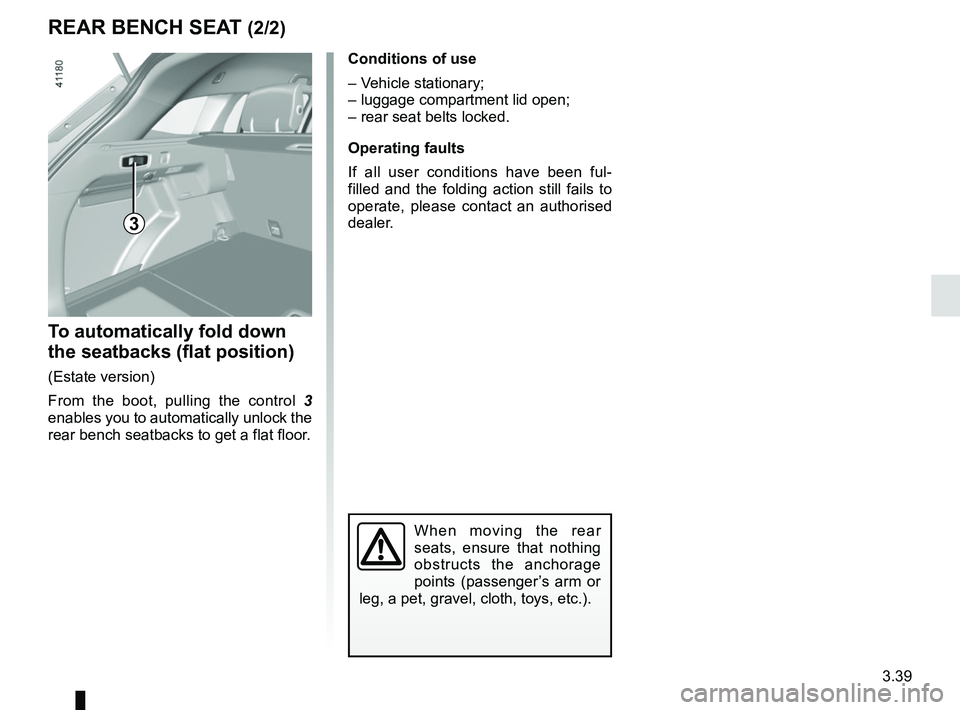
To automatically fold down
the seatbacks (flat position)
(Estate version)
From the boot, pulling the control 3
enables you to automatically unlock the
rear bench seatbacks to get a flat floor.
3
When moving the rear
seats, ensure that nothing
obstructs the anchorage
points (passenger’s arm or
leg, a pet, gravel, cloth, toys, etc.).
Conditions of use
– Vehicle stationary;
– luggage compartment lid open;
– rear seat belts locked.
Operating faults
If all user conditions have been ful-
filled and the folding action still fails to
operate, please contact an authorised
dealer.

The display of information shown below DEPENDS ON THE VEHICLE EQUIPMENT \
AND COUNTRY.
On display C
Passenger airbag ON
Please refer to the information
on “Child safe")