2018 RENAULT KOLEOS sat nav
[x] Cancel search: sat navPage 57 of 332

1.51
DRIVING POSITION: LEFT-HAND DRIVE (2/2)
The equipment fitted, described below, DEPENDS ON THE VERSION AND COUNTRY. 19 Controls for:
– Cruise control/speed limiter main
control,
– Assisted parking.
20 Gear lever.
21 Ignition switch (vehicles with key).
22 Controls for remote radio and navi-
gation system.
23 Control for adjusting steering
wheel height and reach.
24 Unlocking controls:
– bonnet,
– fuel filler flap.
25 Controls for:
– Electric headlight beam adjust-
ment,
– Instrument panel lighting dimmer,
– Tailgate opening or Lane depar-
ture warning on/off (depeding on
the vehicle),
– Heated steering wheel on/off,
– ESC and Traction Control system,
– Two and four-wheel drive mode
selector.
1 Air vent.
2 Demister outlet.
3 Stalk for:
– direction indicator lights;
– exterior lights;
– fog lights.
4 Cruise control/speed limiter con-
trols.
5 Instrument panel.
6 Driver Airbag and horn location.
7 Controls for on-board computer in-
formation read-out and vehicle set-
tings customisation menu.
8 Steering column stalk for wind-
screen and rear screen wash/
wiper.
9 Engine start/stop button (vehicle
with RENAULT card).
10 Multifunction screen.
11 Hazard warning light switch, cen-
tral door locking warning light.
12 Multifunction screen controls for:
– power on/off,
– volume,
– home menu,
– driving aids menu,
– display settings.
13 Heating or air conditioning con-
trols.
14 Controls for:
– heated front seats,
– ventilated front seats,
– activation/deactivation of ECO
mode,
– activation/deactivation of assisted
parking,
– activation/deactivation of the Stop
and Start function.
15 Passenger Airbag location.
16
Glovebox.
17 Accessories socket or cigarette
lighter.
18 Cup holders.
Page 59 of 332

1.53
DRIVING POSITION: RIGHT-HAND DRIVE (2/2)
The equipment fitted, described below, DEPENDS ON THE VERSION AND COUNTRY.
16 Unlocking controls:
– bonnet,
– fuel filler flap.
17 Ignition switch (vehicles with key).
18 Control for remote radio and navi-
gation system.
19 Control for adjusting steering
wheel height and reach.
20 Engine start/stop button (vehicle
with RENAULT card).
21 Accessories socket or cigarette
lighter.
22 Cup holder
23 Controls for:
– Cruise control/speed limiter main
control,
– Assisted parking.
24 Gear lever.
25 Glovebox.
1 Air vent.
2 Demister outlet.
3 Passenger Airbag location.
4 Controls for:
– heated front seats,
– ventilated front seats,
– activation/deactivation of ECO
mode,
– activation/deactivation of assisted
parking,
– activation/deactivation of the Stop
and Start function.
5 Heating or air conditioning con-
trols.
6 Multifunction screen.
7 Hazard warning light switch, cen-
tral door locking warning light.
8 Multifunction screen controls for:
– power on/off,
– volume,
– home menu,
– driving aids menu,
– display settings.
9 Stalk for:
– direction indicator lights;
– exterior lights;
– fog lights.
10 Cruise control/speed limiter con-
trols.
11 Instrument panel.
12 Driver Airbag and horn location.
13 Controls for on-board computer in-
formation read-out and vehicle set-
tings customisation menu.
14 Steering column stalk for wind-
screen and rear screen wash/
wiper.
15
Controls for:
– Electric headlight beam adjust-
ment,
– Instrument panel lighting dimmer,
– Tailgate opening or Lane depar-
ture warning on/of
f (depeding on
the vehicle),
– Heated steering wheel on/off,
– ESC and Traction Control system,
– Two and four-wheel drive mode
selector.
Page 78 of 332

1.72
VEHICLE SETTINGS CUSTOMISATION MENU (1/2)
Adjusting the settings
(depending on the vehicle)
Select the function to modify:
a) unlocking the driver’s door only;
b) automatic locking of the doors while driving;
c) hands-free function;
d) indicator audio volume;
e) internal welcome sound;
f) external welcome;
g) reading lamp in automatic mode;
h) rear windscreen wiping in reverse gear;
i) configuration of the driving style indi- cator;
j) Active noise control.
Select “ON” or “OFF” to activate or de-
activate the function.
For the “Light brightness intensity”
function, select the intensity by press-
ing “+” or “-”.
Depending on the vehicle equipment,
this function allows you to activate/de-
activate and adjust some of the vehi-
cle’s functions.
Vehicles fitted with a
navigation system
Accessing the settings menu
With the vehicle at a standstill, using
the multifunction screen
1, select menu
“Vehicle”, “User settings” to access the
various settings.
1
For safety reasons, carry
out any adjustments when
the vehicle is stationary.
Page 79 of 332

1.73
VEHICLE SETTINGS CUSTOMISATION MENU (2/2)
34
= function activated
< function deactivated
Once a line has been selected, press
the switch 3 OK to adjust the function.
If you select either “Parking assist” or
“Language”, you will have to make a
further selection (sound volume of the
parking distance control or instrument
panel language). In this case, make
your selection and confirm it by holding
the switch 3 OK – the selected value is
shown by a
~ in front of the line.
To exit the menu, press the control 4
upwards or downwards. It may be nec-
essary to carry out this operation sev-
eral times.
Vehicles not fitted with a
navigation system
Accessing the settings menu on
display 2
With the vehicle at a standstill, press
and hold the switch 3 OK to access the
settings menu.
Adjusting the settings
(depending on the vehicle)
Browse using the control 4 to select the
function to adjust:
a) Language;
b) Vehicle speed unit;
c) Unlocking the driver’s door only;
d) Lock doors when in motion;
e) Use handfree card;
f) Rear wipers when reverse is ON;
g) Flashers volume;
h) Welcome lights;
i) Automatic cabin lights;
j) Parking assist;
k) Parking assist audio volume;
l) Lane departure volume;
m) Lane departure sensitivity;
n) Lane departure vibration;
p) Active braking;
q) Automatic main beam lights.
The vehicle settings personalisation
menu cannot be used when driv-
ing. At speed exceeding 12 mph
(20 km/h), the instrumental panel
display switches automatically back
to trip computer and warning system
mode.
2
Page 125 of 332
2.21
DRIVING ADVICE, ECO-DRIVING (1/5)
1
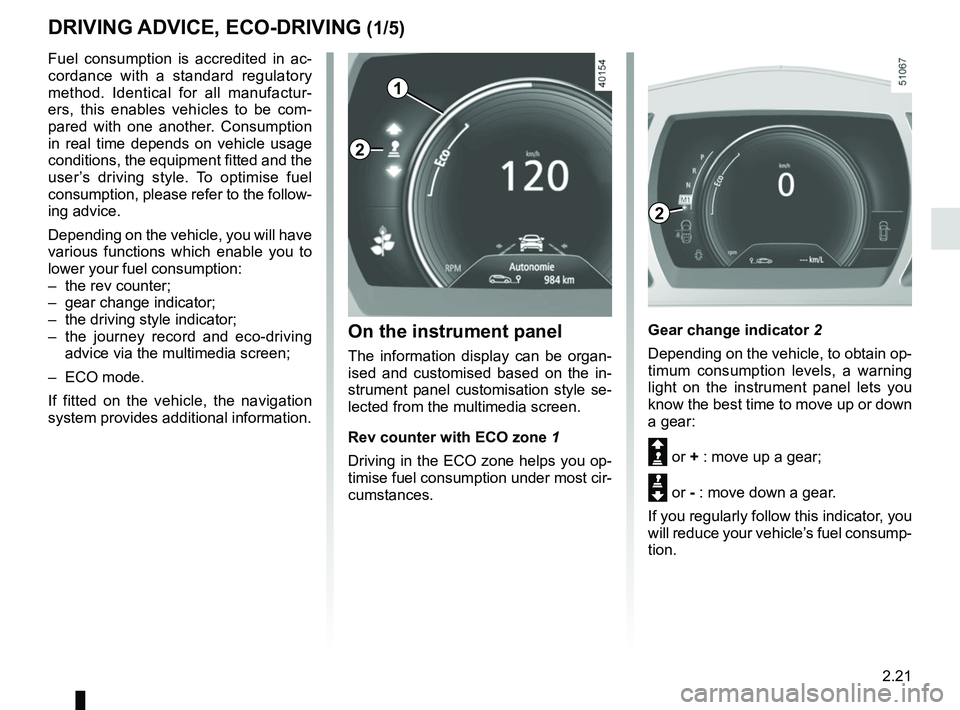
Gear change indicator 2
Depending on the vehicle, to obtain op-
timum consumption levels, a warning
light on the instrument panel lets you
know the best time to move up or down
a gear:
Š or + : move up a gear;
‰ or - : move down a gear.
If you regularly follow this indicator, you
will reduce your vehicle’s fuel consump-
tion.
Fuel consumption is accredited in ac-
cordance with a standard regulatory
method. Identical for all manufactur-
ers, this enables vehicles to be com-
pared with one another. Consumption
in real time depends on vehicle usage
conditions, the equipment fitted and the
user’s driving style. To optimise fuel
consumption, please refer to the follow-
ing advice.
Depending on the vehicle, you will have
various functions which enable you to
lower your fuel consumption:
– the rev counter;
– gear change indicator;
– the driving style indicator;
– the journey record and eco-driving
advice via the multimedia screen;
– ECO mode.
If fitted on the vehicle, the navigation
system provides additional information.
On the instrument panel
The information display can be organ-
ised and customised based on the in-
strument panel customisation style se-
lected from the multimedia screen.
Rev counter with ECO zone 1
Driving in the ECO zone helps you op-
timise fuel consumption under most cir-
cumstances.
2
2
Page 219 of 332
3.23
Note: For vehicles fitted with a naviga-
tion system, you can use the multifunc-
tion screen to deactivate/activate the
courtesy lights which come on when
the doors or boot are opened. To do
this, please refer to “Vehicle settings
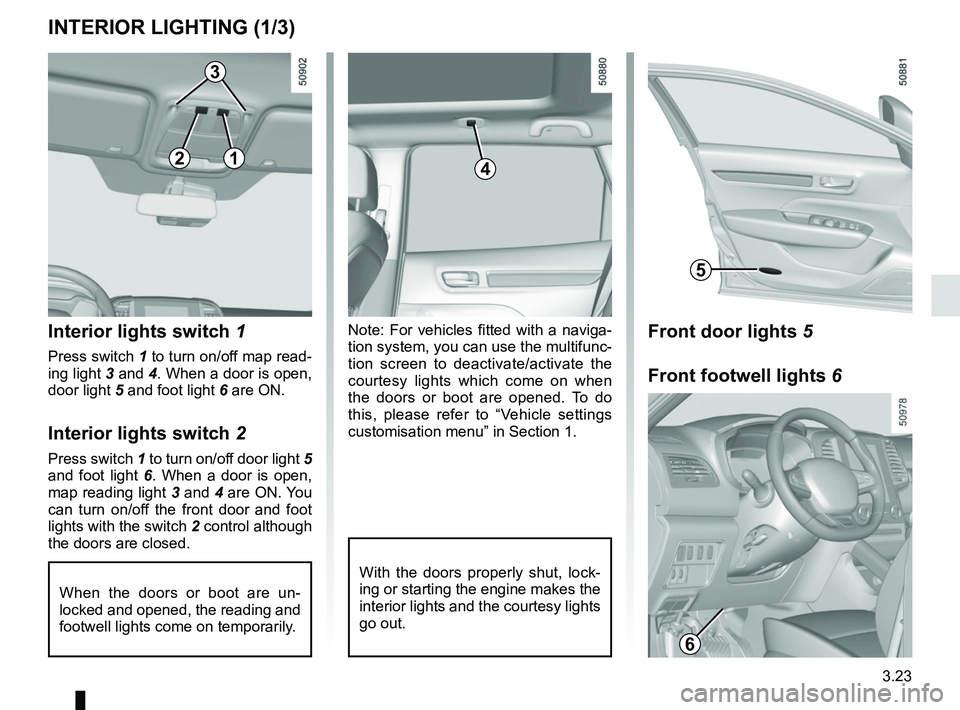
customisation menu” in Section 1.Interior lights switch 1
Press switch 1 to turn on/off map read-
ing light 3 and 4. When a door is open,
door light 5 and foot light 6 are ON.
Interior lights switch 2
Press switch 1 to turn on/off door light 5
and foot light 6. When a door is open,
map reading light 3 and 4 are ON. You
can turn on/off the front door and foot
lights with the switch 2 control although
the doors are closed.
When the doors or boot are un-
locked and opened, the reading and
footwell lights come on temporarily.
INTERIOR LIGHTING (1/3)
With the doors properly shut, lock-
ing or starting the engine makes the
interior lights and the courtesy lights
go out.
4
3
5
12
Front door lights 5
Front footwell lights 6
6