2018 RENAULT KOLEOS climate control
[x] Cancel search: climate controlPage 83 of 332

1.77
Welcome and goodbye function
(depending on the vehicle)
From the multifunction screen, select
menu “Vehicle”, “User settings”,
“External welcome” and activate or de-
activate the function (ON or OFF).
REAR VIEW MIRRORS (1/2)Folding rear view mirrors
The door mirrors automatically fold in
when the vehicle is locked using the
button on the RENAULT card or remote
“Hands-free” locking. In this case, when
the engine is started, the door mirrors
fold out.
In any case, you can make the door
mirrors fold in or fold out with switch 1.
If the switch 1 is pressed, automatic
mode is deactivated. To reactivate the
automatic mode, press the switch 1
again.
Exterior rear view mirrors
Adjustment
Select the door mirror using the
switch 2, then use the control 3 to
adjust it to the desired position.
Heated door mirrors
Mirror de-icing is carried out at the
same time as rear screen de-icing.
Please refer to the information
on “Manual air conditioning” and
“Automatic climate control” in Section 3.
The driver’s door mirror
may have two clearly de-
fined zones. Zone A shows
what can normally be seen
in an ordinary rear view mirror.
Zone B increases rear side visibility.
Objects in the mirror are closer
than they appear.
For safety reasons, carry
out any adjustments when
the vehicle is not being
driven.
1
2
3
AB
Page 116 of 332

2.12
STOP AND START FUNCTION (3/4)
Conditions for preventing the
standby of the engine
Certain conditions prevent the system
from using the engine standby function,
including when:
for vehicles equipped with a
RENAULT card:
– the driver’s door is not closed;
– the driver’s seatbelt is not fastened;
for all vehicles:
– reverse gear is engaged;
– the bonnet is not locked;
– the outdoor temperature is too low or too high;
– the battery is not sufficiently char- ged;
– if available, “4WD Lock” mode is activated (please see the section
“Transmission: 4-wheel drive (4WD)”
in Section 2);
– the difference between the vehicle interior temperature and the auto-
matic climate control instruction is
too high; – parking distance control is in opera-
tion;
– for vehicles with automatic gear- boxes, the gradient is steeper than
approximately 12%;
– the “Clear View” function is activa- ted (please see “Automatic Climate
Control” in Section 3);
– the engine temperature is too low or high;
– the emission control system is being regenerated;
or
– ...
Warning light
is displayed on the
instrument panel. This notifies you that
engine standby is not available.
Deactivate the Stop and
Start function when perfor-
ming any operations in the
engine compartment.
Special cases for vehicles
with a RENAULT card
With the engine on standby (traffic jam,
traffic lights, etc.), if the driver unfas-
tens the seat belt and opens the driv-
er’s door, or gets out of the seat, the
ignition is switched off.
The assisted parking brake is applied
automatically.
To restart and reactivate the Stop and
Start system, start the engine (please
refer to “Starting, stopping the engine”
in Section 2).
Special cases of vehicles
with a key
With the engine on standby (traffic
jam, traffic lights, etc.), if you get out of
the vehicle, a beep warns you that the
engine is on standby and has not been
stopped.
After engine standby, even
driver takes off the vehicle,
it could be restarted. Please
check the safety before you
leave.
Page 117 of 332

2.13
STOP AND START FUNCTION (4/4)
Special feature of the automatic
engine re-start
Under certain conditions, the engine
can restart on its own in order to gua-
rantee your safety and comfort.
This can occur especially when:
– the outdoor temperature is too low or too high;
– the “Clear View” function is activa- ted (please see “Automatic Climate
Control” in Section 3);
– the battery is not sufficiently char- ged;
– the vehicle speed is above 3 mph (5 km/h) (downhill slope, etc.);
– repeated pressing on the brake pedal or braking system require-
ment;
– ...
1
2
Deactivating, activating the
function
Press switch 1 to deactivate the func-
tion. The message “Stop & Start deac-
tivated” will appear on the instrument
panel and the integrated warning light 2
on the switch will light up.
Pressing again will reactivate the
system. The message “Stop & Start ac-
tivated” will appear on the instrument
panel and the integrated warning light 2
on switch 1 will go out.
Note: With the engine on standby,
press switch 1 to automatically re-
start the engine.
The system is automatically reactivated
each time the vehicle is started (see
“Stop and Start function” in Section 2).
Operating faults
When the message “Check Stop &
Start” appears on the instrument panel
and the integrated warning light 2 lights
up on the switch 1, the system is deac-
tivated.
Please consult an authorised dealer.
Before getting out of the
vehicle, you must switch
off the ignition (please see
section on “Starting, stop-
ping the engine” in section 2).Special feature of vehicles with
a key: for some of these condi-
tions the automatic restarting of the
engine is inhibited if a front door is
open.
Page 197 of 332

3.1
Section 3: Your comfort
Air vents. . . . . . . . . . . . . . . . . . . . . . . . . . . . . . . .\
. . . . . . . . . . . . . . . . . . . . . . . . . . . . . . . . . . . . . . . 3.2
Manual air conditioning/heating system . . . . . . . . . . . . . . . . . . . . . . . . . . . . . . . . . . . .\
. . . . . . . . . . 3.4
Automatic climate control . . . . . . . . . . . . . . . . . . . . . . . . . . . . . . . . . . . .\
. . . . . . . . . . . . . . . . . . . . . 3.7
Air conditioning: information and advice on use . . . . . . . . . . . . . . . . . . . . . . . . . . . . . . . . . . . .\
. . . . 3.17
Outside air quality and deodorisation functions . . . . . . . . . . . . . . . . . . . . . . . . . . . . . . . . . . . . \
. . . . . 3.18
Electric windows . . . . . . . . . . . . . . . . . . . . . . . . . . . . . . . . . . . .\
. . . . . . . . . . . . . . . . . . . . . . . . . . . . 3.19
Electric sunroof . . . . . . . . . . . . . . . . . . . . . . . . . . . . . . . . . . . .\
. . . . . . . . . . . . . . . . . . . . . . . . . . . . . 3.21
Interior lighting . . . . . . . . . . . . . . . . . . . . . . . . . . . . . . . . . . . . \
. . . . . . . . . . . . . . . . . . . . . . . . . . . . . . 3.23
Passenger compartment storage space and fittings . . . . . . . . . . . . . . . . . . . . . . . . . . . . . . . . . . . . \
. 3.26
Ashtray, cigarette lighter, accessories socket . . . . . . . . . . . . . . . . . . . . . . . . . . . . . . . . . . . .\
. . . . . . 3.31
Rear headrest . . . . . . . . . . . . . . . . . . . . . . . . . . . . . . . . . . . .\
. . . . . . . . . . . . . . . . . . . . . . . . . . . . . . 3.32
Sliding rear bench seat . . . . . . . . . . . . . . . . . . . . . . . . . . . . . . . . . . . .\
. . . . . . . . . . . . . . . . . . . . . . . 3.33
Boot . . . . . . . . . . . . . . . . . . . . . . . . . . . . . . . . . . . . \
. . . . . . . . . . . . . . . . . . . . . . . . . . . . . . . . . . . . . . 3.36
Automatic tailgate . . . . . . . . . . . . . . . . . . . . . . . . . . . . . . . . . . . .\
. . . . . . . . . . . . . . . . . . . . . . . . . . . 3.37
Luggage cover . . . . . . . . . . . . . . . . . . . . . . . . . . . . . . . . . . . . \
. . . . . . . . . . . . . . . . . . . . . . . . . . . . . . 3.42
Luggage net. . . . . . . . . . . . . . . . . . . . . . . . . . . . . . . . . . . . \
. . . . . . . . . . . . . . . . . . . . . . . . . . . . . . . . 3.43
Luggage compartment storage . . . . . . . . . . . . . . . . . . . . . . . . . . . . . . . . . . . .\
. . . . . . . . . . . . . . . . . 3.45
Transporting objects in the boot . . . . . . . . . . . . . . . . . . . . . . . . . . . . . . . . . . . .\
. . . . . . . . . . . . . . . . 3.46
Transporting objects: . . . . . . . . . . . . . . . . . . . . . . . . . . . . . . . . . . . . \
. . . . . . . . . . . . . . . . . . . . . . . . . 3.47 equipment . . . . . . . . . . . . . . . . . . . . . . . . . . . . . . . . . . . .\
. . . . . . . . . . . . . . . . . . . . . . . . . . . 3.47
Roof bars, Spoiler . . . . . . . . . . . . . . . . . . . . . . . . . . . . . . . . . . . .\
. . . . . . . . . . . . . . . . . . . . . . . . . . . 3.48
Multimedia equipment . . . . . . . . . . . . . . . . . . . . . . . . . . . . . . . . . . . . \
. . . . . . . . . . . . . . . . . . . . . . . . 3.49
Page 203 of 332

3.7
AUTOMATIC CLIMATE CONTROL: Controls A (1/5)
10
15
7654
9
16
17
11
18
11
Controls A
Press zone 14 to access the multifunc-
tion screen 2. The presence of the con-
trols detailed below will depend on the
vehicle model.
1 and 3 Left and right temperature indi-
cation adjustment.
4 De-icing/demisting of the rear screen and, depending on the vehicle, the
door mirrors.
5, 8, 9 and 10 automatic modes (Normal, Soft, Fast)
6 Air recirculation.
7 “Clear View” function. 11
Ventilation speeds.
12 Distribution of air in the passenger- compartment.
13 Right and left temperature display.
14 Zone displaying air conditioning set- tings.
15 “DUAL” function.
16 Automatic recirculation function de- pending on the vehicle.
17 Air conditioning.
18 Stopping the system.
8
14
13
13
13
2
Some buttons have a warning light-
indicating their operative state.
AAutomatic mode
The automatic climate control system-
guarantees comfort in the passen-
ger compartment and good visibility
(except in the event of extreme condi-
tions), while optimising consumption.
The system controls the ventilation
speed, air distribution, air recirculation,
and starting and stopping the air condi-
tioning and air temperature.
This mode consists of a choice of three
programmes:
NORMAL: allows the selected comfort
level to be best attained, depending on
the exterior conditions. Press button 4
or key 9.
SOFT: reaches the desired comfort
level more gently and silently. Press
button 8.
FAST: increases the flow of air in the
passenger compartment. This mode
is recommended in particular to opti
mise comfort in the rear seats. Press
button 10.
12
Page 204 of 332

3.8
AUTOMATIC CLIMATE CONTROL: Controls A (2/5)
Varying the ventilation speed
In automatic mode, the system uses
the most suitable amount of air to reach
and maintain the desired comfort level.
You can still adjust the ventilation speed
by pressing buttons 11 or by slid-
ing or touching your finger in zone 19.
Depending on the vehicle, the ventila-
tion speed, which is no longer control-
led automatically, appears in zone 19
and zone 14.
Temperature adjustmentThere are two types of settings:
– uniform passenger compartment
setting;
– DUAL function setting to independ- ently adjust the left and right sides.
Uniform passenger compartment
setting
Use control 1.
DUAL function setting
Press button 15 to activate. Use con-
trol 1 to adjust the left side and control 3
for the right side.
The displayed temperature values
show a comfort level.
When starting the engine, increas-
ing or decreasing the value dis-
played will not allow the com-
fort level to be reached any more
quickly. The system will always op-
timise the temperature increase or
decrease (the ventilation system
does not start instantly at maximum
speed: it gradually increases). This
may take several minutes.
Generally speaking, unless there is
a particular reason not to, the dash-
board air vents should remain open.
13
15
1111
14
19
A
Page 205 of 332
3.9
AUTOMATIC CLIMATE CONTROL: Controls A (3/5)
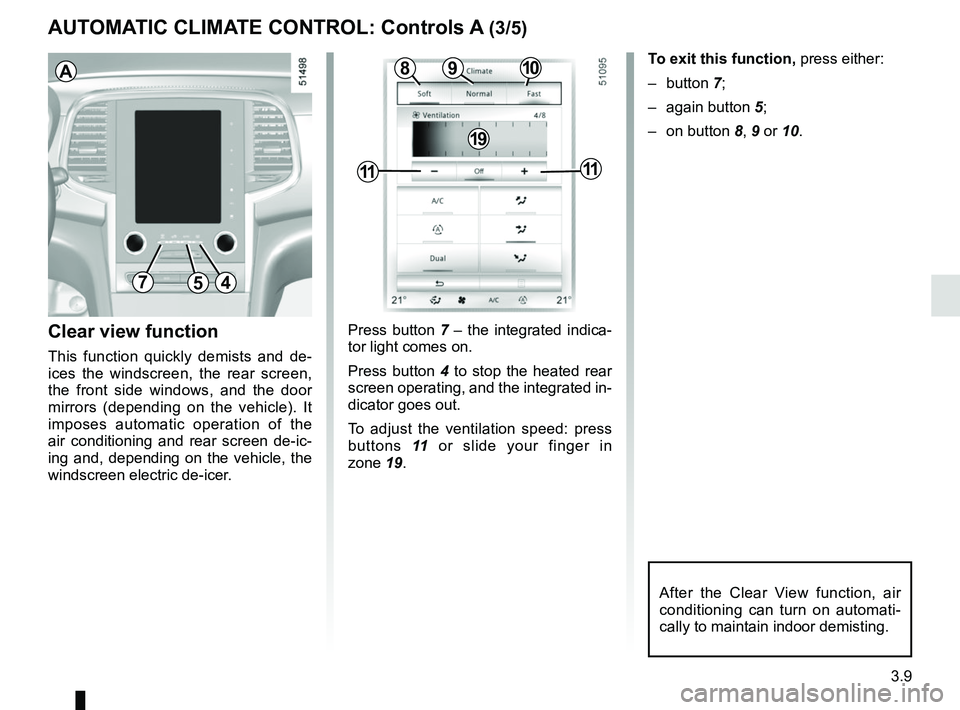
Clear view function
This function quickly demists and de-
ices the windscreen, the rear screen,
the front side windows, and the door
mirrors (depending on the vehicle). It
imposes automatic operation of the
air conditioning and rear screen de-ic-
ing and, depending on the vehicle, the
windscreen electric de-icer.
754
109
1111
8
19
To exit this function, press either:
– button 7;
– again button 5;
– on button 8, 9 or 10.
Press button 7 – the integrated indica-
tor light comes on.
Press button 4 to stop the heated rear
screen operating, and the integrated in-
dicator goes out.
To adjust the ventilation speed: press
buttons 11 or slide your finger in
zone 19.A
After the Clear View function, air
conditioning can turn on automati-
cally to maintain indoor demisting.
Page 206 of 332

3.10
AUTOMATIC CLIMATE CONTROL: Controls A (4/5)
Switching air conditioning on
or off
In automatic mode, the system switches
the air conditioning system on or off,
depending on the climate conditions.
Press button 17 to:
– activate the air conditioning (a warn-ing light in zone 14 comes on).
– deactivate the air conditioning (the warning light in zone 14 goes out)
17
18
14
Stopping the system
Press button 18 to activate or deacti-
vate the system (the operating warn-
ing light on button 18 notifies you of the
system status).
Rear screen de-icing/
demisting
Press button 3 – the integrated indica-
tor light comes on. This function en-
ables rapid demisting or de-icing of the
rear screen and de-icing of the door
mirrors (on equipped vehicles).
To exit this function, press button 3
again. Demisting automatically stops.
It is preferable to use one of the
automatic programmes NORMAL,
SOFT or FAST.
In automatic mode ( 4 warning light
is lit), all air conditioning functions
are controlled by the system.
You can still change the system se-
lection. In this case, the warning
light on the button 4 will go out and
the changed function, which is no
longer controlled by the system, will
be shown on the display.
To return to automatic mode, press
one of programmes NORMAL,
SOFT , or FAST, or button 4.
3
A
4
Using the ECO mode
– If you press the button 20 when
the air conditioning operates,
ECO mode activate.
– In the ECO mode, air condi- tioning speed and power is be
weaken in order to optimize the
fuel consumption.
– If you want to increase air con- ditioning speed and power, you
should deactivate the ECO mode.
20