Page 150 of 332
2.46
ACTIVE EMERGENCY BRAKING (8/11)
System B (continued)
Activating or deactivating the
system
For vehicles fitted with a navigation
system
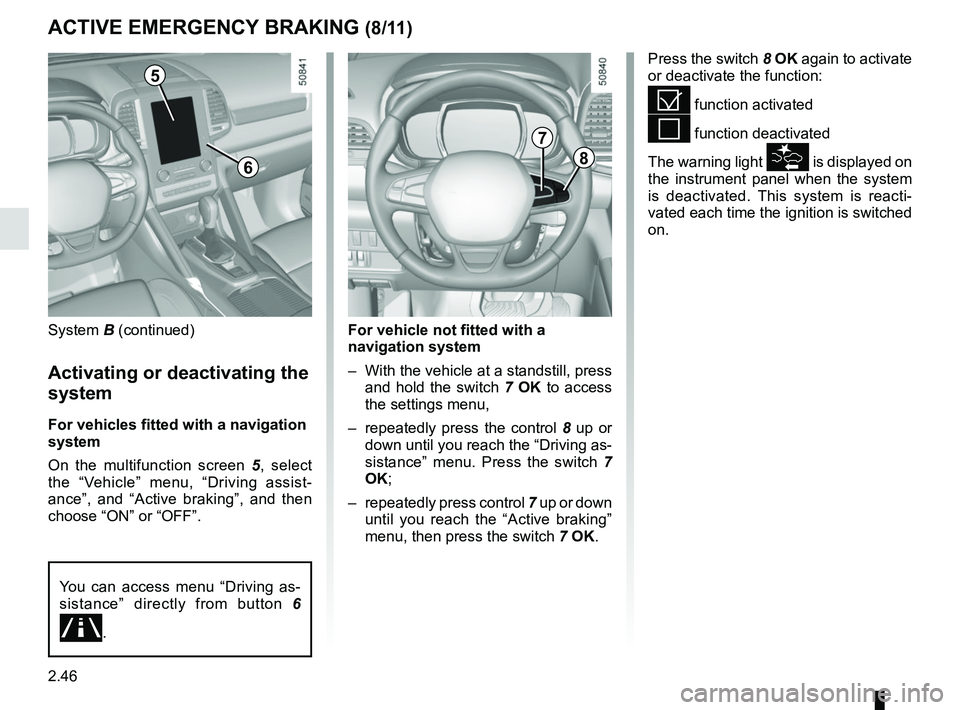
On the multifunction screen 5, select
the “Vehicle” menu, “Driving assist-
ance”, and “Active braking”, and then
choose “ON” or “OFF”.
Press the switch 8 OK again to activate
or deactivate the function:
= function activated
< function deactivated
The warning light
is displayed on
the instrument panel when the system
is deactivated. This system is reacti-
vated each time the ignition is switched
on.
5
8
7
For vehicle not fitted with a
navigation system
– With the vehicle at a standstill, press and hold the switch 7 OK to access
the settings menu,
– repeatedly press the control 8 up or
down until you reach the “Driving as-
sistance” menu. Press the switch 7
OK;
– repeatedly press control 7 up or down
until you reach the “Active braking”
menu, then press the switch 7 OK.
You can access menu “Driving as-
sistance” directly from button 6
\b.
6
Page 157 of 332
2.53
FATIGUE DETECTION WARNING (1/2)
The fatigue detection warning is a func-
tion which is useful on monotonous
roads (motorways, high-speed roads
etc.).
It analyses driver behaviour and takes
account of events to inform you of any
risk of fatigue such as:
– steering wheel movement;
– driver actions on other devices (indi-cators, windscreen washer etc.);
– time spent driving without stopping;
– ...
This function is an addi-
tional driving aid in case of
risk of fatigue. This function
does not take the place of
the driver.
Under no circumstances should this
function replace the driver’s care or
responsibility whilst driving.
Activation/deactivation
Vehicles fitted with a multimedia
system
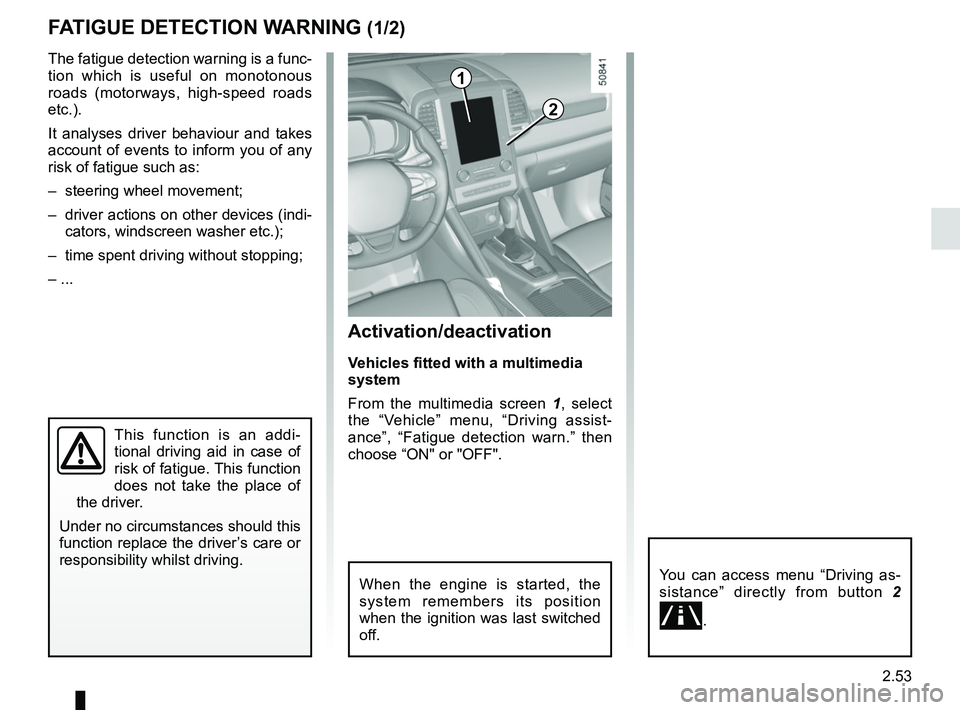
From the multimedia screen 1, select
the “Vehicle” menu, “Driving assist-
ance”, “Fatigue detection warn.” then
choose “ON" or "OFF".
You can access menu “Driving as-
sistance” directly from button 2
\b.
2
1
When the engine is started, the
system remembers its position
when the ignition was last switched
off.
Page 160 of 332
2.56
Activation/deactivation
Vehicles fitted with a navigation
system
On the multifunction screen 2, select
the “Vehicle” menu, “Driving assist-
ance”, and “Driving assistance”, and
then choose “ON” or “OFF”.
You can access menu “Driving as-
sistance” directly from button 3
\b.
Vehicles not fitted with a navigation
system
– With the vehicle at a standstill, press
and hold the switch 4 OK to access
the settings menu;
– repeatedly press the control 5 up or
down until you reach the “Driving as-
sistance” menu. Press the switch 4
OK;
BLIND SPOT WARNING (2/4)
– repeatedly press control 5 up or
down until you reach the “Blind spot
alert” menu, then press the switch 4
OK.
– Press the switch 4 OK again to acti-
vate or deactivate the function.
2
45
When the engine is started, the
system remembers its position
when the ignition was last switched
off.
3
Page 194 of 332

2.90
AUTOMATIC TRANSMISSION (1/3)
Operation
With the selection lever 1 in position P,
switch on the ignition.
To move out of position P, you must de-
press the brake pedal before pressing
the unlocking button 2.
With your foot on the brake pedal
(warning light
Ó on the display 3
goes out), move the lever out of posi-
tion P.
Only engage D or R when the vehi-
cle is stopped, with your foot on the
brake and the accelerator pedal re-
leased.
Selector lever 1
P: park
R: reverse
N: Neutral
D: automatic mode
M: manual mode
Note: Press the button 2 to go from po-
sition D or N to R or P.
3: displays the gear engaged in manual
mode.
12
Driving in automatic mode
Move lever 1 to position D.
In most road conditions you will en-
counter, you will not need to touch your
lever again: the gears will change au-
tomatically at the right time and at the
most suitable engine speed because
the automatic system takes into ac-
count the vehicle load and road contour
and adjusts itself to the particular driv-
ing style you have chosen.
Economical driving
When driving, always leave the lever
in position D, keeping the accelerator
pedal lightly depressed to ensure auto-
matic gear changes at a lower engine
speed.
Accelerating and overtaking
Depress the accelerator pedal firmly
and fully (so that it goes beyond the
kickdown point).
This will enable you to change down
to the optimum gear within the
engine range.3
Page 196 of 332
2.92
AUTOMATIC TRANSMISSION (3/3)
Parking the vehicle
When the vehicle is stopped, move the
lever to position P while keeping your
foot on the brake pedal: the gearbox is
in neutral and the drive wheels are me-
chanically locked by the driveshaft.
Apply the parking brake or, depen-
ding on the vehicle, ensure that the
electronic parking brake is applied.
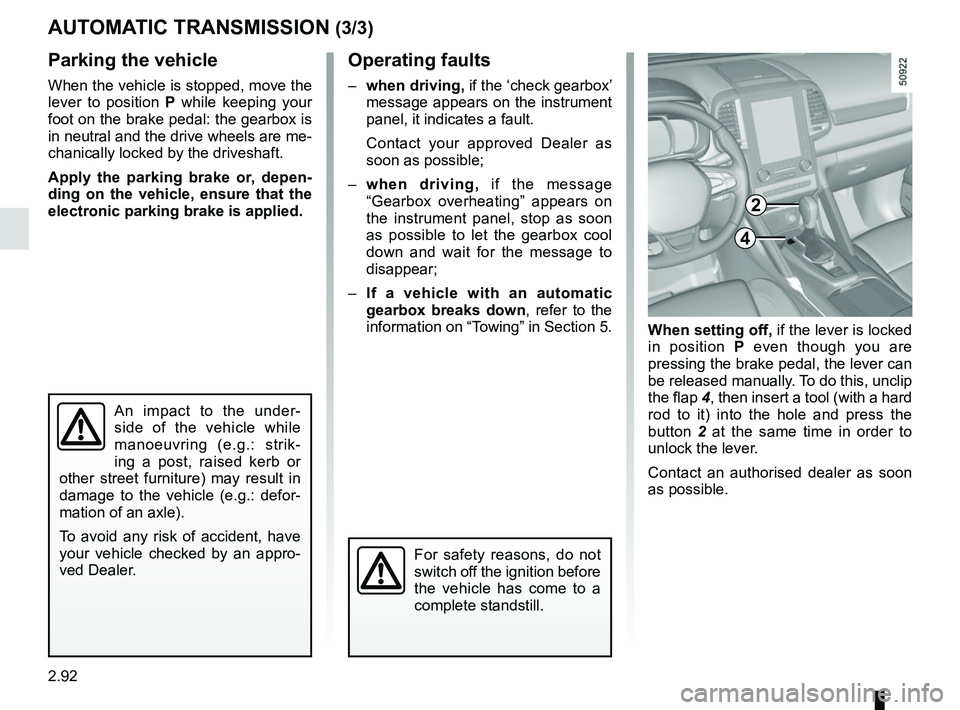
When setting off, if the lever is locked
in position P even though you are
pressing the brake pedal, the lever can
be released manually. To do this, unclip
the flap 4, then insert a tool (with a hard
rod to it) into the hole and press the
button 2 at the same time in order to
unlock the lever.
Contact an authorised dealer as soon
as possible.
Operating faults
– when driving, if the ‘check gearbox’
message appears on the instrument
panel, it indicates a fault.
Contact your approved Dealer as
soon as possible;
– when driving, if the message
“Gearbox overheating” appears on
the instrument panel, stop as soon
as possible to let the gearbox cool
down and wait for the message to
disappear;
– If a vehicle with an automatic
gearbox breaks down, refer to the
information on “Towing” in Section 5.
4
For safety reasons, do not
switch off the ignition before
the vehicle has come to a
complete standstill.
An impact to the under-
side of the vehicle while
manoeuvring (e.g.: strik-
ing a post, raised kerb or
other street furniture) may result in
damage to the vehicle (e.g.: defor-
mation of an axle).
To avoid any risk of accident, have
your vehicle checked by an appro-
ved Dealer.
2
Page 217 of 332

3.21
ELECTRIC SUNROOF (1/2)
To slide the curtain 1
With the ignition on:
– Full opening: push switch 2 to the
middle of position A;
– Full closing: push switch 2 to the
end of position B.
It doesn’t need to be held. The curtain
will automatically open or close all the
way.
To tilt the sunroof
When the sunroof is closed, press
switch 2 to tilt up the sunroof. It doesn’t
need to be held.
When the sunroof is tilt, press switch 2
to close the sunroof. It doesn’t need to
be held.
Special features
If the window detects resistance when
closing or tilting down (e.g.: arms,
branch of a tree, etc.) it moves to the
front or tilts up.
If this function malfunctions and re-
peats opening or tilting up the sunroof,
keep pushing the tilt down switch within
5 seconds after it happens; the sun-
roof will fully close gradually. Make sure
nothing is caught in the sunroof.
1
2
A
B
Driver’s responsibility
when parking or stopping
the vehicle
Never leave an animal,
child or adult who is not self-suffi-
cient alone on your vehicle, even for
a short time.
They may pose a risk to themselves
or to others by starting the engine,
activating equipment such as the
electric windows or locking the
doors.
Also, in hot and/or sunny weather,
please remember that the tempera-
ture inside the passenger compart-
ment increases very quickly.
If something gets trapped, reverse
the direction of travel as soon as
possible by pushing switch 2 to the
position A.
RISK OF DEATH OR SERIOUS
INJURY.
Page 218 of 332
3.22
ELECTRIC SUNROOF (2/2)
It doesn’t need to be held. The sun-
roof will automatically open or close all
the way. To stop the window, push the
switch once more while it is opening or
closing.
Note: If you wish to open the sunroof
while driving, comfort opening is rec-
ommended to prohibit wind buffeting.
Precautions during use
– Vehicle with loaded roof bars.As a general rule, if there is a load
on the roof, use of the sunroof is not
recommended.
Before using the sunroof, check the
objects and/or accessories (bike
racks, roof boxes, etc.) attached to
the roof bars: they should be prop-
erly arranged and secured and
should not interfere with the opera-
tion of the sunroof.
Contact an approved dealer for de-
tails of possible conversions;
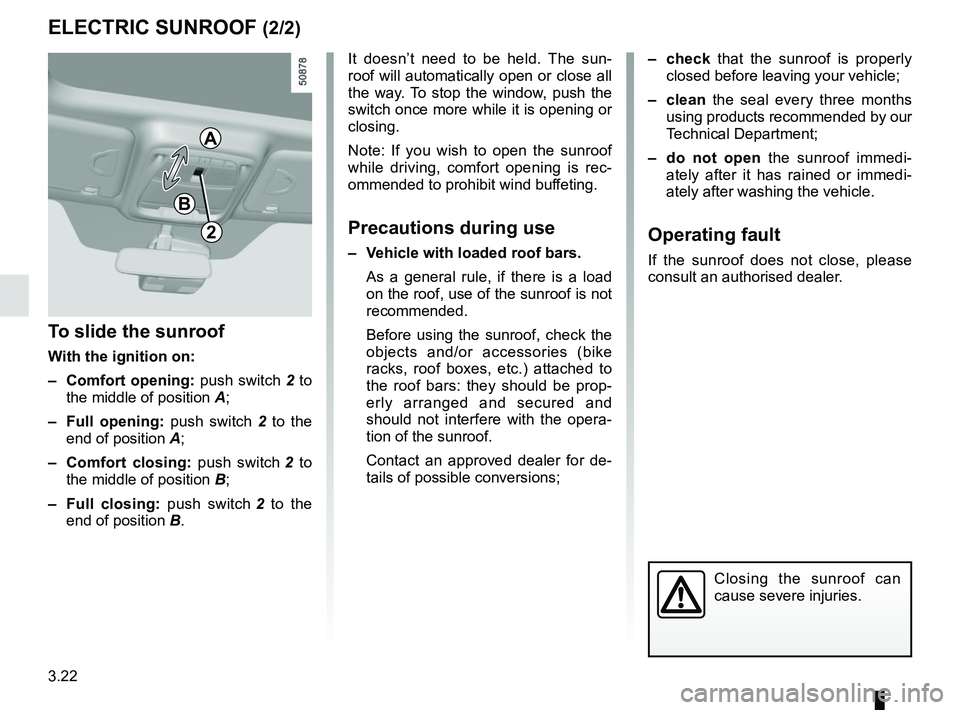
To slide the sunroof
With the ignition on:
– Comfort opening: push switch 2 to
the middle of position A;
– Full opening: push switch 2 to the
end of position A;
– Comfort closing: push switch 2 to
the middle of position B;
– Full closing: push switch 2 to the
end of position B.
2
– check that the sunroof is properly
closed before leaving your vehicle;
– clean the seal every three months using products recommended by our
Technical Department;
– do not open the sunroof immedi-
ately after it has rained or immedi-
ately after washing the vehicle.
Operating fault
If the sunroof does not close, please
consult an authorised dealer.
Closing the sunroof can
cause severe injuries.
A
B
Page 227 of 332
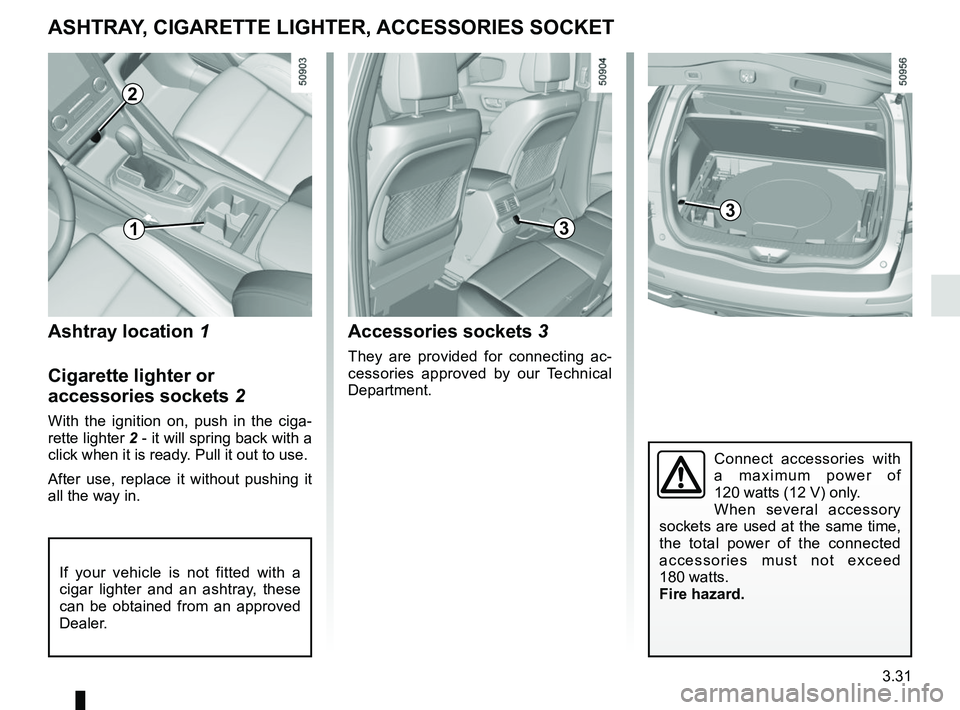
3.31
Ashtray location 1
Cigarette lighter or
accessories sockets 2
With the ignition on, push in the ciga-
rette lighter 2 - it will spring back with a
click when it is ready. Pull it out to use.
After use, replace it without pushing it
all the way in.
Accessories sockets 3
They are provided for connecting ac-
cessories approved by our Technical
Department.
ASHTRAY, CIGARETTE LIGHTER, ACCESSORIES SOCKET
If your vehicle is not fitted with a
cigar lighter and an ashtray, these
can be obtained from an approved
Dealer.
2
13
Connect accessories with
a maximum power of
120 watts (12 V) only.
When several accessory
sockets are used at the same time,
the total power of the connected
accessories must not exceed
180 watts.
Fire hazard.
3