Page 157 of 332
2.53
FATIGUE DETECTION WARNING (1/2)
The fatigue detection warning is a func-
tion which is useful on monotonous
roads (motorways, high-speed roads
etc.).
It analyses driver behaviour and takes
account of events to inform you of any
risk of fatigue such as:
– steering wheel movement;
– driver actions on other devices (indi-cators, windscreen washer etc.);
– time spent driving without stopping;
– ...
This function is an addi-
tional driving aid in case of
risk of fatigue. This function
does not take the place of
the driver.
Under no circumstances should this
function replace the driver’s care or
responsibility whilst driving.
Activation/deactivation
Vehicles fitted with a multimedia
system
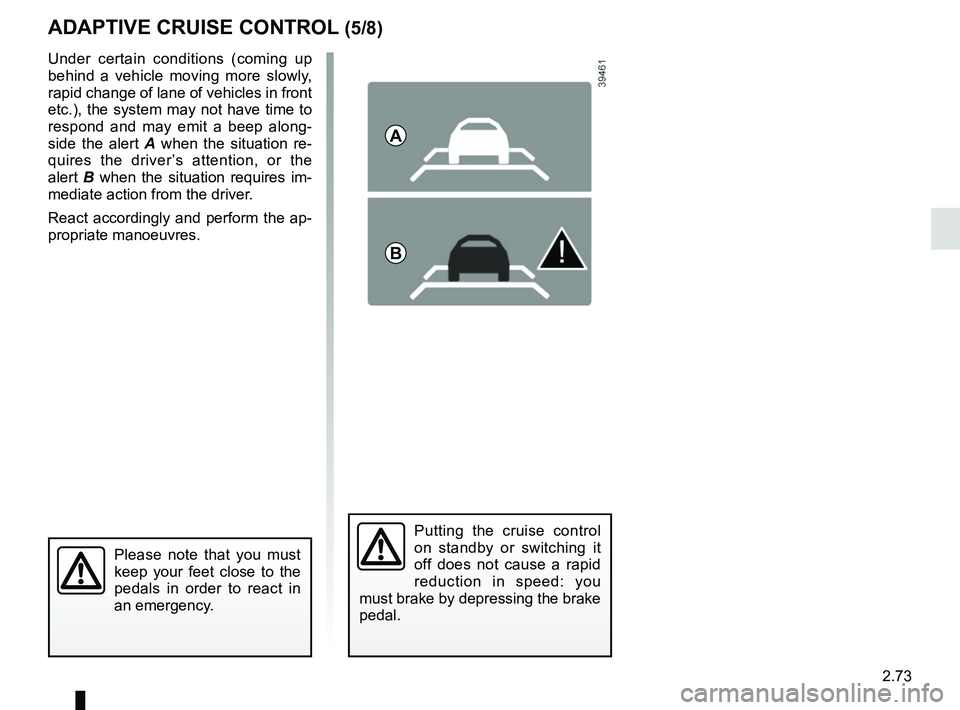
From the multimedia screen 1, select
the “Vehicle” menu, “Driving assist-
ance”, “Fatigue detection warn.” then
choose “ON" or "OFF".
You can access menu “Driving as-
sistance” directly from button 2
\b.
2
1
When the engine is started, the
system remembers its position
when the ignition was last switched
off.
Page 159 of 332

2.55
BLIND SPOT WARNING (1/4)
This system alerts the driver to other
vehicles in the detection zone A.
The system is activated when the vehi-
cle’s speed is between approximately
30 km/h (19 mph) and 140 km/h
(87 mph).
This function uses sensors 1 installed
in the front and rear bumper of both
sides.
1
A
Special featureMake sure that the sensors are not ob-
scured (by dirt, mud, snow, etc.).
If a sensor is obscured, the message
“Blind spot clean sensor” will appear on
the instrument panel. Clean the sen-
sors.
AThis function is an addi-
tional aid which indicates
other vehicles in the blind
spot area.
It can never in any case be a subs-
titute for care nor for the driver’s
responsibility while in charge of his
vehicle.
The driver should always look out
for sudden hazards during driving:
make sure while manoeuvring that
there are no moving or movable ob-
jects (such as a child, an animal, a
pushchair or a bicycle) or small or
narrow obstacles (such as a boulder
or a post) in the blind spot area.
Page 169 of 332
2.65
CRUISE CONTROL FUNCTION (1/4)
The cruise control function helps you to
maintain your driving speed at a speed
that you choose, called the cruising
speed.
This cruising speed may be set at any
speed above 20 mph (30 km/h).
The cruise control function
is in no way linked to the
braking system.
This function is an addi-
tional driving aid. However,
the function does not take
the place of the driver.
Therefore, it can under no circum-
stances replace the driver’s respon-
sibility to respect speed limits and to
be vigilant (the driver must always
be ready to brake). Cruise control
must not be used in heavy traffic, on
undulating or slippery roads (black
ice, aquaplaning, gravel) and during
bad weather (fog, rain, side winds
etc.).
There is a risk of accidents.
Controls
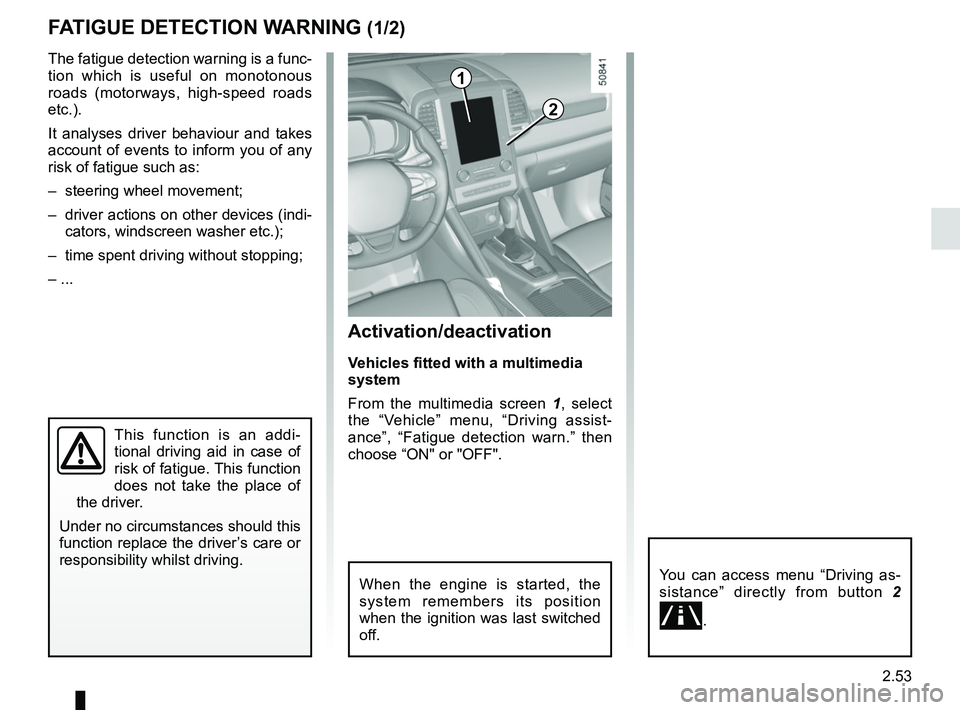
1 Main “On/Off” switch.
2 Controls for:
a cruising speed activation, storage
and increase (+);
b decreasing cruising speed (-).
3 Activation with recall of saved cruis- ing speed (R).
4 Switch the function to standby (with cruising speed saved) (O).
2
a
b
3
4
1
Page 173 of 332
2.69
ADAPTIVE CRUISE CONTROL (1/8)
The adaptive cruise control is a func-
tion which gives you the option, when
traffic conditions permit (large free-flow-
ing road or motorway), of maintaining
a chosen speed, known as the cruising
speed, while keeping a safe distance
from the vehicle in front in the same
lane.
The function can be adjusted from
31 mph (50 km/h) to 99.2 mph
(160 km/h).
The radar-camera has a range of
around 120 metres.
Note:
– the driver should take account of the maximum legally permissible speed
in the country where the vehicle is
travelling;
– the adaptive cruise control can brake the vehicle up to a third of the brak-
ing capacity. Depending on the situ-
ation, the driver may need to brake
harder.
This function is an addi-
tional driving aid.
Therefore, it can under no
circumstances replace the
driver’s responsibility to respect
speed limits and to be vigilant (the
driver must always be ready to
brake).
The adaptive cruise control should
not be used in heavy traffic, on
winding or slippery roads (black ice,
aquaplaning, gravel) and during bad
weather (fog, rain, side winds etc.).
There is a risk of accidents.
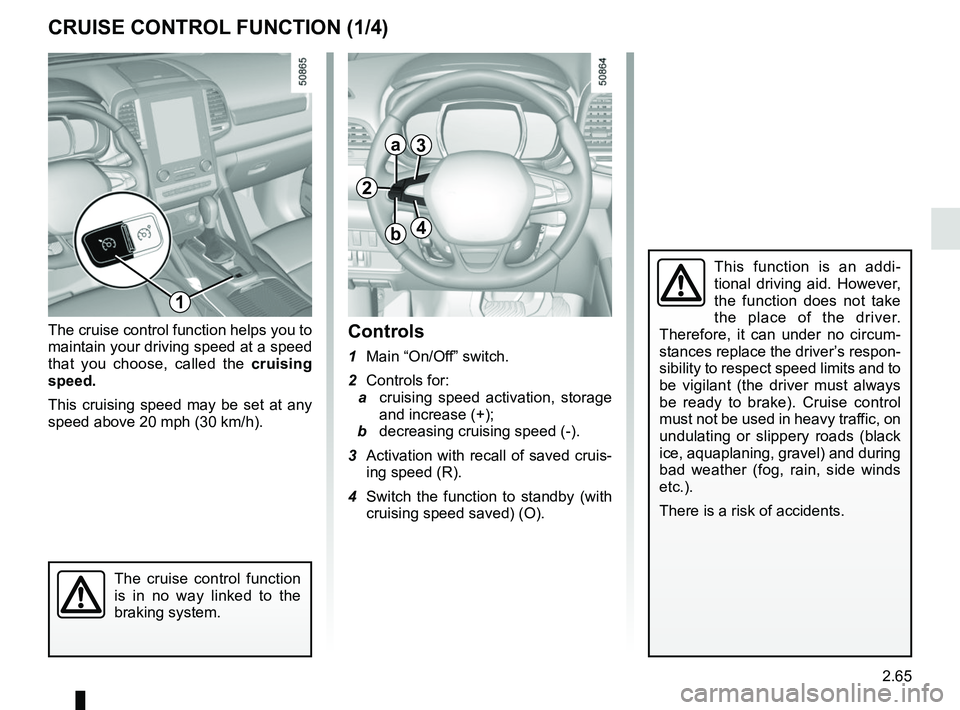
Location of the radar-
camera 1
Make sure the windscreen is not ob-
scured (dirt, mud, snow, condensation
etc.).
On equipped vehicles, some infor-
mation is given on the head-up dis-
play.
1
Page 175 of 332

2.71
Driving
Once a cruising speed is memorised
and the cruise control function is active,
you may lift your foot off the accelera-
tor pedal.
If a following distance is stored and a
vehicle travelling slower than yours is
detected by the system in your lane,
your vehicle will brake (with the brake
lights on) and adapt its speed to that of
the vehicle in front, respecting the fol-
lowing distance selected previously.
Overtaking
If your speed is lower than the cruise
control and you wish to perform an
overtaking manoeuvre, activating the
direction indicator will provide acceler-
ation enabling the overtaking manoeu-
vre.
Please note that you must
keep your feet close to the
pedals in order to react in
an emergency.
ADAPTIVE CRUISE CONTROL (3/8)
Adjusting the cruising speed
The cruising speed can be changed by
pressing the switch 2 repeatedly:
– side a (+) to increase the speed;
– side b (-) to reduce the speed.
Varying the following
distance
You can vary the following distance
from the vehicle in front at any time by
pressing switch 6 repeatedly.
Horizontal following bars will be dis-
played on the instrument panel, indicat-
ing the following distance selected:
– one bar for a short distance (cor- responding to a following time of
around one second);
– two bars for a medium distance;
– three bars for a long distance (cor- responding to a following time of
around two seconds).
Choosing the distance should depend
on the traffic, the laws in your country,
and on the weather conditions.
If a vehicle is detected by the system in
your lane, an outline A of a vehicle will
appear above the following bars.
6
A
2
a
b
Page 177 of 332
2.73
ADAPTIVE CRUISE CONTROL (5/8)
Putting the cruise control
on standby or switching it
off does not cause a rapid
reduction in speed: you
must brake by depressing the brake
pedal.
Please note that you must
keep your feet close to the
pedals in order to react in
an emergency.
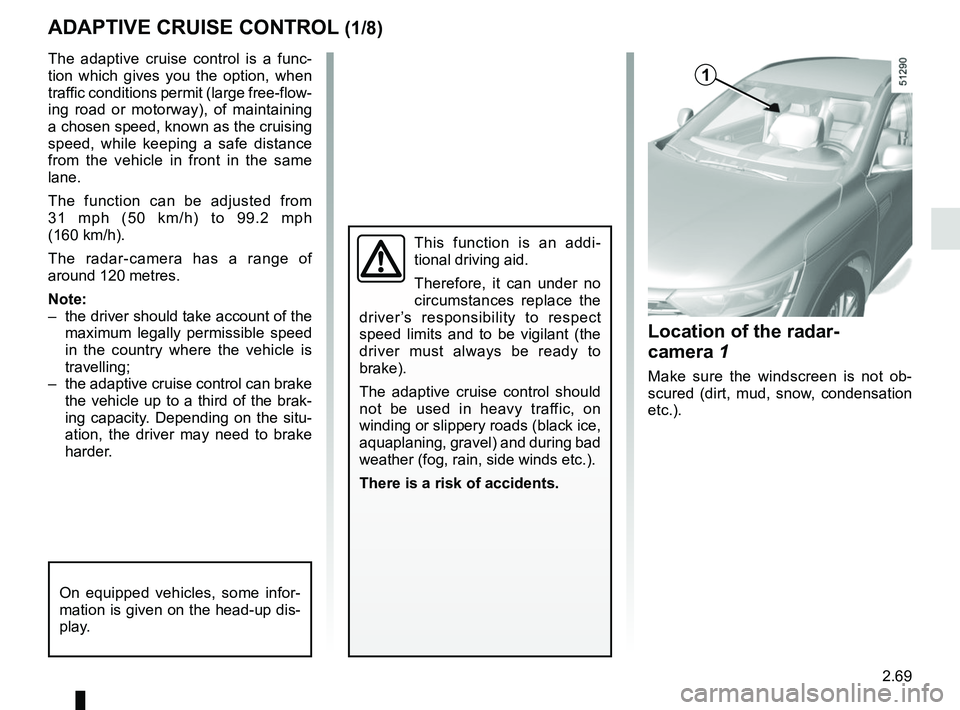
Under certain conditions (coming up
behind a vehicle moving more slowly,
rapid change of lane of vehicles in front
etc.), the system may not have time to
respond and may emit a beep along-
side the alert A when the situation re-
quires the driver’s attention, or the
alert B when the situation requires im-
mediate action from the driver.
React accordingly and perform the ap-
propriate manoeuvres.
A
B
Page 181 of 332

2.77
PARKING DISTANCE CONTROL (1/5)
Operating principle
Ultrasonic sensors in the rear bumper
measure the distance between the ve-
hicle and an obstacle.
This measurement is indicated by
beeps which become more frequent the
closer you come to the obstacle, until
they become a continuous beep when
the vehicle is approximately 20 to
30 centimetres from the obstacle.
The system detects obstacles to the
front, the rear and the sides of the ve-
hicle.
The parking distance control system
is only activated when the vehicle is
driven at a speed below approximately
6 mph (10 km/h).
This function is an addi-
tional aid that indicates the
distance between the vehi-
cle and an obstacle whilst
reversing, using sound signals.
Under no circumstances should it
replace the driver’s care or respon-
sibility whilst reversing.
The driver should always look out
for sudden hazards during driv-
ing: always ensure that there are
no moving obstacles (such as a
child, animal, pram or bicycle, etc.)
or small, narrow objects such as
stones or posts in your path when
manoeuvring.
Special features
Ensure that the ultrasonic sensors indi-
cated by arrows 1 are not obscured (by
dirt, mud, snow, etc.).
1
Page 187 of 332

2.83
This function is an additional
aid. It cannot, therefore,
under any circumstances
replace the vigilance or the
responsibility of the driver.
The driver should always look out
for sudden hazards during driving:
always ensure that there are no
moving obstacles (such as a child,
animal, pram, bicycle, etc.) or small,
narrow objects such as stones or
posts in your path when manoeu-
vring.
The screen shows a reverse mirror
image.
The frames are a representation
projected onto flat ground; this in-
formation must not be taken into
account when superimposed on a
vertical object or an object on the
ground.
Objects which appear on the edge
of the screen may be deformed.
In very bright light (snow, vehicle in
sunshine etc.), the camera vision
may be adversely affected.
If the boot is open or poorly closed,
the message “Boot open” appears
and the camera display disappears.
You can also adjust the camera image
settings (brightness, contrast, etc.)
Activating, deactivating the
reversing camera
From the multifunction screen 2, select
“Vehicle”, “Settings”, “Parking as-
sistance”, then “Rear view camera”.
Activate or deactivate the reversing
camera and confirm your choice.
REVERSING CAMERA (2/2)
2