Page 203 of 332

3.7
AUTOMATIC CLIMATE CONTROL: Controls A (1/5)
10
15
7654
9
16
17
11
18
11
Controls A
Press zone 14 to access the multifunc-
tion screen 2. The presence of the con-
trols detailed below will depend on the
vehicle model.
1 and 3 Left and right temperature indi-
cation adjustment.
4 De-icing/demisting of the rear screen and, depending on the vehicle, the
door mirrors.
5, 8, 9 and 10 automatic modes (Normal, Soft, Fast)
6 Air recirculation.
7 “Clear View” function. 11
Ventilation speeds.
12 Distribution of air in the passenger- compartment.
13 Right and left temperature display.
14 Zone displaying air conditioning set- tings.
15 “DUAL” function.
16 Automatic recirculation function de- pending on the vehicle.
17 Air conditioning.
18 Stopping the system.
8
14
13
13
13
2
Some buttons have a warning light-
indicating their operative state.
AAutomatic mode
The automatic climate control system-
guarantees comfort in the passen-
ger compartment and good visibility
(except in the event of extreme condi-
tions), while optimising consumption.
The system controls the ventilation
speed, air distribution, air recirculation,
and starting and stopping the air condi-
tioning and air temperature.
This mode consists of a choice of three
programmes:
NORMAL: allows the selected comfort
level to be best attained, depending on
the exterior conditions. Press button 4
or key 9.
SOFT: reaches the desired comfort
level more gently and silently. Press
button 8.
FAST: increases the flow of air in the
passenger compartment. This mode
is recommended in particular to opti
mise comfort in the rear seats. Press
button 10.
12
Page 208 of 332
3.12
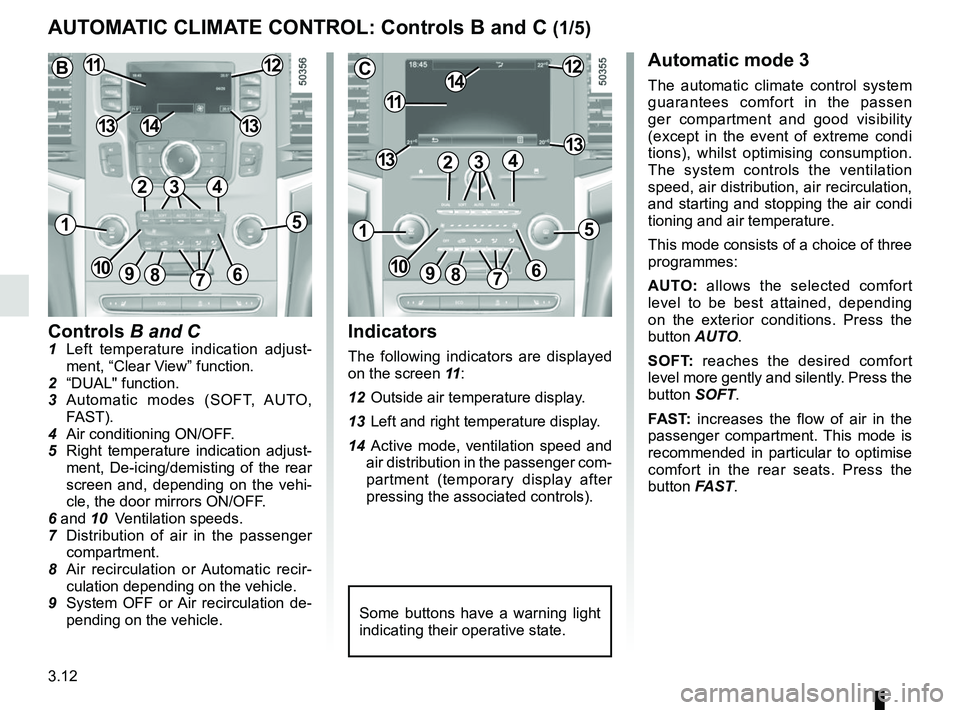
Controls B and C1 Left temperature indication adjust-ment, “Clear View” function.
2 “DUAL" function.
3 Automatic modes (SOFT, AUTO, FAST).
4 Air conditioning ON/OFF.
5 Right temperature indication adjust- ment, De-icing/demisting of the rear
screen and, depending on the vehi-
cle, the door mirrors ON/OFF.
6 and 10 Ventilation speeds.
7 Distribution of air in the passenger
compartment.
8 Air recirculation or Automatic recir- culation depending on the vehicle.
9 System OFF or Air recirculation de- pending on the vehicle.
AUTOMATIC CLIMATE CONTROL: Controls B and C (1/5)
Indicators
The following indicators are displayed
on the screen 11 :
12 Outside air temperature display.
13 Left and right temperature display.
14 Active mode, ventilation speed and air distribution in the passenger com-
partment (temporary display after
pressing the associated controls).
Automatic mode 3
The automatic climate control system
guarantees comfort in the passen
ger compartment and good visibility
(except in the event of extreme condi
tions), whilst optimising consumption.
The system controls the ventilation
speed, air distribution, air recirculation,
and starting and stopping the air condi
tioning and air temperature.
This mode consists of a choice of three
programmes:
AUTO: allows the selected comfort
level to be best attained, depending
on the exterior conditions. Press the
button AUTO.
SOFT: reaches the desired comfort
level more gently and silently. Press the
button SOFT.
FAST: increases the flow of air in the
passenger compartment. This mode is
recommended in particular to optimise
comfort in the rear seats. Press the
button FAST.
Some buttons have a warning light
indicating their operative state.
C
11
1412
131342
1
91086
5
7
3
13
B1112
1413
42
15
7
3
69810
Page 215 of 332

3.19
ELECTRIC WINDOWS (1/2)
These systems operate with the igni-
tion switched on.
Press or pull the switch to raise or lower
a window to the desired height (the rear
windows do not open fully);
From the driver’s seat, use switch:
1 for the driver’s side;
3 for the front passenger side;
4 and 5 for the rear passengers.
From the passenger seats, use
switch 6.
1
3
4
56
Avoid resting any objects against a
half-open window: there is a risk that
the electric window winder could be
damaged.
Passenger safety
The driver can prevent the
front and rear passenger
electric windows from op-
erating (and the driver’s window)
by pressing switch 2. A confirmation
message is displayed on the instru-
ment panel.
Driver’s responsibility
Never leave your vehicle with the
RENAULT card or key inside, and
never leave a child, adult who is not
self-sufficient or a pet, even for a
short while. They may pose a risk to
themselves or to others by starting
the engine or activating equipment
(such as the gear lever or electric
windows). If any part of the body be-
comes trapped, reverse the direc-
tion of the window immediately by
pressing the relevant switch.
Risk of serious injury.
2
Page 228 of 332
3.32
The headrest is a safety
component; check that it is
fitted and in the correct po-
sition. The top of the head-
rest should be as close as possible
to the top of the head.
Centre seat headrest storage
position
Press the button A and lower the cen-
tral headrest 1 completely.
When the headrest is set at the
lowest position, this is for storage
only. It should not be in this position
when a seat is occupied.
Position for use
Lift the headrest to maximum height,
then lower it until it locks.
To remove a headrest
Raise the headrest as far as it will go,
then press button A and remove the
headrest.
To refit a headrest
Insert the rods in the holes, press the
button A and lower the headrest. Check
that it is correctly locked in place.
REAR HEADRESTS
A
Note: When the headrest need to be
reassembled, pay attention to its posi-
tion which is drawn in the label.
Page 229 of 332

3.33
To replace the seatback, proceed in
the reverse order to removal.
Refit the seatback and click it back into
place.
REAR BENCH SEAT (1/3)
For safety reasons, carry
out any adjustments when
the vehicle is not being
driven.
When moving the rear
seats, ensure that nothing
obstructs the anchorage
points (passenger’s arm or
leg, a pet, gravel, cloth, toys, etc.).
A
1
The configuration of the
two-seat bench with the
small seatback B pulled
down, does not allow the
central seat to be used as it would
be impossible to buckle the seat belt
(belt buckles inaccessible).
When refitting the seat-
back, make sure it is cor-
rectly locked in place.
If seat covers are fitted ,
make sure these do not prevent the
seatback latch from locking in.
Make sure that the seat belts are
positioned correctly.
Reposition the headrests.
To manually fold down the
seatbacks
Ensure that the front seats are far
enough forward.
Lower the headrests fully.
Pull the control 1 and lower the seat-
back A.
B
Page 230 of 332
3.34
To automatically fold down
the seatbacks (flat position)
Place seat belt in hook 2 to avoid dam-
aging the belt. From the boot, pulling
the control 3 enables you to automati-
cally unlock the rear bench seatbacks
to get a flat floor.
Conditions of use
– Vehicle stationary;
– tailgate open;
– rear seat belts unlocked.
Operating fault
If all user conditions have been ful-
filled and the folding action still fails to
operate, please contact an authorised
dealer.
REAR BENCH SEAT (2/3)
When moving the rear
seats, ensure that nothing
obstructs the anchorage
points (passenger’s arm or
leg, a pet, gravel, cloth, toys, etc.).
Use restriction
It is forbidden to drive with a seatback
or a front seat folded down when there
is a passenger occupying a rear seat.
For safety reasons, carry
out any adjustments when
the vehicle is not being
driven.
2
3
Page 231 of 332
3.35
Depending on the vehicle, if you lower
the rear seats armrest, there is a rear
seats heating controller on the rear
armrest.
Rear heated seats(depending on the vehicle)
With the engine running, press switch 4
(for left side of the rear seat) or switch 5
(for right side of the rear seat). The in-
dicator light on the switch lights on to
confirm that the heating has been ac-
tivated. Press the left side of the switch to select
the warmest setting or the right side of
the switch to select the average setting.
The middle position of the switch is off.
The indicator light in the switch lights
off.
The system, which has a thermostat,
decides whether heating is needed de-
pending on the position selected and
stops heating once a certain tempera-
ture has been reached.
REAR BENCH SEAT (3/3)
For safety reasons, carry
out any adjustments when
the vehicle is not being
driven.
45
Page 232 of 332
3.36
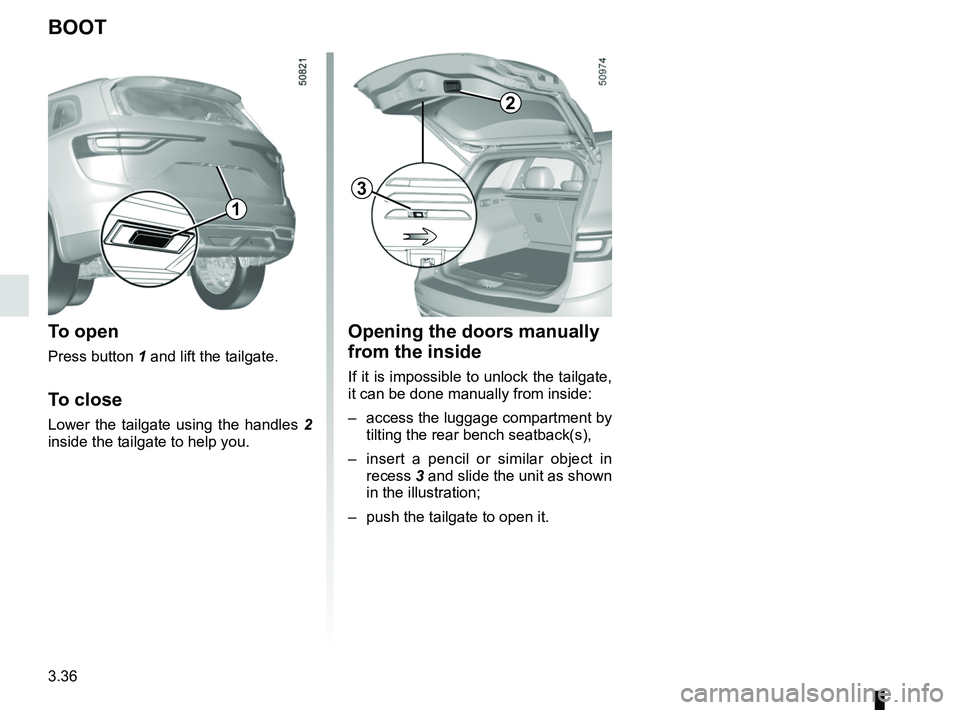
Opening the doors manually
from the inside
If it is impossible to unlock the tailgate,
it can be done manually from inside:
– access the luggage compartment by tilting the rear bench seatback(s),
– insert a pencil or similar object in recess 3 and slide the unit as shown
in the illustration;
– push the tailgate to open it.
BOOT
To open
Press button 1 and lift the tailgate.
To close
Lower the tailgate using the handles 2
inside the tailgate to help you.
2
1
3