Page 175 of 332

2.71
Driving
Once a cruising speed is memorised
and the cruise control function is active,
you may lift your foot off the accelera-
tor pedal.
If a following distance is stored and a
vehicle travelling slower than yours is
detected by the system in your lane,
your vehicle will brake (with the brake
lights on) and adapt its speed to that of
the vehicle in front, respecting the fol-
lowing distance selected previously.
Overtaking
If your speed is lower than the cruise
control and you wish to perform an
overtaking manoeuvre, activating the
direction indicator will provide acceler-
ation enabling the overtaking manoeu-
vre.
Please note that you must
keep your feet close to the
pedals in order to react in
an emergency.
ADAPTIVE CRUISE CONTROL (3/8)
Adjusting the cruising speed
The cruising speed can be changed by
pressing the switch 2 repeatedly:
– side a (+) to increase the speed;
– side b (-) to reduce the speed.
Varying the following
distance
You can vary the following distance
from the vehicle in front at any time by
pressing switch 6 repeatedly.
Horizontal following bars will be dis-
played on the instrument panel, indicat-
ing the following distance selected:
– one bar for a short distance (cor- responding to a following time of
around one second);
– two bars for a medium distance;
– three bars for a long distance (cor- responding to a following time of
around two seconds).
Choosing the distance should depend
on the traffic, the laws in your country,
and on the weather conditions.
If a vehicle is detected by the system in
your lane, an outline A of a vehicle will
appear above the following bars.
6
A
2
a
b
Page 179 of 332

This function is an additional driving aid. This function is not under any circumstances intended to replace the due\
care
and attention of the driver, who should")
2.75
ADAPTIVE CRUISE CONTROL (7/8)
This function is an additional driving aid. This function is not under any circumstances intended to replace the due\
care
and attention of the driver, who should at all times be in control of the vehicle.
The driver should always adapt their speed to the traffic conditions, regardless of the system indications.
The system should under no circumstances be taken to be an obstacle dete\
ctor or an anti-collision system.
System servicing/repairs
– In the event of an impact, the radar-camera alignment may be changed, an\
d its operation may consequently be affected. Deactivate the function and consult an authorised dealer.
– Any work in the area where the radar-camera is located (repairs, replac\
ements, windscreen modifications etc.) must be car- ried out by a qualified professional.
Only an authorised dealer is qualified to service the system.
Deactivating the function
You must disable the function if:
– the brake lights are not functioning;
– the area of the radar-camera has been damaged (on the windscreen side o\
r the interior rear-view mirror side);
– the vehicle is being towed (breakdowns);
– traffic is heavy;
– the vehicle is travelling in a tunnel;
– the vehicle is travelling on a windy road;
– the windscreen is cracked or distorted (do not carry out windscreen rep\
airs in this area; have it changed by an Authorised Dealer);
– the vehicle is travelling on a slippery road or in poor weather conditio\
ns (fog, snow, rain, side winds etc.).
In the event of the system behaving abnormally, deactivate it and consult an authorised dealer.
Page 190 of 332
2.86
Special note
– Drive slowly and always be ready to use the brake;
– The system can not detect parking spaces between objects except for
vehicles such as a post, motorbike or
obstacle;
– The system can not detect park- ing spaces made after detecting or
before detecting;
– Maintain the distance about 50~150 cm from the parked vehicles
when looking for parking spaces.
The system may not detect spaces
when the distance is less than 50 cm
or over 150 cm;
– You can move the gear lever position R to D or D to R while parking. The system is still available.
– The driver should look out for the de- tected space if it is possible to park
(obstacles in the space);
– If you fit a different tire or wheel, the system performance may be
changed. For the best performance,
fit the same size with original one;
– The system may not work if the wheels are misaligned. Contact an
approved dealer.
ASSISTED PARKING (3/6)
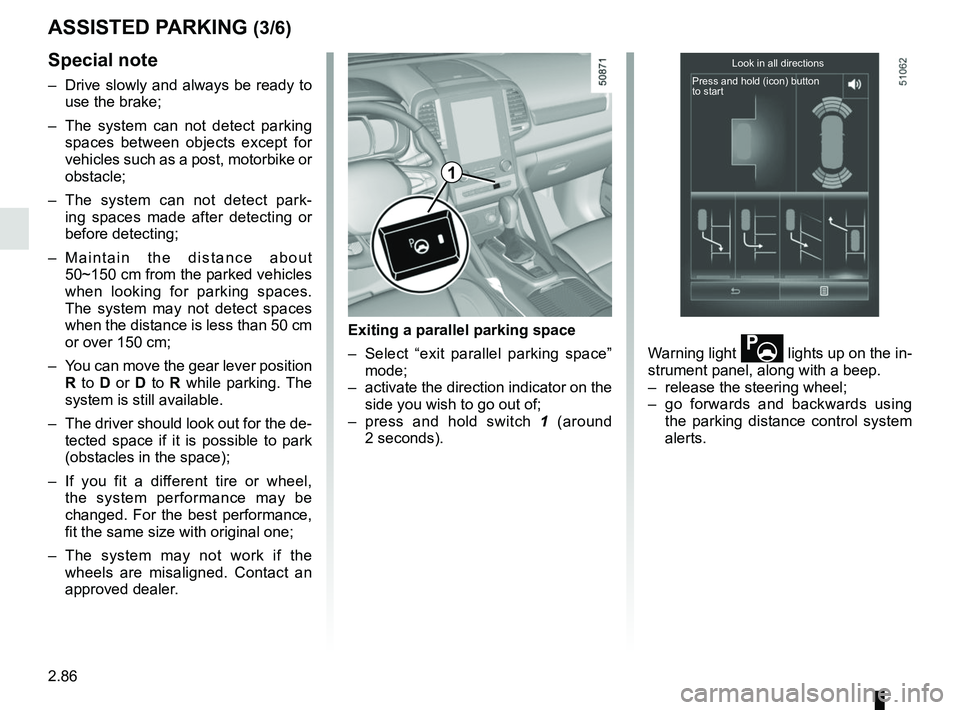
Exiting a parallel parking space
– Select “exit parallel parking space” mode;
– activate the direction indicator on the side you wish to go out of;
– press and hold switch 1 (around
2 seconds). Warning light
lights up on the in-
strument panel, along with a beep.
– release the steering wheel;
– go forwards and backwards using the parking distance control system
alerts.
Look in all directions
Press and hold (icon) button
to start
1
Page 194 of 332

2.90
AUTOMATIC TRANSMISSION (1/3)
Operation
With the selection lever 1 in position P,
switch on the ignition.
To move out of position P, you must de-
press the brake pedal before pressing
the unlocking button 2.
With your foot on the brake pedal
(warning light
Ó on the display 3
goes out), move the lever out of posi-
tion P.
Only engage D or R when the vehi-
cle is stopped, with your foot on the
brake and the accelerator pedal re-
leased.
Selector lever 1
P: park
R: reverse
N: Neutral
D: automatic mode
M: manual mode
Note: Press the button 2 to go from po-
sition D or N to R or P.
3: displays the gear engaged in manual
mode.
12
Driving in automatic mode
Move lever 1 to position D.
In most road conditions you will en-
counter, you will not need to touch your
lever again: the gears will change au-
tomatically at the right time and at the
most suitable engine speed because
the automatic system takes into ac-
count the vehicle load and road contour
and adjusts itself to the particular driv-
ing style you have chosen.
Economical driving
When driving, always leave the lever
in position D, keeping the accelerator
pedal lightly depressed to ensure auto-
matic gear changes at a lower engine
speed.
Accelerating and overtaking
Depress the accelerator pedal firmly
and fully (so that it goes beyond the
kickdown point).
This will enable you to change down
to the optimum gear within the
engine range.3
Page 243 of 332
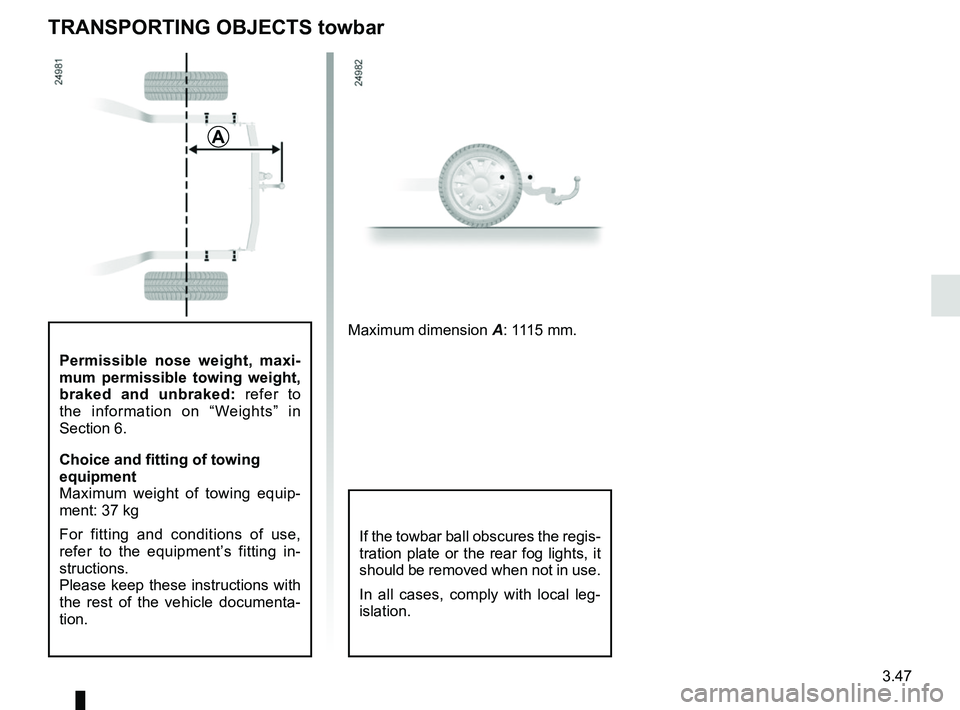
3.47
Permissible nose weight, maxi-
mum permissible towing weight,
braked and unbraked: refer to
the information on “Weights” in
Section 6.
Choice and fitting of towing
equipment
Maximum weight of towing equip-
ment: 37 kg
For fitting and conditions of use,
refer to the equipment’s fitting in-
structions.
Please keep these instructions with
the rest of the vehicle documenta-
tion.
TRANSPORTING OBJECTS towbar
A
Maximum dimension A: 1115 mm.
If the towbar ball obscures the regis-
tration plate or the rear fog lights, it
should be removed when not in use.
In all cases, comply with local leg-
islation.
Page 255 of 332

4.9
Level 2
It is normal for the level to drop as the
brake shoes become worn, but it must
never drop lower than the “MINI” warn-
ing line.
If you wish to check the disc and drum
wear yourself, you should obtain the
document explaining the checking pro-
cedure from the manufacturer’s net-
work or web site.
Topping up
After any operation on the hydraulic cir-
cuit, a specialist must replace the brake
fluid.
Only use fluids approved by our
Technical Department (and taken from
a sealed container).
Replacement interval
Refer to the Maintenance Document for
your vehicle.
Brake fluid level
The level should be read with the engine
switched off and on level ground.
This should be checked frequently,
and immediately if you notice even the
slightest loss in braking efficiency.
LEVELS (2/3)
2
The engine may be hot
when carrying out opera-
tions in close proximity. In
addition, the engine cooling
fan can come on at any moment.
Risk of injury.
Consult your approved dealer at
once if you notice an abnormal or
repeated drop in any of the fluid
levels.
Page 269 of 332
5.5
TYRE PRESSURE KIT (2/3)
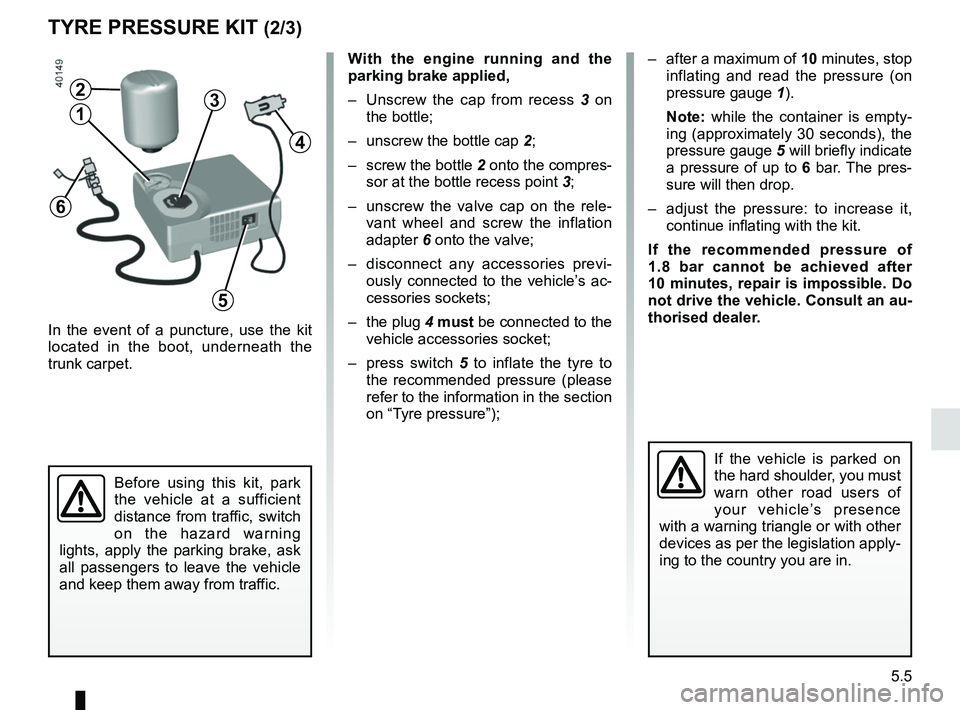
In the event of a puncture, use the kit
located in the boot, underneath the
trunk carpet.
With the engine running and the
parking brake applied,
– Unscrew the cap from recess 3 on
the bottle;
– unscrew the bottle cap 2;
– screw the bottle 2 onto the compres- sor at the bottle recess point 3;
– unscrew the valve cap on the rele- vant wheel and screw the inflation
adapter 6 onto the valve;
– disconnect any accessories previ- ously connected to the vehicle’s ac-
cessories sockets;
– the plug 4 must be connected to the
vehicle accessories socket;
– press switch 5 to inflate the tyre to
the recommended pressure (please
refer to the information in the section
on “Tyre pressure”);
Before using this kit, park
the vehicle at a sufficient
distance from traffic, switch
on the hazard warning
lights, apply the parking brake, ask
all passengers to leave the vehicle
and keep them away from traffic.
If the vehicle is parked on
the hard shoulder, you must
warn other road users of
your vehicle’s presence
with a warning triangle or with other
devices as per the legislation apply-
ing to the country you are in.
– after a maximum of 10 minutes, stop inflating and read the pressure (on
pressure gauge 1).
Note: while the container is empty-
ing (approximately 30 seconds), the
pressure gauge 5 will briefly indicate
a pressure of up to 6 bar. The pres-
sure will then drop.
– adjust the pressure: to increase it, continue inflating with the kit.
If the recommended pressure of
1.8 bar cannot be achieved after
10 minutes, repair is impossible. Do
not drive the vehicle. Consult an au-
thorised dealer.
4
2
13
5
6
Page 272 of 332
5.8
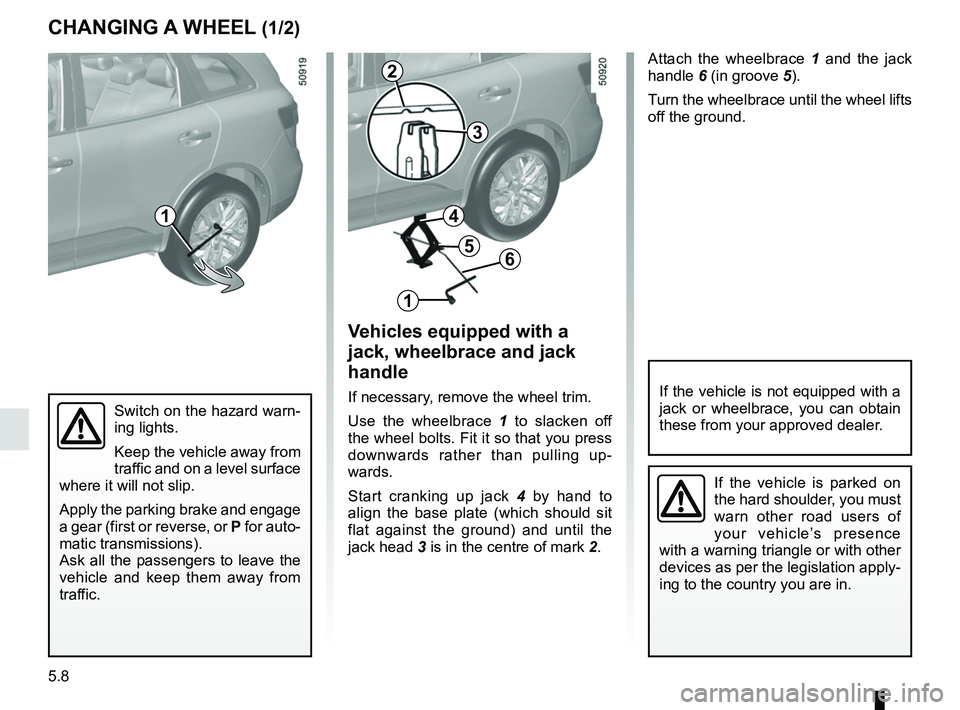
Attach the wheelbrace 1 and the jack
handle 6 (in groove 5).
Turn the wheelbrace until the wheel lifts
off the ground.
Switch on the hazard warn-
ing lights.
Keep the vehicle away from
traffic and on a level surface
where it will not slip.
Apply the parking brake and engage
a gear (first or reverse, or P for auto-
matic transmissions).
Ask all the passengers to leave the
vehicle and keep them away from
traffic.
CHANGING A WHEEL (1/2)
Vehicles equipped with a
jack, wheelbrace and jack
handle
If necessary, remove the wheel trim.
Use the wheelbrace 1 to slacken off
the wheel bolts. Fit it so that you press
downwards rather than pulling up-
wards.
Start cranking up jack 4 by hand to
align the base plate (which should sit
flat against the ground) and until the
jack head 3 is in the centre of mark 2.If the vehicle is not equipped with a
jack or wheelbrace, you can obtain
these from your approved dealer.
If the vehicle is parked on
the hard shoulder, you must
warn other road users of
your vehicle’s presence
with a warning triangle or with other
devices as per the legislation apply-
ing to the country you are in.
1
2
3
1
6
4
5