Page 51 of 332

X = Seat not suitable for fitting child seats ISOFIX.
IUF/IL = On equipped vehicles, seat which allows an approved “Universal/semi-u\
n")
1.45
CHILD SEATS: attachment using the ISOFIX system (2/3)
X = Seat not suitable for fitting child seats ISOFIX.
IUF/IL = On equipped vehicles, seat which allows an approved “Universal/semi-u\
niversal” or “vehicle specific” child seat to be at-
tached using the ISOFIX system; check that it can be fitted.
i-U = Suitable for the i-Size restraint devices in the “Universal” fo\
rward-facing and backward-facing category.
(1) Move the front seat as far forward as possible to install a rear-facing \
child seat, then move back the seat in front as far as it will
go, although without allowing it to come into contact with the child sea\
t.
(2) In all situations, remove the rear headrest of the seat on which the chi\
ld seat is positioned. This must be done before fitting the
child seat. Please refer to the information on the “Rear headrests”\
in Section 3. Move the seat in front of the child forwards,
move the seatback forward to avoid contact between the seat and the chil\
d’s legs.
The size of the ISOFIX child seat is indicated by a letter:
– A, B and B1: for forward-facing seats in group 1 (9 to 18 kg);
– C and D: shell seat or rear-facing seats in group 0+ (less than 13 kg)\
or group 1 (9 to 18 kg);
– E: rear-facing shell seats in group 0 (less than 10 kg) or 0+ (less t\
han 13 kg);
– F and G: cots in group 0 (less than 10 kg).
Page 52 of 332
1.46
CHILD SEATS: attachment using the ISOFIX system (3/3)
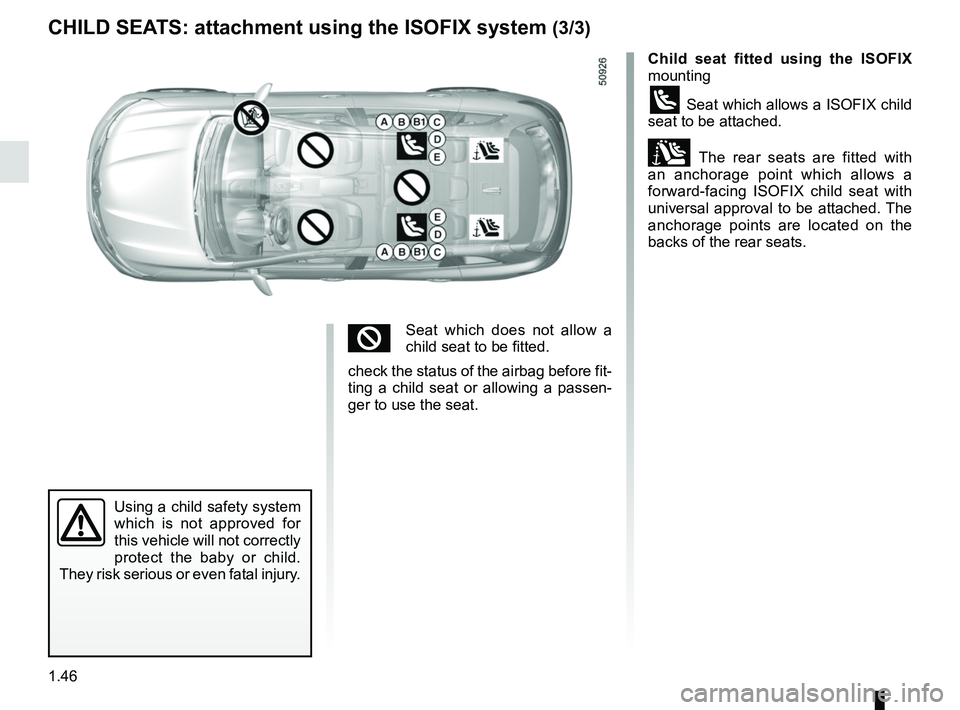
Child seat fitted using the ISOFIX
mounting
ü Seat which allows a ISOFIX child
seat to be attached.
± The rear seats are fitted with
an anchorage point which allows a
forward-facing ISOFIX child seat with
universal approval to be attached. The
anchorage points are located on the
backs of the rear seats.
Using a child safety system
which is not approved for
this vehicle will not correctly
protect the baby or child.
They risk serious or even fatal injury.
²Seat which does not allow a
child seat to be fitted.
check the status of the airbag before fit-
ting a child seat or allowing a passen-
ger to use the seat.
Page 57 of 332

1.51
DRIVING POSITION: LEFT-HAND DRIVE (2/2)
The equipment fitted, described below, DEPENDS ON THE VERSION AND COUNTRY. 19 Controls for:
– Cruise control/speed limiter main
control,
– Assisted parking.
20 Gear lever.
21 Ignition switch (vehicles with key).
22 Controls for remote radio and navi-
gation system.
23 Control for adjusting steering
wheel height and reach.
24 Unlocking controls:
– bonnet,
– fuel filler flap.
25 Controls for:
– Electric headlight beam adjust-
ment,
– Instrument panel lighting dimmer,
– Tailgate opening or Lane depar-
ture warning on/off (depeding on
the vehicle),
– Heated steering wheel on/off,
– ESC and Traction Control system,
– Two and four-wheel drive mode
selector.
1 Air vent.
2 Demister outlet.
3 Stalk for:
– direction indicator lights;
– exterior lights;
– fog lights.
4 Cruise control/speed limiter con-
trols.
5 Instrument panel.
6 Driver Airbag and horn location.
7 Controls for on-board computer in-
formation read-out and vehicle set-
tings customisation menu.
8 Steering column stalk for wind-
screen and rear screen wash/
wiper.
9 Engine start/stop button (vehicle
with RENAULT card).
10 Multifunction screen.
11 Hazard warning light switch, cen-
tral door locking warning light.
12 Multifunction screen controls for:
– power on/off,
– volume,
– home menu,
– driving aids menu,
– display settings.
13 Heating or air conditioning con-
trols.
14 Controls for:
– heated front seats,
– ventilated front seats,
– activation/deactivation of ECO
mode,
– activation/deactivation of assisted
parking,
– activation/deactivation of the Stop
and Start function.
15 Passenger Airbag location.
16
Glovebox.
17 Accessories socket or cigarette
lighter.
18 Cup holders.
Page 59 of 332

1.53
DRIVING POSITION: RIGHT-HAND DRIVE (2/2)
The equipment fitted, described below, DEPENDS ON THE VERSION AND COUNTRY.
16 Unlocking controls:
– bonnet,
– fuel filler flap.
17 Ignition switch (vehicles with key).
18 Control for remote radio and navi-
gation system.
19 Control for adjusting steering
wheel height and reach.
20 Engine start/stop button (vehicle
with RENAULT card).
21 Accessories socket or cigarette
lighter.
22 Cup holder
23 Controls for:
– Cruise control/speed limiter main
control,
– Assisted parking.
24 Gear lever.
25 Glovebox.
1 Air vent.
2 Demister outlet.
3 Passenger Airbag location.
4 Controls for:
– heated front seats,
– ventilated front seats,
– activation/deactivation of ECO
mode,
– activation/deactivation of assisted
parking,
– activation/deactivation of the Stop
and Start function.
5 Heating or air conditioning con-
trols.
6 Multifunction screen.
7 Hazard warning light switch, cen-
tral door locking warning light.
8 Multifunction screen controls for:
– power on/off,
– volume,
– home menu,
– driving aids menu,
– display settings.
9 Stalk for:
– direction indicator lights;
– exterior lights;
– fog lights.
10 Cruise control/speed limiter con-
trols.
11 Instrument panel.
12 Driver Airbag and horn location.
13 Controls for on-board computer in-
formation read-out and vehicle set-
tings customisation menu.
14 Steering column stalk for wind-
screen and rear screen wash/
wiper.
15
Controls for:
– Electric headlight beam adjust-
ment,
– Instrument panel lighting dimmer,
– Tailgate opening or Lane depar-
ture warning on/of
f (depeding on
the vehicle),
– Heated steering wheel on/off,
– ESC and Traction Control system,
– Two and four-wheel drive mode
selector.
Page 198 of 332
3.2
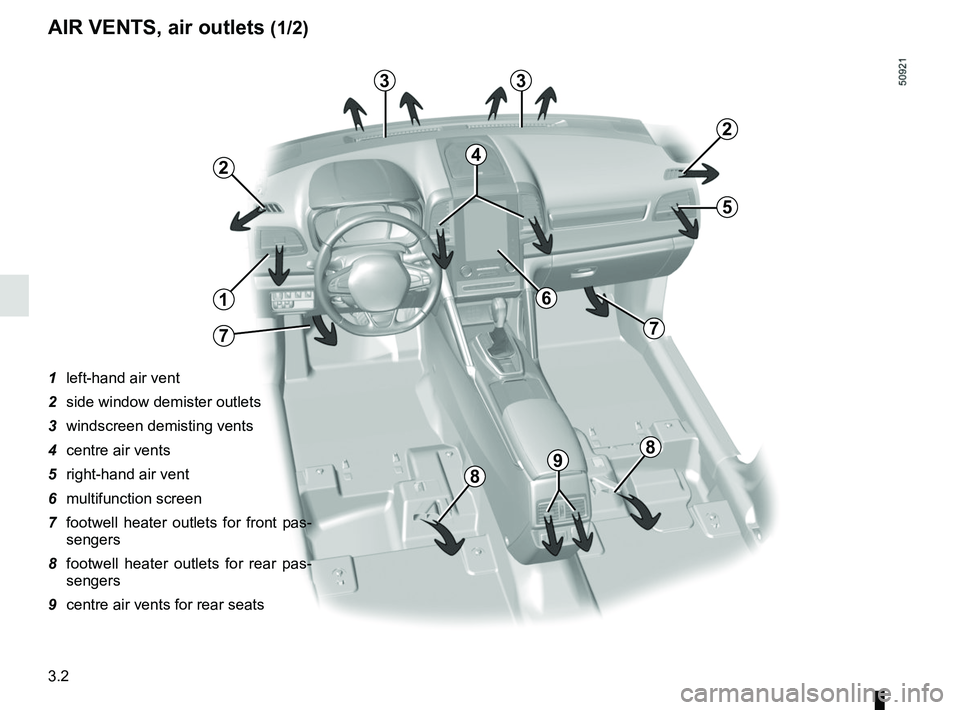
AIR VENTS, air outlets (1/2)
1 left-hand air vent
2 side window demister outlets
3 windscreen demisting vents
4 centre air vents
5 right-hand air vent
6 multifunction screen
7 footwell heater outlets for front pas-sengers
8 footwell heater outlets for rear pas- sengers
9 centre air vents for rear seats
7
8
4
6
8
1
2
33
2
5
7
98
Page 203 of 332

3.7
AUTOMATIC CLIMATE CONTROL: Controls A (1/5)
10
15
7654
9
16
17
11
18
11
Controls A
Press zone 14 to access the multifunc-
tion screen 2. The presence of the con-
trols detailed below will depend on the
vehicle model.
1 and 3 Left and right temperature indi-
cation adjustment.
4 De-icing/demisting of the rear screen and, depending on the vehicle, the
door mirrors.
5, 8, 9 and 10 automatic modes (Normal, Soft, Fast)
6 Air recirculation.
7 “Clear View” function. 11
Ventilation speeds.
12 Distribution of air in the passenger- compartment.
13 Right and left temperature display.
14 Zone displaying air conditioning set- tings.
15 “DUAL” function.
16 Automatic recirculation function de- pending on the vehicle.
17 Air conditioning.
18 Stopping the system.
8
14
13
13
13
2
Some buttons have a warning light-
indicating their operative state.
AAutomatic mode
The automatic climate control system-
guarantees comfort in the passen-
ger compartment and good visibility
(except in the event of extreme condi-
tions), while optimising consumption.
The system controls the ventilation
speed, air distribution, air recirculation,
and starting and stopping the air condi-
tioning and air temperature.
This mode consists of a choice of three
programmes:
NORMAL: allows the selected comfort
level to be best attained, depending on
the exterior conditions. Press button 4
or key 9.
SOFT: reaches the desired comfort
level more gently and silently. Press
button 8.
FAST: increases the flow of air in the
passenger compartment. This mode
is recommended in particular to opti
mise comfort in the rear seats. Press
button 10.
12
Page 208 of 332
3.12
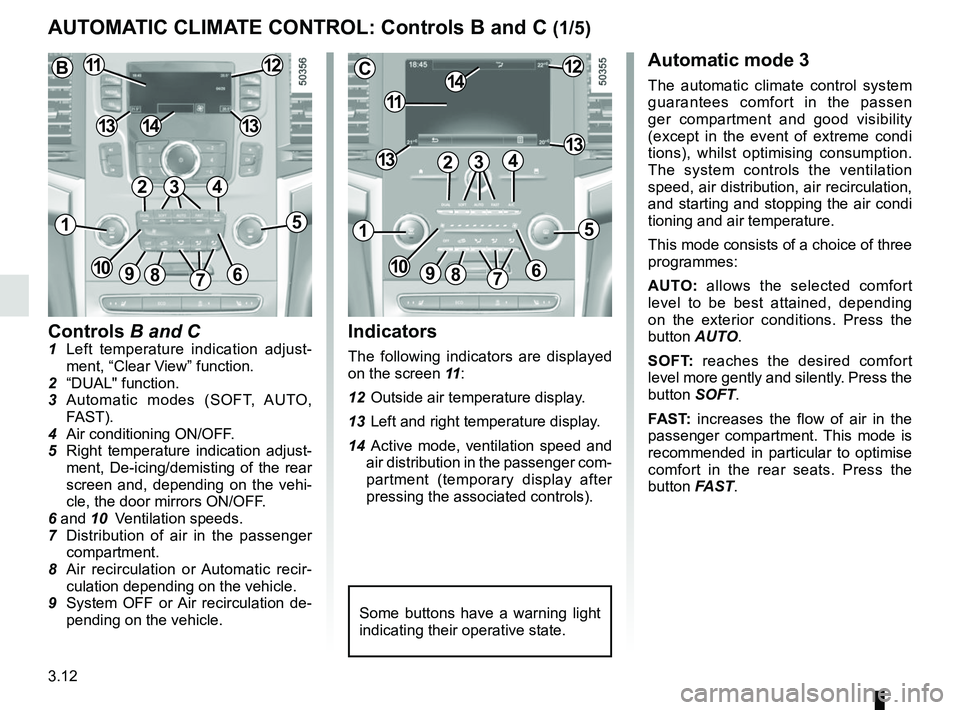
Controls B and C1 Left temperature indication adjust-ment, “Clear View” function.
2 “DUAL" function.
3 Automatic modes (SOFT, AUTO, FAST).
4 Air conditioning ON/OFF.
5 Right temperature indication adjust- ment, De-icing/demisting of the rear
screen and, depending on the vehi-
cle, the door mirrors ON/OFF.
6 and 10 Ventilation speeds.
7 Distribution of air in the passenger
compartment.
8 Air recirculation or Automatic recir- culation depending on the vehicle.
9 System OFF or Air recirculation de- pending on the vehicle.
AUTOMATIC CLIMATE CONTROL: Controls B and C (1/5)
Indicators
The following indicators are displayed
on the screen 11 :
12 Outside air temperature display.
13 Left and right temperature display.
14 Active mode, ventilation speed and air distribution in the passenger com-
partment (temporary display after
pressing the associated controls).
Automatic mode 3
The automatic climate control system
guarantees comfort in the passen
ger compartment and good visibility
(except in the event of extreme condi
tions), whilst optimising consumption.
The system controls the ventilation
speed, air distribution, air recirculation,
and starting and stopping the air condi
tioning and air temperature.
This mode consists of a choice of three
programmes:
AUTO: allows the selected comfort
level to be best attained, depending
on the exterior conditions. Press the
button AUTO.
SOFT: reaches the desired comfort
level more gently and silently. Press the
button SOFT.
FAST: increases the flow of air in the
passenger compartment. This mode is
recommended in particular to optimise
comfort in the rear seats. Press the
button FAST.
Some buttons have a warning light
indicating their operative state.
C
11
1412
131342
1
91086
5
7
3
13
B1112
1413
42
15
7
3
69810
Page 215 of 332

3.19
ELECTRIC WINDOWS (1/2)
These systems operate with the igni-
tion switched on.
Press or pull the switch to raise or lower
a window to the desired height (the rear
windows do not open fully);
From the driver’s seat, use switch:
1 for the driver’s side;
3 for the front passenger side;
4 and 5 for the rear passengers.
From the passenger seats, use
switch 6.
1
3
4
56
Avoid resting any objects against a
half-open window: there is a risk that
the electric window winder could be
damaged.
Passenger safety
The driver can prevent the
front and rear passenger
electric windows from op-
erating (and the driver’s window)
by pressing switch 2. A confirmation
message is displayed on the instru-
ment panel.
Driver’s responsibility
Never leave your vehicle with the
RENAULT card or key inside, and
never leave a child, adult who is not
self-sufficient or a pet, even for a
short while. They may pose a risk to
themselves or to others by starting
the engine or activating equipment
(such as the gear lever or electric
windows). If any part of the body be-
comes trapped, reverse the direc-
tion of the window immediately by
pressing the relevant switch.
Risk of serious injury.
2