Page 109 of 332

2.5
STARTING, STOPPING THE ENGINE: vehicle with RENAULT CARD (1/5)
The RENAULT card must be inserted in
detection zone 1.
To start:
– vehicles with an automatic gearbox, place the lever in position P, depress
the brake pedal and press button 2;
– vehicles with a manual gearbox, depress the brake or clutch pedal
and press the button 2 . If a gear is
engaged, the vehicle may only be
started by depressing the clutch
pedal.
“Hands-free” starting with
the tailgate open
In this case, the RENAULT card should
not be located in the boot, to avoid any
risk of loss.
2
1
Special features
– If one of starting conditions is not ap- plied, the message “Press brake +
START” or “Press clutch + START”
or “Select P” is displayed on the in-
strument panel;
– in some cases, it will be necessary to move the steering wheel while press-
ing the start button 1 to assist in un-
locking the steering column. A mes-
sage on the instrument panel “Turn
steering wheel + START” warns of
this.
Driver’s responsibility
when parking or stopping
the vehicle
Never leave an animal,
child or adult who is not self-suffi-
cient alone in your vehicle, even for
a short time.
They may pose a risk to themselves
or to others by starting the engine,
activating equipment such as the
electric windows or locking the
doors, for example.
Also, in hot and/or sunny weather,
please remember that the tempera-
ture inside the passenger compart-
ment increases very quickly.
RISK OF DEATH OR SERIOUS
INJURY.
Page 192 of 332

2.88
ASSISTED PARKING (5/6)
Suspending the manoeuvre
The manoeuvre is suspended in the fol-
lowing circumstances:
– you take control of the wheel;
– a door or the boot is opened;
– the vehicle is at a standstill for too long;
– an obstacle in the direction of move- ment prevents the manoeuvre from
being completed;
– the engine will stop.
Once the warning light
on the
instrument panel goes off and a beep
sounds, the manoeuvre has been sus-
pended. Then to resume the manoeu-
vre, press and hold the system activa-
tion switch.
In this case, the reason for suspending
the manoeuvre will be displayed on the
multifunction screen. Make sure:
– you have released the steering wheel
and;
– that all doors and the boot are closed, and;
– that no obstacles are in the way of the direction of movement, and;
– that the engine is started.
Cancelling the manoeuvre
The manoeuvre can be stopped in the
following cases:
– by pressing the system activation switch;
– the vehicle speed has exceeded 4 mph (7 km/h);
– You have performed more than ten forwards/backwards movements in
one manoeuvre;
– the parking distance control sensors are dirty or blocked;
– the vehicle wheels have skidded.
Once the warning light
on the
instrument panel goes off and a beep
sounds, the manoeuvre has been
ended.
Special note
The system may be disrupted in the
following circumstances. In this cases,
you should park by yourself because of
risk to impact;
– if there are obstacles around posts;
– if the parking space has obstacles such as bicycles, motorbikes, narrow
posts, etc;
– if the parking space is winding, slip- pery or uneven;
– if the tire pressure is lower or higher than the standard;
– in very bad weather (heavy rain, snow or strong winds);
– fitting different tires (snow chain, spare tire, different size wheel).
Page 219 of 332
3.23
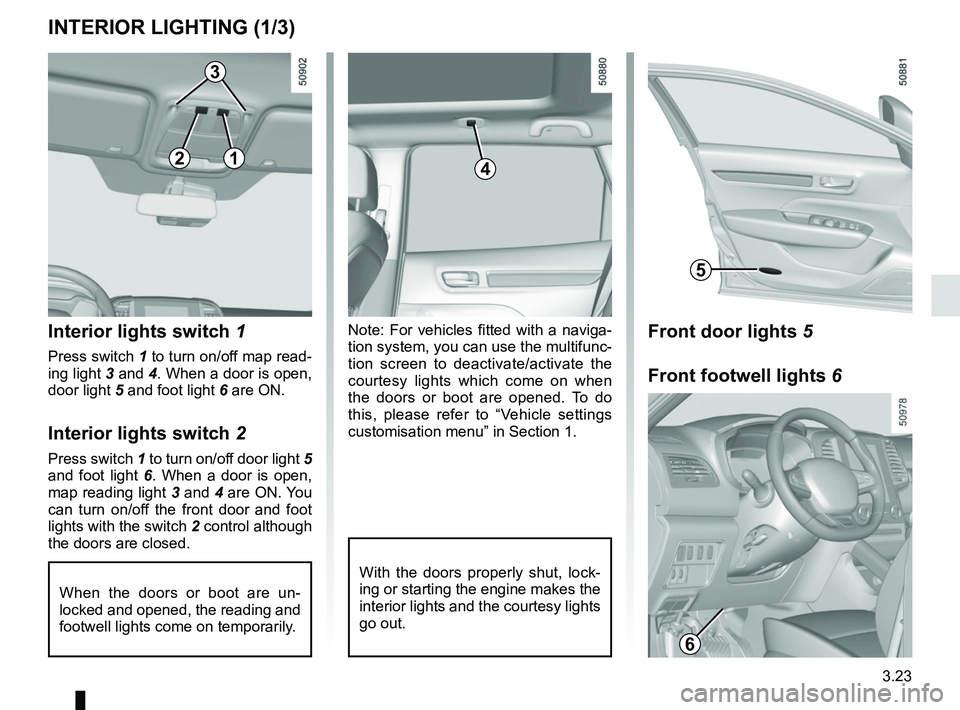
Note: For vehicles fitted with a naviga-
tion system, you can use the multifunc-
tion screen to deactivate/activate the
courtesy lights which come on when
the doors or boot are opened. To do
this, please refer to “Vehicle settings
customisation menu” in Section 1.Interior lights switch 1
Press switch 1 to turn on/off map read-
ing light 3 and 4. When a door is open,
door light 5 and foot light 6 are ON.
Interior lights switch 2
Press switch 1 to turn on/off door light 5
and foot light 6. When a door is open,
map reading light 3 and 4 are ON. You
can turn on/off the front door and foot
lights with the switch 2 control although
the doors are closed.
When the doors or boot are un-
locked and opened, the reading and
footwell lights come on temporarily.
INTERIOR LIGHTING (1/3)
With the doors properly shut, lock-
ing or starting the engine makes the
interior lights and the courtesy lights
go out.
4
3
5
12
Front door lights 5
Front footwell lights 6
6
Page 232 of 332
3.36
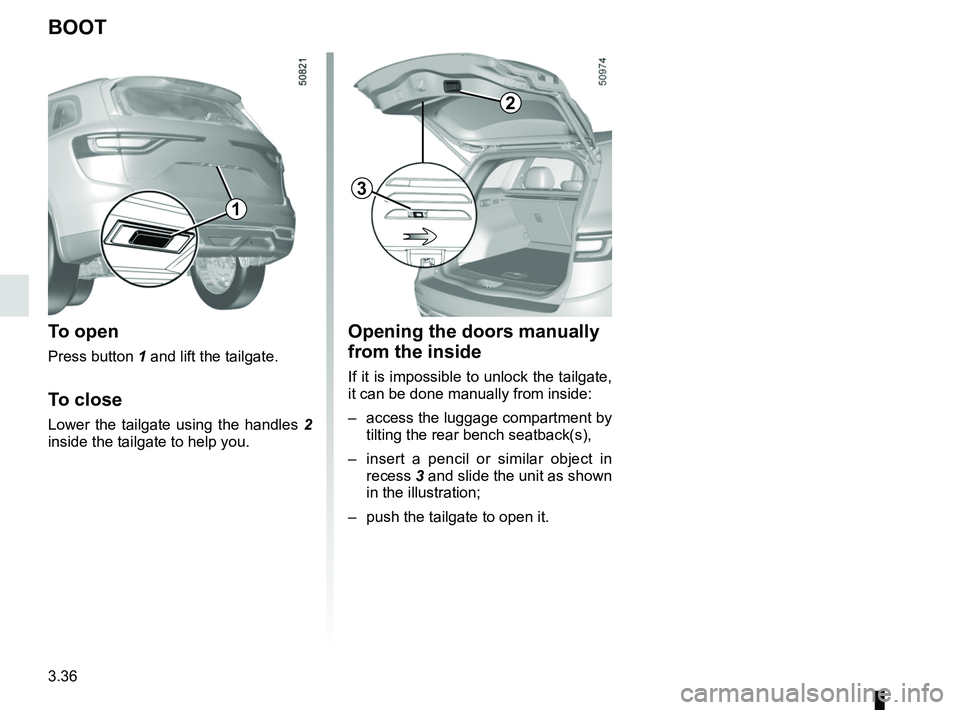
Opening the doors manually
from the inside
If it is impossible to unlock the tailgate,
it can be done manually from inside:
– access the luggage compartment by tilting the rear bench seatback(s),
– insert a pencil or similar object in recess 3 and slide the unit as shown
in the illustration;
– push the tailgate to open it.
BOOT
To open
Press button 1 and lift the tailgate.
To close
Lower the tailgate using the handles 2
inside the tailgate to help you.
2
1
3
Page 284 of 332
5.20
INTERIOR LIGHTING: changing bulbs (2/2)
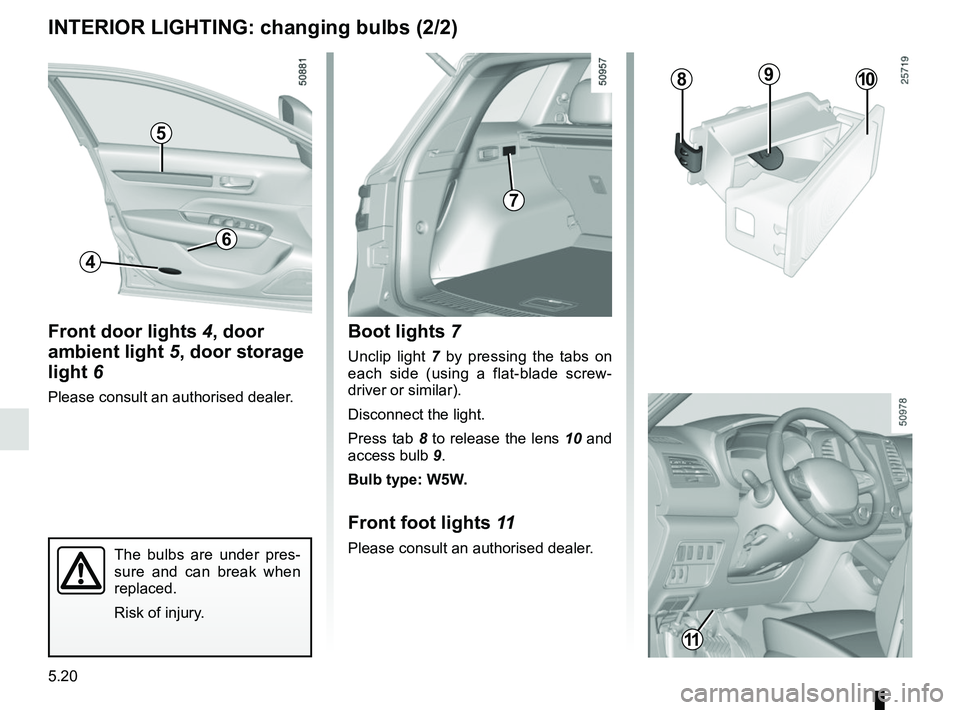
Boot lights 7
Unclip light 7 by pressing the tabs on
each side (using a flat-blade screw-
driver or similar).
Disconnect the light.
Press tab 8 to release the lens 10 and
access bulb 9.
Bulb type: W5W.
Front foot lights 11
Please consult an authorised dealer.The bulbs are under pres-
sure and can break when
replaced.
Risk of injury.
7
89
Front door lights 4, door
ambient light 5, door storage
light 6
Please consult an authorised dealer.
4
6
5
10
11