2018 RENAULT KADJAR ignition
[x] Cancel search: ignitionPage 64 of 310

The display of information shown below DEPENDS ON THE VEHICLE EQUIPMENT \
AND COUNTRY.
\bAssisted parking brake fault
light
Please refer to the information on the
“Assist")
1.58
WARNING LIGHTS (5/6)
The display of information shown below DEPENDS ON THE VEHICLE EQUIPMENT \
AND COUNTRY.
\bAssisted parking brake fault
light
Please refer to the information on the
“Assisted parking brake” in Section 2.
Emergency active brake
assist
Refer to the information on “Driving cor-
rection devices and aids” in Section 2.
Warning light for the elec-
tronic stability program
(ESC) and traction control system
It lights up when the ignition or the
engine is switched on and goes off after
a few seconds.
There are several reasons for the warn-
ing light to come on: please refer to the
information on “Driver correction de-
vices and aids” in Section 2.
A
ΦSpeed limiter and cruise
control indicator lights
See the information on the “Speed lim-
iter” and “Cruise control” in Section 2.
Tyre pressure monitoring
system
Refer to the information on the “Tyre
pressure monitoring system” in
Section 2.
\fMode warning light ECO
This comes on when ECO
mode is activated.
Please refer to the information on “Eco-
driving” in Section 2.
Warning light for reagent
level and faults in the ex-
haust gas reduction system.
Refer to the information on “Reagent
tank” in Section 1.Engine standby warning
light
Please see information in the para-
graph on “Stop and Start Function” in
Section 2.
Unavailability of engine
standby warning light
Please see information in the para-
graph on “Stop and Start Function” in
Section 2.
Page 65 of 310

The display of information shown below DEPENDS ON THE VEHICLE EQUIPMENT \
AND COUNTRY.
On display B
Passenger Airbag ON
Refer to the information on
“Child safety: de")
1.59
WARNING LIGHTS (6/6)
The display of information shown below DEPENDS ON THE VEHICLE EQUIPMENT \
AND COUNTRY.
On display B
Passenger Airbag ON
Refer to the information on
“Child safety: deactivating/activating
the front passenger airbag” in Section 1.
¹Passenger Airbag OFF
Refer to the information on
“Child safety: deactivating/activating
the front passenger airbag” in Section 1.
ßDriver’s seat belt reminder
and, depending on the vehi-
cle, front passenger seat belt re-
minder
This lights up when the ignition is
switched on, then, if the driver's or front
passenger's (if this seat is occupied)
seat belt is not fastened and the vehicle
has reached approximately 12.4 mph
(20 km/h), it flashes and a beep sounds
for around 2 minutes.
Note: an object placed on the passen-
ger seat base can activate the warning
light.
Rear seat belt reminder (depending
on vehicle)
Warning light
ß comes on, accom-
panied (depending on the vehicle) by
a message indicating the number of
fastened seat belts on the instrument
panel for approximately 30 seconds,
each time the vehicle is started, a door
is opened or a rear seat belt is fas-
tened/unfastened. Check that the rear
passengers are wearing seat belts and
that the number of seat belts shown as
fastened corresponds to the number of
rear seat places occupied.
B
Page 66 of 310
1.60
DISPLAYS AND INDICATORS (1/2)
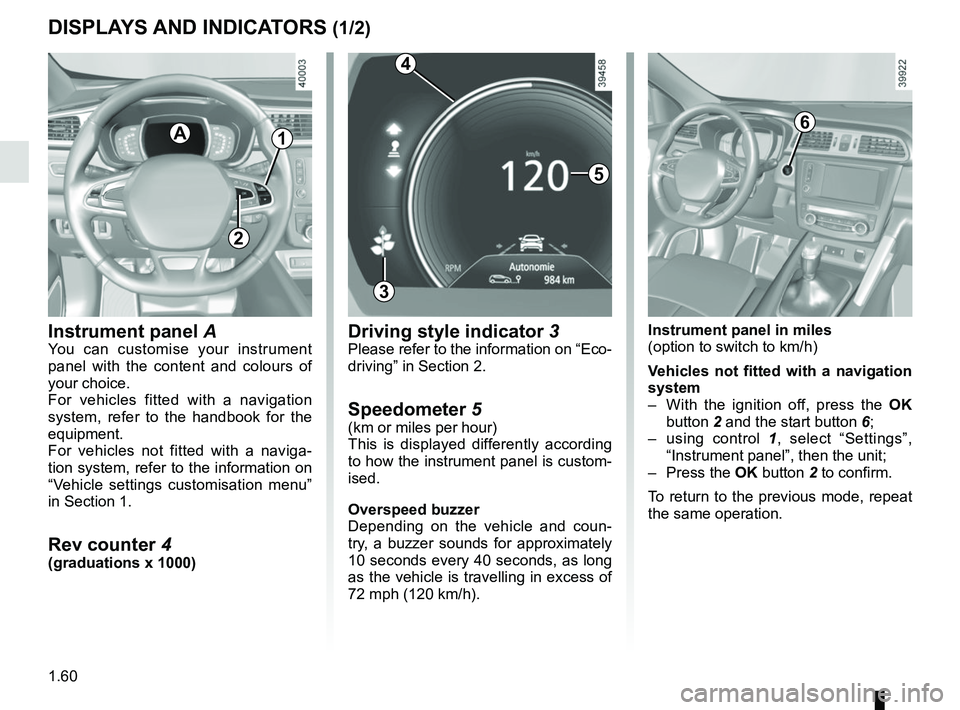
Instrument panel A
You can customise your instrument
panel with the content and colours of
your choice.
For vehicles fitted with a navigation
system, refer to the handbook for the
equipment.
For vehicles not fitted with a naviga-
tion system, refer to the information on
“Vehicle settings customisation menu”
in Section 1.
Rev counter 4(graduations x 1000)
A
5
3
Driving style indicator 3Please refer to the information on “Eco-
driving” in Section 2.
Speedometer 5(km or miles per hour)
This is displayed differently according
to how the instrument panel is custom-
ised.
Overspeed buzzer
Depending on the vehicle and coun-
try, a buzzer sounds for approximately
10 seconds every 40 seconds, as long
as the vehicle is travelling in excess of
72 mph (120 km/h).
6
Instrument panel in miles
(option to switch to km/h)
Vehicles not fitted with a navigation
system
– With the ignition off, press the OK
button 2 and the start button 6;
– using control 1, select “Settings”,
“Instrument panel”, then the unit;
– Press the OK button 2 to confirm.
To return to the previous mode, repeat
the same operation.
4
1
2
Page 72 of 310

The display of information shown below DEPENDS ON THE VEHICLE EQUIPMENT \
AND COUNTRY.
Examples of selectionsInterpreting the display selected
On-board comp")
1.66
ON-BOARD COMPUTER: trip settings (3/5)
The display of information shown below DEPENDS ON THE VEHICLE EQUIPMENT \
AND COUNTRY.
Examples of selectionsInterpreting the display selected
On-board computer with mileage-
before-service message
c) Mileage before service or oil change.Mileage before service
With the ignition switched on, the engine not running and
the display set to “Service Intervals”, press and hold the OK
button for approximately 5 seconds to display the mileage before
service (distance or time to the next service). When the distance
value approaches its limit, there are several possible scenarios:
– range less than 930 miles (1,500 km) or one month: the
message “Service due in” is displayed accompanied by the
nearest term (distance or time);
– range equal to 0 km/miles or service date reached: the
message “Service required” is displayed accompanied by
warning light
©.
The vehicle requires a service as soon as possible.
Service Intervals
Service in
30 000 km / 12 mo
Service due in
300 km / 24 days
Service required
Reset : to reset the distance before the next service, press and hold button 2 for approximately 10 seconds until the display
shows the mileage before service permanently.
NB: if a service is performed without changing the engine oil, only the mi\
leage before the next service should be reset. In the
event of an oil change, both the distance before the next service and th\
e next oil change should be reset.
Page 73 of 310

Examples of selectionsInterpreting the display selected
On-board computer")
1.67
The display of information shown below DEPENDS ON THE VEHICLE EQUIPMENT \
AND COUNTRY.
TRIP COMPUTER: trip settings (4/5)
Examples of selectionsInterpreting the display selected
On-board computer with distance before
next service message (cntd.)
c) Mileage before service or oil change.Mileage before service
With the ignition switched on, the engine not running and
the display set to “Mileage before service”, press and hold the
OK button for approximately 5 seconds to display the mileage
before the next service, then press the 2 button to view the
mileage before the next oil change (distance or time remaining
before the next service). When the distance value approaches its
limit, there are several possible scenarios:
– distance/time remaining less than 900 miles (1,500 km) or
one month : the message “Service due in” is displayed, ac-
companied by the nearest term (distance or time);
– range equal to 0 km/miles or service date reached: the
message “Service required” is displayed accompanied by
warning light
©.
The vehicle requires an oil change as soon as possible.
Service Intervals
Oil change in
30 000 km / 24 mo
Service due in
300 km / 24 days
Service required
Depending on the vehicle, the mileage before an oil change varies accord\
ing to the driving style (frequent driving at low speed ,
door-to-door journeys, extensive use at idling speed, towing a trailer, etc.). The distance remaining until the next oil change can
therefore decrease more quickly in some cases than the actual distance t\
ravelled.
Resetting: to reset the mileage before a service, press and hold button 2 for approximately 10 seconds until the display shows
the range permanently.
NB: if a service is performed without changing the engine oil, only the mi\
leage before the next service should be reset. In the
event of an oil change, both the distance before the next service and th\
e next oil change should be reset.
Page 75 of 310

1.69
TRIP COMPUTER AND WARNING SYSTEM: information messages
Examples of messagesInterpreting the display selected
« Parking brake on » Indicates that the parking brake has been applied.
« Checking control functions » Displayed with the ignition on when the vehicle is running self-diagnost\
ics.
« Turn steeringwheel + START »Turn the steering wheel slightly whilst pressing the vehicle start button\
to unlock
the steering column.
« Steering wheel not locked » Indicates that the steering column has not been locked.
These can help in the vehicle starting phase, or give information about \
a selection or a driving status.
Examples of information messages are given in the following pages.
Page 93 of 310

1.87
Special note
When driving the vehicle, the wiping
speed slows down whenever the ve-
hicle stops. For example, fast wiping
speed will slow to normal wiping speed.
As soon as the vehicle moves off,
wiping will return to the speed originally
selected.
If stalk 1 is operated, it overrides and
cancels the automatic function.Vehicle fitted with intermittent
windscreen wipers
A single sweep
A short push will trigger one sweep
of the wipers.
B stop
C intermittent wiping
The wipers will pause for several
seconds between sweeps. It is
possible to change the time be-
tween sweeps by turning ring 2.
D slow continuous wiping
E fast continuous wiping
Positions A, C and D are accessible
with the ignition on. Position E is
accessible only when the engine is
running.
1
A
B
C
D
WINDSCREEN WASH, WIPE (1/6)
E
Efficiency of a wiper blade
Check the condition of the wiper
blades. How long they last depends
on you:
– it must remain clean: clean the blade and the screen regularly
with soapy water;
– do not use it when the screen is dry;
– free it from the screen when it has not been used for a long time.
In any event, replace them as soon
as they begin to lose efficiency: ap-
proximately every year (refer to the
information on “Wiper blades: re-
placement” in section 5).
Precautions for using the
wipers
– In freezing or snowy weather, clear the screen before starting
the wipers (risk of motor over-
heating);
– ensure that no objects are ob- structing the travel of the blade.
12
Page 95 of 310

1.89
D slow continuous wiping
E fast continuous wiping
Positions A and D are accessible
with the ignition on. Positions C
and E are accessible only with the
engine running.
Operating fault
In the event of a malfunction of the
automatic wiping, the wiper is set to
intermittent wiping. Contact an au-
thorised dealer.
The operation of the rain sensor can
be disturbed in the event of:
– damaged windscreen wipers; a
film of water or traces left by a
blade in the sensor’s detection
zone may increase the response
time of the automatic wipers, or
increase the wiping frequency;
– a windscreen with any chip or
crack level with the sensor, or a
windscreen covered in dust, dirt,
insects, ice, the use of washing
wax and water-repellent chemi-
cals; the windscreen wiper will
be less sensitive or may even not
react at all.
1
A
B
C
DE
WINDSCREEN WASH, WIPE (3/6)
Special note
When driving the vehicle, the wiping
speed slows down whenever the ve-
hicle stops. For example, fast wiping
speed will slow to normal wiping speed.
As soon as the vehicle moves off,
wiping will return to the speed originally
selected.
If stalk 1 is operated, it overrides and
cancels the automatic function.
Precautions
– In the event of ice, check whether the
blades are stuck to the windscreen
before operating the wiping mecha-
nism. If you activate the wipers while
the blades are stuck down with ice,
you may risk damaging both the
blade and the wiper motor.
– Do not activate the wipers on a dry
screen. This will lead to the prema-
ture wear or damage to the blades.