Page 580 of 700

Wheel And Wheel Trim Care
All wheels and wheel trim, especially aluminum and
chrome plated wheels, should be cleaned regularly using
mild (neutral Ph) soap and water to maintain their luster
and to prevent corrosion. Wash wheels with the same soap
solution recommended for the body of the vehicle.
Your wheels are susceptible to deterioration caused by salt,
sodium chloride, magnesium chloride, calcium chloride,
etc., and other road chemicals used to melt ice or control
dust on dirt roads. Use a soft cloth or sponge and mild soap
to wipe away promptly. Do not use harsh chemicals or a
stiff brush. They can damage the wheel’s protective coating
that helps keep them from corroding and tarnishing.
CAUTION!
Avoid products or automatic car washes that use acidic
solutions or strong alkaline additives or harsh brushes.
Many aftermarket wheel cleaners and automatic car
washes may damage the wheel’s protective finish.
Such damage is not covered by the New Vehicle
Limited Warranty. Only car wash soap, Mopar Wheel
Cleaner or equivalent is recommended.When cleaning extremely dirty wheels including excessive
brake dust, care must be taken in the selection of tire and
wheel cleaning chemicals and equipment to prevent dam-
age to the wheels. Mopar Wheel Treatment or Mopar
Chrome Cleaner or their equivalent is recommended or
select a non-abrasive, non-acidic cleaner for aluminum or
chrome wheels.
CAUTION!
Do not use scouring pads, steel wool, a bristle brush,
metal polishes or oven cleaner. These products may
damage the wheel’s protective finish. Such damage is
not covered by the New Vehicle Limited Warranty.
Only car wash soap, Mopar Wheel Cleaner or equiva-
lent is recommended.
NOTE: If you intend parking or storing your vehicle for an
extended period after cleaning the wheels with wheel
cleaner, drive your vehicle and apply the brakes to remove
the water droplets from the brake components. This activ-
ity will remove the red rust on the brake rotors and prevent
vehicle vibration when braking.
578 SERVICING AND MAINTENANCE
Page 593 of 700

TECHNICAL SPECIFICATIONS
CONTENTS
�IDENTIFICATION DATA ...................593
▫ Vehicle Identification Number .............593
� BRAKE SYSTEM ........................593
▫ Hydraulic Brake Assist — 2500/3500 Models Only
(Except Power Wagon) ...................593
� WHEEL AND TIRE TORQUE SPECIFICATIONS . .594
▫ Torque Specifications ....................594
� FUEL REQUIREMENTS ...................596
▫ 3.6L Engine .......................... .596
▫ 5.7L Engine .......................... .596
▫ 6.4L Engine .......................... .597
▫ Reformulated Gasoline ..................597
▫ Materials Added To Fuel .................597
▫ Gasoline/Oxygenate Blends ...............598 ▫
Do Not Use E-85 In Non-Flex Fuel Vehicles . . . .598
▫ CNG And LP Fuel System Modifications ......599
▫ MMT In Gasoline .......................599
▫ Fuel System Cautions ....................599
▫ Carbon Monoxide Warnings ...............600
� FLEXIBLE FUEL (3.6L ENGINE ONLY) ........600
▫ E-85 General Information .................600
▫ Ethanol Fuel (E-85) ..................... .600
▫ Fuel Requirements .....................601
▫ Selection Of Engine Oil For Flexible Fuel Vehicles
(E-85) And Gasoline Vehicles ..............601
▫ Starting ............................ .602
▫ Cruising Range ........................602
▫ Replacement Parts ..................... .602
9
Page 595 of 700

IDENTIFICATION DATA
Vehicle Identification Number
The Vehicle Identification Number (VIN) is found on the
left front corner of the instrument panel, visible through
the windshield. This number also appears on the vehicle
frame and underbody as well as the Automobile Informa-
tion Disclosure Label affixed to a window on your vehicle,
the vehicle registration and title.
NOTE:It is illegal to remove or alter the VIN.
BRAKE SYSTEM
If power assist is lost for any reason (for example, repeated
brake applications with the engine off), the brakes will still
function. However, you will experience a substantial in-
crease in braking effort to stop the vehicle.
If either the front or rear hydraulic system loses normal
braking capability, the remaining system will still function
with some loss of overall braking effectiveness. This will be
evident by increased pedal travel during application,
greater pedal force required to slow or stop, and activation
of the “Brake Warning Light” and the “ABS Warning
Light” (if equipped) during brake use.
Hydraulic Brake Assist — 2500/3500 Models Only
(Except Power Wagon)
The brake system power assist is provided by a hydro-
boost unit which shares fluid with the power steering
system. You may experience some clicking or hissing
noises from the hydro-boost system during hard braking
conditions.
NOTE:Under cold temperatures, pedal effort will be
higher than normal until the power steering fluid reaches
operating temperature.
Vehicle Identification Number
9
TECHNICAL SPECIFICATIONS 593
Page 610 of 700
ComponentFluid, Lubricant, or Genuine Part
Front and Rear Axle – 2500/3500 Models We recommend you use SAE 75W-85 HD Ram GL-5
Synthetic Axle Lubricant. Limited slip additive is not
required for Limited-Slip Rear Axles.
Brake Master Cylinder We recommend you use Mopar DOT 3. If DOT 3 brake
fluid is not available, then DOT 4 is acceptable.
Power Steering Reservoir – 2500/3500 Models We recommend you use Mopar Power Steering Fluid +4 or
Mopar ATF+4 Automatic Transmission Fluid.
608 TECHNICAL SPECIFICATIONS
Page 617 of 700
Customer Programmable Features — Uconnect 3
Personal Settings
Push the MORE or SETTINGS button on the faceplate, then
press the “Settings” button on the touchscreen (if
equipped) to display the settings menu screen. In thismode the Uconnect system allows you to access program-
mable features that may be equipped such as Display,
Units, Voice, Clock, Safety & Driving Assistance, Lights,
Doors & Locks, Auto-On Comfort (if equipped), Engine Off
Options, Suspension, Trailer Brake, Audio, Compass Set-
tings, Phone/Bluetooth, SiriusXM Setup (if equipped),
Restore Settings, Clear Personal Data and System Informa-
tion.
NOTE:
Only one category may be selected at a time.
When making a selection, press the button on the touch-
screen to enter the desired mode. Once in the desired
mode, press and release the preferred setting until the
button is highlighted. Once the setting is complete, either
press the back arrow or the “Done” button on the touch-
screen or the Back button on the faceplate to return to the
previous menu. Pressing the Up or Down Arrow buttons
on the touchscreen on the right side of the screen will allow
you to toggle up or down through the list of available
settings.
NOTE: All settings should be changed with the ignition in
the RUN position.
Uconnect 3 With 5–inch Display Buttons On The
Touchscreen And Buttons On The Faceplate
1 — Uconnect Buttons On The Touchscreen
2 — Uconnect Buttons On The Faceplate
10
MULTIMEDIA 615
Page 628 of 700
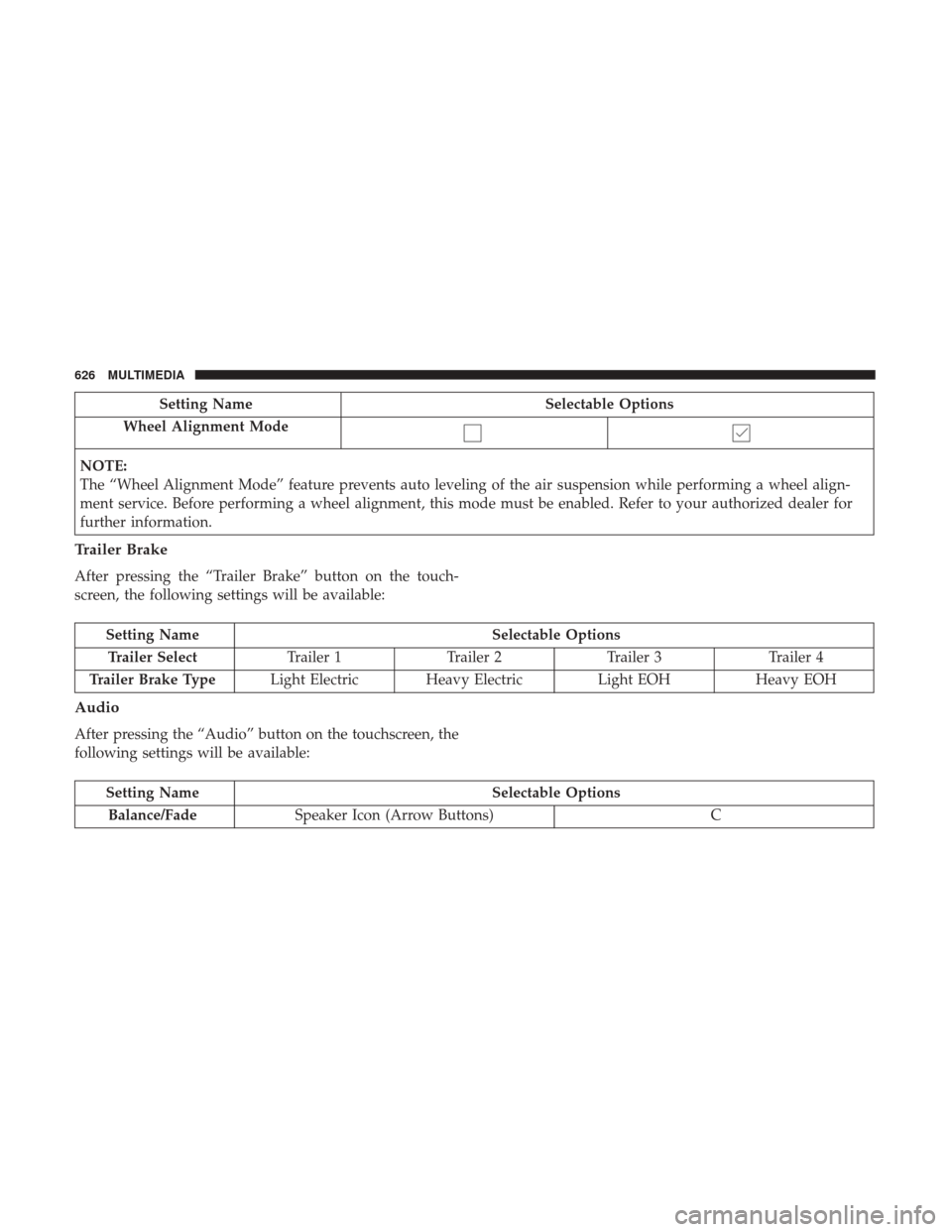
Setting NameSelectable Options
Wheel Alignment Mode
NOTE:
The “Wheel Alignment Mode” feature prevents auto leveling of the air suspension while performing a wheel align-
ment service. Before performing a wheel alignment, this mode must be enabled. Refer to your authorized dealer for
further information.
Trailer Brake
After pressing the “Trailer Brake” button on the touch-
screen, the following settings will be available:
Setting Name Selectable Options
Trailer Select Trailer 1Trailer 2Trailer 3 Trailer 4
Trailer Brake Type Light Electric Heavy Electric Light EOHHeavy EOH
Audio
After pressing the “Audio” button on the touchscreen, the
following settings will be available:
Setting Name Selectable Options
Balance/Fade Speaker Icon (Arrow Buttons) C
626 MULTIMEDIA
Page 635 of 700
Customer Programmable Features — Uconnect
4C/4C NAV Personal Settings
Press the “Apps” button on the touchscreen then press the
“Settings” button on the touchscreen to display the settings
menu screen. In this mode the Uconnect system allows youto access programmable features that may be equipped
such as Display, Voice, Clock, Safety & Driving Assistance,
Lights, Doors & Locks, Auto-On Comfort (if equipped),
Engine Off Options, Suspension, Trailer Brake, Audio,
Phone/Bluetooth, SiriusXM Setup (if equipped), Restore
Settings, Clear Personal Data and System Information.
NOTE:
Only one category may be selected at a time.
When making a selection, press the button on the touch-
screen to enter the desired mode. Once in the desired
mode, press and release the preferred setting until a
check-mark appears next to the setting, showing that
setting has been selected. Once the setting is complete,
either press the back arrow button on the touchscreen or
the Back button on the faceplate to return to the previous
menu or press the “X” button on the touchscreen to close
out of the settings screen. Pressing the Up or Down Arrow
buttons on the touchscreen on the right side of the screen
will allow you to toggle up or down through the list of
available settings.
NOTE: All settings should be changed with the ignition in
the RUN position.
Uconnect 4C/4C NAV With 8.4–inch Display Buttons On
The Touchscreen And Buttons On The Faceplate
1 — Uconnect Buttons On The Touchscreen
2 — Uconnect Buttons On The Faceplate
10
MULTIMEDIA 633
Page 649 of 700
Setting NameSelectable Options
Wheel Alignment Mode
NOTE:
Before performing a wheel alignment, the “Wheel Alignment Mode” must be enabled. Refer to your authorized
dealer for further information.
Trailer Brake
After pressing the “Trailer Brake” button on the touch-
screen, the following settings will be available:
Setting Name Selectable Options
Trailer Select Trailer 1Trailer 2Trailer 3 Trailer 4
Trailer Brake Type Light Electric Heavy Electric Light EOHHeavy EOH
10
MULTIMEDIA 647