Page 636 of 700
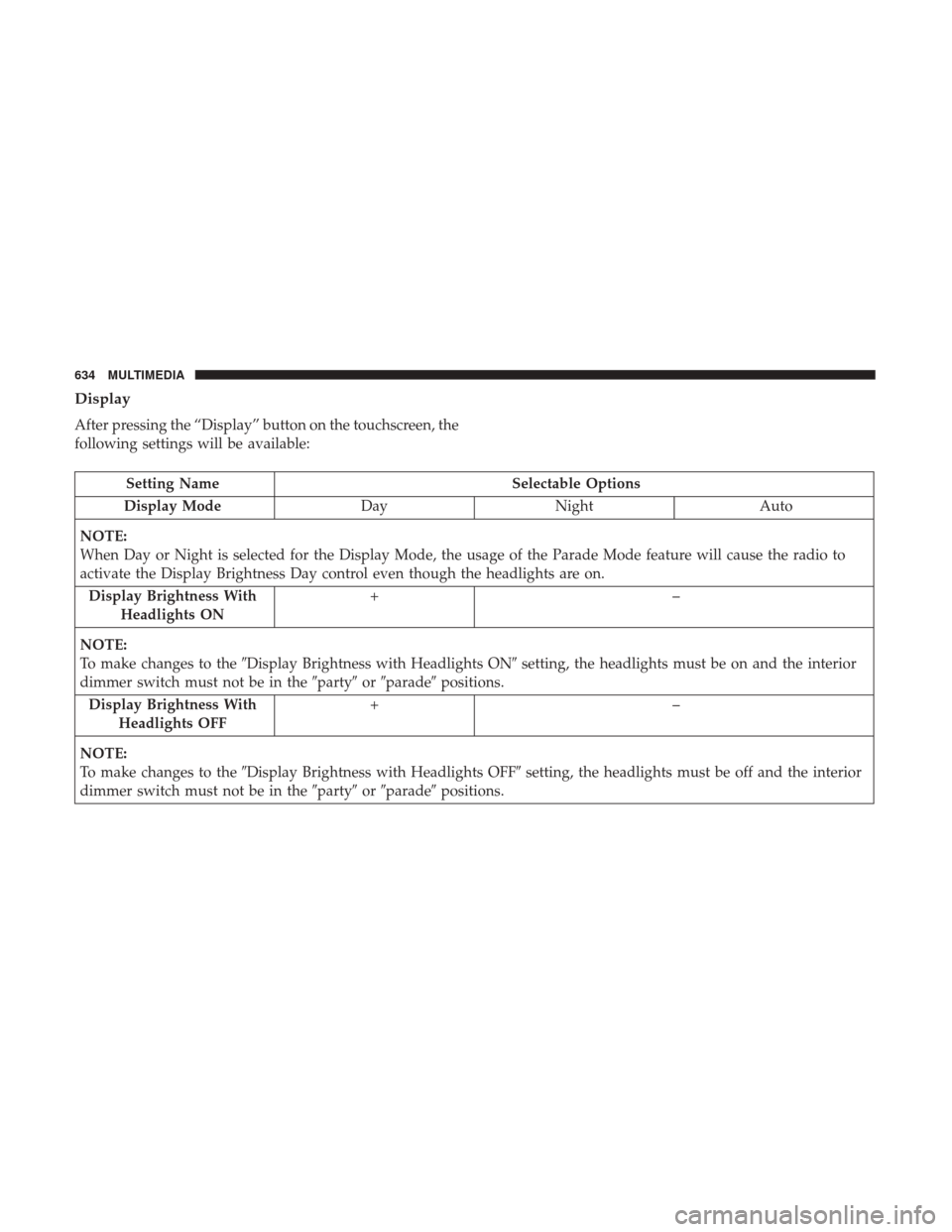
Display
After pressing the “Display” button on the touchscreen, the
following settings will be available:
Setting NameSelectable Options
Display Mode DayNight Auto
NOTE:
When Day or Night is selected for the Display Mode, the usage of the Parade Mode feature will cause the radio to
activate the Display Brightness Day control even though the headlights are on. Display Brightness With Headlights ON +–
NOTE:
To make changes to the �Display Brightness with Headlights ON� setting, the headlights must be on and the interior
dimmer switch must not be in the �party�or�parade� positions.
Display Brightness With Headlights OFF +–
NOTE:
To make changes to the �Display Brightness with Headlights OFF� setting, the headlights must be off and the interior
dimmer switch must not be in the �party�or�parade� positions.
634 MULTIMEDIA
Page 637 of 700
Setting NameSelectable Options
Set Theme Pre-configured Themes
Set Language English, Français, Español
Touchscreen Beep
Navigation Turn-By-Turn
In Cluster — If Equipped
Controls Screen Time-Out — If Equipped
Fuel Saver Display — If Equipped
Units — If Equipped
After pressing “Units” on the touchscreen, the following
will be available:
Setting Name Selectable Options
Units USMetric
10
MULTIMEDIA 635
Page 638 of 700
Voice
After pressing the “Voice” button on the touchscreen, the
following settings will be available:
Setting NameSelectable Options
Voice Response Length Brief Detailed
Show Command List AlwaysWith Help Never
Clock
After pressing the “Clock” button on the touchscreen, the
following settings will be available:
Setting Name Selectable Options
Sync Time With GPS — If Equipped
Set Time Hours +–
Set Time Minutes +–
Time Format 12hrs24hrs
Show Time In Status Bar — If Equipped
NOTE:
The “Show Time In Status Bar” feature will allow you to turn on or shut off the digital clock in the status bar.
636 MULTIMEDIA
Page 639 of 700
Safety & Driving Assistance
After pressing the “Safety & Driving Assistance” button on
the touchscreen, the following settings will be available:
Setting NameSelectable Options
ParkSense Sound Only Sound and Display
NOTE:
The Rear Park Assist system will scan for objects behind the vehicle when the transmission gear selector is in RE-
VERSE and the vehicle speed is less than 7 mph (11 km/h). Front ParkSense Chime Volume Low
Med High
Rear ParkSense Chime Volume Low
Med High
Tilt Side Mirrors In Re- verse — If Equipped
NOTE:
When the “Tilt Side Mirrors In Reverse” feature is selected, the outside side-view mirrors will tilt downward when
the ignition is in the RUN position and the transmission gear selector is in the REVERSE position. The mirrors will
move back to their previous position when the transmission is shifted out of REVERSE.
10
MULTIMEDIA 637
Page 640 of 700

Setting NameSelectable Options
ParkView Backup Camera
NOTE:
Your vehicle may be equipped with the ParkView Rear Back Up Camera that allows you to see an on-screen image of
the rear surroundings of your vehicle whenever the gear selector is put into REVERSE. The image will be displayed
on the radio touchscreen display along with a caution note to “check entire surroundings” across the top of the
screen. After five seconds, this note will disappear. The ParkView camera is located on the rear of the vehicle above
the rear License plate. ParkView Backup Camera Active Guidelines On
Off
NOTE:
Your vehicle may be equipped with the ParkView Rear Back Up Camera Active Guidelines that allows you to see Ac-
tive (Dynamic) Guidelines which deflect with steering wheel angle over the ParkView Back up Camera display when-
ever the gear selector is put into REVERSE. The image will be displayed on the radio touchscreen display along with
a caution note to “check entire surroundings” across the top of the screen. After five seconds, this note will disappear. ParkView Backup Camera Delay On
Off
NOTE:
When the “ParkView Backup Camera Delay” feature is enabled, it will allow the ParkView Backup Camera display to
remain on while in drive for up to 10 seconds, or 8 mph (12 km/h).
638 MULTIMEDIA
Page 642 of 700
Lights
After pressing the “Lights” button on the touchscreen, the
following settings will be available:
Setting NameSelectable Options
Headlight Off Delay +–
NOTE:
When the “Headlight Off Delay” feature is selected, the driver can choose to have the headlights remain on for 0, 30,
60, or 90 seconds when exiting the vehicle. Headlight Illumination On Ap- proach +–
NOTE:
When the “Headlight Illumination On Approach” feature is selected, the headlights will activate and remain on for 0,
30, 60, or 90 seconds when the doors are unlocked with the key fob. Headlights With Wipers — If Equipped
NOTE:
When the “Headlights With Wipers” feature is selected, and the headlight switch is in the AUTO position, the head-
lights will turn on approximately ten seconds after the wipers are turned on. The headlights will also turn off when
the wipers are turned off if they were turned on by this feature.
640 MULTIMEDIA
Page 643 of 700
Setting NameSelectable Options
Auto Dim High Beams — If Equipped
NOTE:
When the “Auto Dim High Beams” feature is selected, the high beam headlights will deactivate automatically under
certain conditions.
Flash Lights With Lock
NOTE:
When the “Flash Lights With Lock” feature is selected, the exterior lamps will flash when the doors are locked or un-
locked with the key fob. This feature may be selected with or without the sound horn on lock feature selected.
Doors & Locks
After pressing the “Doors & Locks” button on the touch-
screen, the following settings will be available:
Setting Name Selectable Options
Auto Door Locks
NOTE:
When the “Auto Door Locks” feature is selected, all doors will lock automatically when the vehicle reaches a speed of
15 mph (24 km/h).
10
MULTIMEDIA 641
Page 646 of 700
Auto Comfort Systems — If Equipped
After pressing the “Auto-On Comfort” button on the
touchscreen, the following settings will be available:
Setting NameSelectable Options
Auto-On Driver Heated/
Ventilated Seat & Steering Wheel With Vehicle Start — If Equipped Off
Remote Start All Starts
NOTE:
When the “Auto-On Driver Heated/Ventilated Seat & Steering Wheel With Vehicle Start” feature is selected the driv-
er’s heated seat and heated steering wheel will automatically turn on when temperatures are below 40° F (4.4° C).
When temperatures are above 80° F (26.7° C), the driver vented seat will turn on.
Engine Off Options
After pressing the “Engine Off Options” button on the
touchscreen, the following settings will be available:
Setting Name Selectable Options
Easy Exit Seat — If Equipped
NOTE:
When the “Easy Exit Seat” feature is selected, the Driver ’s seat will automatically move rearward once the engine is shut off.
644 MULTIMEDIA