Page 626 of 700
Engine Off Options
After pressing the “Engine Off Options” button on the
touchscreen, the following settings will be available:
Setting NameSelectable Options
Easy Exit Seats — If Equipped
Headlight Off Delay 0 sec30 sec 60 sec 90 sec
Engine Off Power Delay 0 sec
45 sec 5 min10 min
Setting Name Selectable Options
Auto Entry/Exit — If Equipped OnOff
Suspension — If Equipped
After pressing the “Suspension” button on the touchscreen,
the following settings will be available:
Setting Name Selectable Options
Sound Horn With Lower OnOff
Flash Lights With Lower OnOff
624 MULTIMEDIA
Page 628 of 700
Setting NameSelectable Options
Wheel Alignment Mode
NOTE:
The “Wheel Alignment Mode” feature prevents auto leveling of the air suspension while performing a wheel align-
ment service. Before performing a wheel alignment, this mode must be enabled. Refer to your authorized dealer for
further information.
Trailer Brake
After pressing the “Trailer Brake” button on the touch-
screen, the following settings will be available:
Setting Name Selectable Options
Trailer Select Trailer 1Trailer 2Trailer 3 Trailer 4
Trailer Brake Type Light Electric Heavy Electric Light EOHHeavy EOH
Audio
After pressing the “Audio” button on the touchscreen, the
following settings will be available:
Setting Name Selectable Options
Balance/Fade Speaker Icon (Arrow Buttons) C
626 MULTIMEDIA
Page 630 of 700
Setting NameSelectable Options
Loudness — If Equipped On
Off
NOTE:
The “Loudness” feature improves sound quality at lower volumes.
Compass Settings — If Equipped
After pressing the “Compass Settings” button on the
touchscreen, the following settings will be available:
Setting Name Selectable Options
Variance 123456789101112131415
NOTE:
•Compass Variance is the difference between Magnetic North and Geographic North. To compensate for the differ-
ences the variance should be set for the zone where the vehicle is driven, per the zone map. Once properly set, the
compass will automatically compensate for the differences, and provide the most accurate compass heading.
•Keep magnetic materials away from the top of the instrument panel, such as iPod’s, Mobile Phones, Laptops and
Radar Detectors. This is where the compass module is located, and it can cause interference with the compass sen-
sor, and it may give false readings.
628 MULTIMEDIA
Page 631 of 700
Setting NameSelectable Options
Perform Compass Calibration On
Off
NOTE: Press the “Calibration” button on the touchscreen to change this setting. This compass is self-calibrating,
which eliminates the need to manually reset the compass. When the vehicle is new, the compass may appear erratic
until it is calibrated. You may also calibrate the compass by pressing the “ON” button on the touchscreen and com-
pleting one or more 360-degree turns (in an area free from large metal or metallic objects). The compass will now
function normally.
Compass Variance Map
10
MULTIMEDIA 629
Page 632 of 700
Phone/Bluetooth
After pressing the “Phone/Bluetooth” button on the touch-
screen, the following settings will be available:
Setting NameSelectable Options
Paired Phones List of Paired Phones
NOTE:
The “Paired Phones” feature shows which phones are paired to the Phone/Bluetooth system. For further information,
refer to the Uconnect Owner ’s Manual Supplement.
SiriusXM Setup — If Equipped
After pressing the “SiriusXM Setup” button on the touch-
screen, the following settings will be available:
Setting Name Selectable Options
Tune Start OnOff
Channel Skip List of Channels
NOTE:
SiriusXM can be programmed to exclude undesirable channels while scanning. To make your selection, press the
“Channel Skip” button on the touchscreen, select the channels you would like to skip.
630 MULTIMEDIA
Page 633 of 700

Setting NameSelectable Options
Subscription Info Sirius ID
NOTE:
New vehicle purchasers or lessees will receive a free limited time subscription to SiriusXM Satellite Radio with your
radio. Following the expiration of the free services, it will be necessary to access the information on the Subscription
Information screen to re-subscribe.
1. Press the “Subscription Info” button on the touchscreen to access the Subscription Information screen.
2. Write down the SIRIUS ID numbers for your receiver. To reactivate your service, either call the number listed on the screen or visit the provider online.
SiriusXM Travel Link is a separate subscription.
Restore Settings
After pressing the “Restore Settings” button on the touch-
screen, the following settings will be available:
Setting Name Selectable Options
Restore Settings YesCancel
NOTE:
When the “Restore Settings” feature is selected it will reset the Display, Clock, Audio, and Radio Settings to their de-
fault settings. If “Yes” is selected a pop-up will appear asking �Are you sure you want to reset your settings to de-
fault?” select “Yes” to restore, or “Cancel” to exit.
10
MULTIMEDIA 631
Page 634 of 700
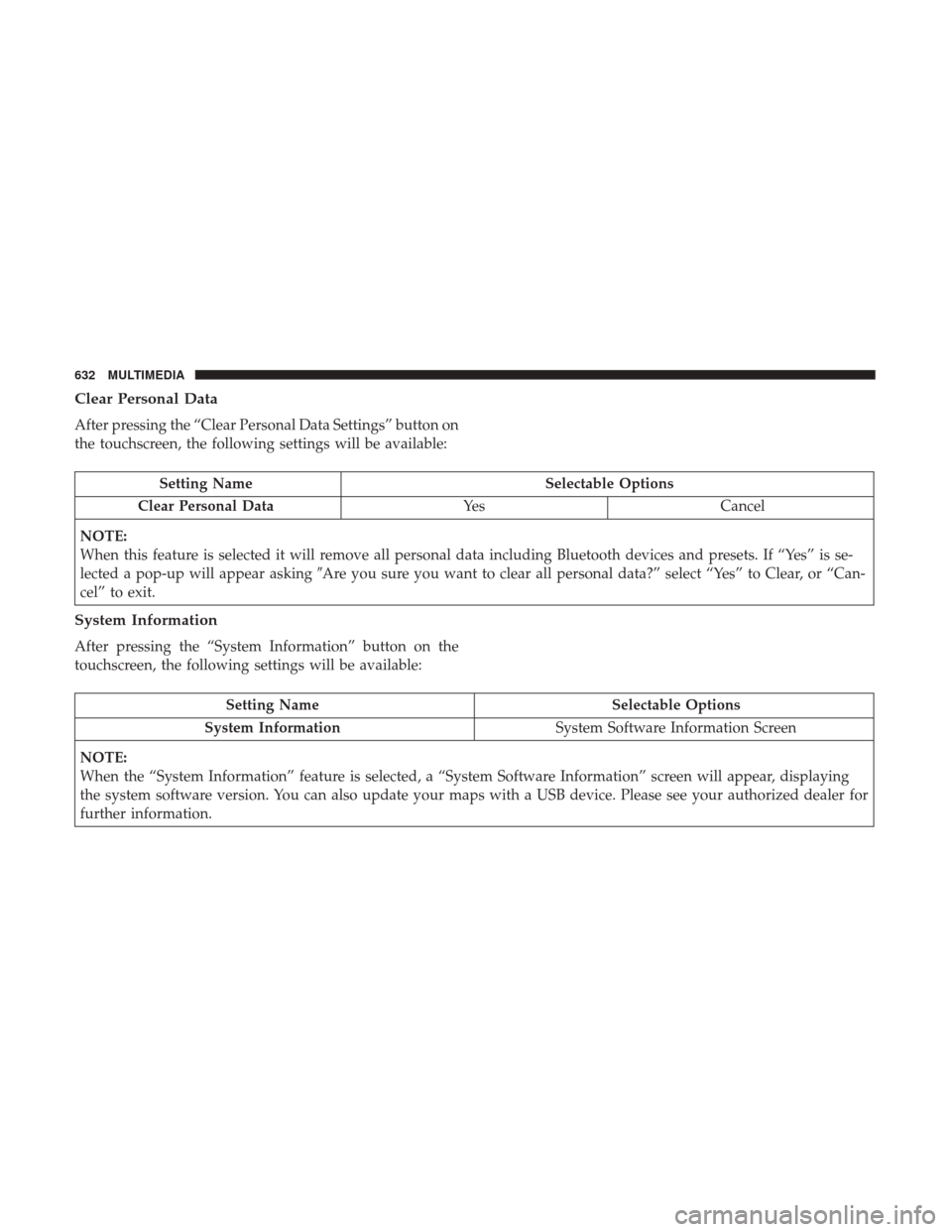
Clear Personal Data
After pressing the “Clear Personal Data Settings” button on
the touchscreen, the following settings will be available:
Setting NameSelectable Options
Clear Personal Data YesCancel
NOTE:
When this feature is selected it will remove all personal data including Bluetooth devices and presets. If “Yes” is se-
lected a pop-up will appear asking �Are you sure you want to clear all personal data?” select “Yes” to Clear, or “Can-
cel” to exit.
System Information
After pressing the “System Information” button on the
touchscreen, the following settings will be available:
Setting Name Selectable Options
System Information System Software Information Screen
NOTE:
When the “System Information” feature is selected, a “System Software Information” screen will appear, displaying
the system software version. You can also update your maps with a USB device. Please see your authorized dealer for
further information.
632 MULTIMEDIA
Page 635 of 700

Customer Programmable Features — Uconnect
4C/4C NAV Personal Settings
Press the “Apps” button on the touchscreen then press the
“Settings” button on the touchscreen to display the settings
menu screen. In this mode the Uconnect system allows youto access programmable features that may be equipped
such as Display, Voice, Clock, Safety & Driving Assistance,
Lights, Doors & Locks, Auto-On Comfort (if equipped),
Engine Off Options, Suspension, Trailer Brake, Audio,
Phone/Bluetooth, SiriusXM Setup (if equipped), Restore
Settings, Clear Personal Data and System Information.
NOTE:
Only one category may be selected at a time.
When making a selection, press the button on the touch-
screen to enter the desired mode. Once in the desired
mode, press and release the preferred setting until a
check-mark appears next to the setting, showing that
setting has been selected. Once the setting is complete,
either press the back arrow button on the touchscreen or
the Back button on the faceplate to return to the previous
menu or press the “X” button on the touchscreen to close
out of the settings screen. Pressing the Up or Down Arrow
buttons on the touchscreen on the right side of the screen
will allow you to toggle up or down through the list of
available settings.
NOTE: All settings should be changed with the ignition in
the RUN position.
Uconnect 4C/4C NAV With 8.4–inch Display Buttons On
The Touchscreen And Buttons On The Faceplate
1 — Uconnect Buttons On The Touchscreen
2 — Uconnect Buttons On The Faceplate
10
MULTIMEDIA 633