2018 PEUGEOT EXPERT sat nav
[x] Cancel search: sat navPage 343 of 416

35
Select "Ambience ".
Or
" Position ".
Or
" Sound ".
Or
" Voice ".
Or
" Ringtone ".
Press " OK" to save the settings.
Modifying system settings
or Press Settings
to display the
primary page.
Press the " OPTIONS" button to go to the
secondary page.
Select "Screen configuration ".
Select " Animation ".
Activate or deactivate: " Automatic
scrolling ".
Select " Brightness ".
Move the cursor to adjust the
brightness of the screen and/or of
the instrument panel. or
Press Settings
to display the
primary page.
Press the " OPTIONS" button to go to the
secondary page.
Select "System settings ".
Initialisation of the profile selected
activates the English language by default.
Select a " Profile" (1
or 2
or 3) to associate the
" Audio settings " with it.
Select " Audio settings ".
Select "Units" to change the units of distance,
fuel consumption and temperature.
Select " Factory settings " to return to the initial
settings.
Returning the system to factory settings
activates the English language by default.
Select " System info " to display the versions of
the different modules installed in the system.
.
PEUGEOT Connect Nav
Page 344 of 416

36
Select the language
or Press Settings
to display the
primary page.
Press the " OPTIONS" button to go to the
secondary page.
Select "Languages " to change the
language.
Setting the date
or Press Settings
to display the
primary page.
Press the " OPTIONS" button to go to the
secondary page. Select "
Setting the time- date".
Select " Date".
Press on this button to define the
date.
Press " OK" to confirm.
Select the display format of the date.
Adjustment of the time and date is only
available if "GPS synchronisation" is
deactivated.
The change between winter and summer
time is done by changing the time zone.
Setting the time
or Press Settings
to display the
primary page.
Press the " OPTIONS" button to go to the
secondary page.
Select "Setting the time- date".
Select " Time".
Press this button to adjust the time
using the virtual keypad.
Press " OK" to confirm.
Press this button to define the time
zone.
PEUGEOT Connect Nav
Page 345 of 416
37
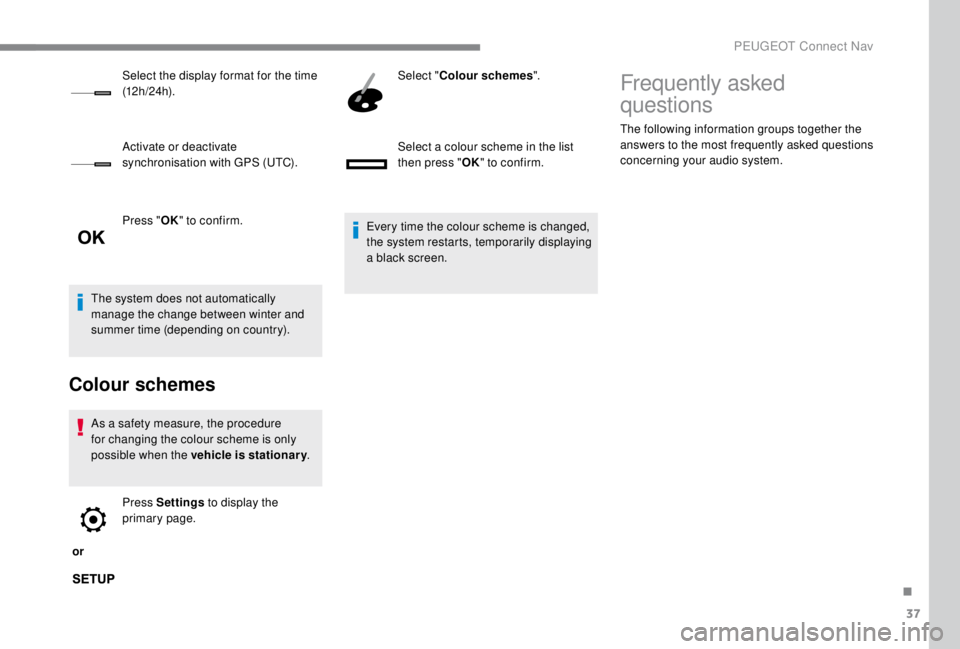
Press "OK" to confirm.
The system does not automatically
manage the change between winter and
summer time (depending on country).
Colour schemes
As a safety measure, the procedure
for changing the colour scheme is only
possible when the vehicle is stationary .
or Press Settings
to display the
primary page. Select "
Colour schemes ".
Select a colour scheme in the list
then press " OK" to confirm.
Every time the colour scheme is changed,
the system restarts, temporarily displaying
a black screen.
Select the display format for the time
(12 h / 24 h).
Activate or deactivate
synchronisation with GPS (UTC).
Frequently asked
questions
The following information groups together the
answers to the most frequently asked questions
concerning your audio system.
.
PEUGEOT Connect Nav
Page 346 of 416
38
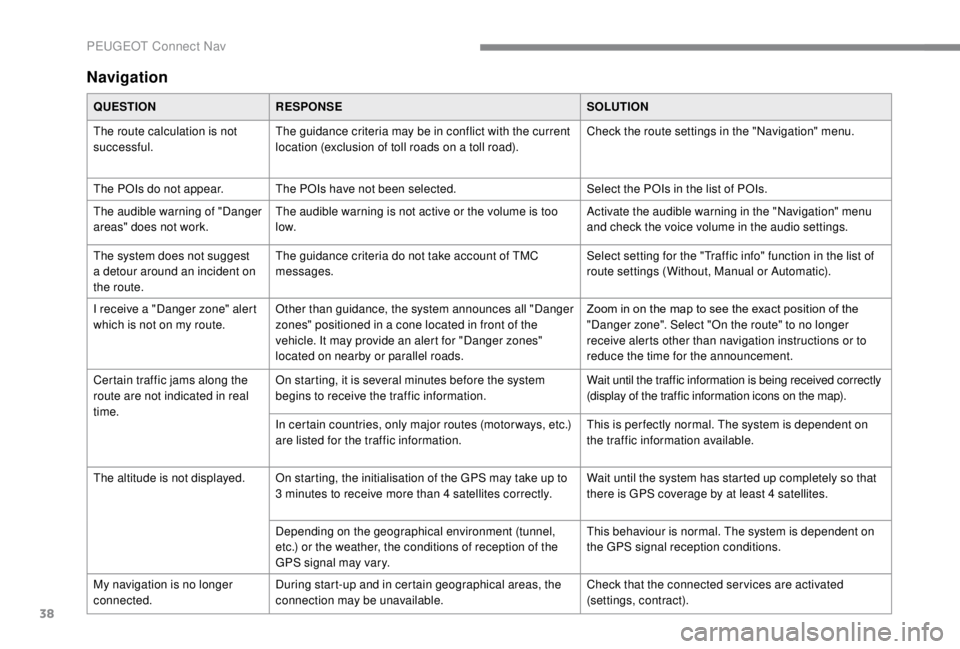
Navigation
QUESTIONRESPONSE SOLUTION
The route calculation is not
successful. The guidance criteria may be in conflict with the current
location (exclusion of toll roads on a toll road). Check the route settings in the "Navigation" menu.
The POIs do not appear. The POIs have not been selected. Select the POIs in the list of POIs.
The audible warning of "Danger
areas" does not work. The audible warning is not active or the volume is too
low. Activate the audible warning in the "Navigation" menu
and check the voice volume in the audio settings.
The system does not suggest
a detour around an incident on
the route. The guidance criteria do not take account of TMC
messages.
Select setting for the "Traffic info" function in the list of
route settings (Without, Manual or Automatic).
I receive a "Danger zone" alert
which is not on my route. Other than guidance, the system announces all "Danger
zones" positioned in a cone located in front of the
vehicle. It may provide an alert for "Danger zones"
located on nearby or parallel roads. Zoom in on the map to see the exact position of the
"Danger zone". Select "On the route" to no longer
receive alerts other than navigation instructions or to
reduce the time for the announcement.
Certain traffic jams along the
route are not indicated in real
time. On starting, it is several minutes before the system
begins to receive the traffic information.
Wait until the traffic information is being received correctly
(display of the traffic information icons on the map).
In certain countries, only major routes (motor ways, etc.)
are listed for the traffic information. This is per fectly normal. The system is dependent on
the traffic information available.
The altitude is not displayed. On starting, the initialisation of the GPS may take up to 3
minutes to receive more than 4 satellites correctly.Wait until the system has started up completely so that
there is GPS coverage by at least 4
satellites.
Depending on the geographical environment (tunnel,
etc.) or the weather, the conditions of reception of the
GPS signal may vary. This behaviour is normal. The system is dependent on
the GPS signal reception conditions.
My navigation is no longer
connected. During start-up and in certain geographical areas, the
connection may be unavailable. Check that the connected ser vices are activated
(settings, contract).
PEUGEOT Connect Nav
Page 349 of 416
41
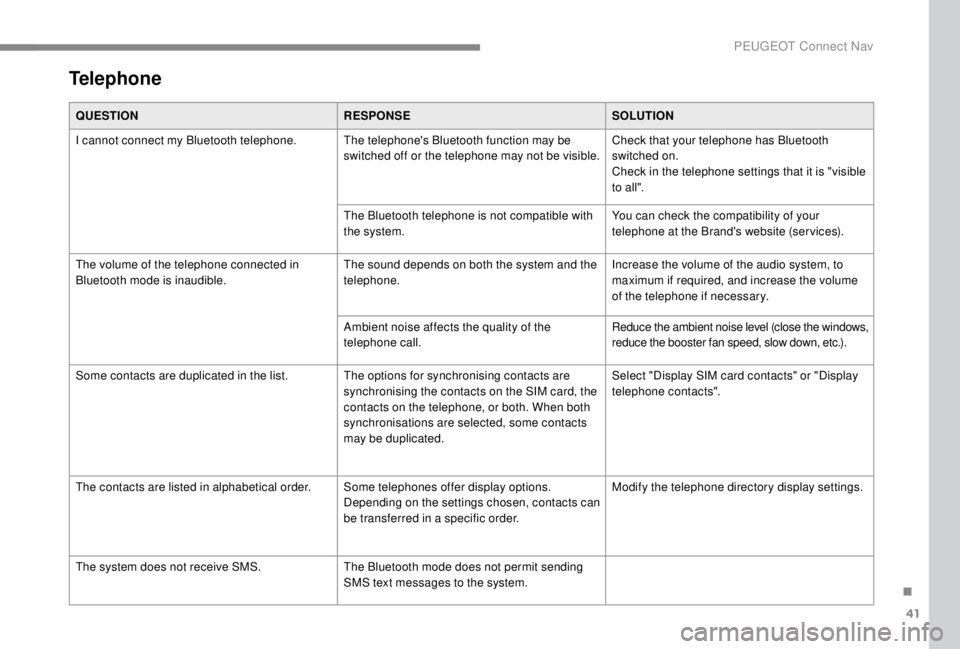
Telephone
QUESTIONRESPONSESOLUTION
I cannot connect my Bluetooth telephone. The telephone's Bluetooth function may be switched off or the telephone may not be visible.Check that your telephone has Bluetooth
switched on.
Check in the telephone settings that it is "visible
to all".
The Bluetooth telephone is not compatible with
the system. You can check the compatibility of your
telephone at the Brand's website (services).
The volume of the telephone connected in
Bluetooth mode is inaudible. The sound depends on both the system and the
telephone.Increase the volume of the audio system, to
maximum if required, and increase the volume
of the telephone if necessary.
Ambient noise affects the quality of the
telephone call. Reduce the ambient noise level (close the windows,
reduce the booster fan speed, slow down, etc.).
Some contacts are duplicated in the list. The options for synchronising contacts are synchronising the contacts on the SIM card, the
contacts on the telephone, or both. When both
synchronisations are selected, some contacts
may be duplicated.Select "Display SIM card contacts" or "Display
telephone contacts".
The contacts are listed in alphabetical order. Some telephones offer display options.
Depending on the settings chosen, contacts can
be transferred in a specific order.Modify the telephone directory display settings.
The system does not receive SMS. The Bluetooth mode does not permit sending
SMS text messages to the system.
.
PEUGEOT Connect Nav
Page 350 of 416
42
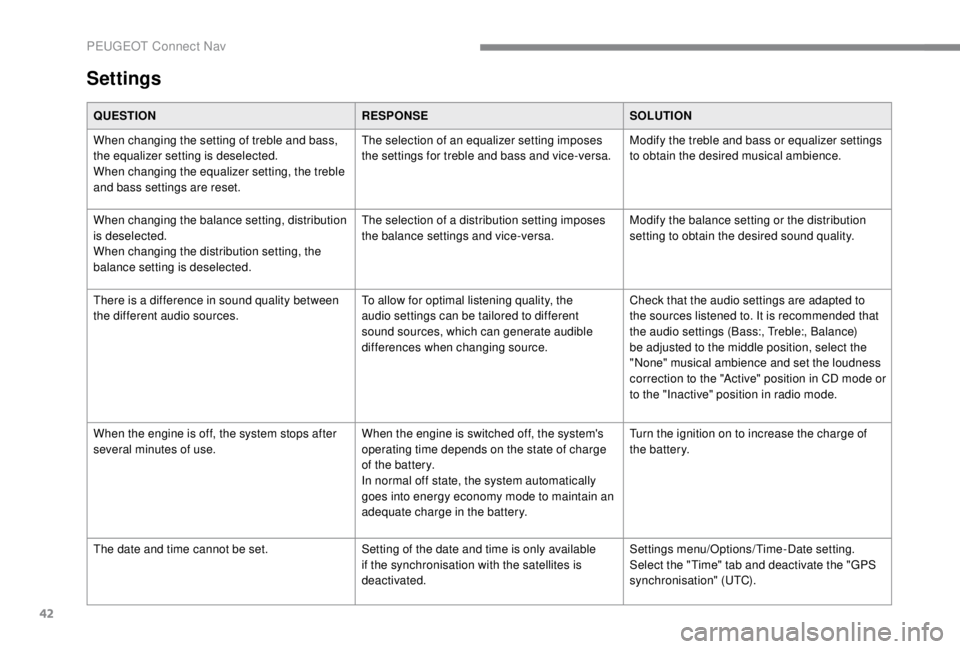
Settings
QUESTIONRESPONSESOLUTION
When changing the setting of treble and bass,
the equalizer setting is deselected.
When changing the equalizer setting, the treble
and bass settings are reset. The selection of an equalizer setting imposes
the settings for treble and bass and vice-versa.
Modify the treble and bass or equalizer settings
to obtain the desired musical ambience.
When changing the balance setting, distribution
is deselected.
When changing the distribution setting, the
balance setting is deselected. The selection of a distribution setting imposes
the balance settings and vice-versa.
Modify the balance setting or the distribution
setting to obtain the desired sound quality.
There is a difference in sound quality between
the different audio sources. To allow for optimal listening quality, the
audio settings can be tailored to different
sound sources, which can generate audible
differences when changing source.Check that the audio settings are adapted to
the sources listened to. It is recommended that
the audio settings (Bass:, Treble:, Balance)
be adjusted to the middle position, select the
"None" musical ambience and set the loudness
correction to the "Active" position in CD mode or
to the "Inactive" position in radio mode.
When the engine is off, the system stops after
several minutes of use. When the engine is switched off, the system's
operating time depends on the state of charge
of the battery.
In normal off state, the system automatically
goes into energy economy mode to maintain an
adequate charge in the battery.Turn the ignition on to increase the charge of
the battery.
The date and time cannot be set. Setting of the date and time is only available
if the synchronisation with the satellites is
deactivated.Settings menu/Options/Time-Date setting.
Select the "Time" tab and deactivate the "GPS
synchronisation" (UTC).
PEUGEOT Connect Nav
Page 368 of 416
14
Connect a USB cable. The
smartphone charges when
connected by a USB cable.
From the system, press
"Telephone " to display the primary
page.
Press the " PHONE" button to go to the
secondary page.
Press on " CarPlay" to display the
CarPlay
® inter face.
On connecting the USB cable, the
CarPlay
® function deactivates the
system's Bluetooth® mode.
You can go to the CarPlay
®
navigation at any time by pressing
the system's Navigation button.
Android Auto smartphone
connection
As a safety measure and because it
requires sustained attention by the driver,
using a smartphone when driving is
prohibited.
All operations must be done with the
vehicle stationary.
On your smartphone, download the
Android Auto application.
The synchronisation of a personal
smartphone allows users to display
applications adapted for the smartphone's
Android Auto technology on the vehicle
screen.
The principles and standards
are constantly changing, for the
communication process between the
smartphone and the system to operate,
it is essential that the smartphone is
unlocked; update the operating system
of the smar tphone as well as the date
and time of the smar tphone and the
system.
For the list of eligible smartphones, go
to the Brand's internet website in your
c o u nt r y. As a safety measure, applications can
only be viewed with the vehicle stationary;
display is interrupted once the vehicle is
moving.
The "Android Auto" function requires the
use of a compatible smartphone and
applications.
Telephone not connected by
Bluetooth®
Connect a USB cable. The
smartphone charges when
connected by a USB cable.
From the system, press
"
Telephone " to display the primary
page.
Press " Android Auto " to start the
application in the system.
Depending on the smartphone, it may be
necessary to activate the " Android Auto"
function.
PEUGEOT Connect Radio
Page 396 of 416

14
Ending a call
In the contextual menu, select
"Hang up " to end the call.
Confirm with OK.
Microphone off
(so that the caller cannot hear) In the contextual menu:
-
s
elect "Micro OFF " to switch off
the microphone.
-
d
eselect "Micro OFF " to switch
the microphone on.
Confirm with OK.
Telephone mode
In the contextual menu:
- s elect " Telephone mode " to
transfer the call to the telephone
(for example, to leave the
vehicle while continuing a
conversation).
-
d
eselect " Telephone mode " to
transfer the call to the vehicle. Confirm with OK.
If the contact has been cut off, when you
reconnect on returning to the vehicle,
the Bluetooth connection will be restored
automatically and sound returned to the
system (depending on the compatibility of the
telephone).
In some cases, the combined mode must be
activated from the telephone.
Interactive voice response
From the contextual menu, select
" DTMF tones " and confirm to use
the digital keypad to navigate in the
interactive voice response menu.
Confirm with OK.
Consultation call
From the contextual menu, select
" Switch " and validate to return to a
call left on hold.
Confirm with OK.
Directory
To access the directory, press and
hold SRC/TEL .
Select " Directory " to see the list of
contacts.
Confirm with OK.
To modify the contacts saved in the
system, press MENU then select
" Telephone " and confirm.
Select " Directory management "
and confirm.
Yo u c a n :
-
"Consult an entr y ",
-
"Delete an entry ",
-
"Delete all entries ".
The system accesses the
telephone's contacts directory,
depending on its compatibility, and
while it is connected via Bluetooth.
Bluetooth® audio system